
### About
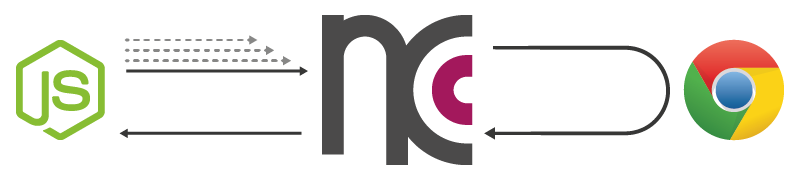
**ncc** (or node-chrome-canvas) utilizes Googles [Chrome-Browser](https://www.google.com/chrome/browser/) and its [remote debugging protocol](https://developers.google.com/chrome-developer-tools/docs/debugger-protocol) to give [Node.js](http://nodejs.org/) access to a full-blown HTML5 Canvas-Element and its 2d-Context.
In contrast to [canvas](https://www.npmjs.org/package/canvas) (that may satisfy your needs as well) which uses [Cairo](http://cairographics.org/) to sham a canvas, **ncc** works with a real [HTMLCanvasElement](https://developer.mozilla.org/en-US/docs/Web/API/HTMLCanvasElement) in a Browser-Context.
Behind the curtains of the familiar Canvas-API, **ncc** uses a single WebSocket-Connection and some command-bundeling-logic to gain its performance.
### Quickstart
```
npm install ncc
```
```javascript
var ncc = require('ncc')
var canvas = ncc();
canvas.width = canvas.height = 256;
var ctx = canvas.getContext('2d');
ctx.fillStyle = "slateGray";
ctx.fillRect(28, 28, 200, 200)(); // function call is intentional!
```
### Examples
- **[draw ncc logo](https://github.com/indus/ncc/blob/master/examples/1_draw_ncc_logo.js)**
>> **learn** how to setup ncc and draw shapes to canvas
- **[early access](https://github.com/indus/ncc/blob/master/examples/2_early_access.js)**
>> **learn** how to start using ncc even before it is fully set up
- **[get return values](https://github.com/indus/ncc/blob/master/examples/3_get_return_values.js)**
>> **learn** how to get return values of non-void functions
- **[gardients/patterns](https://github.com/indus/ncc/blob/master/examples/4_gradients_and_patterns.js)**
>> **learn** how to use gradients and patterns
- **[images](https://github.com/indus/ncc/blob/master/examples/5_images.js)**
>> **learn** how to apply images from urls or the filesystem
- **[shadow canvas](https://github.com/indus/ncc/blob/master/examples/6_shadow_canvas.js)**
>> **learn** how work with more than one canvas
### API
**ncc** follows the native [Web API Interfaces](https://developer.mozilla.org/en-US/docs/Web/API)...
[HTMLCanvasElement](https://developer.mozilla.org/en-US/docs/Web/API/HTMLCanvasElement),
[HTMLImageElement](https://developer.mozilla.org/en-US/docs/Web/API/HTMLImageElement),
[CanvasRenderingContext2D](https://developer.mozilla.org/en-US/docs/Web/API/CanvasRenderingContext2D),
[CanvasGradient](https://developer.mozilla.org/en-US/docs/Web/API/CanvasGradient),
[CanvasPattern](https://developer.mozilla.org/en-US/docs/Web/API/CanvasPattern)
... as close as possible.
Differences are a result of the asynchronous nature of **ncc**. All object creations, method calls and property manipulations don't get processed directly, but get serialized and stored until a return value is necessary and a request is therefore unavoidable.
Every 'Object' provided by **ncc** (and also every return value of a method) is actually a function to trigger a synchronization. You can pass a error-first-callback ( 'function(error, result){...}' ) to such a function to receive the return value of the last action (see [examples](https://github.com/indus/ncc#examples)).
The **Canvas-** RenderingContext2D, -Gradient and -Pattern Proxys are fully implemented.
The **HTML-** CanvasElement and -ImageElement Proxys only necessary properties and functions. For example they both implement a 'width' and 'height' attribute but don´t have further DOM functionality.
Methods and properties beyond the native API are marked with a leading underscore and they are hidden from console by default (e.g. 'image._toFile(fileName, <callback>)' to write an image to the filesystem).
#### proxy - creators
* **ncc(** <options> **,** <callback> **)** >>> **[canvas]**
**ncc(** <callback> **)** >>> **[canvas]**
options (with defaults)
```javascript
{ logLevel: 'info', //['log','info','warn','error']
port: 9222,
retry: 9,
retryDelay: 500,
headless: false
}
```
* **ncc.createCanvas()** >>> **[canvas]** *if one is not enough*
* **ncc.createImage(** <src> **,** <onloadFn> **,** <onerrorFn> **)** >>> **[image]**
* **nccCanvas.getContext(** *[nativeAPI](https://developer.mozilla.org/en-US/docs/Web/API/HTMLCanvasElement#Methods)* **)** >>> **[context2d]**
* **context2d.createLinearGradient(** *[nativeAPI](https://developer.mozilla.org/en-US/docs/Web/API/CanvasRenderingContext2D#createLinearGradient())* **)** >>> **[linearGradient]**
**context2d.createRadialGradient(** *[nativeAPI](https://developer.mozilla.org/en-US/docs/Web/API/CanvasRenderingContext2D#createRadialGradient())* **)** >>> **[radialGradient]**
**context2d.createPattern(** *[nativeAPI](https://developer.mozilla.org/en-US/docs/Web/API/CanvasRenderingContext2D#createPattern())* **)** >>> **[pattern]**