# nextcloud-node-client
 Access nextcloud remotely from node.js applications with a rich and simple TypeScript / JavaScript API.
[](https://www.typescriptlang.org)

[](https://npmjs.org/package/nextcloud-node-client)
[](https://david-dm.org/hobigo/nextcloud-node-client)
[](https://coveralls.io/github/hobigo/nextcloud-node-client?branch=master)
[](https://packagephobia.now.sh/result?p=nextcloud-node-client)
[](https://hobigo.github.io/nextcloud-node-client)
- upload and download files
- create files and folder structures
- all user management functions
- create shares
- tagging and commenting
The nextcloud node client is used to automate access to nextcloud servers from node.js apppliactions.
# Example
```typescript
// typescript
import Client, { File, Folder, Tag, Share } from "nextcloud-node-client";
(async () => {
try {
// create a new client using connectivity information from environment
const client = new Client();
// create a folder structure if not available
const folder: Folder = await client.createFolder("folder/subfolder");
// create file within the folder
const file: File = await folder.createFile("myFile.txt", Buffer.from("My file content"));
// add a tag to the file and create the tag if not existing
await file.addTag("MyTag");
// add a comment to the file
await file.addComment("myComment");
// get the file content
const content: Buffer = await file.getContent();
// share the file publicly with password and note
const share: Share = await client.createShare({ fileSystemElement: file });
await share.setPassword("some password");
await share.setNote("some note\nnew line");
// use the url to access the share
const shareLink:string = share.url;
// delete the folder including the file and share
await folder.delete();
} catch (e) {
// some error handling
console.log(e);
}
})();
```
# Documentation
* [Installation](#installation)
* [Upload files and folders](./docs/upload.md)
* [Download files and folders](./docs/download.md)
* [Get files recursively](./docs/getFiles.md)
* [User Management](./docs/userManagement.md)
* [Tagging](./docs/tagging.md)
* [Security and access management](#security-and-access-management)
* [Concepts and Philosophy](#concepts-and-philosophy)
* [API](#api)
* [Architecture](#architecture)
* [Examples](#examples)
## Installation
``
npm install nextcloud-node-client
``
## Security and access management
The client requires the url of the nextcloud server and the credentials.
Use an app specific password generated in the security - devices & sessions section of the nextcloud settings.
### Environment
Credentials can be specified in the environment:
```
NEXTCLOUD_USERNAME= ""
NEXTCLOUD_PASSWORD = ""
NEXTCLOUD_URL= "https://"
```
The cloud service configuration `VCAP_SERVICES` can be used alternativley (refer to the Cloud Foundry documentation for details).
The nextcloud credentials are stored in the section for user provided services `user-provided`.
The client is able to access the service credentials by providing the instance name.
```json
{
"user-provided": [
{
"credentials": {
"password": "",
"url": "https://",
"username": ""
},
"name": ""
}
]
}
```
### Creating a client
Creating a nextcloud client
```typescript
// uses the environment to initialize
import Client from "nextcloud-node-client";
const client = new Client();
```
```typescript
// uses explicite credentials
import Client, { Server } from "nextcloud-node-client";
const server: Server = new Server(
{ basicAuth:
{ password: "",
username: "",
},
url: "https://",
});
const client = new Client(server);
```
## Concepts and Philosophy
The nextcloud-node-client provids a object oriented API in TypeScript. The focus is to provide a simple access to the nextcloud resources rather than a full functional coverage.
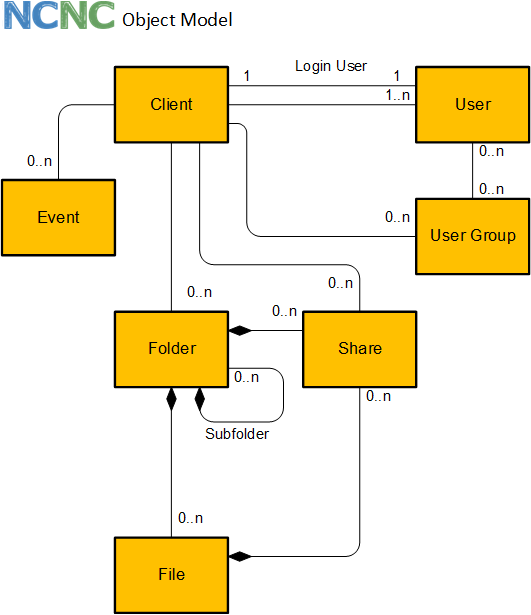
The client comes with an object oriented API to access the APIs of nextcloud. The following object types are supported:
### Client
The client is the root object and represents the connection to the nextcloud server. The client is used to get access to the root folder and the tag repository.
### Folder
The folder is the representation of a nextcloud folder. It may contain many files. All files of a folder are deleted, if the folder is deleted.
### File
The file is the representation of a nextcloud file. Every file is contained in a folder.
### Tag
Tags are used to filter for file and folders. Tags can be created and assigned to files or folders.
### Share
Files and folders can be shared with user, user groups or publicly. The share can be password protected and an exiration date can be applied.
## API
This is an overview of the client API.
Details can be found in the [API docs](https://hobigo.github.io/nextcloud-node-client)
### Client
- factory method for client
- create folder
- get folder, get root folder
- create file
- get file
- create tag*
- get tags, by name, by id
- get quota
- find users, get user by id
- create user
- mass creations and changes of users
- get user groups, by id
- create user group
### Folder
- get name, id, base name, urls
- delete
- create sub folders
- get sub folder
- create file
- get files
- get tags, add tag, remove tag
- add comment
- get comments
- move/rename
### File
- get name, id, base name, urls, content type
- get content
- delete
- get tags, add tag, remove tag
- add comment
- get comments
- get folder
- move/rename
### Tag
- get name, id
- delete*
### Share
- create, update, delete
### User Group
- delete
- get members, get subadmins
### User
- delete
- get properties (display name, email, quota and usage, language, last login, ...)
- change properties (display name, email, quota, language, password, ...)
- send welcome email
- enable / disable
- promote to super admin / demote from super admin
- get member groups, get subadmin groups
- add to user group as member / remove from member user group
- promote as subadmin for user group / demote from subadmin user group
\* admin permissions required
### API Examples
#### Quota
```typescript
const q: IQuota = await client.getQuota();
// { used: 479244777, available: 10278950773 }
```
#### Sytem information
```typescript
const si: ISystemInfo = await client.getSystemInfo();
```
#### Create folder
```typescript
// create folder
const folder: Folder = await client.createFolder("/products/brooms");
// create subfolder
const subfolder: Folder = await folder.createSubFolder("soft brooms");
// "/products/brooms/soft brooms"
```
#### Get folder(s)
```typescript
// get folder
const folder: Folder = await client.getFolder("/products");
// get subfolders
const subfolders: Folder[] = await folder.getSubFolders();
```
#### Delete folder
```typescript
// get folder
const folder: Folder = await client.getFolder("/products");
await folder.delete();
```
#### Create file
```javascript
const folder = await client.getFolder("/products");
const file = folder.createFile("MyFile.txt", new Buffer("My new file"));
```
#### Get file
```javascript
const file = await client.getFile("/products/MyFile.txt");
// or
const folder = await client.getFolder("/products");
const file = await folder.getFile("MyFile.txt");
// file: name, baseName, lastmod, size, mime
```
#### Get file content
```javascript
const file = await client.getFile("/products/MyFile.txt");
const buffer = await file.getContent();
```
#### Get file Url
```javascript
const file = await client.getFile("/products/MyFile.txt");
const url = await file.getUrl();
```
#### Add tag to file
```javascript
const file = await client.getFile("/products/MyFile.txt");
await file.addTag("myTag");
```
#### Delete file
```javascript
const file = await client.getFile("/products/MyFile.txt");
await file.delete();
```
#### Get files
```javascript
const folder = await client.getFolder("/products");
const files = await folder.getFiles();
```
#### Move and/or rename file
```javascript
const file = await client.getFile("/products/MyFile.txt");
await file.move("/products/brooms/MyFileRenamed.txt");
```
#### Create, change and delete a share
```typescript
const file = await client.getFile("/products/MyFile.txt");
// share the file (works also for folder)
const createShare: ICreateShare = { fileSystemElement: file };
const share: Share = await client.createShare(createShare);
// change share settings
await share.setPassword("some password");
await share.setNote("some note\nnew line");
await share.setExpiration(new Date(2020, 11, 5));
// use the url to access the share
const shareLink:string = share.url;
// delete share, if not required anymore
await share.delete();
```
## Architecture
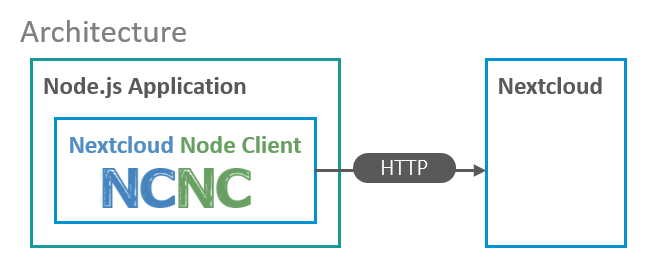
The nextcloud node client can be used by node applications to extend the nextcloud functionality remotely. The client uses only HTTP apis of nextcloud for access.
## Examples
### User management
```typescript
// typescript
import Client, { User, UserGroup } from "nextcloud-node-client";
(async () => {
try {
// create a new client using connectivity
// information from environment
const client = new Client();
// create a new user group
const group: UserGroup = await client.createUserGroup("MyGroup");
// create a new user with a email or password
const user: User = await client.createUser({ id: "MyUserId", email: "mail@example.com" });
// set some properties
// ... password, phone, website, twitter, address, email, locale
await user.setDisplayName("My Display Name");
await user.setQuota("5 GB");
await user.setLanguage("en");
// get properties
// ... quota, user friendly quota, phone, website, twitter, address, locale
const email = await user.getEmail();
// disable user
await user.disable();
// enable user
await user.enable();
// promote to super administrator
await user.promoteToSuperAdmin();
// demote from super administrator
await user.demoteFromSuperAdmin();
// resend welcome email to user
await user.resendWelcomeEmail();
// add to user group as member
await user.addToMemberUserGroup(group);
// get member user groups
const memberGroups: UserGroup[] = await user.getMemberUserGroups();
// get user ids of memembers
await group.getMemberUserIds();
// remove user from member group
await user.removeFromMemberUserGroup(group);
// promote user as subadmin for user group
await user.promoteToUserGroupSubadmin(group);
// get user groups where the user is subadmin
const subadminGroups: UserGroup[] = await user.getSubadminUserGroups();
// get user ids of subadmins
await group.getSubadminUserIds();
// demote user from being subadmin for user group
await user.demoteFromSubadminUserGroup(group);
// delete the user
await user.delete();
// delete the user group
await group.delete();
// mass creations / updates of users
// groups are created on the fly
await client.upsertUsers([
{ id: "myUser1", email: "myUser1@example.com", enabled: false, memberGroups: ["group1", "group2"] },
{ id: "myUser2", password: "mySecurePassword", displayName: "My Name", superAdmin: true, quota: "2 GB" },
// ...
]);
} catch (e) {
// use specific exception *error classes
// for error handling documented in @throws
}
})();
```
### Tagging
```typescript
// typescript
import Client, { File, Folder, Share, Tag, FileSystemElement } from "nextcloud-node-client";
(async () => {
try {
// create a new client using connectivity information from environment
const client = new Client();
// create a folder structure if not available
const folder: Folder = await client.createFolder("folder/subfolder");
// create file within the folder
const file: File = await folder.createFile("myFile.txt", Buffer.from("My file content"));
// create two tags
const tag1: Tag = await client.createTag("tag 1");
const tag2: Tag = await client.createTag("tag 2");
// assign tag to folder
folder.addTag(tag1.name);
// assign tag to files
file.addTag(tag1.name);
file.addTag(tag2.name);
// get list of file system elements with the tag1 assigned
let fse: FileSystemElement[] = await client.getFileSystemElementByTags([tag1]);
// print names of folder and file
console.log(fse[0].name);
console.log(fse[1].name);
// get list of file system elements with the tag1 and tag2
fse = await client.getFileSystemElementByTags([tag1, tag2]);
// print name of file
console.log(fse[0].name);
// delete the tags
await tag1.delete();
await tag2.delete();
// delete the folder including the file and share
await folder.delete();
} catch (e) {
// some error handling
console.log(e);
}
})();
```
## Quality
Tested with nextcloud 17.0.1, 18.0.0
A code coverage of 100% is aspired
## Todo list
### Version 2.0
- remove vcap services support
- remove server object and replace with connection object
- connection object handles all http requets (new Connection, conn.connect() ...)
- refactor client - use connection instead of client in sub objects move client methods to sub objects
- Move exceptions to relevant objects, prefix all exceptions with "Error"
- Remove "I" from interface names
### Sharing
Share with
* user
* usergroup
* email-address
### Search
* Search for files api
* client in github actions - upload files
### Server API
*
Access nextcloud remotely from node.js applications with a rich and simple TypeScript / JavaScript API.
[](https://www.typescriptlang.org)

[](https://npmjs.org/package/nextcloud-node-client)
[](https://david-dm.org/hobigo/nextcloud-node-client)
[](https://coveralls.io/github/hobigo/nextcloud-node-client?branch=master)
[](https://packagephobia.now.sh/result?p=nextcloud-node-client)
[](https://hobigo.github.io/nextcloud-node-client)
- upload and download files
- create files and folder structures
- all user management functions
- create shares
- tagging and commenting
The nextcloud node client is used to automate access to nextcloud servers from node.js apppliactions.
# Example
```typescript
// typescript
import Client, { File, Folder, Tag, Share } from "nextcloud-node-client";
(async () => {
try {
// create a new client using connectivity information from environment
const client = new Client();
// create a folder structure if not available
const folder: Folder = await client.createFolder("folder/subfolder");
// create file within the folder
const file: File = await folder.createFile("myFile.txt", Buffer.from("My file content"));
// add a tag to the file and create the tag if not existing
await file.addTag("MyTag");
// add a comment to the file
await file.addComment("myComment");
// get the file content
const content: Buffer = await file.getContent();
// share the file publicly with password and note
const share: Share = await client.createShare({ fileSystemElement: file });
await share.setPassword("some password");
await share.setNote("some note\nnew line");
// use the url to access the share
const shareLink:string = share.url;
// delete the folder including the file and share
await folder.delete();
} catch (e) {
// some error handling
console.log(e);
}
})();
```
# Documentation
* [Installation](#installation)
* [Upload files and folders](./docs/upload.md)
* [Download files and folders](./docs/download.md)
* [Get files recursively](./docs/getFiles.md)
* [User Management](./docs/userManagement.md)
* [Tagging](./docs/tagging.md)
* [Security and access management](#security-and-access-management)
* [Concepts and Philosophy](#concepts-and-philosophy)
* [API](#api)
* [Architecture](#architecture)
* [Examples](#examples)
## Installation
``
npm install nextcloud-node-client
``
## Security and access management
The client requires the url of the nextcloud server and the credentials.
Use an app specific password generated in the security - devices & sessions section of the nextcloud settings.
### Environment
Credentials can be specified in the environment:
```
NEXTCLOUD_USERNAME= ""
NEXTCLOUD_PASSWORD = ""
NEXTCLOUD_URL= "https://"
```
The cloud service configuration `VCAP_SERVICES` can be used alternativley (refer to the Cloud Foundry documentation for details).
The nextcloud credentials are stored in the section for user provided services `user-provided`.
The client is able to access the service credentials by providing the instance name.
```json
{
"user-provided": [
{
"credentials": {
"password": "",
"url": "https://",
"username": ""
},
"name": ""
}
]
}
```
### Creating a client
Creating a nextcloud client
```typescript
// uses the environment to initialize
import Client from "nextcloud-node-client";
const client = new Client();
```
```typescript
// uses explicite credentials
import Client, { Server } from "nextcloud-node-client";
const server: Server = new Server(
{ basicAuth:
{ password: "",
username: "",
},
url: "https://",
});
const client = new Client(server);
```
## Concepts and Philosophy
The nextcloud-node-client provids a object oriented API in TypeScript. The focus is to provide a simple access to the nextcloud resources rather than a full functional coverage.

The client comes with an object oriented API to access the APIs of nextcloud. The following object types are supported:
### Client
The client is the root object and represents the connection to the nextcloud server. The client is used to get access to the root folder and the tag repository.
### Folder
The folder is the representation of a nextcloud folder. It may contain many files. All files of a folder are deleted, if the folder is deleted.
### File
The file is the representation of a nextcloud file. Every file is contained in a folder.
### Tag
Tags are used to filter for file and folders. Tags can be created and assigned to files or folders.
### Share
Files and folders can be shared with user, user groups or publicly. The share can be password protected and an exiration date can be applied.
## API
This is an overview of the client API.
Details can be found in the [API docs](https://hobigo.github.io/nextcloud-node-client)
### Client
- factory method for client
- create folder
- get folder, get root folder
- create file
- get file
- create tag*
- get tags, by name, by id
- get quota
- find users, get user by id
- create user
- mass creations and changes of users
- get user groups, by id
- create user group
### Folder
- get name, id, base name, urls
- delete
- create sub folders
- get sub folder
- create file
- get files
- get tags, add tag, remove tag
- add comment
- get comments
- move/rename
### File
- get name, id, base name, urls, content type
- get content
- delete
- get tags, add tag, remove tag
- add comment
- get comments
- get folder
- move/rename
### Tag
- get name, id
- delete*
### Share
- create, update, delete
### User Group
- delete
- get members, get subadmins
### User
- delete
- get properties (display name, email, quota and usage, language, last login, ...)
- change properties (display name, email, quota, language, password, ...)
- send welcome email
- enable / disable
- promote to super admin / demote from super admin
- get member groups, get subadmin groups
- add to user group as member / remove from member user group
- promote as subadmin for user group / demote from subadmin user group
\* admin permissions required
### API Examples
#### Quota
```typescript
const q: IQuota = await client.getQuota();
// { used: 479244777, available: 10278950773 }
```
#### Sytem information
```typescript
const si: ISystemInfo = await client.getSystemInfo();
```
#### Create folder
```typescript
// create folder
const folder: Folder = await client.createFolder("/products/brooms");
// create subfolder
const subfolder: Folder = await folder.createSubFolder("soft brooms");
// "/products/brooms/soft brooms"
```
#### Get folder(s)
```typescript
// get folder
const folder: Folder = await client.getFolder("/products");
// get subfolders
const subfolders: Folder[] = await folder.getSubFolders();
```
#### Delete folder
```typescript
// get folder
const folder: Folder = await client.getFolder("/products");
await folder.delete();
```
#### Create file
```javascript
const folder = await client.getFolder("/products");
const file = folder.createFile("MyFile.txt", new Buffer("My new file"));
```
#### Get file
```javascript
const file = await client.getFile("/products/MyFile.txt");
// or
const folder = await client.getFolder("/products");
const file = await folder.getFile("MyFile.txt");
// file: name, baseName, lastmod, size, mime
```
#### Get file content
```javascript
const file = await client.getFile("/products/MyFile.txt");
const buffer = await file.getContent();
```
#### Get file Url
```javascript
const file = await client.getFile("/products/MyFile.txt");
const url = await file.getUrl();
```
#### Add tag to file
```javascript
const file = await client.getFile("/products/MyFile.txt");
await file.addTag("myTag");
```
#### Delete file
```javascript
const file = await client.getFile("/products/MyFile.txt");
await file.delete();
```
#### Get files
```javascript
const folder = await client.getFolder("/products");
const files = await folder.getFiles();
```
#### Move and/or rename file
```javascript
const file = await client.getFile("/products/MyFile.txt");
await file.move("/products/brooms/MyFileRenamed.txt");
```
#### Create, change and delete a share
```typescript
const file = await client.getFile("/products/MyFile.txt");
// share the file (works also for folder)
const createShare: ICreateShare = { fileSystemElement: file };
const share: Share = await client.createShare(createShare);
// change share settings
await share.setPassword("some password");
await share.setNote("some note\nnew line");
await share.setExpiration(new Date(2020, 11, 5));
// use the url to access the share
const shareLink:string = share.url;
// delete share, if not required anymore
await share.delete();
```
## Architecture
The nextcloud node client can be used by node applications to extend the nextcloud functionality remotely. The client uses only HTTP apis of nextcloud for access.

## Examples
### User management
```typescript
// typescript
import Client, { User, UserGroup } from "nextcloud-node-client";
(async () => {
try {
// create a new client using connectivity
// information from environment
const client = new Client();
// create a new user group
const group: UserGroup = await client.createUserGroup("MyGroup");
// create a new user with a email or password
const user: User = await client.createUser({ id: "MyUserId", email: "mail@example.com" });
// set some properties
// ... password, phone, website, twitter, address, email, locale
await user.setDisplayName("My Display Name");
await user.setQuota("5 GB");
await user.setLanguage("en");
// get properties
// ... quota, user friendly quota, phone, website, twitter, address, locale
const email = await user.getEmail();
// disable user
await user.disable();
// enable user
await user.enable();
// promote to super administrator
await user.promoteToSuperAdmin();
// demote from super administrator
await user.demoteFromSuperAdmin();
// resend welcome email to user
await user.resendWelcomeEmail();
// add to user group as member
await user.addToMemberUserGroup(group);
// get member user groups
const memberGroups: UserGroup[] = await user.getMemberUserGroups();
// get user ids of memembers
await group.getMemberUserIds();
// remove user from member group
await user.removeFromMemberUserGroup(group);
// promote user as subadmin for user group
await user.promoteToUserGroupSubadmin(group);
// get user groups where the user is subadmin
const subadminGroups: UserGroup[] = await user.getSubadminUserGroups();
// get user ids of subadmins
await group.getSubadminUserIds();
// demote user from being subadmin for user group
await user.demoteFromSubadminUserGroup(group);
// delete the user
await user.delete();
// delete the user group
await group.delete();
// mass creations / updates of users
// groups are created on the fly
await client.upsertUsers([
{ id: "myUser1", email: "myUser1@example.com", enabled: false, memberGroups: ["group1", "group2"] },
{ id: "myUser2", password: "mySecurePassword", displayName: "My Name", superAdmin: true, quota: "2 GB" },
// ...
]);
} catch (e) {
// use specific exception *error classes
// for error handling documented in @throws
}
})();
```
### Tagging
```typescript
// typescript
import Client, { File, Folder, Share, Tag, FileSystemElement } from "nextcloud-node-client";
(async () => {
try {
// create a new client using connectivity information from environment
const client = new Client();
// create a folder structure if not available
const folder: Folder = await client.createFolder("folder/subfolder");
// create file within the folder
const file: File = await folder.createFile("myFile.txt", Buffer.from("My file content"));
// create two tags
const tag1: Tag = await client.createTag("tag 1");
const tag2: Tag = await client.createTag("tag 2");
// assign tag to folder
folder.addTag(tag1.name);
// assign tag to files
file.addTag(tag1.name);
file.addTag(tag2.name);
// get list of file system elements with the tag1 assigned
let fse: FileSystemElement[] = await client.getFileSystemElementByTags([tag1]);
// print names of folder and file
console.log(fse[0].name);
console.log(fse[1].name);
// get list of file system elements with the tag1 and tag2
fse = await client.getFileSystemElementByTags([tag1, tag2]);
// print name of file
console.log(fse[0].name);
// delete the tags
await tag1.delete();
await tag2.delete();
// delete the folder including the file and share
await folder.delete();
} catch (e) {
// some error handling
console.log(e);
}
})();
```
## Quality
Tested with nextcloud 17.0.1, 18.0.0
A code coverage of 100% is aspired
## Todo list
### Version 2.0
- remove vcap services support
- remove server object and replace with connection object
- connection object handles all http requets (new Connection, conn.connect() ...)
- refactor client - use connection instead of client in sub objects move client methods to sub objects
- Move exceptions to relevant objects, prefix all exceptions with "Error"
- Remove "I" from interface names
### Sharing
Share with
* user
* usergroup
* email-address
### Search
* Search for files api
* client in github actions - upload files
### Server API
* support also the nextcloud server url instead of the WebDAV url only
### Download
* download folder contents example
* download folder contents to disk recursively
### Upload
* upload local file on disk to nextcloud
* upload local folder on disk to nextcloud recursively
### Get Files recursively
* command get files recurively
* filter get files recurively
* example get files recurively
### Access using tags
* Get files and folders by tags client.getFileSystemObjectByTags
### User management
User:
* get
* getIds limit, offset, search
* create
* update
* delete
* deactivate
* add/remove group member
* add/remove group subadmin
* example in readme
* send notification
User group:
* get
* create
* delete
### Streams
Create file and get file using streams
### Eventing
* create event objects
* start observer
* subscribe to events and register handler functions
* telegram support
### notifications
basic methods are available since 1.2.0 without strong typing
* notification object
### Refactoring
* Introduction of exception classes instead of error codes (breaking change)
* Move from codecov to coveralls
* move to eslint instead of using tslint
* remove "I" from all interfaces - (breaking change)
### Search
* Search for files api
* client in github actions - upload files
## License
Apache