# Nextjs-Pagination
Nextjs-Pagination is a powerful, customizable, and easy-to-use pagination component built specifically for Next.js projects. Designed with user experience in mind, it provides flexible configuration options so you can adjust the pagination behavior and look-and-feel to suit your needs. Nextjs-Pagination is built with TypeScript, offering type safety and autocompletion support in supported editors.
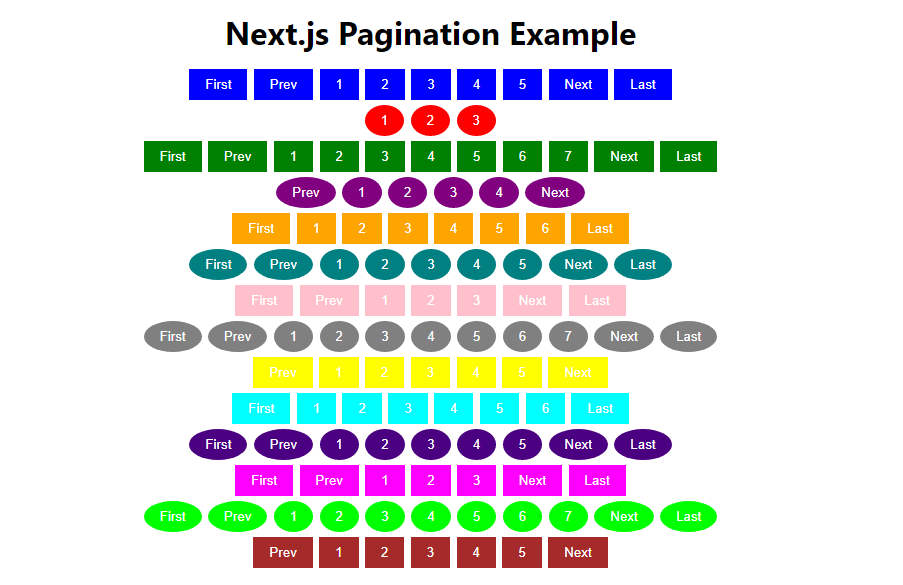
## Features
- Customizable button color and shape: You can easily modify the color and shape of the pagination buttons. For instance, to make the buttons green and circular, you can pass `color="green"` and `shape="circle"` as props.
- Set maximum number of page buttons to display: You can limit the number of page buttons visible at a time. This is useful for large datasets where you don't want to display too many page buttons. For instance, to display up to 7 page buttons at a time, pass `buttonCount={7}` as a prop.
- Option to show or hide 'Next' and 'Prev' buttons: If you want to include 'Next' and 'Prev' buttons for easier navigation, you can do so by passing `showNextPrev={true}` as a prop.
- Option to show or hide 'First' and 'Last' buttons: Similarly, to include 'First' and 'Last' buttons for quick navigation to the first and last pages, pass `showFirstLast={true}` as a prop.
- Callback function for page changes: You can provide a function to be called whenever the page changes. This is useful for fetching new data based on the current page. Pass this function as the `onPageChange` prop.
- Customizable text for 'First', 'Prev', 'Next', 'Last' buttons: You can customize the text of the navigation buttons to suit your needs. They can accept any valid React node, such as text, emojis, symbols, etc. Here are some examples:
- Text: For instance, `firstText="Start"`, `prevText="Backward"`, `nextText="Forward"`, `lastText="End"`
- Emojis: `firstText="⏮"`, `prevText="⏪"`, `nextText="⏩"`, `lastText="⏭"`
- Symbols: `firstText="⇤"`, `prevText="←"`, `nextText="→"`, `lastText="⇥"`
- Special Symbols: `firstText="⟪"`, `prevText="⟨"`, `nextText="⟩"`, `lastText="⟫"`
- Customizable CSS classes for pagination container and buttons: You can add your own CSS classes to the pagination container and buttons for more advanced styling. For example, to add the CSS classes `"pagination-container"` and `"pagination-button"` to the pagination container and buttons respectively, pass `className="pagination-container"` and `buttonClassName="pagination-button"` as props. Remember to replace these with your own CSS classes.
## Installation
Install the package using npm:
### TypeScript
```bash
npm install nextjs-pagination
```
### JavaScript
```bash
npm install nextjs-pagination
```
## Usage
First, import the Pagination component from the `nextjs-pagination` package then use it in your components. Below are the 3 required props needed for JavaScript and TypeScript components:
### TypeScript
```tsx
import { Pagination } from 'nextjs-pagination';
const TSExample = () => {
const handlePageChange = (page: number) => {
setCurrentPage(page);
};
return (
);
};
```
### JavaScript
```jsx
import Pagination from 'nextjs-pagination';
const JSExample = () => {
const handlePageChange = (page) => {
setCurrentPage(page);
};
return (
);
};
```
This will render a pagination component for 100 items with 10 items per page.
## API
Below are the props that you can pass to the Pagination component:
| Prop | Description | Type | Default | Required |
|------------------|-------------------------------------------------------------------------------------------------------------------------|-----------------------|-----------|----------|
| totalItems | Total number of items | number | - | Yes |
| itemsPerPage | Number of items per page | number | - | Yes |
| onPageChange | Callback function called when page changes | function | () => {} | Yes |
| color | Button color | string | '#007bff' | No |
| shape | Button shape ('circle' or 'square') | string | 'square' | No |
| buttonCount | Maximum number of page buttons | number | 5 | No |
| showNextPrev | Whether to show 'Next' and 'Prev' buttons | boolean | false | No |
| showFirstLast | Whether to show 'First' and 'Last' buttons | boolean | false | No |
| onSuccess | Callback function called when a valid page is selected | function | () => {} | No |
| onError | Callback function called when an error occurs | function | () => {} | No |
| customStyles | Custom styles for the buttons. You can use this to apply CSS-in-JS styles directly to the buttons. | React.CSSProperties | {} | No |
| firstText | Text for the 'First' button. Can be any valid React node, such as text, emojis, symbols, etc. | React.ReactNode | 'First' | No |
| prevText | Text for the 'Prev' button. Can be any valid React node, such as text, emojis, symbols, etc. | React.ReactNode | 'Prev' | No |
| nextText | Text for the 'Next' button. Can be any valid React node, such as text, emojis, symbols, etc. | React.ReactNode | 'Next' | No |
| lastText | Text for the 'Last' button. Can be any valid React node, such as text, emojis, symbols, etc. | React.ReactNode | 'Last' | No |
| className | Custom CSS class name for the pagination container. You should replace this with your own CSS class name. | string | '' | No |
| buttonClassName | Custom CSS class name for the buttons. You should replace this with your own CSS class name. | string | '' | No |
## File Structure
- `@types/`
- [`nextjs-pagination.d.ts`](./@types/nextjs-pagination.d.ts) - TypeScript declaration file for the package.
- `dist/`
- [`index.js`](./dist/index.js) - Compiled JavaScript file of the package.
- [`Pagination.js`](./dist/Pagination.js) - Compiled JavaScript file of the package.
- `src/`
- [`index.ts`](./src/index.ts) - Entry point file of the package.
- [`Pagination.tsx`](./src/Pagination.tsx) - The main implementation of the pagination component.
- [`.babelrc`](./.babelrc) - Babel configuration file.
- [`jest.config.js`](./jest.config.js) - Jest configuration file.
- [`package.json`](./package.json) - Package metadata and dependency information.
- [`tsconfig.json`](./tsconfig.json) - TypeScript configuration file.
## Examples
Want to see it in action? [CLICK HERE!](https://npm-i-nextjs-pagination.bankkroll.repl.co/) to check our the example on replit.
(please give it a few seconds to start up the server when you load)
### TypeScript Example
```tsx
import { Pagination } from 'nextjs-pagination';
const ExamplePage: React.FC = () => {
const handlePageChange = (page: number) => {
setCurrentPage(page);
};
return (
console.log("Current page: ", page)}
onError={(error: Error) => console.error(error)}
firstText="First"
lastText="Last"
prevText="Prev"
nextText="Next"
className="custom-pagination-container-class"
buttonClassName="custom-pagination-button-class"
/>
);
};
```
### JavaScript Example
```jsx
import Pagination from 'nextjs-pagination';
const ExamplePage = () => {
const handlePageChange = (page) => {
setCurrentPage(page);
};
return (
console.log("Current page: ", page)}
onError={(error) => console.error(error)}
firstText="First"
lastText="Last"
prevText="Prev"
nextText="Next"
className="custom-pagination-container-class"
buttonClassName="custom-pagination-button-class"
/>
);
};
```
## Contributing
We welcome contributions! Whether it's a bug report, feature request, or a code contribution, we greatly appreciate all help to improve Nextjs-Pagination. For major changes, please open an issue first to discuss what you would like to change.
## License
Nextjs-Pagination is [MIT licensed](./LICENSE).