ng-flat-jalaali-datepicker
===
Lightweight Angular.js datepicker directive built with Moment.js for jalaali Calendar.
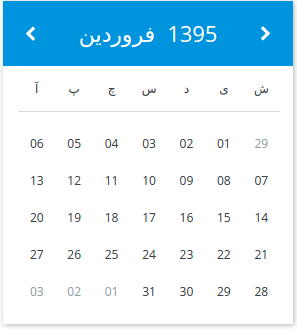
## Demo
[See demo](http://thg303.github.io/jalaali-datepicker-demo/)
## Features
* Custom ng-model date format: custom string or js date
* Min date / Max date
* Allow/disallow future date selection
* Quick selection of month and year
* Locale aware (Angular and Moment locale)
## Requirements
* Angularjs >=1.2
* Moment.js
* Moment-jalaali.js >=0.4.0
## Installation
1. `npm install --save ng-flat-jalaali-datepicker`
2. Link `/dist/ng-flat-jalaali-datepicker.js`and `/dist/ng-flat-jalaali-datepicker.css`
3. Add the module `'ngFlatjalaaliDatepicker'` as dependency of your angular module.
## Usage
This is an attribute only directive.
```html
```
```html
```
## Options
### Attributes:
* `datepicker-config`: **Object** - The datepicker's config object.
* `gregorian-formatted-picked-date`: **String** - The picked date in Gregorian calendar
* `gregorian-picked-date`: **Object** - The picked date in Gregorian calendar as a moment.js object
```html
Pick a date
picked date is {{gfdate}}
```
### Config object properties:
* `dateFormat`: **String** - The Moment.js format of the date in the `ng-model`. Fallback to js date Object if no format is given. Eg: `'jDD/jMM/jYYYY'`.
* `gregorianDateFormat`: **String** - The string date format. if it's not present the `dateFormat` will be used instead.
* `minDate`: **Object** - The minimum selectable date. Must be a Moment Date Object.
* `dropDownYears`: **Number** - The number indicates how many years should appear in the year drop down list.
* `maxDate`: **Object** - The maximum selectable date. Must be a Moment Date Object.
* `allowFuture`: **Boolean** - Maximum selectable date is tomorrow
### Locale
Default locale is Farsi/Persian but you can load any locale of your choice (Angular and Moment), the datepicker use the currents locales. for persian translation of this document see [README.fa.md] (README.fa.md)
## Contributions
Just go to the project directory and:
1. Install the dev dependencies:
`npm install`
2. then start watch task: `gulp watch`
## Credits
* Design: [YannickAWE](https://github.com/YannickAWE)
* moment-jalaali: [Behrang] (https://github.com/jalaali/moment-jalaali)