# Hierarchical Organization Chart for Angular (4+)
[](https://travis-ci.org/nulldev07/org-chart)
The `ng2-org-chart` component displays heirarchal Organizational Chart.
This is extended version of ng2-org-chart with images. Million Credits to ng2-org-chart
## Table of Contents
* [Usage](#usage)
* [Custom CSS](#custom-css)
## Usage
```bash
npm i ng2-org-chart -S
```
### Include default styles in your `index.html`
```html
```
### `app.module.ts`
```js
import { NgModule } from '@angular/core';
import { BrowserModule } from '@angular/platform-browser';
import { OrgChartModule } from 'ng2-org-chart';
import { AppComponent } from './app.component';
@NgModule({
imports: [BrowserModule, OrgChartModule],
declarations: [AppComponent],
bootstrap: [AppComponent]
})
export class AppModule { }
```
### `app.component.html`:
```html
```
### `app.component.ts`:
```js
export class AppComponent {
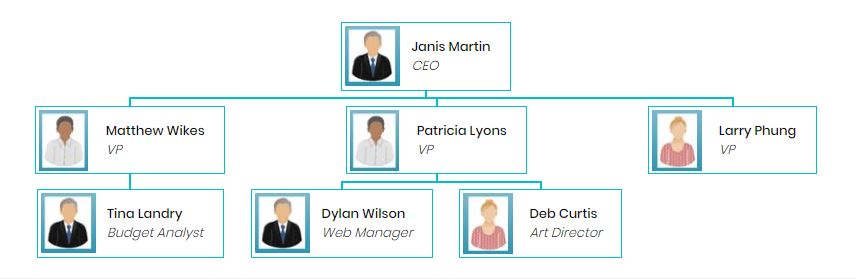
topEmployee: IEmployee = {
name: 'Janis Martin',
designation: 'CEO',
img: "./assets/data/img/b.JPG",
subordinates: [
{
name: 'Matthew Wikes',
designation: 'VP',
img: "./assets/data/img/b.JPG",
subordinates: [
{
name: 'Tina Landry',
designation: 'Budget Analyst',
subordinates: []
}
]
},
{
name: 'Patricia Lyons',
designation: 'VP',
img: "./assets/data/img/c.JPG",
subordinates: [
{
name: 'Dylan Wilson',
designation: 'Web Manager',
img: "./assets/data/img/b.JPG",
subordinates: []
},
{
name: 'Deb Curtis',
designation: 'Art Director',
img: "./assets/data/img/c.JPG",
subordinates: []
}
]
},
{
name: 'Larry Phung',
designation: 'VP',
img: "./assets/data/img/a.JPG",
subordinates: []
}
]
};
}
```
Here is the rendered output:
## Custom CSS
You can override default styles with your custom CSS. Make sure you include your custom CSS *after* including the default CSS so that your styles override the default styles.
```css
.oc-border {
border: 1px solid green;
}
.oc-background {
background-color: limegreen;
}
.oc-name {
font-family: Cambria, Cochin, Georgia, Times, Times New Roman, serif;
white-space: nowrap;
}
.oc-designation {
font-family: 'Gill Sans', 'Gill Sans MT', Calibri, 'Trebuchet MS', sans-serif;
font-style: italic;
white-space: nowrap;
}
.oc-img {
margin-left: -10px;
width: 60px;
height: 60px;
}
```