# A library for loading and playing audio using HTML 5 for Angular
###### Demo
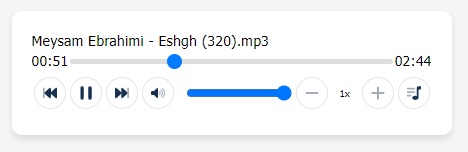
[Live Demo](https://mr-samani.github.io/pkgs/player)
## 📥 Installation
ngx-audio-control is available via npm and yarn
### Using npm:
`$ npm install ngx-audio-control --save`
### Using yarn:
`$ yarn add ngx-audio-control`
## 🌟 Getting Started
Import NgxAudioPlayerModule in in the root module(AppModule):
```
// Import library module
import { NgxAudioPlayerModule } from 'ngx-audio-player';
@NgModule({
imports: [
// ...
NgxAudioPlayerModule
]
})
export class AppModule { }
```
#### Usage
HTML
```
```
Ts
```
@Component({
selector: 'app-player',
templateUrl: './player.component.html',
styleUrls: ['./player.component.scss']
})
export class PlayerComponent {
files = [
'assets/files/a.mp3',
'assets/files/b.mp3',
'assets/files/c.mp3',
];
}
```
## Properties
#### @Input
| Name | Description | Type | Default Value |
| -------------- | ----------------------------------------------------------------------------------------------------------------------------------------- | ---------------------------- | ------------- |
| [showList] | Show play list button | boolean | true |
| [download] | Show download button | boolean | false |
| [showFileName] | Display filename in header | boolean | true |
| [showSpeed] | Show speed control | boolean | true |
| [showVolume] | Show volume control | boolean | true |
| [linear] | Display vertically or horizontally between control buttons and range seeker | boolean | false |
| [preload] | This enumerated attribute is intended to provide a hint to the browser about what the author thinks will lead to the best user experience | 'none', 'metadata' , 'auto' | 'metadata' |
____
> ## 🔰 for seek audio file in chrome:
## IIS web.config
```
```
## Appache .htaccess
```
Header set Accept-Ranges bytes
```
## NginX nginx.conf
```
http {
server {
location / {
add_header Accept-Ranges bytes;
}
}
}
```
## Author
💻Mohammadreza samani | FrontEnd Developer
# Donate
If you like my work you can buy me a 🍺 or 🍕
[❤️Donate😉](https://www.buymeacoffee.com/mrsamani)
