# ngx-extended-pdf-viewer (Easter edition)
<p>
  <a href="https://www.npmjs.com/package/ngx-extended-pdf-viewer">
    <img src="https://img.shields.io/npm/dm/ngx-extended-pdf-viewer.svg?style=flat" alt="downloads">
  </a>
  <a href="https://badge.fury.io/js/ngx-extended-pdf-viewer">
    <img src="https://badge.fury.io/js/ngx-extended-pdf-viewer.svg" alt="npm version">
  </a>
  <a href="https://opensource.org/licenses/Apache-2.0"><img src="https://img.shields.io/badge/License-Apache%202.0-brightgreen.svg"></a>
  </p>
  <p>
  CDN: <a href="https://unpkg.com/browse/ngx-extended-pdf-viewer/">unpkg.com</a>
 </p>

## New: transition to a UI design inspired by Material Design (work in progress)
Version 3.0.0 comes with a slightly modified design. That's work in progress. The goal is to give you a highly customizable, easily themeable library with a fresh and modern look inspired my Material Design. As an unintended side effect, it resembles the redesign called "Photon" of pdf.js. Among other things, you'll soon be able to select between the light mode and the dark mode.

 Talking of which: if you're an UX- or UI-designer with some time to spear, don't hesitate to send me suggestions how to improve the look and feel of the library. Or send me your complaints if you don't my attempts at UI-design. I can't promise to implement every suggestion, but I'm looking forward to your valuable feedback!

## Showcase and manual

There's a showcase at <a href="https://pdfviewer.net">https://pdfviewer.net</a>. Check this page for live demos, source code examples, and a handbook.

## Bringing PDF to the Angular world

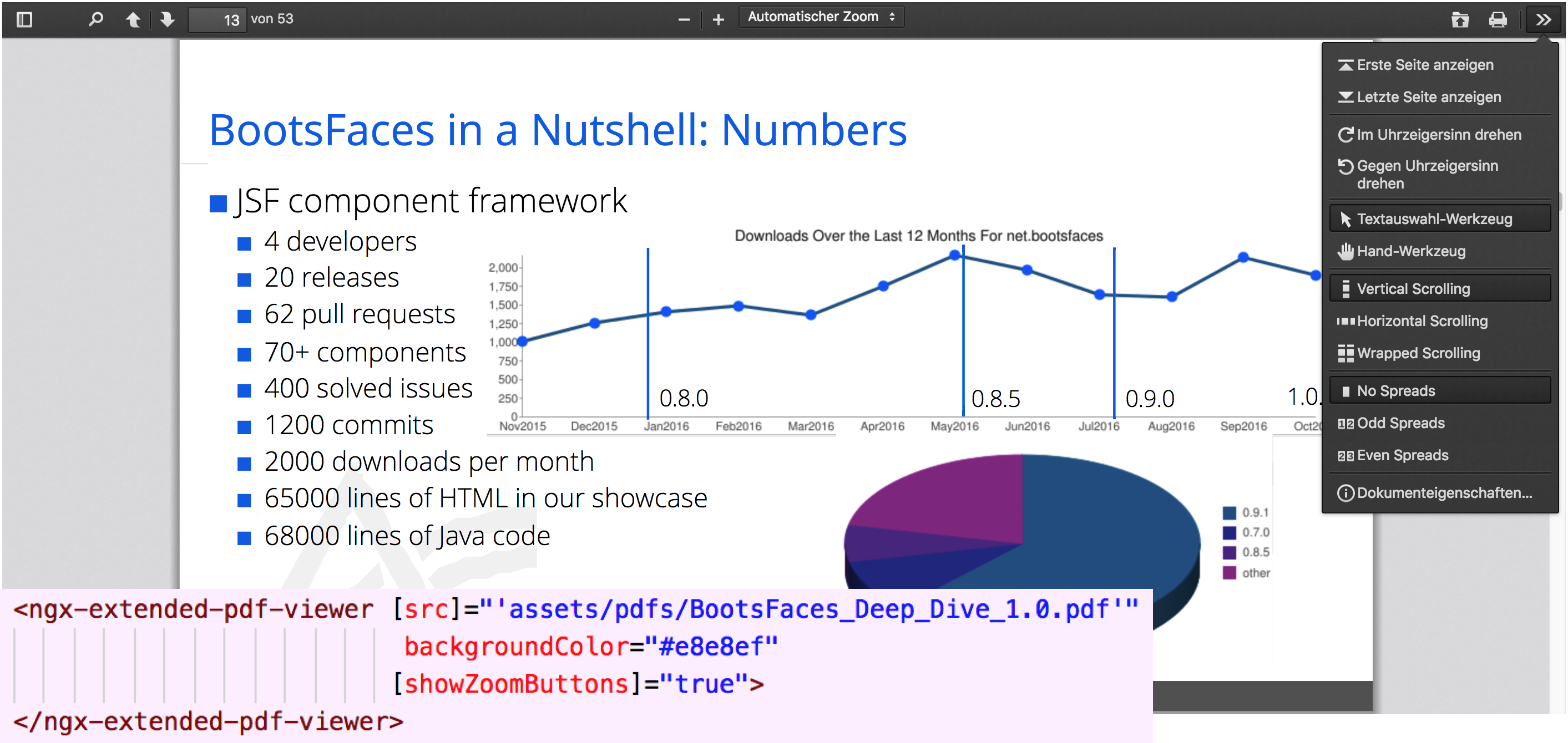
This library provides an embeddable PDF viewer component. It's different from other approaches like [ng2-pdf-viewer](https://vadimdez.github.io/ng2-pdf-viewer/) in that it shows the full suite of UI widgets. In other words, it strongly resembles the PDF viewer of your browser:

<img src="https://beyondjava.net/blog/images/ngx-extended-pdf-viewer/example-screenshot.png">

## Features

- Support for Internet Explorer 11
- Searching (including a programmatic API)
- Printing
- Sidebar with thumbnails, outlines, and attachments
- Rotating
- Download and upload
- Zoom (with optional two-way binding to an attribute)
- Full-screen mode
- various selection tools
- standard display or even / odd spreads (like a book)
- several event listeners
- various approaches to scrolling (vertical, horizontal, "wrapped" scrolling)
- Internationalization (providing translations to several dozen languages)
- direct access to the core API of pdf.js (including TypeScript definition files)
- plus the ability to deactivate each of these features
- and/or to customize the toolbars and menus according to your needs.

Not to mention the ability to display PDF files, running on Mozilla's pdf.js 2.4.456, released in March 2020.

## Potentially breaking changes with version 3.0.0
- I've fixed the behavior of `(zoom)`. Now this event is never triggered if the value of `[zoom]` is `"auto"`, `"page-width"`, `"page-fit"` or `"page-actual"`. It was always meant to work like this, but nonetheless, fixing this bug might break your application. If it does, use `(currentZoomFactor)` instead.
- I've updated to the most current version of pdf.js (2.4.456). That's shouldn't break anything, but you never know, so I've included it in this list.

## Alternatives
<details>
  <summary><b>Expand to learn more about the other options to display PDF files in Angular</b></summary>
  If you only need the base functionality, I'll happily pass you to [the project of Vadym Yatsyuk](https://github.com/vadimdez/ng2-pdf-viewer/). Vadym does a great job delivering a no-nonsense PDF viewer. However, if you need something that can easily pass as the native viewer on a gloomy day, ngx-extended-pdf-viewer is your friend.

There's also a direct counterpart to my library: <a href="https://www.npmjs.com/package/ng2-pdfjs-viewer" target="#">ng2-pdfjs-viewer</a>. As far as I can see, it's also a good library. Recently (May 24, 2019), it has been updated to PDF.js 2.2.171. It wraps the PDF viewer in an iFrame. That's a more reliable approach, but it also offers fewer options. The list of attributes is shorter, and the PDF viewer can't emit events to your application. If you're not happy with my library, check out ng2-pdfjs-viewer. It's a good library, too. Its unique selling point is displaying multiple PDF files simultaneously on the same page.

You might also try to use the native PDF viewer of your browser. That's a valid approach. Actually, it's even the preferred approach. The advantages of both `ngx-extended-pdf-viewer` and `ng2-pdfjs-viewer` are they also support Internet Explorer 11 (with some help of the polyfills). `ngx-extended-pdf-viewer` also gives you a wide range of options that aren't available using the native API.
</details>

## How to use the library
As a rule of thumb, I recommend to clone the [showcase project from GitHub](https://github.com/stephanrauh/extended-pdf-viewer-showcase) before doing anything else. It's a standard Angular CLI application, so you'll get it up and running in less than ten minutes. It's a good starting point to do your own experiments. Maybe even more important: you'll learn if the library works on your machine. (Of course it does, but it's always good to double-check!)

The detailed instructions for JHipster and Angular 2, 4, and 5 are available [on the showcase](https://pdfviewer.net/getting-started).

1.  Install the library with `npm i ngx-extended-pdf-viewer --save`
    
2. Open the file `angular.json` (or `.angular-cli.json` if you're using an older version of Angular) and configure Angular to copy the `assets` folder of the library into the `assets` folder of your application:
  ```json
    "assets": [
      "src/favicon.ico",
      "src/assets",
      {
        "glob": "**/*",
        "input": "node_modules/ngx-extended-pdf-viewer/assets/",
        "output": "/assets/"
      }
    ],
    "scripts": []
  ```
 This simply copies the entire assets folder. If you're concerned about disk memory, you can omit the subfolders `inline-locale-files` and `additional-locale`. If you need only one language, you can reduce the list to `locale.properties` and your language folder.

  _Hint:_ There are two ways to define the language files needed for the labels of the buttons and screen elements of the PDF viewer. The second method is described below in the "internationalization" section.

3.  Now you can display the PDF file like so:
  ```html
  <ngx-extended-pdf-viewer [src]="'assets/example.pdf'" useBrowserLocale="true" height="80vh"></ngx-extended-pdf-viewer>
  ```

4. If you want to display a PDF file you have downloaded from a server, you probably have a `Blob` or a Base64 encoded string. `Blobs` can be passed directly to the attribute `[src]`. Base64 string must be passed to the attribute `[base64Src]` instead.


## Configuration
Do you miss a configuration option? File an issue on the [project bug tracker](https://github.com/stephanrauh/ExploringAngular/tree/master/embedding-pdf). If the base library [pdf.js](https://mozilla.github.io/pdf.js/) supports the requested option, I'll probably add it. BTW, you can speed up the process by providing a code snippet telling me how to implement the feature or by submitting a pull request.

_Legend:_

- [(attribute)] describes an attribute with two-way-binding
- [attribute] means that PDF-viewer reacts when the attribute changes
- (attribute) means an event is raised when the user changes a setting
- attribute (without special characters) means the attribute is used at load time only. Subsequent changes are ignored.

Also see [the attribute list on the showcase](https://pdfviewer.net/attributes). It's the same list, just a little more useful because the showcase doesn't truncate the table on the right-hand side.

| _Attribute_                  | _default value_ | _description_                                                                                                                                                                                                                                                                                                                                                                                                                                                                                                                                                                                                                                                                                                                                                                                                                                                                   |
| :--------------------------- | :-------------: | :------------------------------------------------------------------------------------------------------------------------------------------------------------------------------------------------------------------------------------------------------------------------------------------------------------------------------------------------------------------------------------------------------------------------------------------------------------------------------------------------------------------------------------------------------------------------------------------------------------------------------------------------------------------------------------------------------------------------------------------------------------------------------------------------------------------------------------------------------------------------------ |
| [(src)]                      |                 | If `[src]` is a string: defines the URL of the PDF file to display. `src` may also be a `Blob`, a `Uint8Array` or an `ArrayBuffer`. To a limited extend, `[(src)]` is also a two-way binding attribute. If the user opens another PDF file, the event (srcChange) is fire. There's a catch: for security reasons, most browsers don't display the correct filename. Most often than not, the path is `C:\fakepath\`. The (srcChange) event removes the fakepath bit of the path. The $event attribute is simply the filename. But don't rely on it: it's up to the browser to implement that feature, and if you add the page to the "trusted pages" list in the Internet Explorer, the fully qualified file name is provided.                                                                                                                                                  |
| [base64Src]                  |                 | accepts a PDF file as base64 encoded string                                                                                                                                                                                                                                                                                                                                                                                                                                                                                                                                                                                                                                                                                                                                                                                                                                     |
| (afterPrint)                 |                 | This event is fired after the print jov has either been sent to the printer, or after the user has cancelled the print job. Note there's no way to tell printing from aborting the print.                                                                                                                                                                                                                                                                                                                                                                                                                                                                                                                                                                                                                                                                                       |
| (beforePrint)                |                 | This event is fired when the print is initiated. Note that this simply means the print preview window is opened. There's no way to predict if the user is actually going to print.                                                                                                                                                                                                                                                                                                                                                                                                                                                                                                                                                                                                                                                                                              |
| [backgroundColor]            |        ?        | background color                                                                                                                                                                                                                                                                                                                                                                                                                                                                                                                                                                                                                                                                                                                                                                                                                                                                |
| [contextMenuAllowed]         |      true       | should the context menu show when the right-hand side button is clicked?                                                                                                                                                                                                                                                                                                                                                                                                                                                                                                                                                                                                                                                                                                                                                                                                        |
| (currentZoomFactor)          |       n/a       | fires each time the viewer changes the zoom level. The parameter is the numeric scale factor. Note that it's not a percentage; instead, `[zoom]="'100%'"` results in `(currentZoomFactor)` sending a value of `1.0`. This event seems to fire often enough to make it reliable for detecting the current zoom factor all the time.                                                                                                                                                                                                                                                                                                                                                                                                                                                                                                                                              |
| delayFirstView               |        0        | Number of milliseconds to wait between initializing the PDF viewer and loading the PDF file. Most users can let this parameter safely at it's default value of zero. Set this to 1000 or higher if you run into timing problems (typically caused by loading the locale files after the PDF files, so they are not available when the PDF viewer is initialized).                                                                                                                                                                                                                                                                                                                                                                                                                                                                                                               |
| [enablePinchOnMobile]        |      false      | By default, the pinch gesture zooms the entire window on mobile devices. If you prefer to zoom the PDF viewer only, you can activate `enablePinchOnMobile="true"`.                                                                                                                                                                                                                                                                                                                                                                                                                                                                                                                                                                                                                                                                                                              |
| [enablePrint]                |      true       | Setting this flag to false disables printing the PDF file.                                                                                                                                                                                                                                                                                                                                                                                                                                                                                                                                                                                                                                                                                                                                                                                                                      |
| [filenameForDownload]        |  document.pdf   | Allows the user to define the name of the file after clicking "download"                                                                                                                                                                                                                                                                                                                                                                                                                                                                                                                                                                                                                                                                                                                                                                                                        |
| [(handTool)]                 |      true       | setting this flag to true, activates the "hand tool" to scroll the PDF file by dragging. Setting this to false activates the "text selection" tool. You can also use this flag as a two-way binding attribute. If you're only interested in the event, the event name is `(handToolChange)`. Deactivating this flag also activates the "text layer". This, in turn, enables marking text and highlighting search result.                                                                                                                                                                                                                                                                                                                                                                                                                                                        |
| [height]                     |   (see text)    | define the height of the PDF window. By default, it's 100%. On most web pages, this results in a height of 0 pixels. In this case, the height is set to fill all the available space. More precisely, the all the space to the bottom of the window. If that's less then 100 pixel, the height is set to 100 pixel. Note that this is just an initial setting. It doesn't change when the window is resized.                                                                                                                                                                                                                                                                                                                                                                                                                                                                    |
| [ignoreKeyboard]             |      false      | if this flag is set to true, the PDF viewer ignores every keyboard event.                                                                                                                                                                                                                                                                                                                                                                                                                                                                                                                                                                                                                                                                                                                                                                                                       |
| [ignoreKeys]                 |     (none)      | Accepts a comma-separated list of keys. For example, a legal value is `"['P', 'N']"`. Every key in the list is ignored. In the example, the key "k" navigates to the next page but "n" does not.                                                                                                                                                                                                                                                                                                                                                                                                                                                                                                                                                                                                                                                                                |
| [acceptKeys]                 |     (none)      | Accepts a comma-separated list of keys. For example, a legal value is `"['P', 'N']"`. Every key in the list is accepted, and every other key is ignored. In the example, the key "n" navigates to the next page but "k" does not.                                                                                                                                                                                                                                                                                                                                                                                                                                                                                                                                                                                                                                               |
| imageResourcesPath           | ./assets/images | allows you to put the viewer's SVG file into an arbitrary folder.                                                                                                                                                                                                                                                                                                                                                                                                                                                                                                                                                                                                                                                                                                                                                                                                               |
| language                     |    undefined    | Language of the UI. Must the the complete locale name, such as "es-ES" or "es-AR". It may be all lowercase.                                                                                                                                                                                                                                                                                                                                                                                                                                                                                                                                                                                                                                                                                                                                                                     |
| logLevel                     |        1        | Log level. Legal values: VerbosityLevel.ERRORS (=0),VerbosityLevel.WARNINGS (=1), and VerbosityLevel.INFOS (=5). The higher the log level, the more is logged.                                                                                                                                                                                                                                                                                                                                                                                                                                                                                                                                                                                                                                                                                                                  |
| listenToURL                  |      false      | deactivates the URL listener of the PDF viewer. You can set it to "true" to allow for anchor tags like "#page=23" or "#nameddest=chapter_3". Only activate this flag if you don't use the anchor to encode the URLs for the router.                                                                                                                                                                                                                                                                                                                                                                                                                                                                                                                                                                                                                                             |
| [nameddest]                  |    undefined    | allows you to jump to a "named destination" inside the document. Typical examples of names destinations are "chapter_7" oder "image_3". The named destination are defined within the PDF document; you can only jump to destinations defined by the author of the PDF file.                                                                                                                                                                                                                                                                                                                                                                                                                                                                                                                                                                                                     |
| [showSidebarButton]          |      true       | Show or hide the button to toggle the sidebar                                                                                                                                                                                                                                                                                                                                                                                                                                                                                                                                                                                                                                                                                                                                                                                                                                   |
| [mobileFriendlyZoom]         |      100%       | Increases the size of the UI elements so you can use them on small mobile devices. Must be a percentage (`'150%'`) or a floating-point number (`'1.5'`). Alternatively you can set this attribute to `'true'` (= `'150%'`) or `'false'` (= `'100%'`).                                                                                                                                                                                                                                                                                                                                                                                                                                                                                                                                                                                                                           |
| [password]                   |    undefined    | Allows you to pass a password programmatically. If you pass the wrong password, a red error message claiming "corrupt pdf file" is show in below the toolbar. Caveat: the password must be a string. During my test I accidentally used a numerical value. This fails even if the password consists only of digits. Please note that the password is stored in the main memory without encryption. If you're really serious about protecting your user's data from hackers, this might be a security issue.                                                                                                                                                                                                                                                                                                                                                                     |
| [(page)]                     |    undefined    | two-way binding attribute to determine the page to display; more precisely: `[page]="25"` makes the PDF viewer show page 25 (at any time - even after load time); `[(page)]="attribute"` updates the attribute each time the user scrolls to another page. If you're only interested in the event, that's `(pageChange)`.                                                                                                                                                                                                                                                                                                                                                                                                                                                                                                                                                       |
| [(pageLabel)]                |    undefined    | two-way binding attribute to determine the page to display; more precisely: `[pageLabel]="25"` makes the PDF viewer show the page the author called page "25". This may or may not be a numeric value. For instance, many books use roman numbers for the preface and arab numbers for the rest of the document. In this case, `[pageLabe]="iv"` usually refers to the same page as `[page]="4"`.  `[(pageLabel)]="attribute"` updates the attribute each time the user scrolls to another page. If you're only interested in the event, that's `(pageLabelChange)`.                                                                                                                                                                                                                                                                                                            |
| (pagesLoaded)                |    undefined    | emits the number of pages when a document is loaded; more precisely: emits an instance of `PagesLoadedEvent`. The attribute `pagesCount` tells how many pages the document has. The source attribute contains a reference to the PDF viewer. You can also use this event to detect when a document has been loaded.                                                                                                                                                                                                                                                                                                                                                                                                                                                                                                                                                             |
| (pageRendered)               |    undefined    | fires each time a page is rendered. Emits an instance of `PageRenderedEvent`. The `pageNumber` attribute tells you which page has been rendered.                                                                                                                                                                                                                                                                                                                                                                                                                                                                                                                                                                                                                                                                                                                                |
| (pdfDownloaded)              |    undefined    | fires when a user downloads a document. Strictly speaking, it fires when they click the "download" button. Caveat: Even if the user cancels the download, the event is fired.                                                                                                                                                                                                                                                                                                                                                                                                                                                                                                                                                                                                                                                                                                   |
| (pdfLoaded)                  |    undefined    | emits when the PDF file has been load successfully. The parameter \$event is an `PdfLoadedEvent`, containing the number of pages of the PDF file.                                                                                                                                                                                                                                                                                                                                                                                                                                                                                                                                                                                                                                                                                                                               |
| (pdfLoadingFailed)           |    undefined    | emits when trying to load and open a PDF file has failed. The parameter `$event` is an `Error`, which may or may not contain the stacktrace and additional info about the root cause of the error.                                                                                                                                                                                                                                                                                                                                                                                                                                                                                                                                                                                                                                                                              |
| [printResolution]            |       150       | set the print resolution in DPI. Sensible values are 300, 600, and maybe even 900. Note that higher values result in more memory consumption, more CPU uses, and may even cause browser crashes. During my tests setting the resolution to 1100 dpi worked, but 1150 failed. In my case, the browser seemed to ignore the print request without displaying any error message.                                                                                                                                                                                                                                                                                                                                                                                                                                                                                                   |
| [showBorders]                |      false      | By default, the PDF file is displayed with page borders. You hide them by setting `[showBorders]="true"`. Note that the page borders can be switched off and on even after the PDF file is displayed, but if you're using one of the zoom presets (`auto`, `page-width` etc.), the page isn't resized correctly.                                                                                                                                                                                                                                                                                                                                                                                                                                                                                                                                                                |
| [(rotation)]                 |        0        | [rotation] allows you to rotate every page. Note that this attribute is not responsible to rotate individual pages - it always rotates the entire document. (rotationChange) notifies you when the user rotates the document. This attribute can be used as a two-way binding attribute, i.e. [(rotation)]="angle". Legal values are 0, 90, 180, and 270. Every other value is ignored.                                                                                                                                                                                                                                                                                                                                                                                                                                                                                         |
| [showBookmarkButton]         |      true       | Show or hide the "bookmark" button                                                                                                                                                                                                                                                                                                                                                                                                                                                                                                                                                                                                                                                                                                                                                                                                                                              |
| [showDownloadButton]         |      true       | Show or hide the "download" button (aka "save" button)                                                                                                                                                                                                                                                                                                                                                                                                                                                                                                                                                                                                                                                                                                                                                                                                                          |
| [showFindButton]             |      true       | Show or hide the "find" button                                                                                                                                                                                                                                                                                                                                                                                                                                                                                                                                                                                                                                                                                                                                                                                                                                                  |
| [showHandToolButton]         |      false      | Show or hide the "hand tool" menu item in the secondary toolbar. (The hand tool allows you to move the page by clicking and dragging). This activates also the opposite menu item: "text selection tool". As a side effect, the hand tool also activates the "text layer". This, in turn, enables marking text and highlighting search result.                                                                                                                                                                                                                                                                                                                                                                                                                                                                                                                                  |
| [showOpenFileButton]         |      true       | Show or hide the "open file" button                                                                                                                                                                                                                                                                                                                                                                                                                                                                                                                                                                                                                                                                                                                                                                                                                                             |
| [showPagingButtons]          |      true       | Show or hide the buttons to navigate between pages and the input field to navigate to a particular input field                                                                                                                                                                                                                                                                                                                                                                                                                                                                                                                                                                                                                                                                                                                                                                  |
| [showPresentationModeButton] |      true       | Show or hide the "full screen" button                                                                                                                                                                                                                                                                                                                                                                                                                                                                                                                                                                                                                                                                                                                                                                                                                                           |
| [showPrintButton]            |      true       | Show or hide the "print" button                                                                                                                                                                                                                                                                                                                                                                                                                                                                                                                                                                                                                                                                                                                                                                                                                                                 |
| [showPropertiesButton]       |      true       | Show or hide the "show document properties" menu item in the secondary toolbar                                                                                                                                                                                                                                                                                                                                                                                                                                                                                                                                                                                                                                                                                                                                                                                                  |
| [showRotateButton]           |      true       | Show or hide the "rotate" menu items in the secondary toolbar                                                                                                                                                                                                                                                                                                                                                                                                                                                                                                                                                                                                                                                                                                                                                                                                                   |
| [showScrollingButton]        |      true       | show or hide the button switching between horizontal and vertical scrolling                                                                                                                                                                                                                                                                                                                                                                                                                                                                                                                                                                                                                                                                                                                                                                                                     |
| [showSecondaryToolbarButton] |      true       | Show or hide the secondary toolbar (the menu hiding behind the arrows at the right-hand side)                                                                                                                                                                                                                                                                                                                                                                                                                                                                                                                                                                                                                                                                                                                                                                                   |
| [showSelectToolButton]       |       n/a       | This attribute has been removed with version 0.9.47. Use [showHandToolButton] instead.                                                                                                                                                                                                                                                                                                                                                                                                                                                                                                                                                                                                                                                                                                                                                                                          |
| showSidebarOnLoad            |    undefined    | If this flag is set to "false", the sidebar is hidden until the user clicks the "show sidebar" button. If this flag is set to "true", the sidebar is shown (unless `[showSidebarButton]="false"`). If the flag is `undefined`, the setting used when the PDF file was shown previously is used. Note that since version 1.5.0, there's also an attribute `[(sidebarVisible)]`. If the new attribute has a value, it always overrides `showSidebarOnLoad`.                                                                                                                                                                                                                                                                                                                                                                                                                       |
| [showSpreadButton]           |      true       | Show or hide the "spread" menu items in the secondary toolbar. Also see the attribute `[(spread)]` below.                                                                                                                                                                                                                                                                                                                                                                                                                                                                                                                                                                                                                                                                                                                                                                       |
| showUnverifiedSignatures     |      false      | Display electronic signatures. This feature is deactivated by default because the PDF viewer isn't able to verify the signature reliably yet (see https://github.com/mozilla/pdf.js/issues/1076). Please be aware that the signature may be manipulated. A warning message is also shown in the console log.                                                                                                                                                                                                                                                                                                                                                                                                                                                                                                                                                                    |
| [showZoomButtons]            |      true       | Show or hide the "zoom" button                                                                                                                                                                                                                                                                                                                                                                                                                                                                                                                                                                                                                                                                                                                                                                                                                                                  |
| [(sidebarVisible)]           |    undefined    | Two-way-binding attribute determining whether the sidebar is visible. If you're only interested in the event, the event name is `(sidebarVisibleChange)`. Note that there's an overlap with the attribute `showSidebarOnLoad`. The value of `showSidebarOnLoad` is only considered if the attribute `sidebar` is undefined.                                                                                                                                                                                                                                                                                                                                                                                                                                                                                                                                                     |
| [(spread)]                   |       off       | determines if you're seeing one page or two pages at once (like a paper book). `'off'` means there's only one page. `'odd'` is the traditional book-like view, with two pages side-by-side. `'even'` is similar, only the first page is displayed alone.                                                                                                                                                                                                                                                                                                                                                                                                                                                                                                                                                                                                                        |
| [startTabindex]              |    undefined    | By default, the PDF viewer leaves it to the browser to determine the correct tab index. You can set the tab indexes explicitly by setting `[startTabindex]="100"`. Note that there are roughly 40, 50 buttons and menu items. It's a good idea to reserve a range of - say - 100 indexes for the PDF viewer.                                                                                                                                                                                                                                                                                                                                                                                                                                                                                                                                                                    |
| textLayer                    |    undefined    | allows you to activate or deactivate the text layer. If this flag is set to false, both the "find" button and the "select tool" are hidden. If you don't set this flag explicitly, it's automatically set by `[handTool]` and `[showHandToolButton]`. The text layer is shown by default if and only if `[handTool]="false"` or `[showHandToolButton]="true"`. As a rule of thumb, you always want to activate the text layer unless you run into performance problems.                                                                                                                                                                                                                                                                                                                                                                                                         |
| (textLayerRendered)          |    undefined    | This callback is called when the text layer is rendered.                                                                                                                                                                                                                                                                                                                                                                                                                                                                                                                                                                                                                                                                                                                                                                                                                        |
| (updateFindMatchesCount)     |    undefined    | This event is call during a find operation. Note that it can be called hundreds or even thousands of time, due to the asynchronous implementation of the find algorithm. It sends a `FindFindResultMatchesCount`.                                                                                                                                                                                                                                                                                                                                                                                                                                                                                                                                                                                                                                                               |
| (updateFindState)            |    undefined    | This event is called during the find operations. It sends a `FindState`(i.e. `FindState.FOUND`, `FindState.NOT_FOUND`, `FindState.PENDING` or `FindState.WRAPPED`).                                                                                                                                                                                                                                                                                                                                                                                                                                                                                                                                                                                                                                                                                                             |
| useBrowserLocale             |      false      | if true, the PDF viewer assumes the locale files are in the assets folder. If false, you are responsible for providing the translated texts.                                                                                                                                                                                                                                                                                                                                                                                                                                                                                                                                                                                                                                                                                                                                    |
| [(zoom)]                     |    undefined    | `[zoom]="undefined"` (default value): use the zoom level `"auto"`. If not `undefined`: Set the zoom level of the page, no matter which zoom level was previously configured. Legal values are `[zoom]="'auto'"`, `'page-actual'"`, `"'page-fit'"`, `"'page-width'"`, `"50%"`, or `50` (or any other numeric value). Numbers are always considered percentages; the trailing "%" character is optional. This attribute supports two-way binding. `[(zoom)]="zoomAttribute"` updates the variable `zoomAttribute` each time the user changes the zoom setting. This is useful to use the same zoom across multiple PDF viewer instances or PDF document. If you're only interest in the event, that's `(zoomChange)`. Caveat: since version 1.6.0, `(zoomChange)` fires twice after choosing `page width`, `page fit`, `automatic zoom` or `actual size` from the drop-down menu. |

## Searching programmatically

The service `NgxExtendedPdfViewerService` allows you to search programmatically. If the PDF viewer hasn't been initialized, or if it has already been destroyed, calling the service results in an error message on the console.

| _method_                     | action                                                                                                                                                                                    |
| ---------------------------- | ----------------------------------------------------------------------------------------------------------------------------------------------------------------------------------------- |
| `find(text: string):boolean` | finds a certain text. If the PDF viewer is not initialized, the method returns `false` and prints an error message on the console.                                                        |
| `findNext(): boolean`        | finds the next search result. Only call it after calling `find()` first. If the PDF viewer is not initialized, the method returns `false` and prints an error message on the console.     |
| `findPrevious(): boolean`    | finds the previous search result. Only call it after calling `find()` first. If the PDF viewer is not initialized, the method returns `false` and prints an error message on the console. |

## Internationalization
<details>
  <summary><b>Expand to learn how to translate ngx-extended-pdf-viewer to 120+ languages</b></summary>


### Slow default way

If you add the translation files to your project as described above in step 3, the PDF viewer uses the browser language setting to determine which language to load. First, it loads the `locale.properties`, scans it for the desired language files, and loads the language file from the corresponding folder. That's two additional HTTP calls. That's slow, and it may even lead to errors if the network is already congested loading other resource files.

Don't forget to set the attribute `useBrowserLocale="true"` if you follow this approach.

### Slow way with custom translation files

If you want to use the slow way, but prefer to load the language files from a different URL, add a link to your application like so:

```html
<link rel="resource" type="application/l10n" href="https://www.example.com/locale/locale.properties" />
```

In this case, don't set `useBrowserLocale` (or set it explicitly to false).

### Inlining (aka embedding) the language files

Alternatively, you can provide the translations as a Json file. This Json file has to be part of an HTML page. That's especially useful if you need only one or two languages, because the are loaded a lot faster. To get familiar with this approach, embed the Json file in the `index.html` like so:

```html
<script type="application/l10n">
  {"default_locale":"de","locales":{"de": ... }}
</script>
```

The folder `node_modules/ngx-extended-pdf-viewer/assets/inline-locale-files` contains snippet files you can simply copy into your HTML page.

_Hint_: You can also add the language definition in another HTML file. The bottom line is that the HTML snippet is already part of the DOM when the PDF viewer is initialized. Cluttering the root index file with the translations is an ugly and inflexible hack, but it works.

If you're using the "inline" approach, don't set `useBrowserLocale` (or set it explicitly to `false`).
</details>

## Troubleshooting
See https://github.com/stephanrauh/ngx-extended-pdf-viewer/tree/master/projects/ngx-extended-pdf-viewer/troubleshooting.md


## Feedback, pull requests and bug reports

Pull requests and bug reports are welcome. Please send them to the bug tracker of
the project page: https://github.com/stephanrauh/ngx-extended-pdf-viewer/issues

## Building the library from scratch (and updating to the latest version of Mozilla's pdf.js)

Have a look at [this walkthrough](https://github.com/stephanrauh/ngx-extended-pdf-viewer/blob/master/projects/ngx-extended-pdf-viewer/how-to-build.md).

## License and Kudos
The license of the `ngx-extended-pdf-viewer` is the Apache V2 license.

The library is based on https://github.com/mozilla/pdf.js, which has been published under an Apache V2 license.

Some of the default icons have been published under a <a href="http://scripts.sil.org/cms/scripts/page.php?item_id=OFL_web" target="#">SIL Open Font License 1.1</a> license at <a href="https://materialdesignicons.com/" target="#">Material Design Icons</a>. The other icons have either been published under an <a href="https://github.com/google/material-design-icons/blob/master/LICENSE" target="#">Apache V2 license</a> by Google or by the pdf.js team at Mozilla.

Thanks to the awesome pdf.js team and to all the users you've reported bugs and even sent me pull requests!

## Changelog
See https://github.com/stephanrauh/ngx-extended-pdf-viewer/tree/master/projects/ngx-extended-pdf-viewer/changelog.md