# NgxObjectDiff
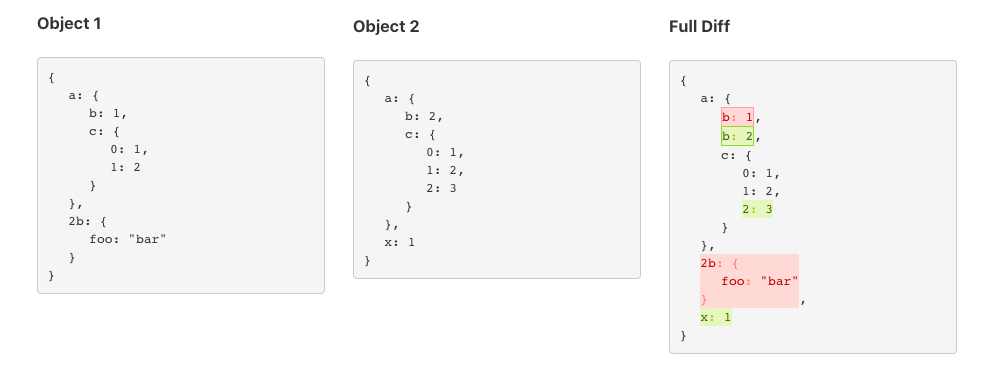
#### An Angular 2+ library to compare and show object differences.
[Demo]( https://saurabh47.github.io/ngx-object-diff/)
## Installation
```
npm i ngx-object-diff
```
# Available methods on `NgxObjectDiff` service
`setOpenChar`: set the opening character for the view, default is `{`
`setCloseChar`: set the closing character for the view, default is `}`
`diff`: compare and build all the difference of two objects including prototype properties
`diffOwnProperties`: compare and build the difference of two objects taking only its own properties into account
`toJsonView`: format a diff object to a full JSON formatted object view
`toJsonDiffView`: format a diff object to a JSON formatted view with only changes
`objToJsonView`: format any javascript object to a JSON formatted view
# Usage
### Import the NgxObjectDiffModule
```
import { NgxObjectDiffModule } from 'ngx-object-diff';
@NgModule({
declarations: [
AppComponent
],
imports: [
BrowserModule,
NgxObjectDiffModule
],
providers: [],
bootstrap: [AppComponent]
})
export class AppModule { }
```
### Inject the service
```
constructor(private objectDiff: NgxObjectDiffService) { }
ngOnInit(): void {
// This is required only if you want to show a JSON formatted view of your object
this.object1View = this.objectDiff.objToJsonView(this.object1);
this.object2View = this.objectDiff.objToJsonView(this.object2);
// you can directly diff your objects js now or parse a Json to object and diff
let diff = this.objectDiff.diff(this.object1, this.object2);
// you can directly diff your objects including prototype properties and inherited properties using `diff` method
let diffAll = ObjectDiff.diff($scope.yourObjectOne, $scope.yourObjectTwo);
// gives a full object view with Diff highlighted
this.diffView = this.objectDiff.toJsonView(diff)
// gives object view with only Diff highlighted
this.diffValueChanges = ObjectDiff.toJsonDiffView(diff);
}
```
### Component
Bind the variables to ```ngx-object-diff``` Component.It will takes care of styling.
```html
```
### Alternate approach
Bind the variables directly in your html using the `innerHTML` property binding of Angular
Use a `` element for better results
```html
```
Based on https://github.com/hipster-labs/angular-object-diff