[](https://npmjs.com/packages/node-env-run) [](https://npmjs.com/packages/node-env-run) [](/LICENSE) [!
[](#contributors)

# node-env-run
> Command-line tool to read `.env` files and execute scripts/commands after loading those environment variables
- Uses [`dotenv`](https://npm.im/dotenv) under the hood
- Easy to configure
- Flexible command to execute
- Let's you override existing environment variables
## Installation
### Install per project:
I recommend installing this module as a `devDependency` for the respective project.
**Install via `yarn`**:
```bash
yarn add node-env-run --dev
```
**Install via `npm`**:
```bash
npm install node-env-run --save-dev
```
### Install globally:
You can alternatively install the module globally if you want to:
```bash
npm install node-env-run --global
```
## Usage
Add a new scripts entry to your `package.json`. Example:
```json
{
"scripts": {
"dev": "nodenv .",
"test": "nodenv -E test/.env test/test.js"
}
}
```
Or use it with [`npx`](https://medium.com/@maybekatz/introducing-npx-an-npm-package-runner-55f7d4bd282b):
```bash
npx node-env-run .
```
## Documentation
This module uses under the hood the [`dotenv` module](https://www.npmjs.com/package/dotenv) to parse the `.env` file. For more information about how to structure your `.env` file, please refer to its [documentation](https://www.npmjs.com/package/dotenv#rules).
### Usage examples:
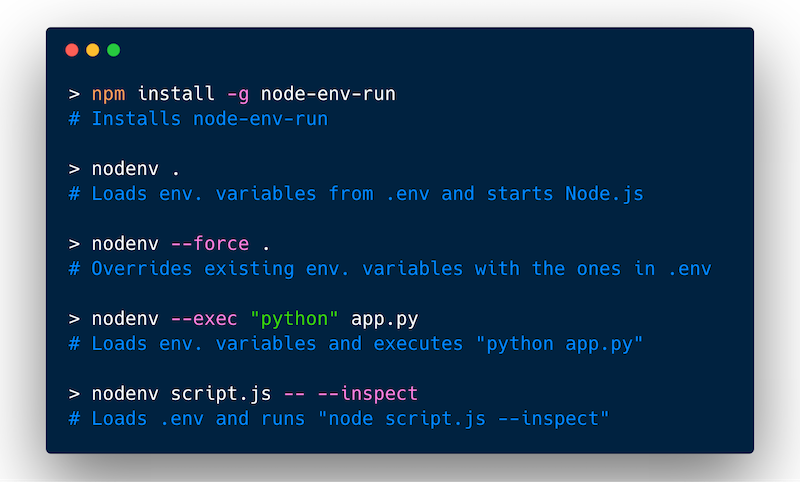
**Start up the `main` file in `package.json` with the enviornment variables from `.env`:**
```bash
nodenv .
```
More examples:
**Start Node.js REPL with set environment variables from `.env.repl`**:
```bash
nodenv -E .env.repl
```
**Run Python file with overridden environment variables**:
```bash
nodenv app.py --exec python --force
```
**Run `server.js` file using [`nodemon`](https://npm.im/nodemon)**:
```bash
nodenv server.js --exec nodemon
```
**Pass `--inspect` flag for debugging after `--`:**
```bash
nodenv someScript -- --inspect
```
### Arguments
You can pass `node-env-run` a variety of arguments. These are the currently supported arguments:
| Flag | Type | Description |
| -------------------- | --------- | ------------------------------------------------------------------------------------------------------- |
| `--encoding` | `string` | Lets you specify the encoding of the `.env` file. Defaults to `utf8` encoding. |
| `--env` or
`-E` | `string` | Specifies the path to the `.env` file that should be read |
| `--exec` or
`-e` | `string` | This lets you specify a command other than `node` to execute the script with. More in the next section. |
| `--force` or `-f` | `boolean` | Flag to temporarily override existing environment variables with the ones in the `.env` file |
| `--help` | `boolean` | Displays the usage/help instructions |
| `--verbose` | `boolean` | Flag to enable more verbose logging |
| `--version` | `boolean` | Displays the current version of the package |
### Using `node-env-run` with other executables
You can use `node-env-run` with other executables. This is particularly useful if you try to combine it with things like [`babel-node`](https://www.npmjs.com/package/@babel/node) or [`ts-node`](https://npm.im/ts-node):
```bash
nodenv index.ts --exec "ts-node"
```
However, you can also use it with completely unrelated executables such as python:
```bash
nodenv app.py --exec python
```
## Caveats & Limitations
### Additional Arguments
If you want to pass additional flags/arguments to the script you are executing using `node-env-run`, you can use the empty `--` argument and follow it with any arguments you'd want to pass. For example:
```bash
nodenv index.js --exec "ts-node" -- --log-level debug
```
`--log-level debug` will be passed to `index.js`.
If you want to do the same with a REPL like node or python you'll have to specify `REPL` explictly, due to some parsing behavior of yargs. For example:
```bash
nodenv REPL --exec node -- -e "console.log('hello world!')"
```
### Using Quotes and Escaping Characters
Using quotes for escaping special characters should generally work out of the box. However, there is one edge case if you are trying to use double quotes (`"`) inside and want to preserve it. In that case you'll have to double escape it due to some inner workings of Node.js. For example:
```bash
nodenv REPL --exec echo -- 'A common greeting is "Hello World"'
# outputs: A common greeting is Hello World
nodenv REPL --exec echo -- 'A common greeting is \"Hello World\"'
# outputs: A common greeting is "Hello World"
```
Similarly if you want to avoid variables to be interpolated you'll have to escape the `$` separately. For example:
```bash
nodenv REPL --exec echo -- '$PATH'
# outputs your actual values stored in $PATH
nodenv REPL --exec echo -- '\$PATH'
# outputs: $PATH
```
## Contributors
| [
Dominik Kundel](https://moin.world)
[💻](https://github.com/dkundel/node-env-run/commits?author=dkundel "Code") |
| :---: |
## License
MIT