# node-merge-images
Merges images. You can optionally set the merging orientation (vertical or horizontal), margins between images, etc.
Click [here](CHANGELOG.md) to see the change log.
- [node-merge-images](#node-merge-images)
- [Supported OS](#supported-os)
- [Requirements](#requirements)
- [Installation](#installation)
- [Image Merging API](#image-merging-api)
- [Usage](#usage)
- [Parameters](#parameters)
- [Return value](#return-value)
- [Throws](#throws)
- [Testing](#testing)
- [Author](#author)
- [License](#license)
## Supported OS
- Linux
- MAC
## Requirements
Requires imagemagick CLI tools to be installed.
- For instance, if you're on OS X you can use Homebrew.
```sh
brew install imagemagick
```
- For Linux, use yum.
```sh
sudo yum -y install ImageMagick
```
## Installation
```sh
npm install --save node-merge-images
```
## Image Merging API
### Usage
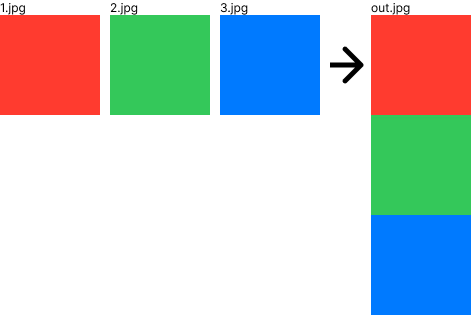
- Merge vertically.
```js
const merge = require('node-merge-images');
await merge(['1.jpg', '2.jpg', '3.jpg'], 'out.jpg');
```
 - Merge horizontally.
```js
const merge = require('node-merge-images');
await merge(['1.jpg', '2.jpg', '3.jpg'], 'out.jpg', {direction: 'horizontal'});
```
- Merge horizontally.
```js
const merge = require('node-merge-images');
await merge(['1.jpg', '2.jpg', '3.jpg'], 'out.jpg', {direction: 'horizontal'});
```
 - Merge vertically with 30px spacing.
In the example, the background color is set to #000 with the background option.
```js
const merge = require('node-merge-images');
await merge(['1.jpg', '2.jpg', '3.jpg'], 'out.jpg', {offset: 30, background: '#000'});
```
- Merge vertically with 30px spacing.
In the example, the background color is set to #000 with the background option.
```js
const merge = require('node-merge-images');
await merge(['1.jpg', '2.jpg', '3.jpg'], 'out.jpg', {offset: 30, background: '#000'});
```
 - Merge horizontally with 30px spacing.
In the example, the background color is set to #000 with the background option.
```js
const merge = require('node-merge-images');
await merge(['1.jpg', '2.jpg', '3.jpg'], 'out.jpg', {direction: 'horizontal', offset: 30, background: '#000'});
```
- Merge horizontally with 30px spacing.
In the example, the background color is set to #000 with the background option.
```js
const merge = require('node-merge-images');
await merge(['1.jpg', '2.jpg', '3.jpg'], 'out.jpg', {direction: 'horizontal', offset: 30, background: '#000'});
```
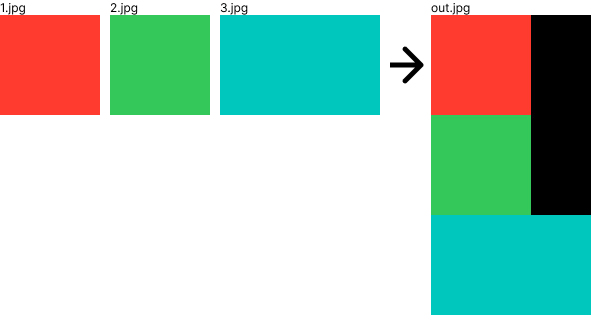
 - Merge images of different sizes vertically.
The image width after merging will be adjusted to the image with the maximum width.
```js
const merge = require('node-merge-images');
await merge(['1.jpg', '2.jpg', '3.jpg'], 'out.jpg');
```
- Merge images of different sizes vertically.
The image width after merging will be adjusted to the image with the maximum width.
```js
const merge = require('node-merge-images');
await merge(['1.jpg', '2.jpg', '3.jpg'], 'out.jpg');
```
 - Merge images of different sizes horizontally.
The image height after merging will be adjusted to the image with the maximum height.
```js
const merge = require('node-merge-images');
await merge(['1.jpg', '2.jpg', '5.jpg'], 'out.jpg', {direction: 'horizontal', offset: 30});
```
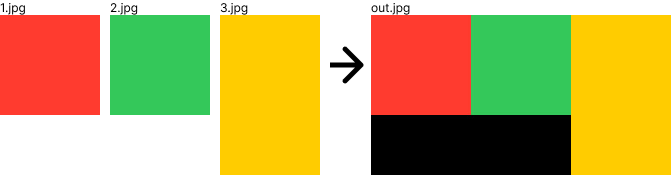
- Merge images of different sizes horizontally.
The image height after merging will be adjusted to the image with the maximum height.
```js
const merge = require('node-merge-images');
await merge(['1.jpg', '2.jpg', '5.jpg'], 'out.jpg', {direction: 'horizontal', offset: 30});
```
 ### Parameters
- {string[]} inputPaths Path list of images to merge.
- {string} outputPath Output destination path for merged images.
- {'vertical'|'horizontal'} options.direction? Direction of the merged image. Default is vertical.
- {string} options.background?
The background color of the merged image.
This option accepts a color name, a hex color, or a numerical RGB, RGBA, HSL, HSLA, CMYK, or CMYKA specification.
For example, blue, #dddddff, rgb(255,255,255), etc.
Default is white.
- {number} options.offset? Offset in pixels between each image. Default is 0.
### Return value
{Promise<void>
### Throws
- {TypeError} Input path is not Array.
- {TypeError} Input path is empty.
- {TypeError} Output path is empty.
- {TypeError} The direction option is not "vertical" or "horizontal".
- {TypeError} Offset option is not greater than or equal to 0.
- {TypeError} Input path file not found.
- {Error} Error executing convert command.
## Testing
With [npm](http://npmjs.org) do:
```sh
npm test
```
## Author
**Takuya Motoshima**
* [github/takuya-motoshima](https://github.com/takuya-motoshima)
* [twitter/TakuyaMotoshima](https://twitter.com/TakuyaMotoshima)
* [facebook/takuya.motoshima.7](https://www.facebook.com/takuya.motoshima.7)
## License
[MIT](LICENSE)
### Parameters
- {string[]} inputPaths Path list of images to merge.
- {string} outputPath Output destination path for merged images.
- {'vertical'|'horizontal'} options.direction? Direction of the merged image. Default is vertical.
- {string} options.background?
The background color of the merged image.
This option accepts a color name, a hex color, or a numerical RGB, RGBA, HSL, HSLA, CMYK, or CMYKA specification.
For example, blue, #dddddff, rgb(255,255,255), etc.
Default is white.
- {number} options.offset? Offset in pixels between each image. Default is 0.
### Return value
{Promise<void>
### Throws
- {TypeError} Input path is not Array.
- {TypeError} Input path is empty.
- {TypeError} Output path is empty.
- {TypeError} The direction option is not "vertical" or "horizontal".
- {TypeError} Offset option is not greater than or equal to 0.
- {TypeError} Input path file not found.
- {Error} Error executing convert command.
## Testing
With [npm](http://npmjs.org) do:
```sh
npm test
```
## Author
**Takuya Motoshima**
* [github/takuya-motoshima](https://github.com/takuya-motoshima)
* [twitter/TakuyaMotoshima](https://twitter.com/TakuyaMotoshima)
* [facebook/takuya.motoshima.7](https://www.facebook.com/takuya.motoshima.7)
## License
[MIT](LICENSE)