
![Logo](img/logo-big.png)

<br/>

[![NPM version][npm-version-image]][npm-url]
[![NPM downloads per month][npm-downloads-month-image]][npm-url]
[![NPM downloads total][npm-downloads-total-image]][npm-url]
[![MIT License][license-image]][license-url]
[![JavaScript Style Guide](https://img.shields.io/badge/code_style-standard-brightgreen.svg)](https://standardjs.com)
[![Youtube][youtube-image]][youtube-url]


![Sample Node](img/readmemain.png)


<p align='center'>
<img width="110px" src="https://raw.githubusercontent.com/Supergiovane/node-red-contrib-knx-ultimate/master/img/KNX_CERTI_MARK_RGB.jpg" ></br>
<span style="font-size:0.7em;color:grey;">Authorized KNX logo by the KNX Association*</span>
</p>
<p align='center'>
<img width="110px" src="https://raw.githubusercontent.com/Supergiovane/node-red-contrib-knx-ultimate/master/img/knxsecure.png" ></br>
</p>
</br>  


<p align='center'>
    <img width="110px" src="https://raw.githubusercontent.com/Supergiovane/node-red-contrib-knx-ultimate/master/img/c/agata.png"></br>
<center>Many thanks to <a href="https://www.agatastore.it">Agata Store - Professional store and Certified KNX Partner</a>  
for providing me with KNX Secure equipment to test with.</center>
</p>

</br>
</br>

**You can use it immediately!**

```javascript

msg.payload = true // Turn light on
msg.payload = {red:255, green:200, blue:30} // Put some colors in our life

```

<br/>

> [!TIP]
> I invest a lot of effort, money, and free time into this node, so please consider [making a small donation](https://www.paypal.com/donate/?hosted_button_id=S8SKPUBSPK758) if you're using KNX-Ultimate. Thank you!

<br/>

## YOUTUBE CHANNEL

<a href="https://www.youtube.com/playlist?list=PL9Yh1bjbLAYpfy1Auz6CKDfXUusgMwOQr" target="_blank"><br/>
<img width="200px" src="https://raw.githubusercontent.com/Supergiovane/node-red-contrib-knx-ultimate/master/img/youtube-logo.jpeg" ></a>

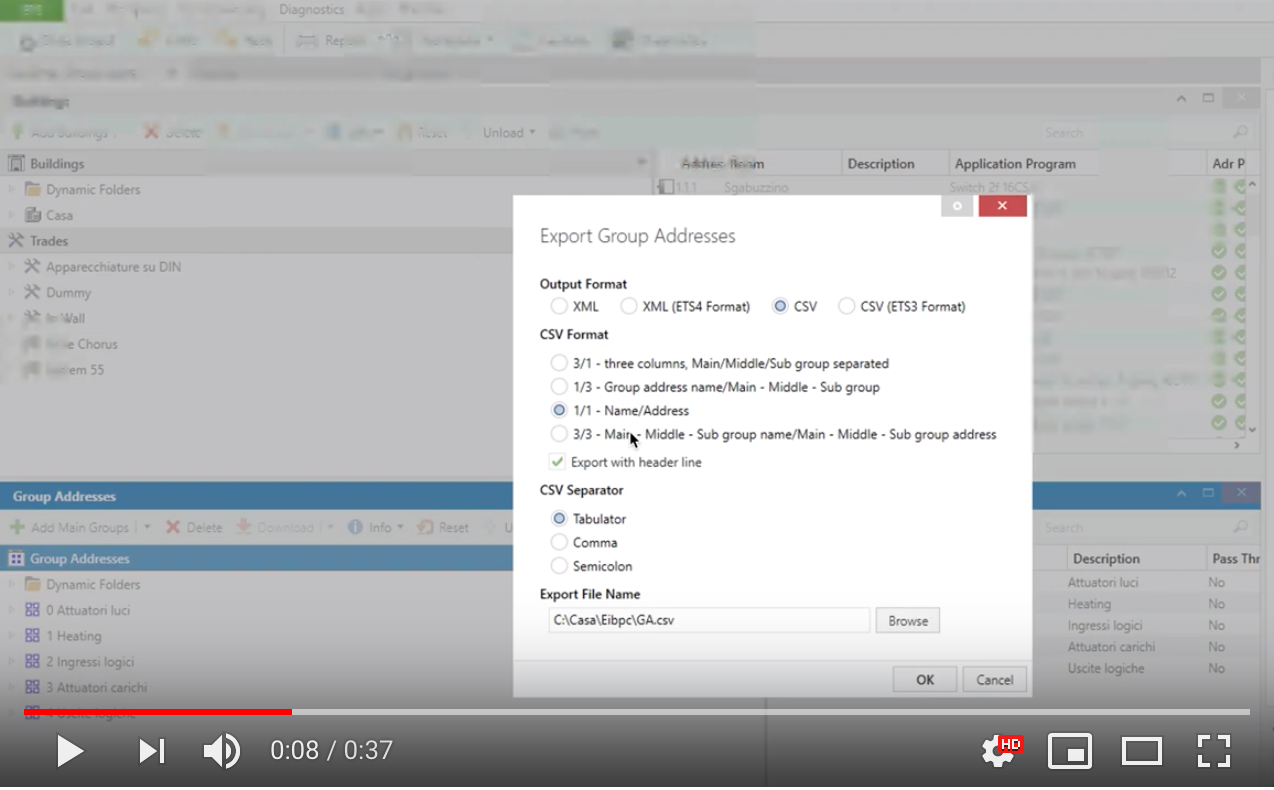
Please subscribe to the [YouTube channel](https://www.youtube.com/playlist?list=PL9Yh1bjbLAYpfy1Auz6CKDfXUusgMwOQr) and watch the node in action. 
<br/>
<br/>

## NODE LIST

**Core KNX nodes**

- **KNX Ultimate** - [docs](https://github.com/Supergiovane/node-red-contrib-knx-ultimate/wiki/2.-Node-Configuration). The primary node for interacting with your KNX installation. Send and receive telegrams, create virtual group addresses, and bridge non‑KNX devices into your bus with an intuitive, highly configurable interface.
- **KNX Config** - Shared configuration for gateways, security settings, and bus parameters used by every runtime node.
- **Scene Controller** - [docs](https://github.com/Supergiovane/node-red-contrib-knx-ultimate/wiki/SceneController-Configuration). Recall, store, and manage scenes exactly as a hardware KNX scene keypad would, including optional learn buttons from the flow.
- **Auto Responder** - Automatically answers KNX read requests (ideal for virtual devices or when you need deterministic status values).
- **Global Context** - [docs](https://github.com/Supergiovane/node-red-contrib-knx-ultimate/wiki/GlobalVariable). Mirrors selected group addresses into Node-RED’s global context for easy use inside function nodes and custom logic.
- **Viewer** - [docs](https://github.com/Supergiovane/node-red-contrib-knx-ultimate/wiki/knxUltimateViewer). Dashboard widget that shows live KNX group address activity and values.

**Automation, safety, and diagnostics**

- **Watchdog** - [docs](https://github.com/Supergiovane/node-red-contrib-knx-ultimate/wiki/7.-WatchDog-Configuration). Monitors bus availability, triggers notifications (e-mail, Telegram, Alexa, Siri, Sonos, …), and can automatically fail over to a backup KNX/IP router or reconnect on demand.
- **Logger** - [docs](https://github.com/Supergiovane/node-red-contrib-knx-ultimate/wiki/Logger-Configuration). Captures telegrams into an ETS‑compatible XML log for in-depth diagnostics (note: KNX/IP interfaces do not report KNX-Ultimate telegrams).
- **Alerter** - [docs](https://github.com/Supergiovane/node-red-contrib-knx-ultimate/wiki/Alerter-Configuration). Raises visual or audio alerts (for instance with node-red-contrib-tts-ultimate) when monitored addresses signal an alarm condition.
- **Load Control** - [docs](https://github.com/Supergiovane/node-red-contrib-knx-ultimate/wiki/LoadControl-Configuration). Supervises energy usage (oven, washing machine, EV charger…) and sheds loads before the main breaker trips.
- **Staircase** - Automates staircase lighting timers with configurable fade and reminder options.
- **Garage** - Manages garage door or gate logic, including impulse control, status feedback, and safety interlocks.

**IoT integrations**

- **IoT Bridge** - Bridges MQTT/REST devices with KNX, handling payload translations so non‑KNX equipment becomes bus-aware.
- **Home Assistant Translator** - [docs](https://github.com/Supergiovane/node-red-contrib-knx-ultimate/wiki/HATranslator). Converts Home Assistant service payloads to KNX telegrams using a built-in, user-editable mapping table.

**Philips Hue nodeset** - [guide](https://github.com/Supergiovane/node-red-contrib-knx-ultimate/wiki/HUE+Bridge+configuration)  
Use the dedicated Hue config node plus the following device nodes to mirror Hue state into KNX and vice versa:

- **Hue Light** - Bi-directional light control with day/night scenes, dimming curves, and tunable white.
- **Hue Button** - Listens to Hue Tap Dial/Dimmer button presses and emits KNX-friendly events.
- **Hue Motion**, **Hue Camera Motion** - Motion detection with daylight filters and occupancy timers.
- **Hue Tap Dial** - Exposes dial rotation and button presses for scene selection or dimming.
- **Hue Light Sensor**, **Hue Temperature Sensor**, **Hue Humidity Sensor** - Publishes environmental readings to KNX.
- **Hue Scene** - Activates Hue scenes and optionally synchronises the status back to KNX.
- **Hue Battery** - Reports battery percentage for Zigbee accessories.
- **Hue Zigbee Connectivity** - Monitors Zigbee connectivity status and signal quality.
- **Hue Plug** - Controls smart plugs/outlets through KNX telegrams.
- **Hue Contact Sensor** - Mirrors door/window contact states.
- **Hue Device Software Update** - Tracks and exposes firmware update availability for Hue devices.

**Additional utility nodes**

- **Hue Config** - Stores bridge credentials and polling intervals for the Hue nodes.
- **KNX/IP Router & Interface config** - Define multiple secure or plain gateways that any runtime node can reuse.

Each node links to detailed wiki documentation with configuration hints, sample payloads, and best practices.

<br>

## CHANGELOG

* See <a href="https://github.com/Supergiovane/node-red-contrib-knx-ultimate/blob/master/CHANGELOG.md">here the changelog</a>


## SUPPORTED TECHNOLOGIES

|Technology|Supported|
|--|--|
| KNX Tunnelling | ![](https://placehold.co/200x20/green/white?text=YES) |
| KNX Routing | ![](https://placehold.co/200x20/green/white?text=YES) |
| KNX IP Secure/Data secure | ![](https://placehold.co/200x20/green/white?text=YES) |
| Philips Hue v2 | ![](https://placehold.co/200x20/green/white?text=YES) |

<br/>


## DOCUMENTATION

* [Wiki and Help](https://github.com/Supergiovane/node-red-contrib-knx-ultimate/wiki)
* [FAQ + Troubleshoot](https://github.com/Supergiovane/node-red-contrib-knx-ultimate/wiki/FAQ-Troubleshoot)
* [Security best practices](https://github.com/Supergiovane/node-red-contrib-knx-ultimate/wiki/SECURITY)


## Highlights

If you're here, you have probably already tried other KNX nodes from npm. I hope you enjoy this one, because I've put a lot of effort into creating the copy/paste friendly node I always wanted, with many features and support for ETS CSV exported group addresses.<br />

<details><summary>Standalone or ETS export friendly</summary>

You can set your own group address, datapoint, and device name, or import the ETS group address list so the datapoint and device name are auto-populated while you type the group address.

</details>
<details><summary>Filling helpers</summary>

If you import your ETS CSV or ESF file, begin typing the group address or device name in the Group Address textbox and a list of matches will appear. Select an item from the list to auto-populate the datapoint and device name—you can keep the suggested values or change them.

</details>
<details><summary>Automatic encoding/decoding of KNX datagrams</summary>

Pass a normal payload to the node (true, false, string, number, object) and you receive a decoded payload of the same shape to use in your flow—no manual buffer handling required.

</details>
<details><summary>Single device or universal listener</summary>

Use the node as a single device (for example, group address 0/0/1) or switch it to “universal” mode to catch all KNX bus traffic. In universal mode the node outputs a comprehensive message containing the group address, device name, decoded payload, and additional metadata. It can also send universal KNX telegrams when you pass a message containing the destination group address, datapoint type, and payload.

</details>
<details><summary>Contextual help for formatting input messages</summary>

The wiki provides extensive documentation and examples, and the editor helps too: whenever you change the datapoint type, a text block with a sample input message—especially for tricky datapoints like RGBW, 10-byte floats, relative dimming, or 3-byte setpoints—appears. Copy/paste it into your function and adjust as needed.

</details>
<details><summary>Huge amount of Datapoints are supported</summary>

A huge range of datapoints is supported. If you need one that is missing, open a GitHub issue and we will work on it.

</details>
<details><summary>Self protection</summary>

The node protects you from common mistakes. See the [Node Protections](https://github.com/Supergiovane/node-red-contrib-knx-ultimate/wiki/-Protections) page for details.

</details>
<details><summary>Built in RBE input/output filter</summary>

You can enable or disable the built-in RBE (report-by-exception) filter. When enabled, messages are forwarded only when the payload changes—both for KNX bus telegrams and flow inputs.

</details>
<details><summary>RAW message directly to the BUS</summary>

Send raw buffers directly to the bus whenever you need low-level control.

</details>


## WORKING WITH ETS CSV OR ESF FILES

Instead of creating a knx-ultimate node for every group address, import your ETS CSV or ESF group address file.  
When a knx-ultimate node runs in **Universal mode (listen to all Group Addresses)** it becomes a universal input/output node, aware of all datapoints, group addresses, and device names (for example, “Living Room Lamp”). Send a payload to the node and it encodes it with the correct datapoint before transmitting it to the bus. Likewise, when the node receives a telegram from the bus, it outputs a decoded payload using the datapoint specified in the ETS file.  


<details><summary>Click here for a sample ETS csv file to paste into the ETS field of your config node.</summary>

> Copy/Paste this into your configuration node.


```javascript

"Group name"	"Address"	"Central"	"Unfiltered"	"Description"	"DatapointType"	"Security"
"Attuatori luci"	"0/-/-"	""	""	"Attuatori luci"	""	"Auto"
"Luci primo piano"	"0/0/-"	""	""	"Luci primo piano"	""	"Auto"
"Camera da letto luce"	"0/0/1"	""	""	"Camera da letto luce"	"DPST-1-8"	"Auto"
"Loggia camera da letto"	"0/0/2"	""	""	"Loggia camera da letto"	"DPST-1-1"	"Auto"
"Camera armadi luce"	"0/0/3"	""	""	"Camera armadi luce"	"DPST-1-1"	"Auto"
"Bagno grande luce"	"0/0/4"	""	""	"Bagno grande luce"	"DPST-1-1"	"Auto"
"Loggia bagno grande"	"0/0/5"	""	""	"Loggia bagno grande"	"DPST-1-1"	"Auto"
"Bagno grande specchio (switch)"	"0/0/6"	""	""	"Bagno grande specchio switch"	"DPST-1-1"	"Auto"
"Lavanderia luce"	"0/0/7"	""	""	"Lavanderia luce"	"DPST-1-1"	"Auto"
"Lavanderia specchio (switch)"	"0/0/8"	""	""	"Lavanderia specchio switch"	"DPST-1-1"	"Auto"
"Studio luce"	"0/0/9"	""	""	"Studio luce"	"DPST-1-1"	"Auto"
"Soggiorno luce (switch)"	"0/0/10"	""	""	"Soggiorno luce switch"	"DPST-1-1"	"Auto"
"Soggiorno aplique (switch)"	"0/0/11"	""	""	"Soggiorno aplique switch"	"DPST-1-1"	"Auto"
"Loggia soggiorno cucina"	"0/0/12"	""	""	"Loggia soggiorno-cucina"	"DPST-1-1"	"Auto"
"Cucina luce"	"0/0/13"	""	""	"Cucina luce"	"DPT-1"	"Auto"
"Cucina luce pensili"	"0/0/14"	""	""	"Cucina luce pensili"	"DPT-1"	"Auto"
"Corridoio luce"	"0/0/15"	""	""	"Corridoio luce"	"DPST-1-1"	"Auto"
"Scala LED"	"0/0/16"	""	""	"Scala LED"	"DPST-1-1"	"Auto"
"Soggiorno aplique brighness value"	"0/0/17"	""	""	""	"DPST-5-1"	"Auto"
"Bagno grande specchio (dim)"	"0/0/18"	""	""	"Bagno grande specchio dim"	"DPST-3-7"	"Auto"
"Soggiorno luce brighness value"	"0/0/19"	""	""	""	"DPST-5-1"	"Auto"
"Lavanderia specchio (dim)"	"0/0/20"	""	""	"Lavanderia specchio dim"	"DPST-3-7"	"Auto"
"Scala LED cambiacolori RGB"	"0/0/21"	""	""	""	"DPST-1-1"	"Auto"
"Bagno grande specchio brightness value"	"0/0/22"	""	""	""	"DPST-5-1"	"Auto"
"Soggiorno luce (dim)"	"0/0/23"	""	""	"Soggiorno luce dim"	"DPST-3-7"	"Auto"

```

</details>


<details><summary>Click here for a sample ETS esf file to paste into the ETS field of your config node.</summary>

> Copy/Paste this into your configuration node.


```javascript

My beautiful home
Attuatori luci.Luci primo piano.0/0/1	Luce camera da letto	EIS 1 'Switching' (1 Bit)	Low	
Attuatori luci.Luci primo piano.0/0/2	Luce loggia camera da letto	EIS 1 'Switching' (1 Bit)	Low	
Attuatori luci.Luci primo piano.0/0/3	Luce camera armadi	EIS 1 'Switching' (1 Bit)	Low	
Attuatori luci.Luci primo piano.0/0/4	Luce bagno grande	EIS 1 'Switching' (1 Bit)	Low	
Attuatori luci.Luci primo piano.0/0/5	Luce loggia bagno grande	EIS 1 'Switching' (1 Bit)	Low	
Attuatori luci.Luci primo piano.0/0/6	Luce specchio bagno grande (switch)	EIS 1 'Switching' (1 Bit)	Low	
Attuatori luci.Luci primo piano.0/0/7	Luce lavanderia	EIS 1 'Switching' (1 Bit)	Low	
Attuatori luci.Luci primo piano.0/0/8	Luce specchio lavanderia (switch)	EIS 1 'Switching' (1 Bit)	Low	
Attuatori luci.Luci primo piano.0/0/9	Luce studio	EIS 1 'Switching' (1 Bit)	Low	
Attuatori luci.Luci primo piano.0/0/10	Plafoniera soggiorno (switch)	EIS 1 'Switching' (1 Bit)	Low	
Attuatori luci.Luci primo piano.0/0/11	Applique soggiorno (switch)	EIS 1 'Switching' (1 Bit)	Low	
Attuatori luci.Luci primo piano.0/0/12	Luce loggia soggiorno cucina	EIS 1 'Switching' (1 Bit)	Low	
Attuatori luci.Luci primo piano.0/0/13	Luce cucina	EIS 1 'Switching' (1 Bit)	Low	
Attuatori luci.Luci primo piano.0/0/14	Pensili cucina	EIS 1 'Switching' (1 Bit)	Low	
Attuatori luci.Luci primo piano.0/0/15	Luce corridoio	EIS 1 'Switching' (1 Bit)	Low	
Attuatori luci.Luci primo piano.0/0/16	LED scala	EIS 1 'Switching' (1 Bit)	Low	
Attuatori luci.Luci primo piano.0/0/18	Luce specchio bagno grande(dim)	EIS 2 'Dimming - control' (4 Bit)	Low	
Attuatori luci.Luci primo piano.0/0/20	Luce specchio lavanderia (dim)	EIS 2 'Dimming - control' (4 Bit)	Low	
Attuatori luci.Luci primo piano.0/0/23	Plafoniera soggiorno (dim)	EIS 2 'Dimming - control' (4 Bit)	Low	
Attuatori luci.Luci primo piano.0/0/24	Applique soggiorno (dim)	EIS 2 'Dimming - control' (4 Bit)	Low	
Attuatori luci.Luci primo piano.0/0/17	Applique soggiorno brighness value	Uncertain (1 Byte)	Low	
Attuatori luci.Luci primo piano.0/0/19	Plafoniera soggiorno brighness value	Uncertain (1 Byte)	Low	
Attuatori luci.Luci primo piano.0/0/21	LED cambiacolori RGB scala	EIS 1 'Switching' (1 Bit)	Low	

```

</details>

<br/>

<a href="https://youtu.be/egRbR_KwP9I" target="_blank"><img src='https://raw.githubusercontent.com/Supergiovane/node-red-contrib-knx-ultimate/master/img/yt.png' width='60%'></a>

<br/>


## COMMERCIAL COMPANIES USING KNX-ULTIMATE
The following commercial companies kindly agreed to be mentioned on this page.  
Do you want to be listed as well? Send an email to maxsupergiovane@icloud.com.

<br/>

<table> 
<tr> 
<td style="valign:center; border: 0px; padding: 15px;">
</td> 

<td style="valign:center; border: 0px; padding: 15px;">

[![](https://raw.githubusercontent.com/Supergiovane/node-red-contrib-knx-ultimate/master/img/c/tervis.png)](https://www.tervis.it)
</td> 
<td style="valign:center; border: 0px; padding: 15px;"> 

[![](https://raw.githubusercontent.com/Supergiovane/node-red-contrib-knx-ultimate/master/img/c/knxsardegna.png)](http://www.knxsardegna.com)
</td> 
<td style="valign:center; border: 0px; padding: 15px;"> 

[![](https://raw.githubusercontent.com/Supergiovane/node-red-contrib-knx-ultimate/master/img/c/agata.png)](https://www.agatastore.it)
</td>
<td style="valign:center; border: 0px; padding: 15px;">

[![](https://raw.githubusercontent.com/Supergiovane/node-red-contrib-knx-ultimate/master/img/c/proKNX.png)](https://proknx.com)
</td> 

<td style="valign:center; border: 0px; padding: 15px;">

[![](https://raw.githubusercontent.com/Supergiovane/node-red-contrib-knx-ultimate/master/img/c/altis.png)](https://altis.swiss)
</td> 

<td style="valign:center; border: 0px; padding: 15px;">

[![](https://raw.githubusercontent.com/Supergiovane/node-red-contrib-knx-ultimate/master/img/c/cannx.png)](https://can-nx.com/kloudnx-routeur-knx-iot-connecte-a-un-cloud-securise/)
</td> 

<td style="valign:center; border: 0px; padding: 15px;">

[![](https://raw.githubusercontent.com/Supergiovane/node-red-contrib-knx-ultimate/master/img/c/innovationsystem.png)](https://www.onsystem-iot.com/)
</td> 

<td style="valign:center; border: 0px; padding: 15px;">

[![](https://raw.githubusercontent.com/Supergiovane/node-red-contrib-knx-ultimate/master/img/c/inventife.png)](https://inventife.com)
</td> 

</tr> 
</table> 


<br/>

* [Tervis - Alarm System Manufacturer](https://www.tervis.it)
* [KNX Sardegna - Gianmarco Sitzia, Certified KNX Partner](http://www.knxsardegna.com)
* [Agata Store - Professional store and Certified KNX Partner](https://www.agatastore.it)
* [ProKNX - KNX Device Manufacturer](https://proknx.com)
* [Altis - Energy and utilities provider](https://altis.swiss)
* [Can'nX France - KNX Device Manufacturer and integrator](https://can-nx.com)
* [Innovation System - System integrators](https://www.onsystem-iot.com)
* [Inventife - Smart building and accident detection](https://www.inventife.com)
<br/>

## FRIENDLY COMMUNITIES AROUND THE WORLD

**Italy**
* [![](https://raw.githubusercontent.com/Supergiovane/node-red-contrib-knx-ultimate/master/img/c/viveresmart.png)](https://www.facebook.com/groups/viveresmart)
* [VivereSmart TV](https://www.youtube.com/channel/UC6GlFhcbNuoSEejZ_HlCynA)

**Germany**
* [![](https://raw.githubusercontent.com/Supergiovane/node-red-contrib-knx-ultimate/master/img/c/knxuserforum.png)](https://knx-user-forum.de/forum/öffentlicher-bereich/knx-eib-forum/1389088-knx-node-for-node-red) 

**China**
* [QQ group: 837579219 （加群需要备注 "来自github"](tencent://groupwpa/?subcmd=all&param=7b2267726f757055696e223a3833373537393231392c2274696d655374616d70223a313633303934363639312c22617574684b6579223a22762b72482b466f4a496a75613033794e4a30744a6970756c55753639424f4d55724f464c4a6c474b77346a30326b7a4f7a3338535536517844684d7756414d62222c2261757468223a22227d&jump_from=)


<br/>
<br/>


## ARE YOU A NODE.JS DEVELOPER?
Many users asked me to “extract” the underlying KNX API and publish it on npm. Here it is!<br/>
The API is called **KNXUltimate**. The README documents it thoroughly and includes examples for both secure and non-secure KNX connections.
* <a href="https://github.com/Supergiovane/KNXUltimate#readme">KNXUltimate API</a>

<br/>
<br/>

<br/>

A big THANK YOU to [@svenflender](https://github.com/svenflender) for the logo and icon graphics!
<br/>
We support [GitBook](https://www.gitbook.com)

![Logo](https://raw.githubusercontent.com/Supergiovane/node-red-contrib-knx-ultimate/master/img/wiki/flags/madeinitaly.png)
<p align='left'>
<img width="110px" src="https://raw.githubusercontent.com/Supergiovane/node-red-contrib-knx-ultimate/master/img/KNX_CERTI_MARK_RGB.jpg" ></br>
Authorized KNX logo by KNX Association</br>
*<i>The author <b>Massimo Saccani</b> has been authorized to use the KNX logo.
<br/>Forks of the knx-ultimate node are not implicitly allowed to use the KNX logo.</i>
</p>


[![Donate via PayPal](https://raw.githubusercontent.com/Supergiovane/node-red-contrib-knx-ultimate/master/img/CodiceQR.png)](https://www.paypal.com/donate/?hosted_button_id=S8SKPUBSPK758)


[license-image]: https://img.shields.io/badge/license-MIT-blue.svg
[license-url]: https://github.com/Supergiovane/node-red-contrib-knx-ultimate/master/LICENSE
[npm-url]: https://npmjs.org/package/node-red-contrib-knx-ultimate
[npm-version-image]: https://img.shields.io/npm/v/node-red-contrib-knx-ultimate.svg
[npm-downloads-month-image]: https://img.shields.io/npm/dm/node-red-contrib-knx-ultimate.svg
[npm-downloads-total-image]: https://img.shields.io/npm/dt/node-red-contrib-knx-ultimate.svg
[youtube-image]: https://img.shields.io/badge/Visit%20me-Youtube-red
[youtube-url]: https://www.youtube.com/channel/UCA9RsLps1IthT7fDSeUbRZw/playlists