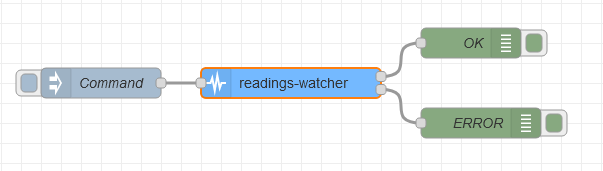
### Objective
A node to check if sequencial readings are within expected parameters, using
different verification methods.
### Details
When placed after a sensor for example, this node keeps track of consecutive readings, and checks if they respect the following configurable strategies:
- Minimum change: will trigger an error if the difference between two consecutive readings is lower than the specified limit.
- Maximum change: will do the same if the difference is higher than the limit.
- Stuck at: will compare the last X readings and trigger an error if they are all the same value.
Values can be interpreted as percentile or fixed. Two consecutive readings of 10 and 15 have a 0.5 "percentile change or a 5 "fixed" change
If the payload is not a number, no message is sent and an error is called with done(error).
Conforment readings will be forwarded to the OK output.
When an error is triggered, the message is redirected to the ERROR output.
When the node is finished with a message, done() is called, so any complete nodes can receive a message about it. Likewise for done(err) and any catch nodes if any error happens.
### Setup
- Enable strategies to limit consecutive readings. When enabled, a corresponding property will appear in the Values section (they can be used simultaneously).
- Set the threshold values.
- Choose if the values set represent percentile or fixed thresholds.
### Properties
name: string
name of node to be displayed in editor
toggles: checkbox
checkboxes to enable/disable the verification methods available
valueType: button
Toggleable buttons to choose between percentile or fixed change
calculation
minchange: number
Minimum change allowed between consecutive readings
maxchange: number
Maximum change allowed between consecutive readings
stucklimit: number
Number of equal value readings allowed before triggering error
### Inputs
A message containing a payload property with a number is required
{ "payload":10 }
### Outputs
A timestamp is added to the message (or updated if it exists already).
If reading is within expected parameters, message is forwarded to the OK output
{ "payload": 10, "timestamp": 1604141914614 }
Otherwise, it is sent through ERROR output and a type is added to show which verification failed
{ "payload": 10, "timestamp": 1604141914614, "type": "minchange" }
### Example Flow