# Installation
There are **3 methods** of installing this Node, chose the method that fits your environment.
## Method A - Node-RED Palette Manager with Internet access
This method requires Internet access for the system running Node-RED. This is most common use-case for the most common Node-RED installations.
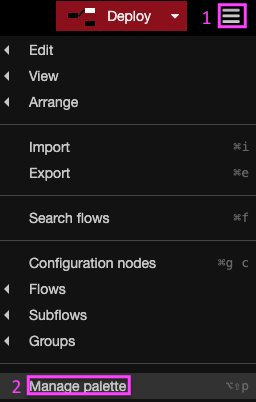
1. Click the "hamburger" menu in the upper right.
2. Click **Manage Palette**.
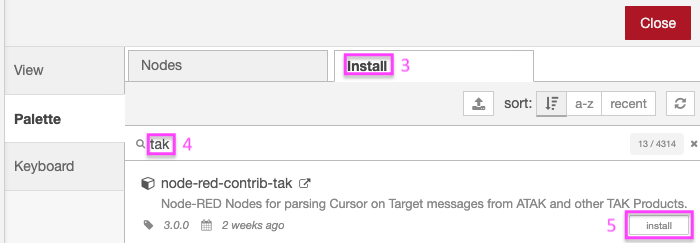
- Select Install tab.
- Enter tak in search box.
- On the node-red-contrib-tak entry, Click Install button.
After about a minute you should see a success message.
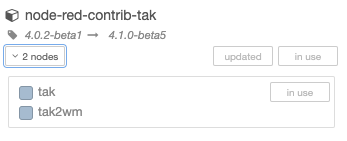
You can confirm installation by clicking the **Nodes** tab:
## Method B - Node-RED Palette Manager without Internet access
This method requires Internet access to download a package, but does not require Internet access on the system running Node-RED.
- I. From a system with Internet access, download an archive of [node-red-contrib-tak](https://github.com/snstac/node-red-contrib-tak/releases/latest/download/node-red-contrib-tak-latest.tgz)
- II. Copy node-red-contrib-tak-latest.tgz to a USB drive (or other removable media).
- III. Insert USB drive or media into system running Node-RED.
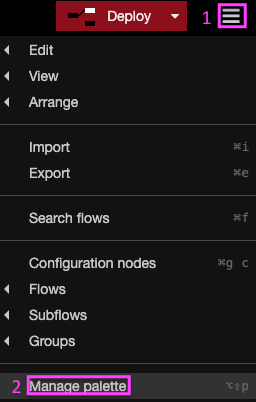
- Click the "hamburger" menu in the upper right.
- Click Manage Palette
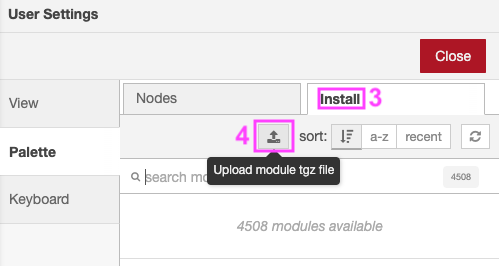
- Select Install tab.
- Click the Upload module tgz file button.

- Select Upload.
After about a minute you should see a success message.
You can confirm installation by clicking the **Nodes** tab:

## Method C - NPM with Internet access
This method requires Internet access for the system running Node-RED and command-line (terminal, SSH or serial) access to the system running Node-RED.
Run the following command in your Node-RED user directory - typically `~/.node-red`, then restart node-red:
```bash
cd ~/.node-red
npm install node-red-contrib-tak
node-red-admin restart
```