[](https://www.npmjs.com/package/noshift.js) [](./LICENSE)
# NoShift.js
**English** | [日本語](./README-ja.md)
> A joke language that lets you write JavaScript without pressing the Shift key.
Typing shifted symbols (`!`, `"`, `(`, `)`, `{`, `}` …) is tiring.
**NoShift.js** replaces every shift-required symbol with a `^`-prefixed sequence, so you can write JavaScript using only unshifted keys.
`.nsjs` files compile directly to plain JavaScript via the `nsc` CLI.
> [!Important]
> **⚠ Breaking Changes (v0.15.0):** The syntax has changed significantly. `^3` is now `#` (was Capitalize), `^6` is now Capitalize (was `&`), `^\` is now `_` (was `|`). New keyword aliases: `or` → `||`, `and` → `&&`, `@or` → `|`, `@and` → `&`. Please update your `.nsjs` files.
---
## Installation
### Global Install
```bash
npm install -g noshift.js@latest
```
### Local Install
```bash
npm install -D noshift.js@latest
```
---
## Getting Started
```bash
# Create a new project
# Global
nsc create my-project
# Local
npx nsc create my-project
# Or initialize only a nsjsconfig.json in the current directory
# Global
nsc init
# Local
npx nsc init
```
---
## CLI Reference
`nsc` is the NoShift.js compiler CLI.
| Command | Alias | Description |
|---|---|---|
| `nsc` / `npx nsc` | | Compile `.nsjs` → `.js` using `nsjsconfig.json` |
| `nsc watch` / `npx nsc watch` | `nsc -w` `nsc --watch` | Watch for changes and recompile automatically |
| `nsc init` / `npx nsc init` | `nsc --init` | Create `nsjsconfig.json` in the current directory |
| `nsc clean` / `npx nsc clean` | `nsc --clean` | Delete the output directory (`outdir`) |
| `nsc run ` / `npx nsc run ` | `nsc -r ` `nsc --run ` | Run a `.nsjs` file directly |
| `nsc create [name]` / `npx nsc create [name]` | `nsc --create [name]` | Scaffold a new project (`--no-linter` / `--no-prettier` to skip) |
| `nsc version` / `npx nsc version` | `nsc -v` `nsc --version` | Show version |
| `nsc help` / `npx nsc help` | `nsc -h` `nsc --help` | Show help |
**Options:**
| Option | Description |
|---|---|
| `--no-header` | Suppress the `// Generated by NoShift.js` header comment in output |
---
## nsjsconfig.json
Place a `nsjsconfig.json` at the project root to configure compilation.
Generated automatically by `nsc init` or `nsc create`.
```json
{
"compileroptions": {
"rootdir": "src",
"outdir": "dist",
"warnuppercase": true,
"capitalizeinstrings": true,
"noheader": false
}
}
```
| Option | Default | Description |
|---|---|---|
| `compileroptions.rootdir` | `"src"` | Source directory |
| `compileroptions.outdir` | `"dist"` | Output directory |
| `compileroptions.warnuppercase` | `true` | Warn about uppercase characters in source code |
| `compileroptions.capitalizeinstrings` | `true` | Enable `^6` capitalize modifier inside string literals |
| `compileroptions.noheader` | `false` | Suppress the `// Generated by NoShift.js` header comment |
---
## Symbol Map
> This symbol mapping is based on the NoShift.js developer's keyboard (JIS layout).
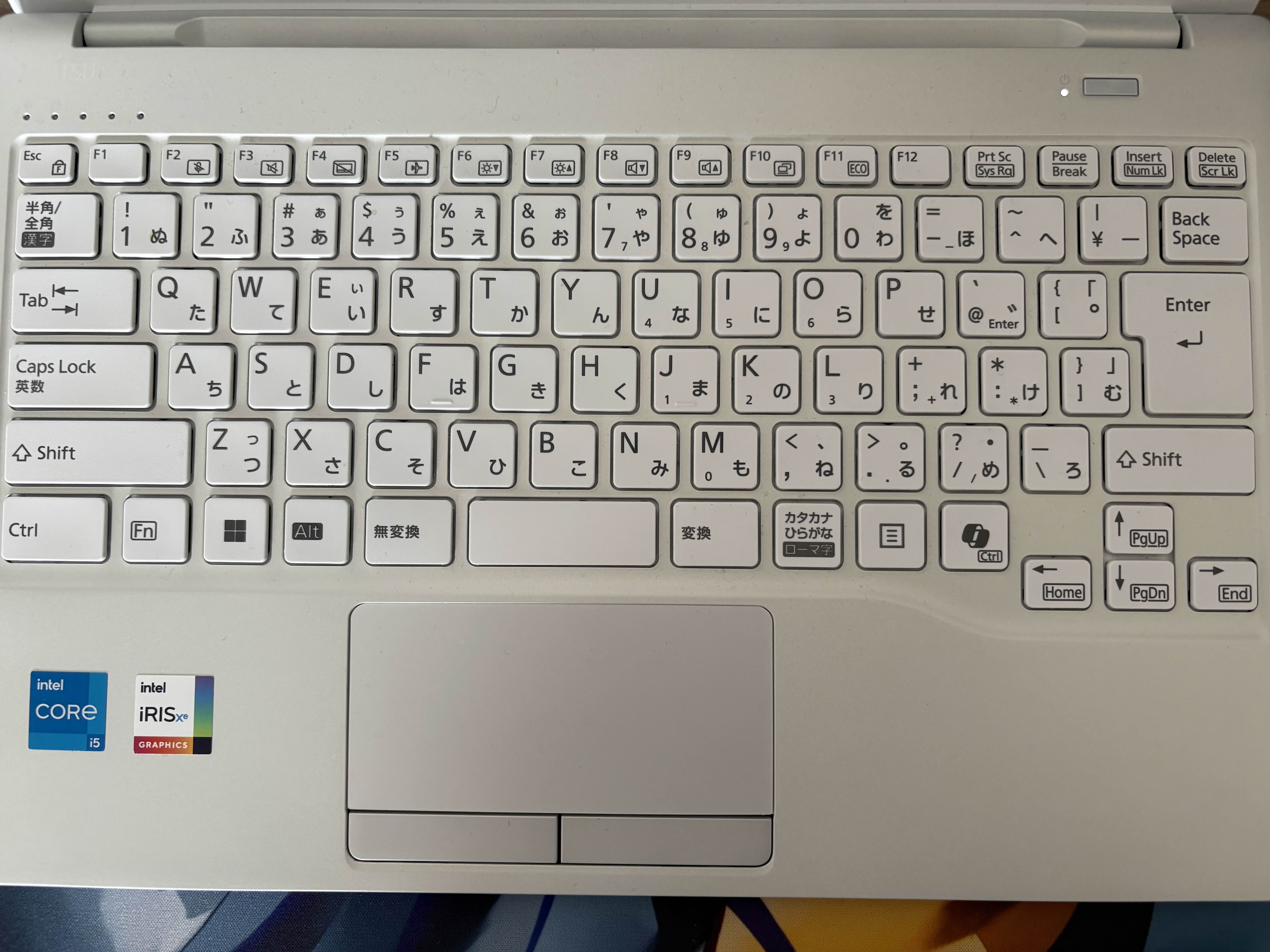
| NoShift | JS | | NoShift | JS |
|:-------:|:--:|---|:-------:|:--:|
| `^1` | `!` | | `^^` | `~` |
| `^2` | `"` | | `^\` | `_` |
| `^3` | `#` | | `^@` | `` ` `` |
| `^4` | `$` | | `^[` | `{` |
| `^5` | `%` | | `^]` | `}` |
| `^6x` | `X` (capitalize) | | `^;` | `+` |
| `^7` | `'` | | `^:` | `*` |
| `^8` | `(` | | `^,` | `<` |
| `^9` | `)` | | `^.` | `>` |
| `^-` | `=` | | `^/` | `?` |
| `^0` | `^` (XOR) | | | |
Template expression: `^4^[` → `${`
Keywords: `or` → `||`, `and` → `&&`, `@or` → `|`, `@and` → `&`
Shebang: `#^1` → `#!` (first line only)
```nsjs
#^1/usr/bin/env node
console.log^8^2^6hello^2^9;
```
```js
#!/usr/bin/env node
console.log("Hello");
```
---
## Syntax Examples
### Hello World
```nsjs
console.log^8^2^6hello, ^6world!^2^9;
```
```js
console.log("Hello, World!");
```
### Capitalize Modifier
`^6` capitalizes the next character:
```nsjs
class ^6animal ^[
^]
```
```js
class Animal {
}
```
### Comments
```nsjs
// line comment
/^: block comment ^:/
/^:
multi-line
block comment
^:/
```
```js
// line comment
/* block comment */
/*
multi-line
block comment
*/
```
### Variables & Arrow Functions
```nsjs
const add ^- ^8a, b^9 ^-^. a ^; b;
const result ^- add^85, 3^9;
console.log^8result^9; // 8
```
```js
const add = (a, b) => a + b;
const result = add(5, 3);
console.log(result); // 8
```
### Strings
```nsjs
// Double-quote string
const s1 ^- ^2^6hello^2;
// Single-quote string
const s2 ^- ^7^6world^7;
// Template literal
const s3 ^- ^@^4^[s1^] ^4^[s2^]^@;
// Escape: \^2 inside ^2...^2 yields a literal ^2 in the output
const s4 ^- ^2quote: \^2^2;
```
```js
const s1 = "Hello";
const s2 = 'World';
const s3 = `${s1} ${s2}`;
const s4 = "quote: ^2";
```
### Objects & Arrays
```nsjs
const obj ^- ^[
name: ^2NoShift^2,
version: 1,
isJoke: true
^];
const arr ^- [1, 2, 3];
```
```js
const obj = {
name: "NoShift",
version: 1,
isJoke: true
};
const arr = [1, 2, 3];
```
### Classes
```nsjs
class ^6animal ^[
constructor^8name^9 ^[
this.name ^- name;
^]
speak^8^9 ^[
console.log^8^@^4^[this.name^] speaks.^@^9;
^]
^]
const dog ^- new ^6animal^8^2^6dog^2^9;
dog.speak^8^9;
```
```js
class Animal {
constructor(name) {
this.name = name;
}
speak() {
console.log(`${this.name} speaks.`);
}
}
const dog = new Animal("Dog");
dog.speak();
```
### Conditionals & Loops
```nsjs
const x ^- 10;
if ^8x ^. 5^9 ^[
console.log^8^2big^2^9;
^] else ^[
console.log^8^2small^2^9;
^]
for ^8let i ^- 0; i ^, 3; i^;^;^9 ^[
console.log^8i^9;
^]
```
```js
const x = 10;
if (x > 5) {
console.log("big");
} else {
console.log("small");
}
for (let i = 0; i < 3; i++) {
console.log(i);
}
```
---
## Programmatic API
You can use NoShift.js as a library to compile `.nsjs` code from within your own scripts.
### ESM
```js
import { compile } from "noshift.js";
const result = compile('console.log^8^2^6hello^2^9;');
console.log(result.outputText);
// => console.log("Hello");
```
### CJS
```js
const { compile } = require("noshift.js");
const result = compile('console.log^8^2^6hello^2^9;');
console.log(result.outputText);
// => console.log("Hello");
```
### Options
```js
const result = compile(source, {
capitalizeInStrings: false, // Disable ^6 inside strings
});
```
### Syntax Diagnostics
Use `diagnose()` to check for syntax errors before compiling:
```js
import { diagnose } from "noshift.js";
const errors = diagnose(source);
if (errors.length > 0) {
for (const e of errors) {
console.error(`Line ${e.line}:${e.column} - ${e.message}`);
}
}
```
---
## File Naming
Files starting with `_` are excluded from compilation (useful for partials/utilities).
```
src/
index.nsjs ← compiled
_helpers.nsjs ← skipped
```
---
## Ecosystem / Links
- [noshift.js (npm)](https://www.npmjs.com/package/noshift.js) — The Core Compiler CLI
- [@noshift.js/lint (npm)](https://www.npmjs.com/package/@noshift.js/lint) — The Official Linter
- [prettier-plugin-noshift.js (npm)](https://www.npmjs.com/package/prettier-plugin-noshift.js) — The Official Prettier Plugin
- [VS Code Extension](https://marketplace.visualstudio.com/items?itemName=otoneko1102.noshift-vscode) — Editor Support (Syntax Highlighting, Snippets)
- [Website & Playground](https://noshift.js.org)
- [Repository](https://github.com/otoneko1102/NoShift.js)
---
## License
MIT © otoneko.