# Open SAAS
### Create fully bundled SaaS application (Backend & Frontend) using an interactive CLI.
### [Link to Dashboard](https://opensaas.frontegg.com)
## What's in it (WIIFM)?
### UI elements
The application comes bundled with a fully enabled dashboard including UI elements based on bootstrap and Material UI.
### Dashboard and charts
The application is bundled with [Recharts](https://recharts.org) which include a fully enabled dashboard with charts (line, donut, pie) and data hooks which loads the data from the backend directly
### Frontend
The frontend is based on [React](https://reactjs.org/) including [Apollo client](https://www.apollographql.com/docs/react/) for the GraphQL operations
### Backend
Backend is bundled with 2 micro-services and API gateway implemented in [Node.JS](https://nodejs.org/en/) over [Typescript](https://www.typescriptlang.org/) including full support for [GraphQL](https://graphql.org/) data query.
#### Micro-services
Micro-services are bundled with samples for data handling on [PostgreSQL](https://www.postgresql.org/) and [MongoDB](https://www.mongodb.com/).
(*) In order to run the backend fully [Docker](https://www.docker.com/) is required.
### E2E enterprise features (already plugged in)
In additions, it has plugged in [Frontegg](https://frontegg.com) powered enterprise features **FULLY MANAGED** including:
- Identity management (Login, Forgot password)
- Authorization management (Roles and permissions handling)
- Team management (inviting new users and revoking access)
- Profile component including MFA and password change
- Tenants management including back-office
- Full enabled notifications center including:
- Notifications bell
- Web push support
- Webhooks infrastructure (including UI component allowing tenants to subscribe to webhooks)
- Slack Infrastructure (including UI component allowing tenants to subscribe to slack events)
- Reporting mechanism
- Send weekly digest to customers
- Host customers reports on an in-app component allowing customers to schedule their own reports and view current status
## Quick Start
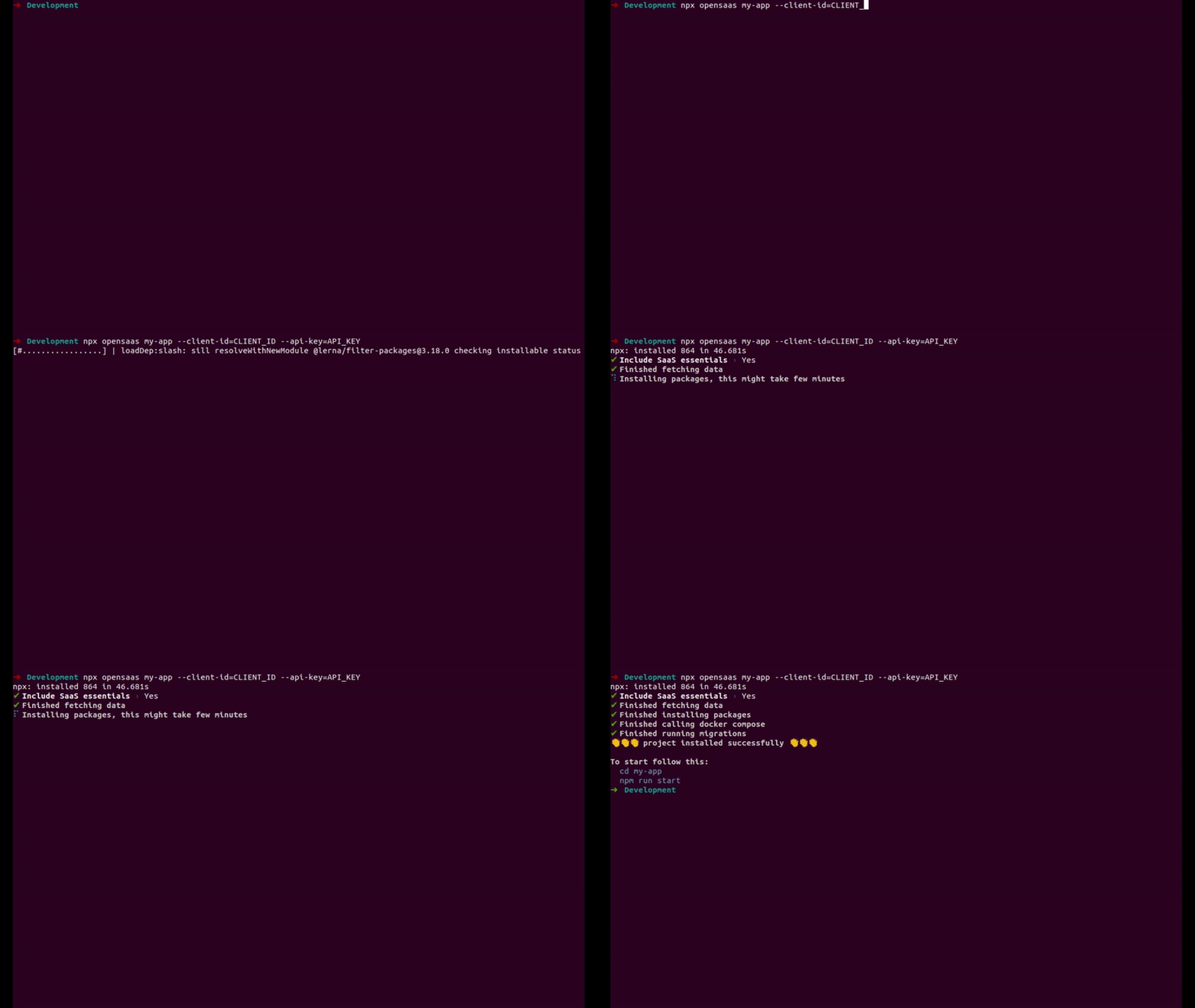
```sh
npx opensaas my-app --host=HOST
cd my-app
npm run start
```
(?) The Frontegg host is available upon registration with [Frontegg](https://portal.frontegg.com) via the [Administration](https://portal.frontegg.com/administration) menu.
### Port bindings
Api gateway default port is 5000.
Metrics service default port is 5001.
Config service default port is 5002.
The dashboard can be opened on http://localhost:3000/.
Dashboard BFF is running on http://localhost:8080/.
## Project structure
```
my-app
├── CONTRIBUTING.md
├── LICENSE
├── Makefile
├── README.md
├── backend
| ├── api-gw
| | ├── Dockerfile
| | ├── entrypoint.sh
| | ├── nodemon.json
| | ├── package-lock.json
| | ├── package.json
| | ├── src
| | | ├── autenticated-data-source.ts
| | | ├── lib
| | | | └── config.ts
| | | └── server.ts
| | ├── tsconfig.json
| | └── tslint.json
| └── services
| ├── config-service
| | ├── Dockerfile
| | ├── README.md
| | ├── docker-compose.yml
| | ├── entrypoint.sh
| | ├── nodemon.json
| | ├── package-lock.json
| | ├── package.json
| | ├── src
| | | ├── db.ts
| | | ├── graphql
| | | ├── lib
| | | ├── models
| | | └── server.ts
| | ├── tsconfig.json
| | └── tslint.json
| └── metrics-service
| ├── Dockerfile
| ├── README.md
| ├── docker-compose.yml
| ├── entrypoint.sh
| ├── nodemon.json
| ├── ormconfig.js
| ├── package-lock.json
| ├── package.json
| ├── src
| | ├── db
| | ├── dto
| | ├── helpers
| | ├── lib
| | ├── resolvers
| | └── server.ts
| ├── tsconfig.json
| └── tslint.json
├── bin
| └── *
├── cli
| ├── add-service.ts
| ├── add.ts
| ├── cli.ts
| ├── deploy-services.ts
| ├── init-repository.ts
| ├── remove-service.ts
| ├── remove.ts
| └── run-services.ts
├── frontend
| ├── Dockerfile
| ├── Procfile
| ├── README.md
| ├── build
| ├── index.js
| ├── nginx.conf
| ├── package-lock.json
| ├── package.json
| ├── postcss.config.js
| ├── public
| ├── src
| | ├── App.scss
| | ├── App.tsx
| | ├── Components
| | | ├── Activities
| | | ├── Alert
| | | ├── Badge
| | | ├── Breadcrumbs
| | | ├── Button
| | | ├── ButtonDropDown
| | | ├── Charts
| | | ├── DatePicker
| | | ├── Dropdown
| | | ├── FilterButton
| | | ├── FilterInput
| | | ├── Form
| | | ├── Icon
| | | ├── Image
| | | ├── Input
| | | ├── List
| | | ├── Loader
| | | ├── NavBar
| | | ├── NotificationContext.tsx
| | | ├── Pagination
| | | ├── Popup
| | | ├── ProfileImage
| | | ├── ProgressBar
| | | ├── ProjectStatus
| | | ├── SettingsButton
| | | ├── SettingsSidebar
| | | ├── Sidebar
| | | ├── Slider
| | | ├── Switch
| | | ├── Tab
| | | └── Table
| | ├── Pages
| | | ├── MainLayout
| | | | ├── Dashboard
| | | | ├── DatePickerPage
| | | | ├── FormPage
| | | | ├── MainLayout.scss
| | | | ├── MainLayout.tsx
| | | | ├── SliderPage
| | | | ├── SwitchPage
| | | | ├── TablePage
| | | | ├── UIScreenPage
| | | | ├── Widget
| | | | ├── index.tsx
| | | | ├── mockRequests.tsx
| | | | └── themes.scss
| | | ├── NotFoundPage
| | | | └── NotFoundPage.tsx
| | | └── Routes.tsx
| | ├── Tailwind.css
| | ├── declaration.d.ts
| | ├── hooks.ts
| | ├── index.scss
| | ├── index.tsx
| | ├── logo.svg
| | ├── react-app-env.d.ts
| | ├── serviceWorker.ts
| | ├── setupTests.ts
| | ├── tailwind.output.css
| | └── withFrontegg.tsx
| ├── tailwind.js
| ├── tsconfig.json
| └── tslint.json
├── lerna.json
├── npx-opensaas.gif
├── output.txt
├── package-lock.json
├── package.json
├── tsconfig.json
└── tslint.json
```
## CLI
#### Add new service
`npm run cli add service-name`
#### Remove service
`npm run cli remove service-name`
#### Run application
`npm run cli run`
#### Init project
`npm run cli init`
#### Deploy project to Heroku
`npm run cli deploy`
## Example of requests to backend using GraphQL
curl \
-X POST \
-H "Content-Type: application/json" \
--data '{ "query": "{ features { name, id, tenantId } }" }' \
http://localhost:5000/graphql
curl \
-X POST \
-H "Content-Type: application/json" \
--data '{ "query": "{ requests { url } }" }' \
http://localhost:5000/graphql
### License
[](https://opensource.org/licenses/MIT)