# pagination-vue-simple
> 一个简单的原生自定义vue分页插件。
 ###### 1.1.0 版本更新说明:
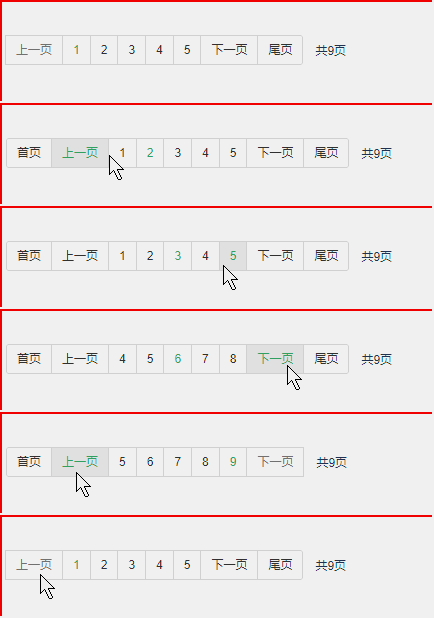
1.新增自定义页码被激活颜色theme-color的功能,并兼容ie9及其以上
2.对属性说明部分参数写法进行修正,使其与完整示例里的写法一致
3.新增效果图展示
## 安装
`npm install pagination-vue-simple --save`
## 初始化 在main.js中全局引入
```javascript
import Vue from 'vue'
import PaginationVueSimple from 'pagination-vue-simple'
Vue.use(PaginationVueSimple)
```
## 最简示例
```vue
```
```javascrpt
```
## 完整示例
```vue
```
```javascrpt
```
## 属性
| 参数 | 说明 | 类型 | 可选值 | 默认值 |
| ------------ | -------------------------------- | ------- | ---------------------- | ---------------------- |
| total | 数据总条数 | Number | | |
| limit | 每页数据条数 | Number | | 10 |
| max-show | 最多显示页码数 | Number | | 5 |
| type | 页码样式大小类型 | String | normal/sm/lg | normal |
| is-show-total-page| 是否显示总页码 | Boolean | true/false | false |
| theme-color | 主题颜色,被选中时的颜色 | String | | #36af6c |
| p-position | 页面放置位置 | String | left/center/right | left |
## 事件
| 事件名称 | 说明 | 回调参数 |
| -------------- | ----------------- | --------------- |
| current-change-page | 切换页码时会触发 | 当前页 page |
###### 1.1.0 版本更新说明:
1.新增自定义页码被激活颜色theme-color的功能,并兼容ie9及其以上
2.对属性说明部分参数写法进行修正,使其与完整示例里的写法一致
3.新增效果图展示
## 安装
`npm install pagination-vue-simple --save`
## 初始化 在main.js中全局引入
```javascript
import Vue from 'vue'
import PaginationVueSimple from 'pagination-vue-simple'
Vue.use(PaginationVueSimple)
```
## 最简示例
```vue
```
```javascrpt
```
## 完整示例
```vue
```
```javascrpt
```
## 属性
| 参数 | 说明 | 类型 | 可选值 | 默认值 |
| ------------ | -------------------------------- | ------- | ---------------------- | ---------------------- |
| total | 数据总条数 | Number | | |
| limit | 每页数据条数 | Number | | 10 |
| max-show | 最多显示页码数 | Number | | 5 |
| type | 页码样式大小类型 | String | normal/sm/lg | normal |
| is-show-total-page| 是否显示总页码 | Boolean | true/false | false |
| theme-color | 主题颜色,被选中时的颜色 | String | | #36af6c |
| p-position | 页面放置位置 | String | left/center/right | left |
## 事件
| 事件名称 | 说明 | 回调参数 |
| -------------- | ----------------- | --------------- |
| current-change-page | 切换页码时会触发 | 当前页 page |