# README
# Penguin's eggs are generated and new birds are ready to fly...
[](https://github.com/pieroproietti/penguins-eggs)
[](https://penguins-eggs.net)
[](https://t.me/penguins_eggs)
[](https://penguins-eggs.net/basket/)
[](https://drive.google.com/drive/folders/19fwjvsZiW0Dspu2Iq-fQN0J-PDbKBlYY)
[](https://sourceforge.net/projects/penguins-eggs/files/)
[](https://npmjs.org/package/penguins-eggs)
[](https://github.com/pieroproietti/penguins-eggs/releases)
 It took years of work to create the penguins-eggs, and I also incurred expenses
for renting the site and subscribing to Google Gemini, for the artificial
intelligence that is now indispensable.
[](https://paypal.me/penguinseggs)
## Index
* [README](#readme)
* [Penguin's eggs are generated and new birds are ready to fly...](#penguin39s-eggs-are-generated-and-new-birds-are-ready-to-fly)
* [penguins-eggs](#penguins-eggs)
* [Installation](#installation)
* [Usage](#usage)
* [The Aviary: Tools & Terminology](#the-aviary-tools--terminology)
* [Supported Distributions](#supported-distributions)
* [Links & Documentation](#links--documentation)
* [Commands](#commands)
* [GUI](#gui)
* [Book](#book)
* [Copyright and licenses](#copyright-and-licenses)
## Links
- [Blog](https://penguins-eggs.net/blog)
- [Cook eggs in 5 minutes!](https://penguins-eggs.net/docs/Tutorial/eggs5)
- [Users guide](https://penguins-eggs.net/docs/Tutorial/eggs-users-guide)
- [Wardrobe users' guide](https://penguins-eggs.net/docs/Tutorial/wardrobe-users-guide)
- [FAQ](https://penguins-eggs.net/docs/faq)
- [Changelog](https://github.com/pieroproietti/penguins-eggs/blob/master/CHANGELOG.md#changelog)
# penguins-eggs
**penguins-eggs** (or simply `eggs`) is a console tool that allows you to
remaster your system and redistribute it as live images on USB sticks or via
PXE.
Think of it as a way to "hatch" a new system from an existing one. It is a
system cloning and distribution remastering tool primarily designed for Linux.
It allows users to create customized live ISO images or backups of a Linux
system, replicating the setup easily.
### Key Capabilities
- **Distribution Remastering:** Craft your own Linux distro (or a spin of an
existing one). Tweak an existing system, strip or add components, and package
it as a new ISO.
- **System Backup & Cloning:** Create a snapshot of your current system,
including installed packages and configurations.
- **Distro-Agnostic:** Works across **Debian, Devuan, Ubuntu, Arch, Fedora,
AlmaLinux, Rocky, OpenSuSE, and Alpine**.
- **Multi-Architecture:** Debian/Ubuntu packages are relased for `i386`,
`amd64`, `arm64` and `riscv64` (native recursive remastering).
- **Fast & Efficient:** Leverages OverlayFS to avoid physically copying the
entire filesystem, combined with zstd compression (up to 10x faster).
- **Secure:** Supports LUKS encryption for user data within the ISO.
---
# Installation
There are three main ways to install `eggs`. Choose the one that fits your
workflow.
### Method 1: The "Fresh Eggs" Script (Recommended)
This is the most practical way suitable for all
[supported distros](https://github.com/pieroproietti/fresh-eggs/blob/main/SUPPORTED-DISTROS.md).
It automatically configures necessary repositories (like NodeSource) and
installs dependencies.
```bash
git clone [https://github.com/pieroproietti/fresh-eggs](https://github.com/pieroproietti/fresh-eggs)
cd fresh-eggs
sudo ./fresh-eggs.sh
```
### Method 2: AppImage (Universal)
Download the latest AppImage from
[Releases](https://github.com/pieroproietti/penguins-eggs/releases).
**Prerequisites:** Depending on your distro, you may need FUSE:
- **Debian/Ubuntu:** `sudo apt-get install fuse libfuse2`
- **Arch:** `sudo pacman -S fuse2`
- **Fedora:** `sudo dnf install fuse fuse-libs`
**Run:**
```bash
chmod +x penguins-eggs-*.AppImage
sudo ./penguins-eggs-*.AppImage
```
_The AppImage will automatically configure itself as `/usr/bin/eggs`._
### Method 3: Native Packages
If you prefer native package managers, specific repositories are available.
| Family | Instructions |
| :---------------- | :------------------------------------------------------------------------------------------------------------------------------------------------------------------------------------------------------------------ |
| **Debian/Ubuntu** | [Install Guide](https://github.com/pieroproietti/penguins-eggs/blob/master/DOCS/INSTALL-DEBIAN-DEVUAN-UBUNTU.md) / [PPA Info](https://pieroproietti.github.io/penguins-eggs-ppa) |
| **Arch/Manjaro** | Available in **AUR** and **Manjaro Community**. Use `yay penguins-eggs` or `pamac install penguins-eggs`. |
| **Fedora/RHEL** | [Fedora Guide](https://github.com/pieroproietti/penguins-eggs/blob/master/DOCS/INSTALL-FEDORA.md) / [Enterprise Linux](https://github.com/pieroproietti/penguins-eggs/blob/master/DOCS/INSTALL-ENTERPRISE-LINUX.md) |
| **Alpine** | Available in the [penguins-alpine](https://github.com/pieroproietti/penguins-alpine) repo. |
---
# Usage
Once installed, simply run `eggs` to see the available commands.
### Basic: Create a Clean ISO
This creates a distributable live ISO _without_ user data. Perfect for sharing
your custom distro.
```bash
sudo eggs produce
```
### Cloning: Backup Your System
To keep your user data, configurations, and files:
| Goal | Command | Description |
| :------------------ | :------------------------- | :------------------------------------------------------- |
| **Standard Clone** | `eggs produce --clone` | Copies user data unencrypted. **Do not share publicly.** |
| **Home Encryption** | `eggs produce --homecrypt` | Encrypts `/home` data inside the ISO using LUKS. |
| **Full Encryption** | `eggs produce --fullcrypt` | Encrypts the entire system (Debian/Devuan only). |
### Compression Options
- `--pendrive`: Optimized for USBs (zstd level 15).
- `--standard`: Uses `xz` compression.
- `--max`: Maximum compression (`xz -Xbcj`).
---
# The Aviary: Tools & Terminology
`penguins-eggs` uses a bird-themed naming convention for its internal tools:
- **Wardrobe:** A tool to organize customizations, scripts, and themes. It
allows you to switch between configurations (e.g., from a bare CLI system to a
full GUI). See
[penguins-wardrobe](https://github.com/pieroproietti/penguins-wardrobe).
- **Cuckoo:** A PXE boot server feature. It allows you to boot your generated
ISO on other computers over the local network without needing a USB drive.
- **Yolk:** A local repository bundled inside the ISO containing essential
packages, allowing offline installation.
- **Krill:** The internal CLI/TUI system installer. Essential for server
installs or when no GUI is available.
- **Calamares:** The industry-standard GUI installer, automatically configured
by `eggs` for desktop environments.
- **Mom & Dad:**
- `eggs mom`: Interactive help and documentation assistant.
- `eggs dad`: Configuration wizard. Run `sudo eggs dad -d` to reset
configuration.
---
# Supported Distributions
`eggs` is designed to be distro-agnostic. It respects the original package
manager and repository lists.
- **Debian Family:** Debian, Devuan, Ubuntu, Linux Mint, Kali, KDE Neon,
Pop!_OS.
- **Arch Family:** Arch Linux, Manjaro, Biglinux, EndeavourOS, Garuda.
- **RPM Family:** Fedora, AlmaLinux, Rocky Linux, OpenSUSE.
- **Others:** Alpine Linux.
> [!NOTE]
> For a complete and updated list, please consult
> [SUPPORTED-DISTROS](https://github.com/pieroproietti/fresh-eggs/blob/main/SUPPORTED-DISTROS.md).
---
# Links & Documentation
- **Official Website:** [penguins-eggs.net](https://penguins-eggs.net)
- **Blog & News:**
[The Triple Somersault](https://penguins-eggs.net/blog/triple-somersault)
- **SourceForge ISOs:**
[Download Examples](https://sourceforge.net/projects/penguins-eggs/files/ISOS/)
- **User Guide:**
[Wardrobe User Guide](https://penguins-eggs.net/docs/Tutorial/wardrobe-users-guide)
# Commands
* [`eggs adapt`](#eggs-adapt)
* [`eggs autocomplete [SHELL]`](#eggs-autocomplete-shell)
* [`eggs calamares`](#eggs-calamares)
* [`eggs config`](#eggs-config)
* [`eggs cuckoo`](#eggs-cuckoo)
* [`eggs dad`](#eggs-dad)
* [`eggs export appimage`](#eggs-export-appimage)
* [`eggs export iso`](#eggs-export-iso)
* [`eggs export pkg`](#eggs-export-pkg)
* [`eggs export tarballs`](#eggs-export-tarballs)
* [`eggs help [COMMAND]`](#eggs-help-command)
* [`eggs kill`](#eggs-kill)
* [`eggs krill`](#eggs-krill)
* [`eggs love`](#eggs-love)
* [`eggs mom`](#eggs-mom)
* [`eggs produce`](#eggs-produce)
* [`eggs setup install`](#eggs-setup-install)
* [`eggs setup purge`](#eggs-setup-purge)
* [`eggs status`](#eggs-status)
* [`eggs tools clean`](#eggs-tools-clean)
* [`eggs tools repo`](#eggs-tools-repo)
* [`eggs tools skel`](#eggs-tools-skel)
* [`eggs tools stat`](#eggs-tools-stat)
* [`eggs tools yolk`](#eggs-tools-yolk)
* [`eggs update`](#eggs-update)
* [`eggs version`](#eggs-version)
* [`eggs wardrobe get [REPO]`](#eggs-wardrobe-get-repo)
* [`eggs wardrobe list [REPO]`](#eggs-wardrobe-list-repo)
* [`eggs wardrobe show [REPO]`](#eggs-wardrobe-show-repo)
* [`eggs wardrobe wear [REPO]`](#eggs-wardrobe-wear-repo)
## `eggs adapt`
adapt monitor resolution for VM only
```
USAGE
$ eggs adapt [-h] [-v]
FLAGS
-h, --help Show CLI help.
-v, --verbose
DESCRIPTION
adapt monitor resolution for VM only
EXAMPLES
$ eggs adapt
```
_See code: [src/commands/adapt.ts](https://github.com/pieroproietti/penguins-eggs/blob/v26.1.31/src/commands/adapt.ts)_
## `eggs autocomplete [SHELL]`
Display autocomplete installation instructions.
```
USAGE
$ eggs autocomplete [SHELL] [-r]
ARGUMENTS
[SHELL] (zsh|bash|powershell) Shell type
FLAGS
-r, --refresh-cache Refresh cache (ignores displaying instructions)
DESCRIPTION
Display autocomplete installation instructions.
EXAMPLES
$ eggs autocomplete
$ eggs autocomplete bash
$ eggs autocomplete zsh
$ eggs autocomplete powershell
$ eggs autocomplete --refresh-cache
```
_See code: [@oclif/plugin-autocomplete](https://github.com/oclif/plugin-autocomplete/blob/v3.2.40/src/commands/autocomplete/index.ts)_
## `eggs calamares`
a GUI system installer - install and configure calamares
```
USAGE
$ eggs calamares [-h] [-i] [-n] [-p] [-r] [--remove] [--theme ] [-v]
FLAGS
-h, --help Show CLI help.
-i, --install install calamares and its dependencies
-n, --nointeractive no user interaction
-p, --policies configure calamares policies
-r, --release release: remove calamares and all its dependencies after the installation
-v, --verbose
--remove remove calamares and its dependencies
--theme= theme/branding for eggs and calamares
DESCRIPTION
a GUI system installer - install and configure calamares
EXAMPLES
sudo eggs calamares
sudo eggs calamares --install
sudo eggs calamares --install --theme=/path/to/theme
sudo eggs calamares --remove
```
_See code: [src/commands/calamares.ts](https://github.com/pieroproietti/penguins-eggs/blob/v26.1.31/src/commands/calamares.ts)_
## `eggs config`
Configure eggs to run it
```
USAGE
$ eggs config [-c] [-h] [-n] [-v]
FLAGS
-c, --clean remove old configuration before to create new one
-h, --help Show CLI help.
-n, --nointeractive no user interaction
-v, --verbose verbose
DESCRIPTION
Configure eggs to run it
EXAMPLES
sudo eggs config
sudo eggs config --clean
sudo eggs config --clean --nointeractive
```
_See code: [src/commands/config.ts](https://github.com/pieroproietti/penguins-eggs/blob/v26.1.31/src/commands/config.ts)_
## `eggs cuckoo`
PXE start with proxy-dhcp
```
USAGE
$ eggs cuckoo [-h] [-v]
FLAGS
-h, --help Show CLI help.
-v, --verbose verbose
DESCRIPTION
PXE start with proxy-dhcp
EXAMPLES
sudo eggs cuckoo
```
_See code: [src/commands/cuckoo.ts](https://github.com/pieroproietti/penguins-eggs/blob/v26.1.31/src/commands/cuckoo.ts)_
## `eggs dad`
ask help from daddy - TUI configuration helper
```
USAGE
$ eggs dad [-c] [-d] [-f ] [-h] [-n] [-v]
FLAGS
-c, --clean remove old configuration before to create
-d, --default reset to default values
-f, --file= use a file configuration custom
-h, --help Show CLI help.
-n, --nointeractive no user interaction
-v, --verbose
DESCRIPTION
ask help from daddy - TUI configuration helper
EXAMPLES
sudo eggs dad
sudo eggs dad --clean
sudo eggs dad --default
```
_See code: [src/commands/dad.ts](https://github.com/pieroproietti/penguins-eggs/blob/v26.1.31/src/commands/dad.ts)_
## `eggs export appimage`
export penguins-eggs AppImage to the destination host
```
USAGE
$ eggs export appimage [-c] [-h] [-v]
FLAGS
-c, --clean remove old .AppImage before to copy
-h, --help Show CLI help.
-v, --verbose verbose
DESCRIPTION
export penguins-eggs AppImage to the destination host
EXAMPLES
$ eggs export pkg
$ eggs export pkg --clean
$ eggs export pkg --all
```
_See code: [src/commands/export/appimage.ts](https://github.com/pieroproietti/penguins-eggs/blob/v26.1.31/src/commands/export/appimage.ts)_
## `eggs export iso`
export remastered ISO in the destination host
```
USAGE
$ eggs export iso [-C] [-c] [-h] [-v]
FLAGS
-C, --checksum export checksums md5 and sha256
-c, --clean delete old ISOs before to copy
-h, --help Show CLI help.
-v, --verbose verbose
DESCRIPTION
export remastered ISO in the destination host
EXAMPLES
$ eggs export iso
$ eggs export iso --clean
```
_See code: [src/commands/export/iso.ts](https://github.com/pieroproietti/penguins-eggs/blob/v26.1.31/src/commands/export/iso.ts)_
## `eggs export pkg`
export penguins-eggs package to the destination host
```
USAGE
$ eggs export pkg [-a] [-c] [-h] [-v]
FLAGS
-a, --all export all archs
-c, --clean remove old .deb before to copy
-h, --help Show CLI help.
-v, --verbose verbose
DESCRIPTION
export penguins-eggs package to the destination host
EXAMPLES
$ eggs export pkg
$ eggs export pkg --clean
$ eggs export pkg --all
```
_See code: [src/commands/export/pkg.ts](https://github.com/pieroproietti/penguins-eggs/blob/v26.1.31/src/commands/export/pkg.ts)_
## `eggs export tarballs`
export pkg/iso/tarballs to the destination host
```
USAGE
$ eggs export tarballs [-c] [-h] [-v]
FLAGS
-c, --clean remove old .deb before to copy
-h, --help Show CLI help.
-v, --verbose verbose
DESCRIPTION
export pkg/iso/tarballs to the destination host
EXAMPLES
$ eggs export tarballs
$ eggs export tarballs --clean
```
_See code: [src/commands/export/tarballs.ts](https://github.com/pieroproietti/penguins-eggs/blob/v26.1.31/src/commands/export/tarballs.ts)_
## `eggs help [COMMAND]`
Display help for eggs.
```
USAGE
$ eggs help [COMMAND...] [-n]
ARGUMENTS
[COMMAND...] Command to show help for.
FLAGS
-n, --nested-commands Include all nested commands in the output.
DESCRIPTION
Display help for eggs.
```
_See code: [@oclif/plugin-help](https://github.com/oclif/plugin-help/blob/v6.2.37/src/commands/help.ts)_
## `eggs kill`
kill the eggs/free the nest
```
USAGE
$ eggs kill [-h] [-i] [-n] [-v]
FLAGS
-h, --help Show CLI help.
-i, --isos erase all ISOs on remote mount
-n, --nointeractive no user interaction
-v, --verbose verbose
DESCRIPTION
kill the eggs/free the nest
EXAMPLES
sudo eggs kill
```
_See code: [src/commands/kill.ts](https://github.com/pieroproietti/penguins-eggs/blob/v26.1.31/src/commands/kill.ts)_
## `eggs krill`
a TUI system installer - install the system
```
USAGE
$ eggs krill [-b] [-c] [-k] [-d ] [-H] [-h] [-i] [-n] [-N] [-p] [-r] [-R ] [-s] [-S] [-t]
[-u] [-v]
FLAGS
-H, --halt Halt the system after installation
-N, --none Swap none: 256M
-R, --replace= Replace partition. eg: --replace /dev/sda3
-S, --suspend Swap suspend: RAM x 2
-b, --btrfs Format btrfs
-c, --chroot chroot before to end
-d, --domain= Domain name, defult: .local
-h, --help Show CLI help.
-i, --ip hostname as ip, eg: ip-192-168-1-33
-k, --crypted Crypted CLI installation
-n, --nointeractive no user interaction
-p, --pve Proxmox VE install
-r, --random Add random to hostname, eg: colibri-ay412dt
-s, --small Swap small: RAM
-t, --testing Just testing krill
-u, --unattended Unattended installation
-v, --verbose Verbose
DESCRIPTION
a TUI system installer - install the system
EXAMPLES
sudo eggs install
sudo eggs install --unattended --halt
sudo eggs install --chroot
```
_See code: [src/commands/krill.ts](https://github.com/pieroproietti/penguins-eggs/blob/v26.1.31/src/commands/krill.ts)_
## `eggs love`
the simplest way to get an egg!
```
USAGE
$ eggs love [-c] [-f] [-h] [-H] [-k] [-n] [-v]
FLAGS
-H, --hidden stealth mode
-c, --clone clone (uncrypted)
-f, --fullcrypt clone crypted full
-h, --help Show CLI help.
-k, --homecrypt clone crypted home
-n, --nointeractive no user interaction
-v, --verbose
DESCRIPTION
the simplest way to get an egg!
EXAMPLES
$ eggs love
```
_See code: [src/commands/love.ts](https://github.com/pieroproietti/penguins-eggs/blob/v26.1.31/src/commands/love.ts)_
## `eggs mom`
ask help from mommy - TUI helper
```
USAGE
$ eggs mom [-h]
FLAGS
-h, --help Show CLI help.
DESCRIPTION
ask help from mommy - TUI helper
EXAMPLES
$ eggs mom
```
_See code: [src/commands/mom.ts](https://github.com/pieroproietti/penguins-eggs/blob/v26.1.31/src/commands/mom.ts)_
## `eggs produce`
produce a live image from your system
```
USAGE
$ eggs produce [--addons ...] [--basename ] [-c] [--excludes ...] [-f] [-h] [-H] [-k]
[-i] [-K ] [--links ...] [-m] [-N] [-n] [-p] [-P ] [--release] [-s] [-S] [--theme ] [-v]
[-y]
FLAGS
-H, --hidden stealth mode
-K, --kernel= kernel version
-N, --noicon no icon eggs on desktop
-P, --prefix= prefix
-S, --standard standard compression: xz -b 1M
-c, --clone clone (uncrypted)
-f, --fullcrypt clone crypted full
-h, --help Show CLI help.
-i, --includeRootHome folder /root is included on live
-k, --homecrypt clone crypted home
-m, --max max compression: xz -Xbcj ...
-n, --nointeractive no user interaction
-p, --pendrive optimized for pendrive: zstd -b 1M -Xcompression-level 15
-s, --script script mode. Generate scripts to manage iso build
-v, --verbose verbose
-y, --yolk force yolk renew
--addons=... addons to be used: adapt, pve, rsupport
--basename= basename
--excludes=... use: static, homes, home
--links=... desktop links
--release release: remove penguins-eggs, calamares and dependencies after installation
--theme= theme for livecd, calamares branding and partitions
DESCRIPTION
produce a live image from your system
EXAMPLES
sudo eggs produce # zstd fast compression
sudo eggs produce --pendrive # zstd compression optimized pendrive
sudo eggs produce --clone # clear clone (unencrypted)
sudo eggs produce --homecrypt # clone crypted home (all inside /home is cypted)
sudo eggs produce --fullcrypt # clone crypted full (entire system is crypted)
sudo eggs produce --basename=colibri
```
_See code: [src/commands/produce.ts](https://github.com/pieroproietti/penguins-eggs/blob/v26.1.31/src/commands/produce.ts)_
## `eggs setup install`
Automatically check and install system prerequisites
```
USAGE
$ eggs setup install
DESCRIPTION
Automatically check and install system prerequisites
EXAMPLES
$ eggs setup # this help
sudo eggs setup install # install native dependencies, autocomplete, man, etc
sudo eggs setup purge # purge all configurations, autocomplete, man, etc installed from penguins-eggs AppImage
```
_See code: [src/commands/setup/install.ts](https://github.com/pieroproietti/penguins-eggs/blob/v26.1.31/src/commands/setup/install.ts)_
## `eggs setup purge`
Automatically check and install system prerequisites
```
USAGE
$ eggs setup purge
DESCRIPTION
Automatically check and install system prerequisites
EXAMPLES
$ eggs setup # this help
sudo eggs setup install # install native dependencies, autocomplete, man, etc
sudo eggs setup purge # purge all configurations, autocomplete, man, etc installed from penguins-eggs AppImage
```
_See code: [src/commands/setup/purge.ts](https://github.com/pieroproietti/penguins-eggs/blob/v26.1.31/src/commands/setup/purge.ts)_
## `eggs status`
informations about eggs status
```
USAGE
$ eggs status [-h] [-v]
FLAGS
-h, --help Show CLI help.
-v, --verbose
DESCRIPTION
informations about eggs status
EXAMPLES
$ eggs status
```
_See code: [src/commands/status.ts](https://github.com/pieroproietti/penguins-eggs/blob/v26.1.31/src/commands/status.ts)_
## `eggs tools clean`
clean system log, apt, etc
```
USAGE
$ eggs tools clean [-h] [-n] [-v]
FLAGS
-h, --help Show CLI help.
-n, --nointeractive no user interaction
-v, --verbose verbose
DESCRIPTION
clean system log, apt, etc
EXAMPLES
sudo eggs tools clean
```
_See code: [src/commands/tools/clean.ts](https://github.com/pieroproietti/penguins-eggs/blob/v26.1.31/src/commands/tools/clean.ts)_
## `eggs tools repo`
add/remove penguins-repos
```
USAGE
$ eggs tools repo [-a] [-h] [-n] [-r] [-v]
FLAGS
-a, --add add penguins-repos
-h, --help Show CLI help.
-n, --nointeractive no user interaction
-r, --remove remove penguins-repos
-v, --verbose verbose
DESCRIPTION
add/remove penguins-repos
EXAMPLES
sudo eggs tools repo --add
sudo eggs tools repo --remove
```
_See code: [src/commands/tools/repo.ts](https://github.com/pieroproietti/penguins-eggs/blob/v26.1.31/src/commands/tools/repo.ts)_
## `eggs tools skel`
update skel from home configuration
```
USAGE
$ eggs tools skel [-h] [-u ] [-v]
FLAGS
-h, --help Show CLI help.
-u, --user= user to be used
-v, --verbose
DESCRIPTION
update skel from home configuration
EXAMPLES
sudo eggs tools skel
sudo eggs tools skel --user user-to-be-copied
```
_See code: [src/commands/tools/skel.ts](https://github.com/pieroproietti/penguins-eggs/blob/v26.1.31/src/commands/tools/skel.ts)_
## `eggs tools stat`
get statistics from sourceforge
```
USAGE
$ eggs tools stat [-h] [-m] [-y]
FLAGS
-h, --help Show CLI help.
-m, --month current month
-y, --year current year
DESCRIPTION
get statistics from sourceforge
EXAMPLES
$ eggs tools stat
$ eggs tools stat --month
$ eggs tools stat --year
```
_See code: [src/commands/tools/stat.ts](https://github.com/pieroproietti/penguins-eggs/blob/v26.1.31/src/commands/tools/stat.ts)_
## `eggs tools yolk`
configure eggs to install without internet
```
USAGE
$ eggs tools yolk [-h] [-v]
FLAGS
-h, --help Show CLI help.
-v, --verbose
DESCRIPTION
configure eggs to install without internet
EXAMPLES
sudo eggs tools yolk
```
_See code: [src/commands/tools/yolk.ts](https://github.com/pieroproietti/penguins-eggs/blob/v26.1.31/src/commands/tools/yolk.ts)_
## `eggs update`
update the Penguins' eggs tool
```
USAGE
$ eggs update [-h] [-v]
FLAGS
-h, --help Show CLI help.
-v, --verbose verbose
DESCRIPTION
update the Penguins' eggs tool
EXAMPLES
$ eggs update
```
_See code: [src/commands/update.ts](https://github.com/pieroproietti/penguins-eggs/blob/v26.1.31/src/commands/update.ts)_
## `eggs version`
```
USAGE
$ eggs version [--json] [--verbose]
FLAGS
--verbose Show additional information about the CLI.
GLOBAL FLAGS
--json Format output as json.
FLAG DESCRIPTIONS
--verbose Show additional information about the CLI.
Additionally shows the architecture, node version, operating system, and versions of plugins that the CLI is using.
```
_See code: [@oclif/plugin-version](https://github.com/oclif/plugin-version/blob/v2.2.36/src/commands/version.ts)_
## `eggs wardrobe get [REPO]`
get warorobe
```
USAGE
$ eggs wardrobe get [REPO] [-h] [-v]
ARGUMENTS
[REPO] repository to get
FLAGS
-h, --help Show CLI help.
-v, --verbose
DESCRIPTION
get warorobe
EXAMPLES
$ eggs wardrobe get
$ eggs wardrobe get your-wardrobe
```
_See code: [src/commands/wardrobe/get.ts](https://github.com/pieroproietti/penguins-eggs/blob/v26.1.31/src/commands/wardrobe/get.ts)_
## `eggs wardrobe list [REPO]`
list costumes and accessoires in wardrobe
```
USAGE
$ eggs wardrobe list [REPO] [-d ] [-h] [-v]
ARGUMENTS
[REPO] wardrobe to get
FLAGS
-d, --distro= distro
-h, --help Show CLI help.
-v, --verbose
DESCRIPTION
list costumes and accessoires in wardrobe
EXAMPLES
$ eggs wardrobe list
$ eggs wardrobe list your-wardrobe
$ eggs wardrobe list --distro arch
```
_See code: [src/commands/wardrobe/list.ts](https://github.com/pieroproietti/penguins-eggs/blob/v26.1.31/src/commands/wardrobe/list.ts)_
## `eggs wardrobe show [REPO]`
show costumes/accessories in wardrobe
```
USAGE
$ eggs wardrobe show [REPO] [-h] [-j] [-v] [-w ]
ARGUMENTS
[REPO] costume to show
FLAGS
-h, --help Show CLI help.
-j, --json output JSON
-v, --verbose
-w, --wardrobe= wardrobe
DESCRIPTION
show costumes/accessories in wardrobe
EXAMPLES
$ eggs wardrobe show colibri
$ eggs wardrobe show accessories/firmwares
$ eggs wardrobe show accessories/
```
_See code: [src/commands/wardrobe/show.ts](https://github.com/pieroproietti/penguins-eggs/blob/v26.1.31/src/commands/wardrobe/show.ts)_
## `eggs wardrobe wear [REPO]`
wear costume/accessories from wardrobe
```
USAGE
$ eggs wardrobe wear [REPO] [-h] [-a] [-f] [-v] [-w ]
ARGUMENTS
[REPO] costume to wear
FLAGS
-a, --no_accessories not install accessories
-f, --no_firmwares not install firmwares
-h, --help Show CLI help.
-v, --verbose
-w, --wardrobe= wardrobe
DESCRIPTION
wear costume/accessories from wardrobe
EXAMPLES
sudo eggs wardrobe wear duck
sudo eggs wardrobe wear accessories/firmwares
sudo eggs wardrobe wear wagtail/waydroid
```
_See code: [src/commands/wardrobe/wear.ts](https://github.com/pieroproietti/penguins-eggs/blob/v26.1.31/src/commands/wardrobe/wear.ts)_
# GUI
There are two GUIs for penguins-eggs at the moment: eggsmaker and penGUI.
## eggsmaker
### A project by [Jorge Luis Endres](https://github.com/jlendres/eggsmaker).

eggsmaker is a graphical interface for penguins-eggs.
Written by my friend Jorge Luis Endres, it is essential and functional. It
doesn’t cover all the possibilities of penguins-eggs, but in the end, a GUI
should be simple and intuitive.
I like it, I hope you like it too, and I thank Jorge for his daring.
eggsmaker packages are available on
[Jorge gdrive](https://drive.google.com/drive/folders/1hK8OB3e5sM2M9Z_vy1uR3_X7gPdNFYdO).
# Book
My friend [Hosein Seilany](https://predator-store.com/about-us/) founder of
[predator-os](https://predator-os.ir/), has written a book on Penguins's eggs,
with my partecipation. It's a remarkable work - even in size and weight - so
it's a great honor to
[announce](https://predator-store.com/product/penguins-eggs-tool) it here!
[](https://predator-store.com/product/penguins-eggs-tool/)
## That's all, Folks!
One of the standout features of Penguins Eggs' is its hassle-free setup. It
comes with all the necessary configurations, making it a convenient choice for
users. Just like in real life, the magic of Penguins Eggs' lies within - no
additional setup required!
## More Information
In addition to the official guide, there are other resources available for
Penguins Eggs' users, particularly developers. These resources can be found in
the [penguins-eggs repository](https://github.com/pieroproietti/penguins-eggs)
under the
[documents](https://github.com/pieroproietti/penguins-eggs/tree/master/documents)
section.
Some noteworthy documents include:
- [Hens: Different Species](https://github.com/pieroproietti/penguins-eggs/blob/master//hens-different-species.md):
A brief guide on using Penguins Eggs' in Debian, Arch, and Manjaro.
- [Arch-naked](https://penguins-eggs.net/docs/Tutorial/archlinux-naked.html): A
blog post detailing how to create an Arch naked live, install it, and
customize the resulting system into a graphics development station.
If you have any questions or need further assistance, feel free to contact me
via email at pieroproietti@gmail.com. You can also stay updated by following my
[blog](https://penguins-eggs.net) or connecting with me on ,
[Telegram](https://t.me/penguins_eggs),
[Mastodom](https://social.treehouse.systems/@artisan),
[Facebook](https://www.facebook.com/groups/128861437762355/),
[GitHub](https://github.com/pieroproietti/penguins-krill),
[Jitsi](https://meet.jit.si/PenguinsEggsMeeting),
[Reddit](https://www.reddit.com/user/Artisan61) or
[Twitter](https://twitter.com/pieroproietti),
[Mastodom](https://social.treehouse.systems/@artisan).
## A word of thanks
- This README would not be so well cared for if not for the work of
[Hosein Seilain](https://github.com/hosseinseilani) who spent his time
revising and supplementing the text;
- The eggs icon was designed by
[Charlie Martinez](https://github.com/quirinux-so);
- and a word of thanks to all of you who are using it and providing feedback and
motivation to continue it.
Thank you!
## Star History
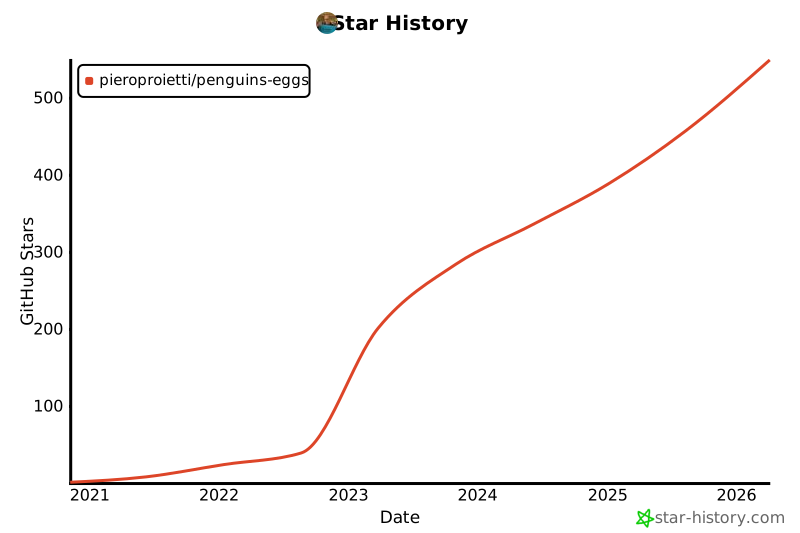
This project collects stars, look to the sky... contribute!
[](https://star-history.com/#pieroproietti/penguins-eggs&Date)
# Copyright and licenses
Copyright (c) 2017, 2026
[Piero Proietti](https://penguins-eggs.net/about-me.html), dual licensed under
the MIT or GPL Version 2 licenses.
It took years of work to create the penguins-eggs, and I also incurred expenses
for renting the site and subscribing to Google Gemini, for the artificial
intelligence that is now indispensable.
[](https://paypal.me/penguinseggs)
## Index
* [README](#readme)
* [Penguin's eggs are generated and new birds are ready to fly...](#penguin39s-eggs-are-generated-and-new-birds-are-ready-to-fly)
* [penguins-eggs](#penguins-eggs)
* [Installation](#installation)
* [Usage](#usage)
* [The Aviary: Tools & Terminology](#the-aviary-tools--terminology)
* [Supported Distributions](#supported-distributions)
* [Links & Documentation](#links--documentation)
* [Commands](#commands)
* [GUI](#gui)
* [Book](#book)
* [Copyright and licenses](#copyright-and-licenses)
## Links
- [Blog](https://penguins-eggs.net/blog)
- [Cook eggs in 5 minutes!](https://penguins-eggs.net/docs/Tutorial/eggs5)
- [Users guide](https://penguins-eggs.net/docs/Tutorial/eggs-users-guide)
- [Wardrobe users' guide](https://penguins-eggs.net/docs/Tutorial/wardrobe-users-guide)
- [FAQ](https://penguins-eggs.net/docs/faq)
- [Changelog](https://github.com/pieroproietti/penguins-eggs/blob/master/CHANGELOG.md#changelog)
# penguins-eggs
**penguins-eggs** (or simply `eggs`) is a console tool that allows you to
remaster your system and redistribute it as live images on USB sticks or via
PXE.
Think of it as a way to "hatch" a new system from an existing one. It is a
system cloning and distribution remastering tool primarily designed for Linux.
It allows users to create customized live ISO images or backups of a Linux
system, replicating the setup easily.
### Key Capabilities
- **Distribution Remastering:** Craft your own Linux distro (or a spin of an
existing one). Tweak an existing system, strip or add components, and package
it as a new ISO.
- **System Backup & Cloning:** Create a snapshot of your current system,
including installed packages and configurations.
- **Distro-Agnostic:** Works across **Debian, Devuan, Ubuntu, Arch, Fedora,
AlmaLinux, Rocky, OpenSuSE, and Alpine**.
- **Multi-Architecture:** Debian/Ubuntu packages are relased for `i386`,
`amd64`, `arm64` and `riscv64` (native recursive remastering).
- **Fast & Efficient:** Leverages OverlayFS to avoid physically copying the
entire filesystem, combined with zstd compression (up to 10x faster).
- **Secure:** Supports LUKS encryption for user data within the ISO.
---
# Installation
There are three main ways to install `eggs`. Choose the one that fits your
workflow.
### Method 1: The "Fresh Eggs" Script (Recommended)
This is the most practical way suitable for all
[supported distros](https://github.com/pieroproietti/fresh-eggs/blob/main/SUPPORTED-DISTROS.md).
It automatically configures necessary repositories (like NodeSource) and
installs dependencies.
```bash
git clone [https://github.com/pieroproietti/fresh-eggs](https://github.com/pieroproietti/fresh-eggs)
cd fresh-eggs
sudo ./fresh-eggs.sh
```
### Method 2: AppImage (Universal)
Download the latest AppImage from
[Releases](https://github.com/pieroproietti/penguins-eggs/releases).
**Prerequisites:** Depending on your distro, you may need FUSE:
- **Debian/Ubuntu:** `sudo apt-get install fuse libfuse2`
- **Arch:** `sudo pacman -S fuse2`
- **Fedora:** `sudo dnf install fuse fuse-libs`
**Run:**
```bash
chmod +x penguins-eggs-*.AppImage
sudo ./penguins-eggs-*.AppImage
```
_The AppImage will automatically configure itself as `/usr/bin/eggs`._
### Method 3: Native Packages
If you prefer native package managers, specific repositories are available.
| Family | Instructions |
| :---------------- | :------------------------------------------------------------------------------------------------------------------------------------------------------------------------------------------------------------------ |
| **Debian/Ubuntu** | [Install Guide](https://github.com/pieroproietti/penguins-eggs/blob/master/DOCS/INSTALL-DEBIAN-DEVUAN-UBUNTU.md) / [PPA Info](https://pieroproietti.github.io/penguins-eggs-ppa) |
| **Arch/Manjaro** | Available in **AUR** and **Manjaro Community**. Use `yay penguins-eggs` or `pamac install penguins-eggs`. |
| **Fedora/RHEL** | [Fedora Guide](https://github.com/pieroproietti/penguins-eggs/blob/master/DOCS/INSTALL-FEDORA.md) / [Enterprise Linux](https://github.com/pieroproietti/penguins-eggs/blob/master/DOCS/INSTALL-ENTERPRISE-LINUX.md) |
| **Alpine** | Available in the [penguins-alpine](https://github.com/pieroproietti/penguins-alpine) repo. |
---
# Usage
Once installed, simply run `eggs` to see the available commands.
### Basic: Create a Clean ISO
This creates a distributable live ISO _without_ user data. Perfect for sharing
your custom distro.
```bash
sudo eggs produce
```
### Cloning: Backup Your System
To keep your user data, configurations, and files:
| Goal | Command | Description |
| :------------------ | :------------------------- | :------------------------------------------------------- |
| **Standard Clone** | `eggs produce --clone` | Copies user data unencrypted. **Do not share publicly.** |
| **Home Encryption** | `eggs produce --homecrypt` | Encrypts `/home` data inside the ISO using LUKS. |
| **Full Encryption** | `eggs produce --fullcrypt` | Encrypts the entire system (Debian/Devuan only). |
### Compression Options
- `--pendrive`: Optimized for USBs (zstd level 15).
- `--standard`: Uses `xz` compression.
- `--max`: Maximum compression (`xz -Xbcj`).
---
# The Aviary: Tools & Terminology
`penguins-eggs` uses a bird-themed naming convention for its internal tools:
- **Wardrobe:** A tool to organize customizations, scripts, and themes. It
allows you to switch between configurations (e.g., from a bare CLI system to a
full GUI). See
[penguins-wardrobe](https://github.com/pieroproietti/penguins-wardrobe).
- **Cuckoo:** A PXE boot server feature. It allows you to boot your generated
ISO on other computers over the local network without needing a USB drive.
- **Yolk:** A local repository bundled inside the ISO containing essential
packages, allowing offline installation.
- **Krill:** The internal CLI/TUI system installer. Essential for server
installs or when no GUI is available.
- **Calamares:** The industry-standard GUI installer, automatically configured
by `eggs` for desktop environments.
- **Mom & Dad:**
- `eggs mom`: Interactive help and documentation assistant.
- `eggs dad`: Configuration wizard. Run `sudo eggs dad -d` to reset
configuration.
---
# Supported Distributions
`eggs` is designed to be distro-agnostic. It respects the original package
manager and repository lists.
- **Debian Family:** Debian, Devuan, Ubuntu, Linux Mint, Kali, KDE Neon,
Pop!_OS.
- **Arch Family:** Arch Linux, Manjaro, Biglinux, EndeavourOS, Garuda.
- **RPM Family:** Fedora, AlmaLinux, Rocky Linux, OpenSUSE.
- **Others:** Alpine Linux.
> [!NOTE]
> For a complete and updated list, please consult
> [SUPPORTED-DISTROS](https://github.com/pieroproietti/fresh-eggs/blob/main/SUPPORTED-DISTROS.md).
---
# Links & Documentation
- **Official Website:** [penguins-eggs.net](https://penguins-eggs.net)
- **Blog & News:**
[The Triple Somersault](https://penguins-eggs.net/blog/triple-somersault)
- **SourceForge ISOs:**
[Download Examples](https://sourceforge.net/projects/penguins-eggs/files/ISOS/)
- **User Guide:**
[Wardrobe User Guide](https://penguins-eggs.net/docs/Tutorial/wardrobe-users-guide)
# Commands
* [`eggs adapt`](#eggs-adapt)
* [`eggs autocomplete [SHELL]`](#eggs-autocomplete-shell)
* [`eggs calamares`](#eggs-calamares)
* [`eggs config`](#eggs-config)
* [`eggs cuckoo`](#eggs-cuckoo)
* [`eggs dad`](#eggs-dad)
* [`eggs export appimage`](#eggs-export-appimage)
* [`eggs export iso`](#eggs-export-iso)
* [`eggs export pkg`](#eggs-export-pkg)
* [`eggs export tarballs`](#eggs-export-tarballs)
* [`eggs help [COMMAND]`](#eggs-help-command)
* [`eggs kill`](#eggs-kill)
* [`eggs krill`](#eggs-krill)
* [`eggs love`](#eggs-love)
* [`eggs mom`](#eggs-mom)
* [`eggs produce`](#eggs-produce)
* [`eggs setup install`](#eggs-setup-install)
* [`eggs setup purge`](#eggs-setup-purge)
* [`eggs status`](#eggs-status)
* [`eggs tools clean`](#eggs-tools-clean)
* [`eggs tools repo`](#eggs-tools-repo)
* [`eggs tools skel`](#eggs-tools-skel)
* [`eggs tools stat`](#eggs-tools-stat)
* [`eggs tools yolk`](#eggs-tools-yolk)
* [`eggs update`](#eggs-update)
* [`eggs version`](#eggs-version)
* [`eggs wardrobe get [REPO]`](#eggs-wardrobe-get-repo)
* [`eggs wardrobe list [REPO]`](#eggs-wardrobe-list-repo)
* [`eggs wardrobe show [REPO]`](#eggs-wardrobe-show-repo)
* [`eggs wardrobe wear [REPO]`](#eggs-wardrobe-wear-repo)
## `eggs adapt`
adapt monitor resolution for VM only
```
USAGE
$ eggs adapt [-h] [-v]
FLAGS
-h, --help Show CLI help.
-v, --verbose
DESCRIPTION
adapt monitor resolution for VM only
EXAMPLES
$ eggs adapt
```
_See code: [src/commands/adapt.ts](https://github.com/pieroproietti/penguins-eggs/blob/v26.1.31/src/commands/adapt.ts)_
## `eggs autocomplete [SHELL]`
Display autocomplete installation instructions.
```
USAGE
$ eggs autocomplete [SHELL] [-r]
ARGUMENTS
[SHELL] (zsh|bash|powershell) Shell type
FLAGS
-r, --refresh-cache Refresh cache (ignores displaying instructions)
DESCRIPTION
Display autocomplete installation instructions.
EXAMPLES
$ eggs autocomplete
$ eggs autocomplete bash
$ eggs autocomplete zsh
$ eggs autocomplete powershell
$ eggs autocomplete --refresh-cache
```
_See code: [@oclif/plugin-autocomplete](https://github.com/oclif/plugin-autocomplete/blob/v3.2.40/src/commands/autocomplete/index.ts)_
## `eggs calamares`
a GUI system installer - install and configure calamares
```
USAGE
$ eggs calamares [-h] [-i] [-n] [-p] [-r] [--remove] [--theme ] [-v]
FLAGS
-h, --help Show CLI help.
-i, --install install calamares and its dependencies
-n, --nointeractive no user interaction
-p, --policies configure calamares policies
-r, --release release: remove calamares and all its dependencies after the installation
-v, --verbose
--remove remove calamares and its dependencies
--theme= theme/branding for eggs and calamares
DESCRIPTION
a GUI system installer - install and configure calamares
EXAMPLES
sudo eggs calamares
sudo eggs calamares --install
sudo eggs calamares --install --theme=/path/to/theme
sudo eggs calamares --remove
```
_See code: [src/commands/calamares.ts](https://github.com/pieroproietti/penguins-eggs/blob/v26.1.31/src/commands/calamares.ts)_
## `eggs config`
Configure eggs to run it
```
USAGE
$ eggs config [-c] [-h] [-n] [-v]
FLAGS
-c, --clean remove old configuration before to create new one
-h, --help Show CLI help.
-n, --nointeractive no user interaction
-v, --verbose verbose
DESCRIPTION
Configure eggs to run it
EXAMPLES
sudo eggs config
sudo eggs config --clean
sudo eggs config --clean --nointeractive
```
_See code: [src/commands/config.ts](https://github.com/pieroproietti/penguins-eggs/blob/v26.1.31/src/commands/config.ts)_
## `eggs cuckoo`
PXE start with proxy-dhcp
```
USAGE
$ eggs cuckoo [-h] [-v]
FLAGS
-h, --help Show CLI help.
-v, --verbose verbose
DESCRIPTION
PXE start with proxy-dhcp
EXAMPLES
sudo eggs cuckoo
```
_See code: [src/commands/cuckoo.ts](https://github.com/pieroproietti/penguins-eggs/blob/v26.1.31/src/commands/cuckoo.ts)_
## `eggs dad`
ask help from daddy - TUI configuration helper
```
USAGE
$ eggs dad [-c] [-d] [-f ] [-h] [-n] [-v]
FLAGS
-c, --clean remove old configuration before to create
-d, --default reset to default values
-f, --file= use a file configuration custom
-h, --help Show CLI help.
-n, --nointeractive no user interaction
-v, --verbose
DESCRIPTION
ask help from daddy - TUI configuration helper
EXAMPLES
sudo eggs dad
sudo eggs dad --clean
sudo eggs dad --default
```
_See code: [src/commands/dad.ts](https://github.com/pieroproietti/penguins-eggs/blob/v26.1.31/src/commands/dad.ts)_
## `eggs export appimage`
export penguins-eggs AppImage to the destination host
```
USAGE
$ eggs export appimage [-c] [-h] [-v]
FLAGS
-c, --clean remove old .AppImage before to copy
-h, --help Show CLI help.
-v, --verbose verbose
DESCRIPTION
export penguins-eggs AppImage to the destination host
EXAMPLES
$ eggs export pkg
$ eggs export pkg --clean
$ eggs export pkg --all
```
_See code: [src/commands/export/appimage.ts](https://github.com/pieroproietti/penguins-eggs/blob/v26.1.31/src/commands/export/appimage.ts)_
## `eggs export iso`
export remastered ISO in the destination host
```
USAGE
$ eggs export iso [-C] [-c] [-h] [-v]
FLAGS
-C, --checksum export checksums md5 and sha256
-c, --clean delete old ISOs before to copy
-h, --help Show CLI help.
-v, --verbose verbose
DESCRIPTION
export remastered ISO in the destination host
EXAMPLES
$ eggs export iso
$ eggs export iso --clean
```
_See code: [src/commands/export/iso.ts](https://github.com/pieroproietti/penguins-eggs/blob/v26.1.31/src/commands/export/iso.ts)_
## `eggs export pkg`
export penguins-eggs package to the destination host
```
USAGE
$ eggs export pkg [-a] [-c] [-h] [-v]
FLAGS
-a, --all export all archs
-c, --clean remove old .deb before to copy
-h, --help Show CLI help.
-v, --verbose verbose
DESCRIPTION
export penguins-eggs package to the destination host
EXAMPLES
$ eggs export pkg
$ eggs export pkg --clean
$ eggs export pkg --all
```
_See code: [src/commands/export/pkg.ts](https://github.com/pieroproietti/penguins-eggs/blob/v26.1.31/src/commands/export/pkg.ts)_
## `eggs export tarballs`
export pkg/iso/tarballs to the destination host
```
USAGE
$ eggs export tarballs [-c] [-h] [-v]
FLAGS
-c, --clean remove old .deb before to copy
-h, --help Show CLI help.
-v, --verbose verbose
DESCRIPTION
export pkg/iso/tarballs to the destination host
EXAMPLES
$ eggs export tarballs
$ eggs export tarballs --clean
```
_See code: [src/commands/export/tarballs.ts](https://github.com/pieroproietti/penguins-eggs/blob/v26.1.31/src/commands/export/tarballs.ts)_
## `eggs help [COMMAND]`
Display help for eggs.
```
USAGE
$ eggs help [COMMAND...] [-n]
ARGUMENTS
[COMMAND...] Command to show help for.
FLAGS
-n, --nested-commands Include all nested commands in the output.
DESCRIPTION
Display help for eggs.
```
_See code: [@oclif/plugin-help](https://github.com/oclif/plugin-help/blob/v6.2.37/src/commands/help.ts)_
## `eggs kill`
kill the eggs/free the nest
```
USAGE
$ eggs kill [-h] [-i] [-n] [-v]
FLAGS
-h, --help Show CLI help.
-i, --isos erase all ISOs on remote mount
-n, --nointeractive no user interaction
-v, --verbose verbose
DESCRIPTION
kill the eggs/free the nest
EXAMPLES
sudo eggs kill
```
_See code: [src/commands/kill.ts](https://github.com/pieroproietti/penguins-eggs/blob/v26.1.31/src/commands/kill.ts)_
## `eggs krill`
a TUI system installer - install the system
```
USAGE
$ eggs krill [-b] [-c] [-k] [-d ] [-H] [-h] [-i] [-n] [-N] [-p] [-r] [-R ] [-s] [-S] [-t]
[-u] [-v]
FLAGS
-H, --halt Halt the system after installation
-N, --none Swap none: 256M
-R, --replace= Replace partition. eg: --replace /dev/sda3
-S, --suspend Swap suspend: RAM x 2
-b, --btrfs Format btrfs
-c, --chroot chroot before to end
-d, --domain= Domain name, defult: .local
-h, --help Show CLI help.
-i, --ip hostname as ip, eg: ip-192-168-1-33
-k, --crypted Crypted CLI installation
-n, --nointeractive no user interaction
-p, --pve Proxmox VE install
-r, --random Add random to hostname, eg: colibri-ay412dt
-s, --small Swap small: RAM
-t, --testing Just testing krill
-u, --unattended Unattended installation
-v, --verbose Verbose
DESCRIPTION
a TUI system installer - install the system
EXAMPLES
sudo eggs install
sudo eggs install --unattended --halt
sudo eggs install --chroot
```
_See code: [src/commands/krill.ts](https://github.com/pieroproietti/penguins-eggs/blob/v26.1.31/src/commands/krill.ts)_
## `eggs love`
the simplest way to get an egg!
```
USAGE
$ eggs love [-c] [-f] [-h] [-H] [-k] [-n] [-v]
FLAGS
-H, --hidden stealth mode
-c, --clone clone (uncrypted)
-f, --fullcrypt clone crypted full
-h, --help Show CLI help.
-k, --homecrypt clone crypted home
-n, --nointeractive no user interaction
-v, --verbose
DESCRIPTION
the simplest way to get an egg!
EXAMPLES
$ eggs love
```
_See code: [src/commands/love.ts](https://github.com/pieroproietti/penguins-eggs/blob/v26.1.31/src/commands/love.ts)_
## `eggs mom`
ask help from mommy - TUI helper
```
USAGE
$ eggs mom [-h]
FLAGS
-h, --help Show CLI help.
DESCRIPTION
ask help from mommy - TUI helper
EXAMPLES
$ eggs mom
```
_See code: [src/commands/mom.ts](https://github.com/pieroproietti/penguins-eggs/blob/v26.1.31/src/commands/mom.ts)_
## `eggs produce`
produce a live image from your system
```
USAGE
$ eggs produce [--addons ...] [--basename ] [-c] [--excludes ...] [-f] [-h] [-H] [-k]
[-i] [-K ] [--links ...] [-m] [-N] [-n] [-p] [-P ] [--release] [-s] [-S] [--theme ] [-v]
[-y]
FLAGS
-H, --hidden stealth mode
-K, --kernel= kernel version
-N, --noicon no icon eggs on desktop
-P, --prefix= prefix
-S, --standard standard compression: xz -b 1M
-c, --clone clone (uncrypted)
-f, --fullcrypt clone crypted full
-h, --help Show CLI help.
-i, --includeRootHome folder /root is included on live
-k, --homecrypt clone crypted home
-m, --max max compression: xz -Xbcj ...
-n, --nointeractive no user interaction
-p, --pendrive optimized for pendrive: zstd -b 1M -Xcompression-level 15
-s, --script script mode. Generate scripts to manage iso build
-v, --verbose verbose
-y, --yolk force yolk renew
--addons=... addons to be used: adapt, pve, rsupport
--basename= basename
--excludes=... use: static, homes, home
--links=... desktop links
--release release: remove penguins-eggs, calamares and dependencies after installation
--theme= theme for livecd, calamares branding and partitions
DESCRIPTION
produce a live image from your system
EXAMPLES
sudo eggs produce # zstd fast compression
sudo eggs produce --pendrive # zstd compression optimized pendrive
sudo eggs produce --clone # clear clone (unencrypted)
sudo eggs produce --homecrypt # clone crypted home (all inside /home is cypted)
sudo eggs produce --fullcrypt # clone crypted full (entire system is crypted)
sudo eggs produce --basename=colibri
```
_See code: [src/commands/produce.ts](https://github.com/pieroproietti/penguins-eggs/blob/v26.1.31/src/commands/produce.ts)_
## `eggs setup install`
Automatically check and install system prerequisites
```
USAGE
$ eggs setup install
DESCRIPTION
Automatically check and install system prerequisites
EXAMPLES
$ eggs setup # this help
sudo eggs setup install # install native dependencies, autocomplete, man, etc
sudo eggs setup purge # purge all configurations, autocomplete, man, etc installed from penguins-eggs AppImage
```
_See code: [src/commands/setup/install.ts](https://github.com/pieroproietti/penguins-eggs/blob/v26.1.31/src/commands/setup/install.ts)_
## `eggs setup purge`
Automatically check and install system prerequisites
```
USAGE
$ eggs setup purge
DESCRIPTION
Automatically check and install system prerequisites
EXAMPLES
$ eggs setup # this help
sudo eggs setup install # install native dependencies, autocomplete, man, etc
sudo eggs setup purge # purge all configurations, autocomplete, man, etc installed from penguins-eggs AppImage
```
_See code: [src/commands/setup/purge.ts](https://github.com/pieroproietti/penguins-eggs/blob/v26.1.31/src/commands/setup/purge.ts)_
## `eggs status`
informations about eggs status
```
USAGE
$ eggs status [-h] [-v]
FLAGS
-h, --help Show CLI help.
-v, --verbose
DESCRIPTION
informations about eggs status
EXAMPLES
$ eggs status
```
_See code: [src/commands/status.ts](https://github.com/pieroproietti/penguins-eggs/blob/v26.1.31/src/commands/status.ts)_
## `eggs tools clean`
clean system log, apt, etc
```
USAGE
$ eggs tools clean [-h] [-n] [-v]
FLAGS
-h, --help Show CLI help.
-n, --nointeractive no user interaction
-v, --verbose verbose
DESCRIPTION
clean system log, apt, etc
EXAMPLES
sudo eggs tools clean
```
_See code: [src/commands/tools/clean.ts](https://github.com/pieroproietti/penguins-eggs/blob/v26.1.31/src/commands/tools/clean.ts)_
## `eggs tools repo`
add/remove penguins-repos
```
USAGE
$ eggs tools repo [-a] [-h] [-n] [-r] [-v]
FLAGS
-a, --add add penguins-repos
-h, --help Show CLI help.
-n, --nointeractive no user interaction
-r, --remove remove penguins-repos
-v, --verbose verbose
DESCRIPTION
add/remove penguins-repos
EXAMPLES
sudo eggs tools repo --add
sudo eggs tools repo --remove
```
_See code: [src/commands/tools/repo.ts](https://github.com/pieroproietti/penguins-eggs/blob/v26.1.31/src/commands/tools/repo.ts)_
## `eggs tools skel`
update skel from home configuration
```
USAGE
$ eggs tools skel [-h] [-u ] [-v]
FLAGS
-h, --help Show CLI help.
-u, --user= user to be used
-v, --verbose
DESCRIPTION
update skel from home configuration
EXAMPLES
sudo eggs tools skel
sudo eggs tools skel --user user-to-be-copied
```
_See code: [src/commands/tools/skel.ts](https://github.com/pieroproietti/penguins-eggs/blob/v26.1.31/src/commands/tools/skel.ts)_
## `eggs tools stat`
get statistics from sourceforge
```
USAGE
$ eggs tools stat [-h] [-m] [-y]
FLAGS
-h, --help Show CLI help.
-m, --month current month
-y, --year current year
DESCRIPTION
get statistics from sourceforge
EXAMPLES
$ eggs tools stat
$ eggs tools stat --month
$ eggs tools stat --year
```
_See code: [src/commands/tools/stat.ts](https://github.com/pieroproietti/penguins-eggs/blob/v26.1.31/src/commands/tools/stat.ts)_
## `eggs tools yolk`
configure eggs to install without internet
```
USAGE
$ eggs tools yolk [-h] [-v]
FLAGS
-h, --help Show CLI help.
-v, --verbose
DESCRIPTION
configure eggs to install without internet
EXAMPLES
sudo eggs tools yolk
```
_See code: [src/commands/tools/yolk.ts](https://github.com/pieroproietti/penguins-eggs/blob/v26.1.31/src/commands/tools/yolk.ts)_
## `eggs update`
update the Penguins' eggs tool
```
USAGE
$ eggs update [-h] [-v]
FLAGS
-h, --help Show CLI help.
-v, --verbose verbose
DESCRIPTION
update the Penguins' eggs tool
EXAMPLES
$ eggs update
```
_See code: [src/commands/update.ts](https://github.com/pieroproietti/penguins-eggs/blob/v26.1.31/src/commands/update.ts)_
## `eggs version`
```
USAGE
$ eggs version [--json] [--verbose]
FLAGS
--verbose Show additional information about the CLI.
GLOBAL FLAGS
--json Format output as json.
FLAG DESCRIPTIONS
--verbose Show additional information about the CLI.
Additionally shows the architecture, node version, operating system, and versions of plugins that the CLI is using.
```
_See code: [@oclif/plugin-version](https://github.com/oclif/plugin-version/blob/v2.2.36/src/commands/version.ts)_
## `eggs wardrobe get [REPO]`
get warorobe
```
USAGE
$ eggs wardrobe get [REPO] [-h] [-v]
ARGUMENTS
[REPO] repository to get
FLAGS
-h, --help Show CLI help.
-v, --verbose
DESCRIPTION
get warorobe
EXAMPLES
$ eggs wardrobe get
$ eggs wardrobe get your-wardrobe
```
_See code: [src/commands/wardrobe/get.ts](https://github.com/pieroproietti/penguins-eggs/blob/v26.1.31/src/commands/wardrobe/get.ts)_
## `eggs wardrobe list [REPO]`
list costumes and accessoires in wardrobe
```
USAGE
$ eggs wardrobe list [REPO] [-d ] [-h] [-v]
ARGUMENTS
[REPO] wardrobe to get
FLAGS
-d, --distro= distro
-h, --help Show CLI help.
-v, --verbose
DESCRIPTION
list costumes and accessoires in wardrobe
EXAMPLES
$ eggs wardrobe list
$ eggs wardrobe list your-wardrobe
$ eggs wardrobe list --distro arch
```
_See code: [src/commands/wardrobe/list.ts](https://github.com/pieroproietti/penguins-eggs/blob/v26.1.31/src/commands/wardrobe/list.ts)_
## `eggs wardrobe show [REPO]`
show costumes/accessories in wardrobe
```
USAGE
$ eggs wardrobe show [REPO] [-h] [-j] [-v] [-w ]
ARGUMENTS
[REPO] costume to show
FLAGS
-h, --help Show CLI help.
-j, --json output JSON
-v, --verbose
-w, --wardrobe= wardrobe
DESCRIPTION
show costumes/accessories in wardrobe
EXAMPLES
$ eggs wardrobe show colibri
$ eggs wardrobe show accessories/firmwares
$ eggs wardrobe show accessories/
```
_See code: [src/commands/wardrobe/show.ts](https://github.com/pieroproietti/penguins-eggs/blob/v26.1.31/src/commands/wardrobe/show.ts)_
## `eggs wardrobe wear [REPO]`
wear costume/accessories from wardrobe
```
USAGE
$ eggs wardrobe wear [REPO] [-h] [-a] [-f] [-v] [-w ]
ARGUMENTS
[REPO] costume to wear
FLAGS
-a, --no_accessories not install accessories
-f, --no_firmwares not install firmwares
-h, --help Show CLI help.
-v, --verbose
-w, --wardrobe= wardrobe
DESCRIPTION
wear costume/accessories from wardrobe
EXAMPLES
sudo eggs wardrobe wear duck
sudo eggs wardrobe wear accessories/firmwares
sudo eggs wardrobe wear wagtail/waydroid
```
_See code: [src/commands/wardrobe/wear.ts](https://github.com/pieroproietti/penguins-eggs/blob/v26.1.31/src/commands/wardrobe/wear.ts)_
# GUI
There are two GUIs for penguins-eggs at the moment: eggsmaker and penGUI.
## eggsmaker
### A project by [Jorge Luis Endres](https://github.com/jlendres/eggsmaker).

eggsmaker is a graphical interface for penguins-eggs.
Written by my friend Jorge Luis Endres, it is essential and functional. It
doesn’t cover all the possibilities of penguins-eggs, but in the end, a GUI
should be simple and intuitive.
I like it, I hope you like it too, and I thank Jorge for his daring.
eggsmaker packages are available on
[Jorge gdrive](https://drive.google.com/drive/folders/1hK8OB3e5sM2M9Z_vy1uR3_X7gPdNFYdO).
# Book
My friend [Hosein Seilany](https://predator-store.com/about-us/) founder of
[predator-os](https://predator-os.ir/), has written a book on Penguins's eggs,
with my partecipation. It's a remarkable work - even in size and weight - so
it's a great honor to
[announce](https://predator-store.com/product/penguins-eggs-tool) it here!
[](https://predator-store.com/product/penguins-eggs-tool/)
## That's all, Folks!
One of the standout features of Penguins Eggs' is its hassle-free setup. It
comes with all the necessary configurations, making it a convenient choice for
users. Just like in real life, the magic of Penguins Eggs' lies within - no
additional setup required!
## More Information
In addition to the official guide, there are other resources available for
Penguins Eggs' users, particularly developers. These resources can be found in
the [penguins-eggs repository](https://github.com/pieroproietti/penguins-eggs)
under the
[documents](https://github.com/pieroproietti/penguins-eggs/tree/master/documents)
section.
Some noteworthy documents include:
- [Hens: Different Species](https://github.com/pieroproietti/penguins-eggs/blob/master//hens-different-species.md):
A brief guide on using Penguins Eggs' in Debian, Arch, and Manjaro.
- [Arch-naked](https://penguins-eggs.net/docs/Tutorial/archlinux-naked.html): A
blog post detailing how to create an Arch naked live, install it, and
customize the resulting system into a graphics development station.
If you have any questions or need further assistance, feel free to contact me
via email at pieroproietti@gmail.com. You can also stay updated by following my
[blog](https://penguins-eggs.net) or connecting with me on ,
[Telegram](https://t.me/penguins_eggs),
[Mastodom](https://social.treehouse.systems/@artisan),
[Facebook](https://www.facebook.com/groups/128861437762355/),
[GitHub](https://github.com/pieroproietti/penguins-krill),
[Jitsi](https://meet.jit.si/PenguinsEggsMeeting),
[Reddit](https://www.reddit.com/user/Artisan61) or
[Twitter](https://twitter.com/pieroproietti),
[Mastodom](https://social.treehouse.systems/@artisan).
## A word of thanks
- This README would not be so well cared for if not for the work of
[Hosein Seilain](https://github.com/hosseinseilani) who spent his time
revising and supplementing the text;
- The eggs icon was designed by
[Charlie Martinez](https://github.com/quirinux-so);
- and a word of thanks to all of you who are using it and providing feedback and
motivation to continue it.
Thank you!
## Star History
This project collects stars, look to the sky... contribute!
[](https://star-history.com/#pieroproietti/penguins-eggs&Date)
# Copyright and licenses
Copyright (c) 2017, 2026
[Piero Proietti](https://penguins-eggs.net/about-me.html), dual licensed under
the MIT or GPL Version 2 licenses.