# Pip.WebUI Getting Started Step 1. Create application structure
### Setup development environment
If you don't have node.js installed on your computer, download and install it from [https://nodejs.org/en/download/](https://nodejs.org/en/download/).
Verify that you are running at least node v4.x.x and npm 3.x.x by running node -v and npm -v in a terminal/console window.
Install build tools:
```bash
npm install bower -g
npm install gulp-cli -g
```
### Create project folder structure
```
├── src
│ ├── index.html
│ ├── index.js
│ ├── styles.less
├── package.json
├── gulpfile.js
├── build.conf.js
```
### Install dependencies
Create **package.json** file in the root folder, to define npm dependencies:
```javascript
{
"name": "pip-webui-sample",
"version": "1.0.0",
"description": "Getting started sample for Pip.WebUI",
"dependencies": {
},
"devDependencies": {
"pip-webui": "^1.0.0",
"pip-webui-tasks": "^1.0.0"
}
}
```
Install npm dependencies by executing the command line:
```bash
npm install
```
Or create **bower.json** file in the root folder, to define bower dependencies:
```javascript
{
"name": "pip-webui-sample",
"version": "1.0.0",
"description": "Getting started sample for Pip.WebUI",
"dependencies": {
"pip-webui": "^1.0.0"
}
}
```
Install bower dependencies by executing the command line:
```bash
bower install
```
### Configure build tasks
Create **gulpfile.js** file in the root folder, and define their build tasks using tasks provided **pip-webui-tasks** module:
```javascript
var gulp = require('gulp');
// Add all standard tasks
require('pip-webui-tasks').all();
// Define build tasks
gulp.task('build', ['build-dev', 'build-prod']);
gulp.task('rebuild', ['build-dev']);
gulp.task('clean', ['build-clean']);
gulp.task('launch', ['app-launch']);
// Set default task
gulp.task('default', ['build']);
```
Create **build.conf.js** file in the root folder and define configuration for the build tasks:
```javascript
module.exports = {
module: {
name: 'app',
styles: 'styles'
},
file: {
lib: [
'node_modules/pip-webui/dist/**/*'
]
}
};
```
For more information on build tasks and configuration see [pip-webui-tasks module](https://github.com/pip-webui/pip-webui-tasks).
### Create stubs for application source files
In the **/src** folder create the following files:
##### index.js
```javascript
(function () {
})();
```
##### index.html
```html
Pip.WebUI Getting Started
Nothing here yet!
```
##### styles.less
```
// Todo: add styles here
```
### Execute first build
In command line start the build process:
```bash
gulp build
```
If build is successful, in the root folder you can find two new folders **/lib** and **/dist**
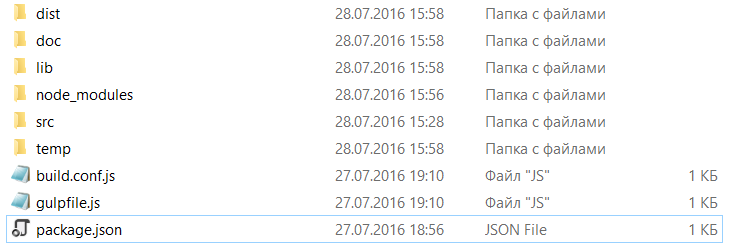
Go to **/dist** folder, locate **index.html** file.
Open your app by executing the command line:
```bash
gulp launch
```
You should see an empty web page.

### Continue
[Go to step 2](https://github.com/pip-webui/pip-webui-sample/blob/master/step2/) to add Pip.WebUI libraries and create Angular boilerplate code in your application.