# Pip.WebUI Getting Started
Step 9. Add map view to Nodes page
[Go to step 8](https://github.com/pip-webui/pip-webui-sample/blob/master/step8/) to show notifications.
### Create nodes map view
Rename **/src/nodes/nodes.html** file to **/src/nodes/nodes_tiles.html**
Create **/src/nodes/nodes_map.html** and copy there the content below:
```html
```
### Create nodes tiles controller
After we split the Nodes page into tile and map views the **nodesController** will become a parent controller for all views.
Then we need to add two more child controllers **nodesTilesController** and **nodesMapController** for each view.
Make changes in the **/src/nodes/nodes.js** file. Change **nodesController** and add **nodesTilesController** and **nodesMapController**:
```javascript
thisModule.controller('nodesController', function($scope, $http, pipAppBar) {
...
// Remove primary action configuration: pipAppBar.showLocalActions();
...
});
thisModule.controller('nodesTilesController', function($scope, $state, pipAppBar) {
// Configure primary actions of each view inside controller
// Show primary action to switch between views
pipAppBar.showLocalActions([
{
name: 'nodes.map',
icon: 'icons:location',
callback: toMapView
}
]);
function toMapView() {
$state.go('nodes.map');
}
});
thisModule.controller('nodesMapController', function($scope, $state, pipAppBar) {
// Configure primary actions of each view inside controller
// Show primary action to switch between views
pipAppBar.showLocalActions([
{
name: 'nodes.tiles',
icon: 'icons:grid',
callback: toTilesView
}
]);
function toTilesView() {
$state.go('nodes.tiles');
}
});
```
## Update application routes
Open **index.js** and in the configuration section make changes to nodes route states and default states:
```javascript
app.config(
function (pipSideNavProvider, $mdIconProvider, pipAppBarProvider, pipAuthStateProvider,
pipSettingsProvider, pipHelpProvider, $urlRouterProvider, pipRestProvider) {
...
// Configure application route states
pipAuthStateProvider
.state('nodes', { // <--- Pay attention!
url: '/nodes', // <--- Pay attention!
template: '', // <--- Pay attention!
abstract: true, // <--- Pay attention!
controller: 'nodesController', // <--- Pay attention!
auth: true // <--- Pay attention!
})
.state('nodes.tiles', { // <--- Pay attention!
url: '/tiles', // <--- Pay attention!
controller: 'nodesTilesController', // <--- Pay attention!
templateUrl: 'nodes/nodes_tiles.html' // <--- Pay attention!
})
.state('nodes.map', { // <--- Pay attention!
url: '/map', // <--- Pay attention!
controller: 'nodesMapController', // <--- Pay attention!
templateUrl: 'nodes/nodes_map.html' // <--- Pay attention!
})
.state('events', {
url: '/events',
controller: 'eventsController',
templateUrl: 'events/events.html',
auth: true
});
// Configure default states
pipAuthStateProvider.unauthorizedState('signin');
pipAuthStateProvider.authorizedState('nodes.tiles'); // <--- Pay attention!
$urlRouterProvider.otherwise(function ($injector, $location) {
return $location.$$path === '' ? '/signin' : '/nodes/tiles'; // <--- Pay attention!
});
...
});
```
After you make all the changes, rebuild the application. When you go to the nodes page and toggle the view, you shall see a map with positions of IoT nodes:
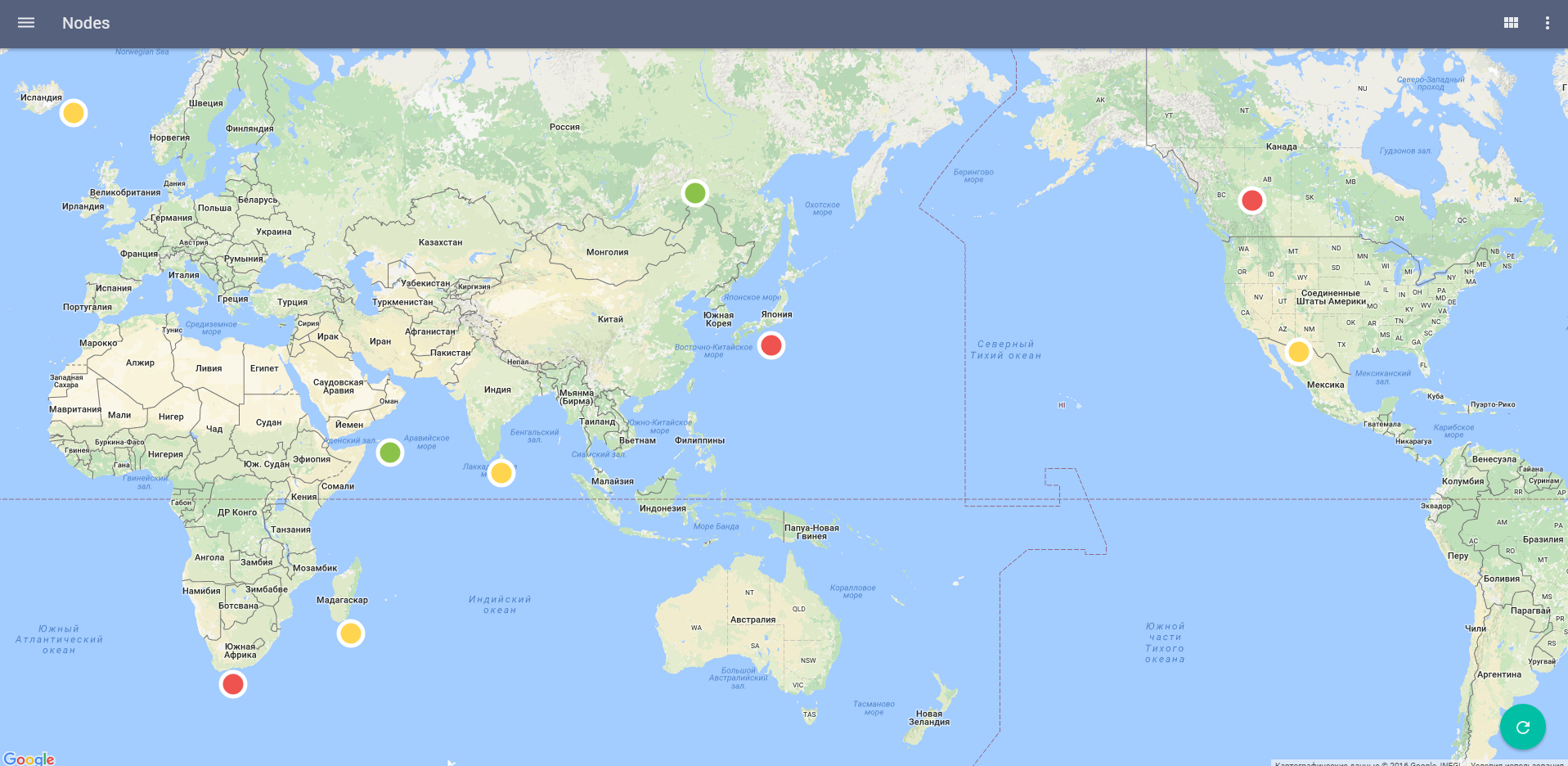
Go to the events page, and then go back to the nodes. We continue to receive toast messages about incoming events. Fix this. Add this code into **eventsController**:
```javascript
thisModule.controller('eventsController', function($scope, $interval, $mdMedia, $http, pipAppBar, pipToasts) {
...
$scope.$on('$destroy', function() {
$interval.cancel(stopTime);
});
return;
...
});
```
After you made all the changes, rebuild the application. Verify that the events reading stops after the transition to nodes.
### Continue
[Go to step 10](https://github.com/pip-webui/pip-webui-sample/blob/master/step10/) to add charts view to Events page.