# PostCSS Focus Visible [ ][PostCSS]
`npm install postcss-focus-visible --save-dev`
[PostCSS Focus Visible] lets you use the `:focus-visible` pseudo-class in CSS,
following the [Selectors Level 4 specification].
To use this feature you need to do two things :
- add the [PostCSS plugin](#usage) that transforms the selector into a class or attribute
- add the [focus-visible polyfill] that sets the attribute or class on elements in a browser
[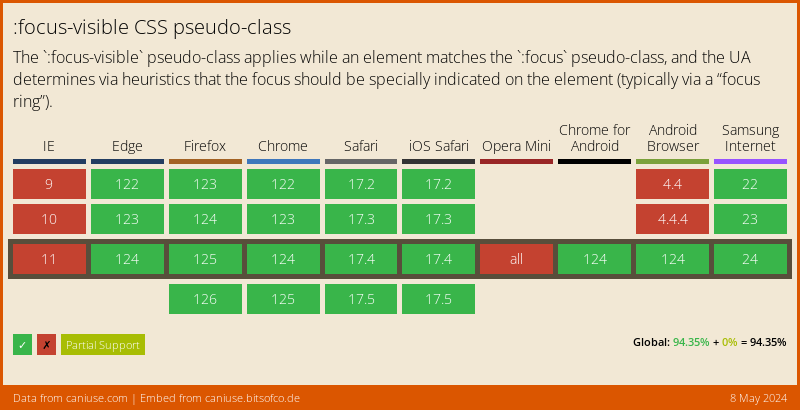](https://caniuse.com/#feat=css-focus-visible)
```css
```css
:focus:not(:focus-visible) {
outline: none;
}
/* becomes */
:focus:not(.focus-visible).js-focus-visible, .js-focus-visible :focus:not(.focus-visible) {
outline: none;
}
:focus:not(:focus-visible) {
outline: none;
}
```
[PostCSS Focus Visible] duplicates rules using the `:focus-visible` pseudo-class
with a `.focus-visible` class selector, the same selector used by the
[focus-visible polyfill].
## Usage
Add [PostCSS Focus Visible] to your project:
```bash
npm install postcss postcss-focus-visible --save-dev
```
Use it as a [PostCSS] plugin:
```js
const postcss = require('postcss');
const postcssFocusVisible = require('postcss-focus-visible');
postcss([
postcssFocusVisible(/* pluginOptions */)
]).process(YOUR_CSS /*, processOptions */);
```
## Options
### preserve
The `preserve` option determines whether the original notation
is preserved. By default, it is preserved.
```js
postcssFocusVisible({ preserve: false })
```
```css
:focus:not(:focus-visible) {
outline: none;
}
/* becomes */
:focus:not(.focus-visible).js-focus-visible, .js-focus-visible :focus:not(.focus-visible) {
outline: none;
}
```
### replaceWith
The `replaceWith` option defines the selector to replace `:focus-visible`. By
default, the replacement selector is `.focus-visible`.
```js
postcssFocusVisible({ replaceWith: '[data-focus-visible-added]' })
```
```css
:focus:not(:focus-visible) {
outline: none;
}
/* becomes */
```
Note that if you want to keep using [focus-visible polyfill], the only
acceptable value would be `[data-focus-visible-added]`,
given that the polyfill does not support arbitrary values.
### disablePolyfillReadyClass
The `disablePolyfillReadyClass` option determines if selectors are prefixed with an indicator class.
This class is only set on your document if the polyfill loads and is needed.
By default this option is `false`.
Set this to `true` to prevent the class from being added.
```js
postcssFocusVisible({ disablePolyfillReadyClass: true })
```
```css
:focus:not(:focus-visible) {
outline: none;
}
/* becomes */
:focus:not(.focus-visible) {
outline: none;
}
:focus:not(:focus-visible) {
outline: none;
}
```
[cli-url]: https://github.com/csstools/postcss-plugins/actions/workflows/test.yml?query=workflow/test
[css-url]: https://cssdb.org/#focus-visible-pseudo-class
[discord]: https://discord.gg/bUadyRwkJS
[npm-url]: https://www.npmjs.com/package/postcss-focus-visible
[PostCSS]: https://github.com/postcss/postcss
[PostCSS Focus Visible]: https://github.com/csstools/postcss-plugins/tree/main/plugins/postcss-focus-visible
[Selectors Level 4 specification]: https://www.w3.org/TR/selectors-4/#the-focus-visible-pseudo
[focus-visible polyfill]: https://github.com/WICG/focus-visible
][PostCSS]
`npm install postcss-focus-visible --save-dev`
[PostCSS Focus Visible] lets you use the `:focus-visible` pseudo-class in CSS,
following the [Selectors Level 4 specification].
To use this feature you need to do two things :
- add the [PostCSS plugin](#usage) that transforms the selector into a class or attribute
- add the [focus-visible polyfill] that sets the attribute or class on elements in a browser
[](https://caniuse.com/#feat=css-focus-visible)
```css
```css
:focus:not(:focus-visible) {
outline: none;
}
/* becomes */
:focus:not(.focus-visible).js-focus-visible, .js-focus-visible :focus:not(.focus-visible) {
outline: none;
}
:focus:not(:focus-visible) {
outline: none;
}
```
[PostCSS Focus Visible] duplicates rules using the `:focus-visible` pseudo-class
with a `.focus-visible` class selector, the same selector used by the
[focus-visible polyfill].
## Usage
Add [PostCSS Focus Visible] to your project:
```bash
npm install postcss postcss-focus-visible --save-dev
```
Use it as a [PostCSS] plugin:
```js
const postcss = require('postcss');
const postcssFocusVisible = require('postcss-focus-visible');
postcss([
postcssFocusVisible(/* pluginOptions */)
]).process(YOUR_CSS /*, processOptions */);
```
## Options
### preserve
The `preserve` option determines whether the original notation
is preserved. By default, it is preserved.
```js
postcssFocusVisible({ preserve: false })
```
```css
:focus:not(:focus-visible) {
outline: none;
}
/* becomes */
:focus:not(.focus-visible).js-focus-visible, .js-focus-visible :focus:not(.focus-visible) {
outline: none;
}
```
### replaceWith
The `replaceWith` option defines the selector to replace `:focus-visible`. By
default, the replacement selector is `.focus-visible`.
```js
postcssFocusVisible({ replaceWith: '[data-focus-visible-added]' })
```
```css
:focus:not(:focus-visible) {
outline: none;
}
/* becomes */
```
Note that if you want to keep using [focus-visible polyfill], the only
acceptable value would be `[data-focus-visible-added]`,
given that the polyfill does not support arbitrary values.
### disablePolyfillReadyClass
The `disablePolyfillReadyClass` option determines if selectors are prefixed with an indicator class.
This class is only set on your document if the polyfill loads and is needed.
By default this option is `false`.
Set this to `true` to prevent the class from being added.
```js
postcssFocusVisible({ disablePolyfillReadyClass: true })
```
```css
:focus:not(:focus-visible) {
outline: none;
}
/* becomes */
:focus:not(.focus-visible) {
outline: none;
}
:focus:not(:focus-visible) {
outline: none;
}
```
[cli-url]: https://github.com/csstools/postcss-plugins/actions/workflows/test.yml?query=workflow/test
[css-url]: https://cssdb.org/#focus-visible-pseudo-class
[discord]: https://discord.gg/bUadyRwkJS
[npm-url]: https://www.npmjs.com/package/postcss-focus-visible
[PostCSS]: https://github.com/postcss/postcss
[PostCSS Focus Visible]: https://github.com/csstools/postcss-plugins/tree/main/plugins/postcss-focus-visible
[Selectors Level 4 specification]: https://www.w3.org/TR/selectors-4/#the-focus-visible-pseudo
[focus-visible polyfill]: https://github.com/WICG/focus-visible