# pretty-print-json
_Pretty-print JSON data into HTML to indent and colorize (written in TypeScript)_
[](https://github.com/center-key/pretty-print-json/blob/master/LICENSE.txt)
[](https://www.npmjs.com/package/pretty-print-json)
[](https://bundlephobia.com/result?p=pretty-print-json)
[](https://snyk.io/test/github/center-key/pretty-print-json)
[](https://www.jsdelivr.com/package/npm/pretty-print-json)
[](https://travis-ci.org/center-key/pretty-print-json)
[](https://github.com/center-key/pretty-print-json/actions?query=workflow%3Abuild)
## 1) Try it out
Interactive online tool to format JSON:
https://pretty-print-json.js.org
## 2) Setup
### Web browser
Load from the [jsdelivr.com CDN](https://www.jsdelivr.com/package/npm/pretty-print-json):
```html
...
```
For **dark mode**, replace `pretty-print-json.css` with `pretty-print-json.dark-mode.css` in the `` tag.
### Node.js server
Install package for node:
```shell
$ npm install pretty-print-json
```
Import into your application:
```javascript
import { prettyPrintJson } from 'pretty-print-json';
```
Or for older CommonJS/UMD environments:
```javascript
const { prettyPrintJson } = require('pretty-print-json'); //deprecated
```
## 3) Usage
### API
```javascript
const html = prettyPrintJson.toHtml(data[, options]);
```
### Example
##### HTML:
```html
```
##### JavaScript:
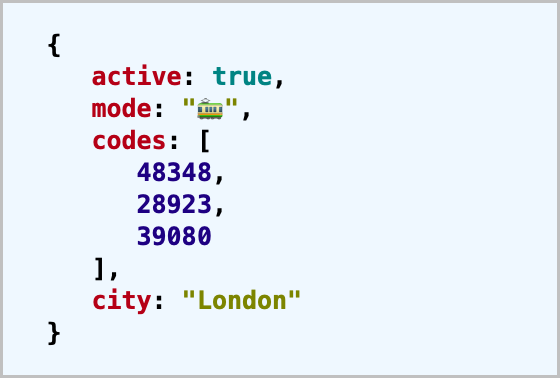
Pass data into `prettyPrintJson.toHtml()` and display the results.
```javascript
const data = { active: true, mode: '🚃', codes: [48348, 28923, 39080], city: 'London' };
const elem = document.getElementById('account');
elem.innerHTML = prettyPrintJson.toHtml(data);
```
### Options
| Name (key) | Type | Default | Description |
| :---------- | :---------- | :------ | :-------------------------------- |
| `indent` | **integer** | `3` | Number of spaces for indentation. |
| `linkUrls` | **boolean** | `true` | Create anchor tags for URLs. |
| `quoteKeys` | **boolean** | `false` | Always double quote key names. |
## 4) TypeScript declarations
The **TypeScript Declaration File** file is [pretty-print-json.d.ts](dist/pretty-print-json.d.ts)
in the **dist** folder.
The output of the `prettyPrintJson.toHtml(thing: unknown, options?: FormatOptions)` function is
configured with a `FormatOptions` object:
```typescript
type FormatOptions = {
indent?: number,
linkUrls?: boolean,
quoteKeys?: boolean;
};
```
Example TypeScript usage with explicit types:
```typescript
import { prettyPrintJson, FormatOptions } from 'pretty-print-json';
const data = { active: true, mode: '🚃', codes: [48348, 28923, 39080], city: 'London' };
const options: FormatOptions = { linkUrls: true };
const html: string = prettyPrintJson.toHtml(data, options);
```
## 5) Contributor notes
To be a contributor, **fork** the project and run the commands `npm install` and `npm test` on your
local clone. Make your edits and rerun the tests. Pull requests welcome.
---
Feel free to submit questions at:
[github.com/center-key/pretty-print-json/issues](https://github.com/center-key/pretty-print-json/issues)
[MIT License](LICENSE.txt) | [Blog post](https://blog.centerkey.com/2013/05/javascript-colorized-pretty-print-json.html)
 _Pretty-print JSON data into HTML to indent and colorize (written in TypeScript)_
[](https://github.com/center-key/pretty-print-json/blob/master/LICENSE.txt)
[](https://www.npmjs.com/package/pretty-print-json)
[](https://bundlephobia.com/result?p=pretty-print-json)
[](https://snyk.io/test/github/center-key/pretty-print-json)
[](https://www.jsdelivr.com/package/npm/pretty-print-json)
[](https://travis-ci.org/center-key/pretty-print-json)
[](https://github.com/center-key/pretty-print-json/actions?query=workflow%3Abuild)
_Pretty-print JSON data into HTML to indent and colorize (written in TypeScript)_
[](https://github.com/center-key/pretty-print-json/blob/master/LICENSE.txt)
[](https://www.npmjs.com/package/pretty-print-json)
[](https://bundlephobia.com/result?p=pretty-print-json)
[](https://snyk.io/test/github/center-key/pretty-print-json)
[](https://www.jsdelivr.com/package/npm/pretty-print-json)
[](https://travis-ci.org/center-key/pretty-print-json)
[](https://github.com/center-key/pretty-print-json/actions?query=workflow%3Abuild)
 ## 1) Try it out
Interactive online tool to format JSON:
## 1) Try it out
Interactive online tool to format JSON: