prisma-dbml-generator
Automatically generate a DBML schema from your Prisma Schema.




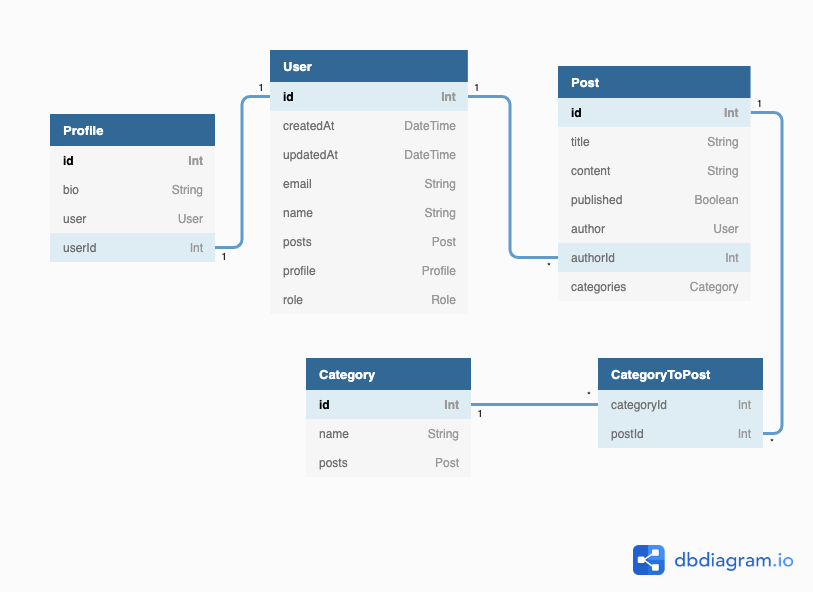
Updates every time `npx prisma generate` runs. Use [dbdiagram.io](https://dbdiagram.io/home) to visualize your `dbml` files as Entity-Relationship Diagram:
## Getting started
| Prisma | prisma-dbml-generator |
| -------- | -------------------------------------------------------------------------------- |
| >=2.29.0 | [0.7.0](https://github.com/notiz-dev/prisma-dbml-generator/releases/tag/v0.7.0) |
| <2.29.0 | [0.6.0](https://github.com/notiz-dev/prisma-dbml-generator/releases/tag/v0.6.0) |
1. Install this generator:
```bash
npm install -D prisma-dbml-generator
```
2. Add the generator to the `schema.prisma`
```prisma
generator dbml {
provider = "prisma-dbml-generator"
}
```
3. Running `npx prisma generate` for the following [schema.prisma](https://github.com/notiz-dev/prisma-dbml-generator/blob/main/prisma/schema.prisma)
```prisma
model User {
id Int @id @default(autoincrement())
createdAt DateTime @default(now())
updatedAt DateTime @updatedAt
email String @unique
name String?
posts Post[]
profile Profile?
/// user role
role Role @default(USER)
}
/// User profile
model Profile {
id Int @default(autoincrement()) @id
bio String?
user User @relation(fields: [userId], references: [id])
userId Int @unique
}
model Post {
id Int @id @default(autoincrement())
title String @default("")
content String?
published Boolean @default(false)
author User? @relation(fields: [authorId], references: [id])
authorId Int?
categories Category[]
}
model Category {
id Int @id @default(autoincrement())
name String
posts Post[]
}
/// user role
enum Role {
ADMIN /// allowed to do everything
USER
}
```
generates the following [schema.dbml](https://github.com/notiz-dev/prisma-dbml-generator/blob/main/prisma/dbml/schema.dbml) to `prisma/dbml`
```dbml
//// ------------------------------------------------------
//// THIS FILE WAS AUTOMATICALLY GENERATED (DO NOT MODIFY)
//// ------------------------------------------------------
Table User {
id Int [pk, increment]
createdAt DateTime [default: `now()`, not null]
updatedAt DateTime [not null]
email String [unique, not null]
name String
posts Post
profile Profile
role Role [not null, default: 'USER', note: 'user role']
}
Table Profile {
id Int [pk, increment]
bio String
user User [not null]
userId Int [unique, not null]
Note: 'User profile'
}
Table Post {
id Int [pk, increment]
title String [not null, default: '']
content String
published Boolean [not null, default: false]
author User
authorId Int
categories Category
}
Table Category {
id Int [pk, increment]
name String [not null]
posts Post
}
Table CategoryToPost {
categoriesId Int [ref: > Category.id]
postsId Int [ref: > Post.id]
}
Enum Role {
ADMIN
USER
}
Ref: Profile.userId - User.id
Ref: Post.authorId > User.id
```
4. [Visualize](https://dbdiagram.io/d) the `schema.dbml`
## Additional Options
| Option | Description | Type | Default |
| ----------------------- | ----------------------------------------------- | --------- | ------------- |
| `projectDatabaseType` | Project database type for dbdocs | `string` | `null` |
| `projectName` | Project name for dbdocs | `string` | `null` |
| `projectNote` | Project note for dbdocs | `string` | `null` |
| `projectNotePath` | Project note path to a markdown file for dbdocs | `string` | `null` |
| `output` | Output directory for the DBML file | `string` | `./dbml` |
| `outputName` | Name for the DBML file | `string` | `schema.dbml` |
| `manyToMany` | Create Many-To-Many join table | `boolean` | `true` |
| `mapToDbSchema` | Use mapped table name | `boolean` | `true` |
| `includeRelationFields` | Include relation fields | `boolean` | `true` |
Use additional options in the `schema.prisma`
```prisma
generator dbml {
provider = "prisma-dbml-generator"
output = "../dbml"
outputName = "awesome.dbml"
projectName = "Project Name"
projectDatabaseType = "PostgreSQL"
projectNote = "Test project description"
}
```
## Development
```bash
npm run dev
npm test
```
## Helpful
[Prisma Generator](https://github.com/prisma/specs/tree/master/generators)