puppeteer-screenshot-tester
---------------------------




Small library that allows us to compare screenshots generated by puppeteer in our tests.
Installation
--------------
To use Puppeteer Screenshot Tester in your project, run:
```
yarn add --dev puppeteer-screenshot-tester
```
or
```
npm install --save-dev puppeteer-screenshot-tester
```
Usage
-------------
Require the `puppeteer-screenshot-tester` library:
```js
const ScreenshotTester = require('puppeteer-screenshot-tester')
```
### Initialize Screenshot Tester
```js
const tester = await ScreenshotTester()
```
#### Optional arguments:
```js
const tester = await ScreenshotTester(
[threshold = 0][, includeAA = false[, ignoreColors = false[, matchingBox = { ignoreRectangles = [], includeRectangle = [] } [, errorSettings = Object [, outputSettings = Object]]]]]
)
```
- `threshold` <[number]> A threshold value <0,1> default set to 0, max ratio of difference between images
- `includeAA` <[boolean]> Should include anti aliasing?
- `ignoreColors` <[boolean]> Should ignore colors?
- `matchingBox` <[Object]> Restrict what should be compared
- `matchingBox.ignoreRectangles` <[Array]> Should ignore rectangles? example: `[[325,170,100,40], [10,10,200,200]]`, **X and Y should be the coordinates of the top-left corner**
- `matchingBox.includeRectangle` <[Array]> Compare only part of screen? example: `[[325,170,100,40], [10,10,200,200]]`, **X and Y should be the coordinates of the top-left corner**
- `errorSettings` <[Object]> change how to display errors (errorType: `flat` | `movement` | `flatDifferenceIntensity` | `movementDifferenceIntensity` | `diffOnly`):
```
{
errorColor: {
red: 255,
green: 0,
blue: 255
},
errorType: 'flat',
transparency: 0.7
}
```
- `outputSettings` <[Object]> change the output image settings:
```
{
forceExt: 'jpeg' | 'png' | 'webp' | null,
compressionLevel: 8 // 0-9 for .png, 0-100 otherwise
overrides: {} // valid sharp options (see bellow)
}
```
- returns: <[function]> resolves to function
#### overrides:
You can override options passed to [sharp image processor](https://sharp.pixelplumbing.com/). Just paste the `overrides` object that corresponds with sharp options:
- .png [Options](https://sharp.pixelplumbing.com/api-output#png)
- .webp [Options](https://sharp.pixelplumbing.com/api-output#webp)
- .jpeg/jpg [Options](https://sharp.pixelplumbing.com/api-output#jpeg)
### Run the test
```js
const result = await tester(page)
```
#### Required arguments:
- `page` <[BrowserPage]> BrowserPage returned by puppeteer when calling `puppeteer.launch().newPage()`
#### Optional arguments:
```js
const result = await tester(page[, name = 'test'[, screenshotOptions = {}]])
```
- `name` <[string]> name of created screenshot 'test' by default
- `screenshotOptions` <[Object]> options passed to Puppeteer's screenshot method [See the Puppeteer documentation for more info](https://github.com/GoogleChrome/puppeteer/blob/master/docs/api.md#pagescreenshotoptions), _plus_ the following keys:
- `saveNewImageOnError`: <[boolean]> saves the undiffed new image on error as `${saveFolder}/${name}-new${ext}`
- `overwriteImageOnChange`: <[boolean]> overwrites the reference image (`${saveFolder}/${name}${ext}`) on error / change
#### Returns
- <[boolean]> true if images are the same or there is no image to compare (first run)
Examples
----------------
```javascript
const puppeteer = require('puppeteer')
const ScreenshotTester = require('puppeteer-screenshot-tester')
describe('google test', () => {
let originalTimeout
// extend default interval to 10s because some image processing might take some time
// we can do it beforeEach or once per test suite it's up to you
// if you're running that on fast computer/server probably won't need to do that
beforeEach(function() {
originalTimeout = jasmine.DEFAULT_TIMEOUT_INTERVAL
jasmine.DEFAULT_TIMEOUT_INTERVAL = 10000
})
// set default interval timeout for jasmine
afterEach(function() {
jasmine.DEFAULT_TIMEOUT_INTERVAL = originalTimeout
})
it(`check if google exists`, async () => {
// create ScreenshotTester with optional config
const tester = await ScreenshotTester(0.8, false, false, [], {
transparency: 0.5
}, { compressionLevel: 8 })
// setting up puppeteer
const browser = await puppeteer.launch()
const page = await browser.newPage()
await page.setViewport({width: 1920, height: 1080})
await page.goto('https://www.google.com', { waitUntil: 'networkidle0' })
await page.type('input[title="Search"]', 'Hello', { delay: 100 })
// call our tester with browser page returned by puppeteer browser
// second parameter is optional it's just a test name if provide that's filename
const result = await tester(page, 'test2', {
fullPage: true,
})
await browser.close()
// make assertion result is always boolean
expect(result).toBe(true)
})
})
```
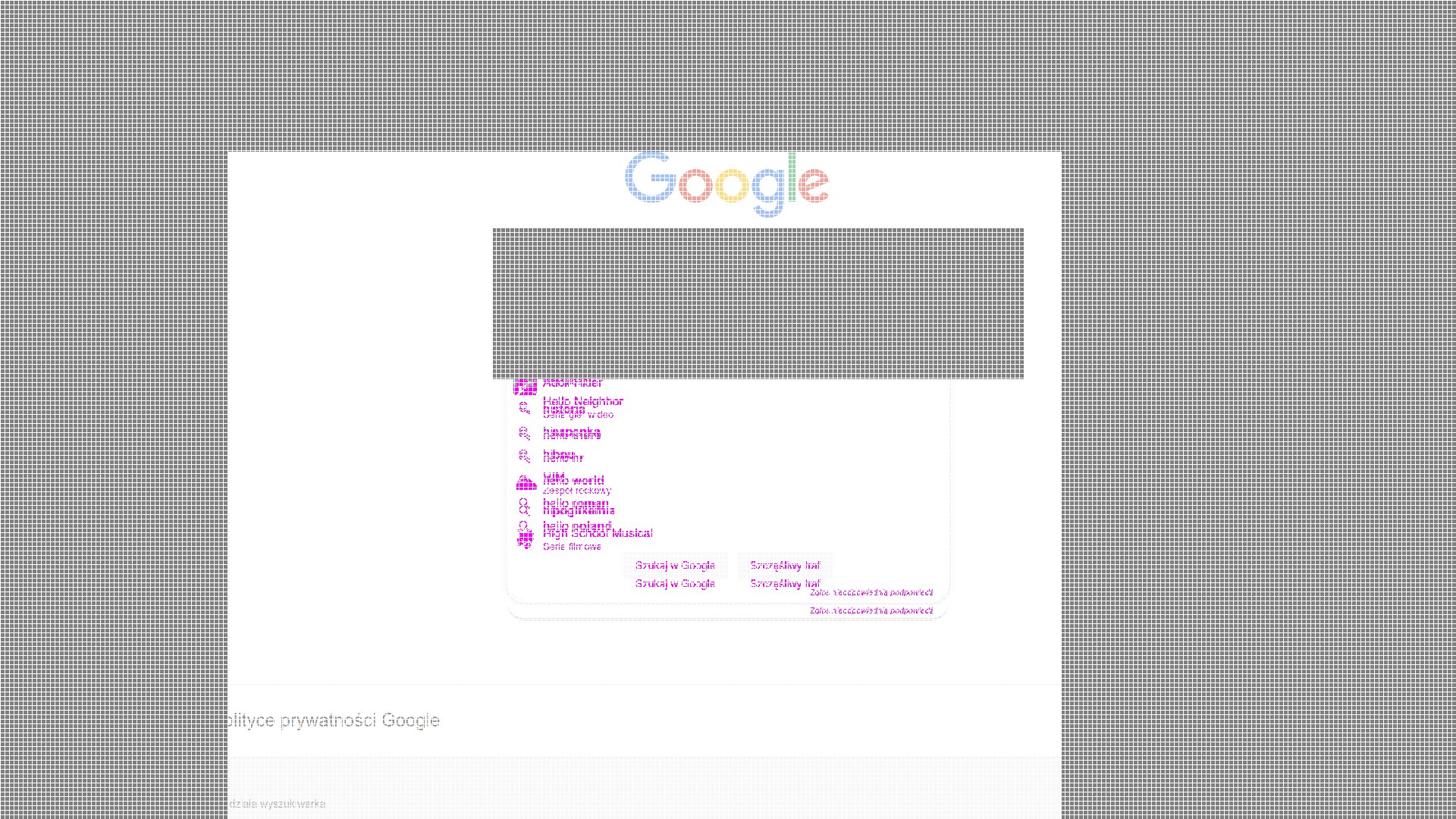
#### Ignoring Rectangles and Including rectangles
```javascript
const tester = await ScreenshotTester(
0.1, // threshold
false, // anti-aliasing
false, // ignore colors
{
ignoreRectangles: [[650, 300, 700, 200]],
includeRectangles: [[300, 200, 1100, 1100]]
}, // rectangles
{
transparency: 0.5
}
)
```
## Contributors
Thanks goes to these wonderful people :sunglasses: :
This project follows the [all-contributors](https://github.com/kentcdodds/all-contributors) specification. Contributions of any kind welcome!


