# qui-indexlist
> 索引列表组件, 可以通过索引快速定位
## 预览
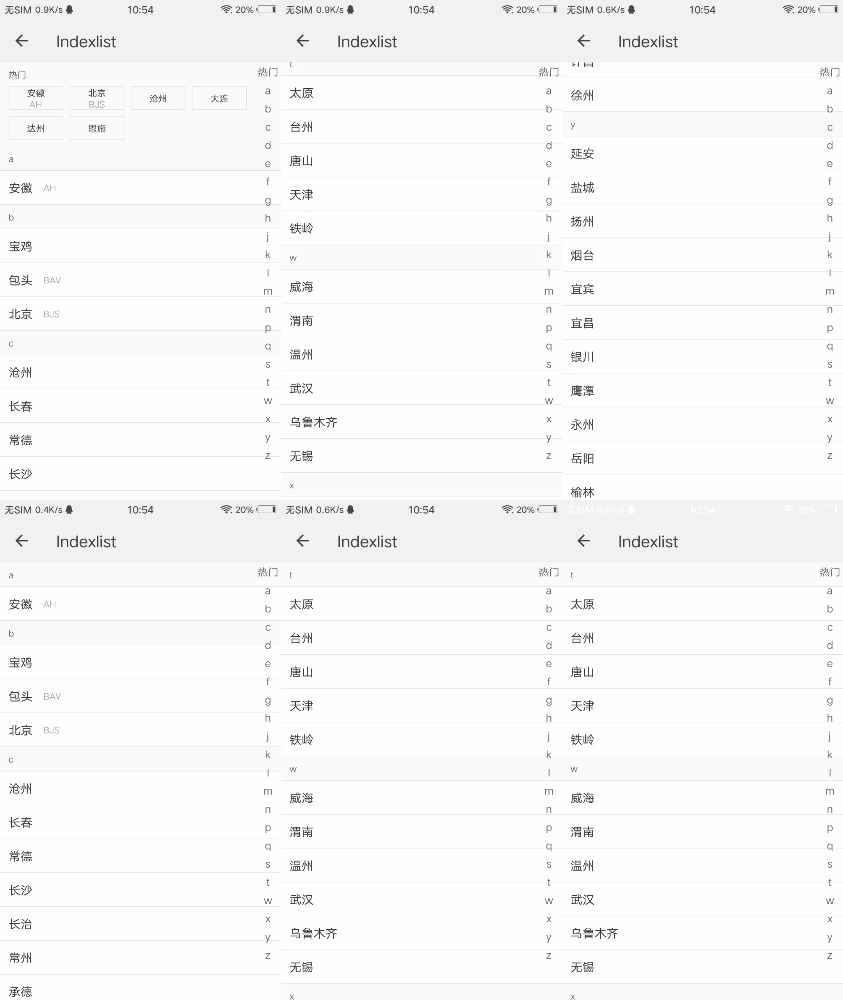 ## 依赖接口
无依赖
## 使用方法
```ux
```
更详细代码可以参考[qui-indexlist demo](https://github.com/qapp-ui/qapp-ui/blob/master/src/Indexlist/index.ux)
## 参数
| 名称 | 类型 | 必填 | 默认值 | 描述 |
|-----|------|-----|-------|-----|
| list | `Array` | `Y` | `-` | 数据 |
| list[{name}] | `String` | `Y` | `-` | 名称 |
| list[{desc}] | `String` | `N` | `-` | 描述 |
| list[{key}] | `String` | `Y`| `-` | 排序字符串,比如拼音等 |
| list[{hot}] | `Boolean` | `N` | `false` | 是否是热门项 |
| hotTitle | `String` | `N` | `热门` | 热门项索引标签 |
| hotType | `String` | `N` | `list` | 热门项显示类型,支持list,group类型,默认为list类型 |
| showIndex | `String` | `N` | `1` | 是否显示侧边索引栏,`'1'`表示显示,`'0'`表示不显示 |
| onlyShowList | `String` | `N` | `0` | 是否不显示热门列表,`'1'`表示不显示热门列表,`'0'`表示显示热门列表 |
## 事件
| 名称 | 参数 | 描述 |
|--------|---------|--------|
|qui-click| `{type,item}` | 点击列表项时触发,type为hot表示点击的热门列表项,其他为正常列表项;item为传入的列表项数据 |
## 依赖接口
无依赖
## 使用方法
```ux
```
更详细代码可以参考[qui-indexlist demo](https://github.com/qapp-ui/qapp-ui/blob/master/src/Indexlist/index.ux)
## 参数
| 名称 | 类型 | 必填 | 默认值 | 描述 |
|-----|------|-----|-------|-----|
| list | `Array` | `Y` | `-` | 数据 |
| list[{name}] | `String` | `Y` | `-` | 名称 |
| list[{desc}] | `String` | `N` | `-` | 描述 |
| list[{key}] | `String` | `Y`| `-` | 排序字符串,比如拼音等 |
| list[{hot}] | `Boolean` | `N` | `false` | 是否是热门项 |
| hotTitle | `String` | `N` | `热门` | 热门项索引标签 |
| hotType | `String` | `N` | `list` | 热门项显示类型,支持list,group类型,默认为list类型 |
| showIndex | `String` | `N` | `1` | 是否显示侧边索引栏,`'1'`表示显示,`'0'`表示不显示 |
| onlyShowList | `String` | `N` | `0` | 是否不显示热门列表,`'1'`表示不显示热门列表,`'0'`表示显示热门列表 |
## 事件
| 名称 | 参数 | 描述 |
|--------|---------|--------|
|qui-click| `{type,item}` | 点击列表项时触发,type为hot表示点击的热门列表项,其他为正常列表项;item为传入的列表项数据 |