
<rapi-doc>
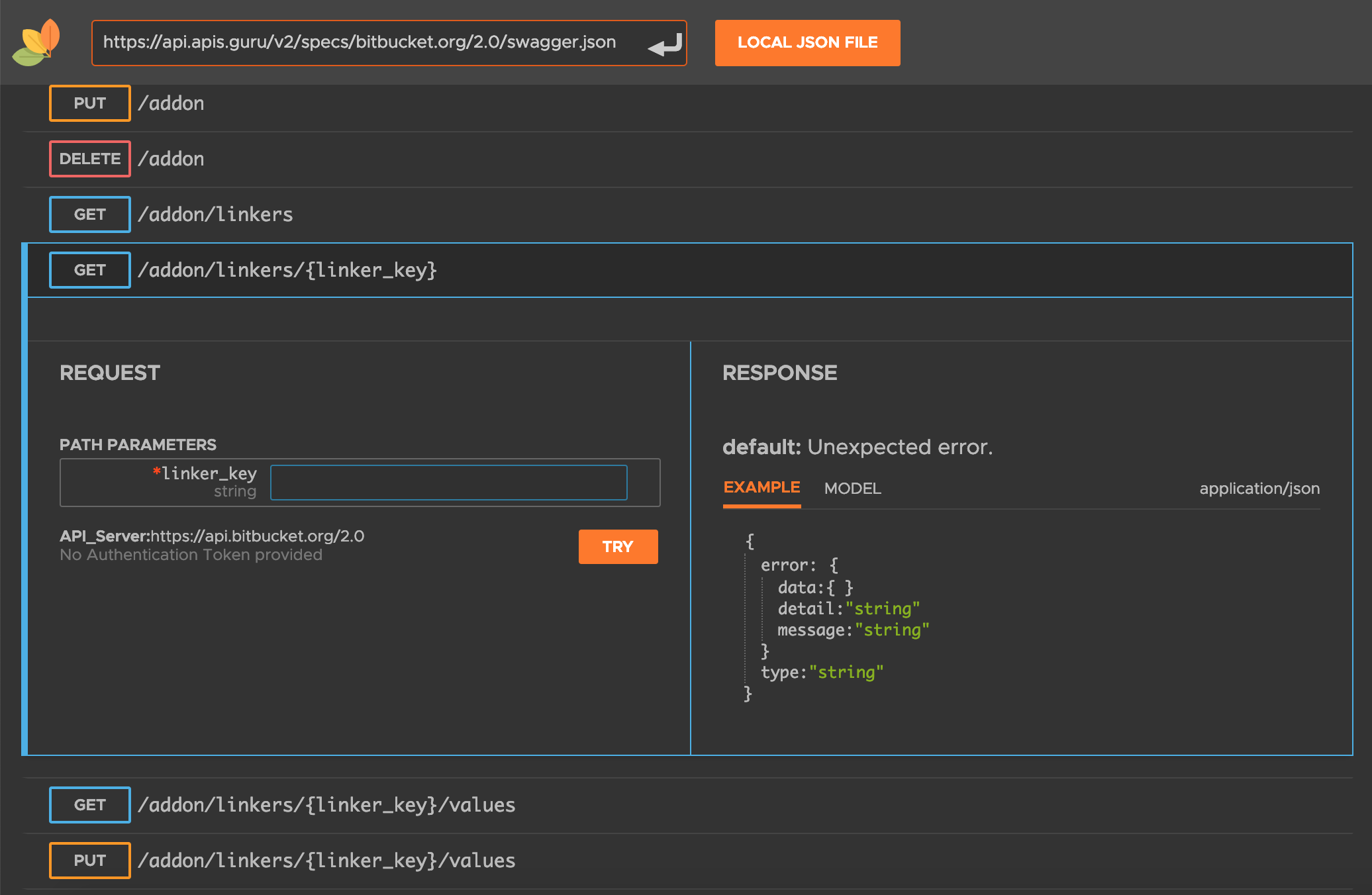
  <!doctype html> <!-- Important: must specify -->
  <html>
  <head>
    <meta charset="utf-8"> <!-- Important: rapi-doc uses utf8 charecters -->
    <script src="https://unpkg.com/rapidoc/dist/rapidoc-min.js"></script>
  </head>
  <body>
    <rapi-doc
      spec-url="https://api.apis.guru/v2/specs/bitbucket.org/2.0/swagger.json"
    > </rapi-doc>
  </body>
  </html>
| Attribute | Description | Default |
|---|---|---|
| spec-url | url of the OpenAPI spec to view | (empty) |
| server | OpenAPI spec has a provision for providing the server url. The UI will list all the server URLs provided in the spec. The user can then select one URL to which he or she intends to send API calls while trying out the apis. However, if you want to provide an API server of your own which is not listed in the spec, you can use this property to provide one. It is helpful in the cases where the same spec is shared between multiple environment say Dev and Test and each have their own API server. | (empty) |
| allow-authentication | Authentication feature, allows the user to select one of the authentication mechanism thats available in the spec. It can be http-basic, http-bearer or api-key. If you dont want your users to go through the authentication process, instead want them to use a pre-generated api-key then you may hide authentication section by setting this attribute to false and provide the api-key details using various api-key-???? attributes. | true |
| api-key-name | Name of the API key that will be send while trying out the APIs | (empty) |
| api-key-value | Value of the API key that will be send while trying out the APIs | Authorization |
| api-key-location |
determines how you want to send the api-key.
allowed values are header or query
|
header |
| allow-spec-url-load | If set to 'false', user will not be able to load any spec url from the UI. | true |
| allow-spec-file-load | If set to 'false', user will not be able to load any spec file from the local drive. This attribute is applicable only when the device width is more than 768px, else this feature is not available | true |
| allow-search | If set to 'false', user will not be able to search APIs. | true |
| allow-try | 'TRY' feature allows you to make REST calls to the API server. To disable this feature set it to false | true |
| show-info |
show/hide the documents info section Info section contains information about the spec, such as the title and description of the spec, the version, terms of services etc. In certain situation you may not need to show this section. For instance you are embedding this element inside a another help document. Chances are, the help doc may already have this info, in that case you may want to hide this section. |
true |
| show-header | show/hide the header. If you dont want your user to open any other api spec, other than the current one, then set this attribute to false |
true |
| heading-text | Heading Text on top-left corner | (empty) |
| header-color | Hex color code for the header's background | #444444 |
| primary-color | Hex color code on various controls such as buttons, tabs | #FF791A |
| regular-font | Font Name(s) to be used for regular text | rapidoc, Helvetica, Arial |
| mono-font | Font Name(s) to be used for monospaced text | Monaco, 'Andale Mono', 'Roboto Mono' |
| theme | light, dark | light |
| layout | layout helps in placement of your request/response sections. The allowed values are 'row' or 'column'. In column layout, request & response sections are placed one below the other, In row layout request & response sections are placed side by side. This attribute is applicable only when the device width is more than 768px. | row |
| resolve-circular-refs | RapiDoc attempts to resolve all the circular references (if prsent) in the api spec. However if you face any performance issues while loading the spec, then you can disable it by setting it to 'false' Our recommendation is to leave it as the default value of 'true'. | true |
| Slot Name | Description |
|---|---|
| (default) | any content placed inside <rapi-doc> tag, will be shown immidiately under the header and above the info section |
| logo | use this slot to replace the logo |
| footer | The conents of this slot will appear at the bottom of the spec |
  <rapi-doc
    spec-url="https://api.apis.guru/v2/specs/bitbucket.org/2.0/swagger.json"
  >
  </rapi-doc>
  <rapi-doc
    spec-url="https://api.apis.guru/v2/specs/bitbucket.org/2.0/swagger.json"
    theme="dark"
  >
  </rapi-doc>
  <rapi-doc
    spec-url="https://api.apis.guru/v2/specs/bitbucket.org/2.0/swagger.json"
    header-color="#2d87e2"
    theme="dark"
  >
  </rapi-doc>
  <rapi-doc
    spec-url="https://api.apis.guru/v2/specs/bitbucket.org/2.0/swagger.json"
    theme='dark'
    show-header='false'
    show-info='false'
    allow-authentication='false'
    theme='dark'
    layout="column"
  >
  </rapi-doc>
  <head>
    <link href="https://fonts.googleapis.com/css?family=Varela+Round"
     rel="stylesheet" >
  </head>

  <body>
    <rapi-doc
      spec-url="https://api.apis.guru/v2/specs/bitbucket.org/2.0/swagger.json"
      regular-font="'Varela Round', 'Arial Rounded MT Bold' "
    >
    </rapi-doc>
  </body>
  <rapi-doc spec-url="https://api.apis.guru/v2/specs/bitbucket.org/2.0/swagger.json">
    <img
      slot="logo"
      src="https://img.icons8.com/color/48/000000/youtube-play.png"
    />
  </rapi-doc>
  <rapi-doc spec-url="https://api.apis.guru/v2/specs/bitbucket.org/2.0/swagger.json">

    <!-- content at the top -->
    <p>This is an example to add external html content </li>
    <p>Ypu may add </li>
    <ul>
      <li> Table </li>
      <li> Text </li>
      <li> Images </li>
      <li> Links </li>
      <li> any HTML content </li>
    </ul>

    <!-- content at the bottom -->
    <p slot="footer"> This content will apear at the bottom </p>

  </rapi-doc>