# RazJS
## JavaScript (browser) version of the [Razor-Express (RAZ) view template engine library](https://www.npmjs.com/package/raz).
> $ npm install razjs --save
>*Note:* debugging information of runtime code errors in the JS version is more stingy because the NodeJS virtual machine is not used in the browser.
### Examples
#### Example 1: rendering HTML with Razor syntax
*HTML:*
```HTML
```
*JavaScript:*
```JS
const countries = [
{ name: "Russia", area: 17098242 },
{ name: "Canada", area: 9984670 },
{ name: "United States", area: 9826675 },
{ name: "China", area: 9596960 },
{ name: "Brazil", area: 8514877 },
{ name: "Australia", area: 7741220 },
{ name: "India", area: 3287263 }
];
const template = `
| Country |
Area sq.km |
@for(var i = 0; i < Model.length; i++){
var country = Model[i];
| @country.name |
@country.area |
}
`;
const html = raz.render(template, countries);
document.getElementById("target").innerHTML = html;
```
*HTML output:*
| Country |
Area sq.km |
| Russia |
17098242 |
| Canada |
9984670 |
| United States |
9826675 |
| China |
9596960 |
| Brazil |
8514877 |
| Australia |
7741220 |
| India |
3287263 |
^ Try it on [jsfiddle.net](https://jsfiddle.net/develax/tfr9zhm5/)
#### Example 2: handling and displaying errors
*HTML:*
```HTML
```
*JavaScript:*
```JS
window.addEventListener('error', function (e) {
setTimeout(() => {
// The document have to be fully loaded before replacing its whole content - that's why we use timer.
document.documentElement.innerHTML = (e.error.isRazorError) ? e.error.html() : e.error.toString();
}, 0);
e.preventDefault(); // Stop propagating since we've handled it.
});
const model = 1;
const template = "@Model";
const html = raz.render(template, model);
document.getElementById("target").innerHTML = html;
```
*Rendered HTML:*
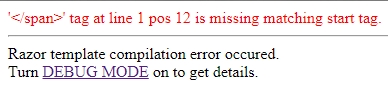
The error information displayed above is quite stingy. To get more details turn `debug` mode on:
```JS
raz.debug = true;
```
...and refresh the browser page:
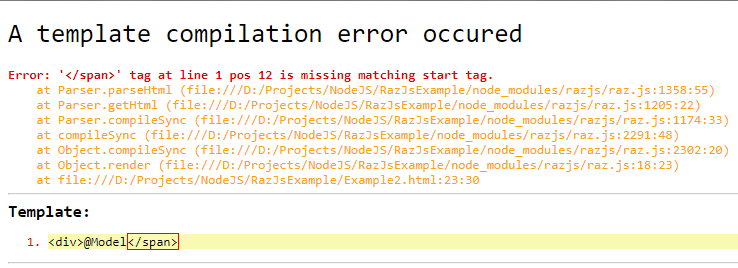
^ This code is available in the [RazJsExample](https://github.com/DevelAx/RazJsExample) repository.
#### Example 3 (the entire HTML-page with embedded JavaScript)
```HTML
RazJS library test - #1
```
*HTML output:*
**Days of the week:**
- Sunday
- Monday
- Tuesday
- Wednesday
- Thursday
- Friday
- Saturday
Today is _Thursday_.
^ Try it on [jsfiddle.net](https://jsfiddle.net/develax/ub5os9hn/4/) or the [RazJsExample](https://github.com/DevelAx/RazJsExample) repository.
----------------
> More syntax construction examples on [Razor-Express syntax reference for NodeJS & Express](https://github.com/DevelAx/RazorExpress/blob/master/docs/syntax.md).