# rc-input-number
---

input number ui component for react (web & react-native)

[![NPM version][npm-image]][npm-url]
[![build status][travis-image]][travis-url]
[![Test coverage][coveralls-image]][coveralls-url]
[![gemnasium deps][gemnasium-image]][gemnasium-url]
[![node version][node-image]][node-url]
[![npm download][download-image]][download-url]

[npm-image]: http://img.shields.io/npm/v/rc-input-number.svg?style=flat-square
[npm-url]: http://npmjs.org/package/rc-input-number
[travis-image]: https://img.shields.io/travis/react-component/input-number.svg?style=flat-square
[travis-url]: https://travis-ci.org/react-component/input-number
[coveralls-image]: https://img.shields.io/coveralls/react-component/input-number.svg?style=flat-square
[coveralls-url]: https://coveralls.io/r/react-component/input-number?branch=master
[gemnasium-image]: http://img.shields.io/gemnasium/react-component/input-number.svg?style=flat-square
[gemnasium-url]: https://gemnasium.com/react-component/input-number
[node-image]: https://img.shields.io/badge/node.js-%3E=_0.10-green.svg?style=flat-square
[node-url]: http://nodejs.org/download/
[download-image]: https://img.shields.io/npm/dm/rc-input-number.svg?style=flat-square
[download-url]: https://npmjs.org/package/rc-input-number

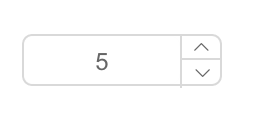
## Screenshots
- web:

  <img src="http://gtms01.alicdn.com/tps/i1/TB18CIlIpXXXXaxXFXXDa5hRXXX-268-124.png" width="288"/>

- react-native:

  <img src="https://zos.alipayobjects.com/rmsportal/dojvWLzTShEfSAU.png" width="288"/>

## install

[![rc-input-number](https://nodei.co/npm/rc-input-number.png)](https://npmjs.org/package/rc-input-number)

## Usage

```js
var InputNumber = require('rc-input-number');
var React = require('react');
var ReactDOM = require('react-dom');
ReactDOM.render(<InputNumber defaultValue={19}/>, container);
```

## Development

```
npm install
npm start
```

## Example

http://127.0.0.1:8000/examples/

online example: http://react-component.github.io/input-number/examples/

## react-native

```
./node_modules/rc-tools run react-native-init
react-native run-ios
```

## API

### props

<table class="table table-bordered table-striped">
    <thead>
    <tr>
        <th style="width: 100px;">name</th>
        <th style="width: 50px;">type</th>
        <th style="width: 50px;">default</th>
        <th>description</th>
    </tr>
    </thead>
    <tbody>
        <tr>
          <td>min</td>
          <td>Number</td>
          <td></td>
          <td>Specifies the minimum value</td>
        </tr>
        <tr>
          <td>max</td>
          <td>Number</td>
          <td></td>
          <td>Specifies the maximum value</td>
        </tr>
        <tr>
          <td>step</td>
          <td>Number or String</td>
          <td>1</td>
          <td>Specifies the legal number intervals</td>
        </tr>
        <tr>
          <td>disabled</td>
          <td>Boolean</td>
          <td>false</td>
          <td>Specifies that an InputNumber should be disabled</td>
        </tr>
        <tr>
          <td>autoFocus</td>
          <td>Boolean</td>
          <td>false</td>
          <td>Specifies that an InputNumber should automatically get focus when the page loads</td>
        </tr>
        <tr>
          <td>readOnly</td>
          <td>Boolean</td>
          <td>false</td>
          <td>Specifies that an InputNumber is read only </td>
        </tr>
        <tr>
          <td>name</td>
          <td>String</td>
          <td></td>
          <td>Specifies the name of an InputNumber(`web only`)</td>
        </tr>
        <tr>
          <td>value</td>
          <td>Number</td>
          <td></td>
          <td>Specifies the value of an InputNumber</td>
        </tr>
        <tr>
          <td>defaultValue</td>
          <td>Number</td>
          <td></td>
          <td>Specifies the defaultValue of an InputNumber</td>
        </tr>
        <tr>
          <td>onChange</td>
          <td>Function</td>
          <td></td>
          <td>Called when value of an InputNumber changed</td>
        </tr>
        <tr>
          <td>style</td>
          <td>Object</td>
          <td></td>
          <td>root style. such as {width:100}</td>
        </tr>
        <tr>
          <td>styles</td>
          <td>ReactNative StyleSheet</td>
          <td></td>
          <td>component's stylesheet, can use lib/styles</td>
        </tr>
        <tr>
          <td>upStyle</td>
          <td>Object</td>
          <td></td>
          <td>up step wrap style. `react native only`</td>
        </tr>
        <tr>
          <td>downStyle</td>
          <td>Object</td>
          <td></td>
          <td>down step style. `react native only`</td>
        </tr>
        <tr>
          <td>inputStyle</td>
          <td>Object</td>
          <td></td>
          <td>input style. `react native only`</td>
        </tr>
    </tbody>
</table>

## Test Case

```
npm test
npm run chrome-test
```

## Coverage

```
npm run coverage
```

open coverage/ dir

## License

rc-input-number is released under the MIT license.