# react-archer
[](https://circleci.com/gh/pierpo/react-archer)
🏹 Draw arrows between DOM elements in React 🖋
## Installation
`npm install react-archer --save` or `yarn add react-archer`
## Example
[Try it out!](https://pierpo.github.io/react-archer/)
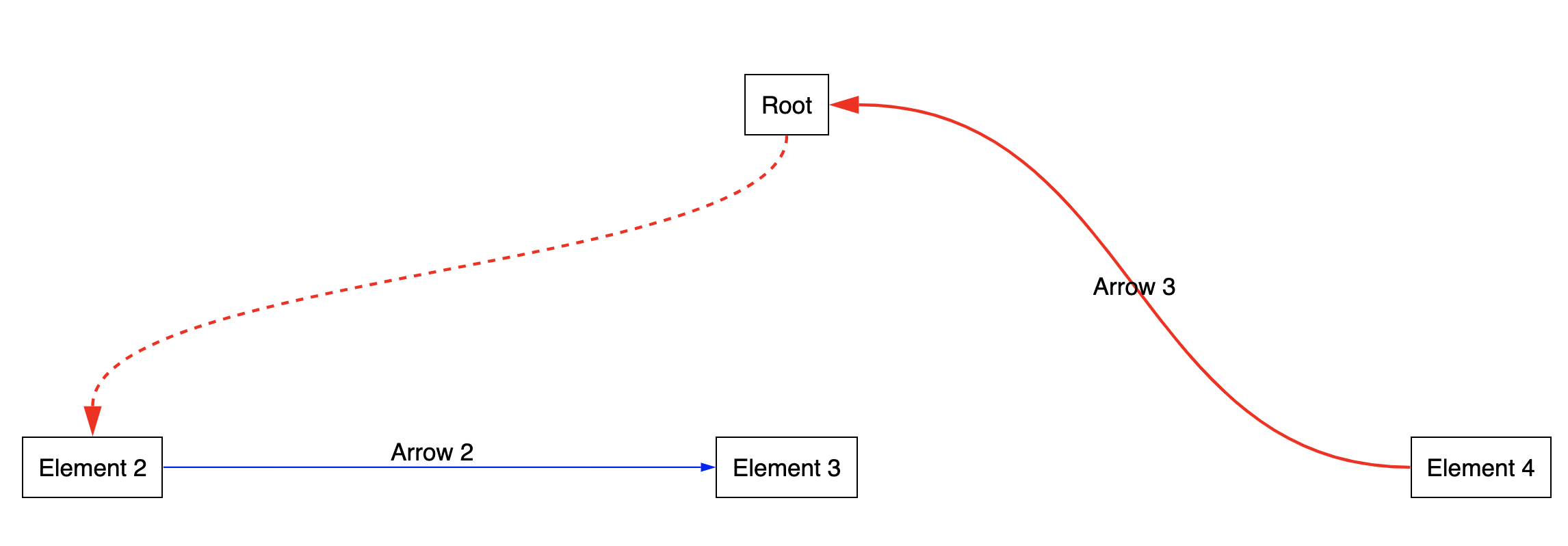
```javascript
import { ArcherContainer, ArcherElement } from 'react-archer';
const rootStyle = { display: 'flex', justifyContent: 'center' };
const rowStyle = { margin: '200px 0', display: 'flex', justifyContent: 'space-between' };
const boxStyle = { padding: '10px', border: '1px solid black' };
const App = () => {
return (
,
},
]}
>
Element 2
Element 3
Element 4
);
};
export default App;
```
## API
### `ArcherContainer`
#### Props
| Name | Type | Description |
| - | - | - |
| `strokeColor` | `string` | A color string `'#ff0000'`
| `strokeWidth` | `number` | A size in `px`
| `strokeDasharray` | `string` | Adds dashes to the stroke. It has to be a string representing an array of sizes. See some [SVG strokes documentation](https://www.w3schools.com/graphics/svg_stroking.asp).
| `noCurves` | `boolean` | Set this to true if you want angles instead of curves
| `lineStyle` | `string` | Can be one of `angle`, `curve` or `straight`. Setting this overrides `noCurves`.
| `offset` | `number` | Optional number for space between element and start/end of stroke
| `svgContainerStyle` | `Style` | Style of the SVG container element. Useful if you want to add a z-index to your SVG container to draw the arrows under your elements, for example.
| `children` | `React.Node` |
| `endShape` | `Object` | An object containing the props to configure the "end shape" of the arrow. Can be one of `arrow` (default) or `circle`. See [`ShapeType`](flow-typed/archer-types.js) for a complete list of available options.
| `startMarker` | `boolean` | Optional flag (default `false`) to also add a marker at the start of the arrow.
| `endMarker` | `boolean` | Optional flag (default `true`) to remove the marker at the end of the arrow.
#### Instance methods
If you access to the ref of your `ArcherContainer`, you will access the `refreshScreen` method.
This will allow you to have more control on when you want to re-draw the arrows.
### `ArcherElement`
| Name | Type | Description |
| - | - | - |
| `id` | `string` | The id that will identify the Archer Element.
| `children` | `React.Node \| (ArcherContext) => React.Node` | :warning: Must be a **single** element or a function of the internal context. If you are passing a custom component, it should be wrapped in a div or you should forward the reference (see [this](https://github.com/pierpo/react-archer/releases/tag/v2.0.0))
| `relations` | `Relation[]` |
The `Relation` type has the following shape:
```javascript
{
targetId: string,
targetAnchor: 'top' | 'bottom' | 'left' | 'right' | 'middle',
sourceAnchor: 'top' | 'bottom' | 'left' | 'right' | 'middle',
label: React.Node,
order?: number, // higher order means arrow will be drawn on top of the others
className?: string, // CSS class selectors on the SVG arrow
style: ArcherStyle,
domAttributes?: DOMAttributes, // Allows to make selectable arrows by passing dom attributes like onMouseHover
cursor?: Property.Cursor, // Allows to customize the hovering cursor of the arrow. Will only work if domAttributes is present
hitSlop?: number, // Allows to make the selectable arrow thicker. Will only work if domAttributes is present
}
```
> Please note that the `middle` anchor does not look very good: the curve won't look nice and the arrow marker will have a little offset.
> The issue won't be solved before a long time.
The `ArcherStyle` type has the following shape:
```javascript
{
strokeColor: string,
strokeWidth: number,
strokeDasharray: number,
noCurves: boolean,
lineStyle: string,
endShape: Object,
startMarker: boolean,
endMarker: boolean,
}
```
## Troubleshooting
### My arrows don't re-render correctly...
Try using the `refreshScreen` instance method on your `ArcherContainer` element. You can access it through the [ref of the component](https://reactjs.org/docs/refs-and-the-dom.html).
Call `refreshScreen` when the event that you need is triggered (`onScroll` etc.).