# React Custom Rating Component

> A fully customizable React rating component supporting stars, hearts, and custom icons with various precisions.

## Installation

Install using npm or yarn:

```shell
npm install react-custom-rating-component
```

Or

```shell
yarn add react-custom-rating-component
```

## Motivation

This package was created to offer a highly customizable and declarative rating component with support for different shapes, precise ratings, and custom icons.

## Demo

Check out the interactive playground showcasing different use cases:

[Playground](https://codesandbox.io/s/react-custom-rating-component-examples-fm98gv)

### Live Example

[React Custom Rating Component](https://react-custom-rating-component.web.app/)

### Demo Image
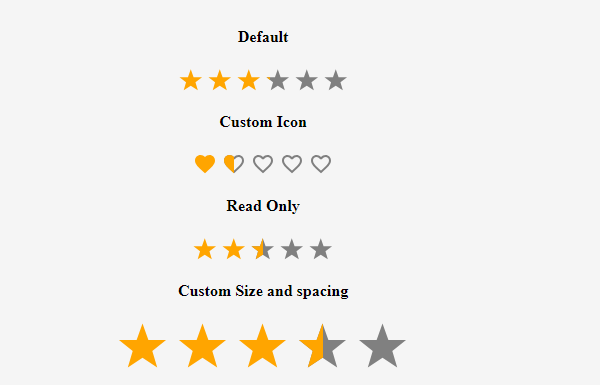
![](https://react-custom-rating-component.web.app/package-sc-1.png)

## Usage

```tsx
import { Rating } from 'react-custom-rating-component'

const App = () => {
  return (
    <div style={{ display: 'flex', justifyContent: 'center', alignItems: 'center', margin: '40px 20px' }}>
      <Rating
        defaultValue={2.5}
        size='30px'
        spacing='10px'
        activeColor='red'
        onChange={(newRating) => console.log('New Rating:', newRating)}
        onHover={(hoveredRating) => console.log('Hovered Rating:', hoveredRating)}
      />
    </div>
  )
}
```

## Features

- Customizable icons (stars, hearts, or custom SVGs)
- Supports precise ratings (0.1 - 1 increments)
- Read-only mode
- Custom colors and sizes
- Hover effects with tooltips

## Props

| Prop           | Type                          | Default  | Description                                   |
| -------------- | ----------------------------- | -------- | --------------------------------------------- |
| `defaultValue` | number                        | 0        | The default rating value.                     |
| `precision`    | 0.1 - 1                       | 1        | The increment step for rating selection.      |
| `count`        | number                        | 5        | The number of rating icons displayed.         |
| `shape`        | 'star' \| 'heart' \| 'custom' | 'star'   | Defines the shape of rating icons.            |
| `onChange`     | function                      | -        | Callback when rating value changes.           |
| `onHover`      | function                      | -        | Callback when rating is hovered.              |
| `readOnly`     | boolean                       | false    | Disables user interaction.                    |
| `size`         | string                        | '24px'   | Defines the size of rating icons.             |
| `spacing`      | string                        | '5px'    | Defines the space between rating icons.       |
| `activeColor`  | string                        | 'orange' | Color for active rating icons.                |
| `defaultColor` | string                        | 'gray'   | Color for inactive rating icons.              |
| `titleArray`   | string[]                      | -        | Custom tooltips for each rating level.        |
| `showTitle`    | boolean                       | false    | Enables tooltips on hover.                    |
| `emptyIcon`    | function                      | -        | Returns custom SVG component for empty icon.  |
| `fillIcon`     | function                      | -        | Returns custom SVG component for filled icon. |

## Examples

### Custom Icon Rating

```tsx
import { Rating, IconStylesProps } from 'react-custom-rating-component'

const CircleIcon = ({ iconStyles, defaultColor, isFilled }: IconStylesProps & { isFilled?: boolean }) => (
  <svg viewBox='0 0 24 24' style={iconStyles} fill={isFilled ? 'currentColor' : defaultColor}>
    <circle cx='12' cy='12' r='10' />
  </svg>
)

const App = () => (
  <Rating
    count={5}
    defaultValue={3.5}
    precision={0.5}
    shape='custom'
    emptyIcon={(props) => <CircleIcon {...props} isFilled={false} />}
    fillIcon={(props) => <CircleIcon {...props} isFilled />}
  />
)
```

### Read-Only Mode

```tsx
<Rating defaultValue={4} readOnly />
```

### Custom Colors

```tsx
<Rating defaultValue={4} activeColor='red' defaultColor='purple' />
```

### Tooltips

```tsx
<Rating defaultValue={3} showTitle titleArray={['Poor', 'Fair', 'Good', 'Better', 'Excellent']} />
```

## Issues & Contributions

If you encounter any issues or have feature requests, raise them on GitHub:

[GitHub Issues](https://github.com/KimeraMoses/react-custom-rating-component/issues)

## Thank You!

Thank you for using React Custom Rating Component!
