# React Customer Chat
Simple component integrate facebook customer chat plugin to your react web
 # Install
```js
npm install react-customer-chat --save
```
## [Setting Up the Plugin](https://developers.facebook.com/docs/messenger-platform/discovery/customer-chat-plugin#steps)
Option 1: Setup Using Developer Steps
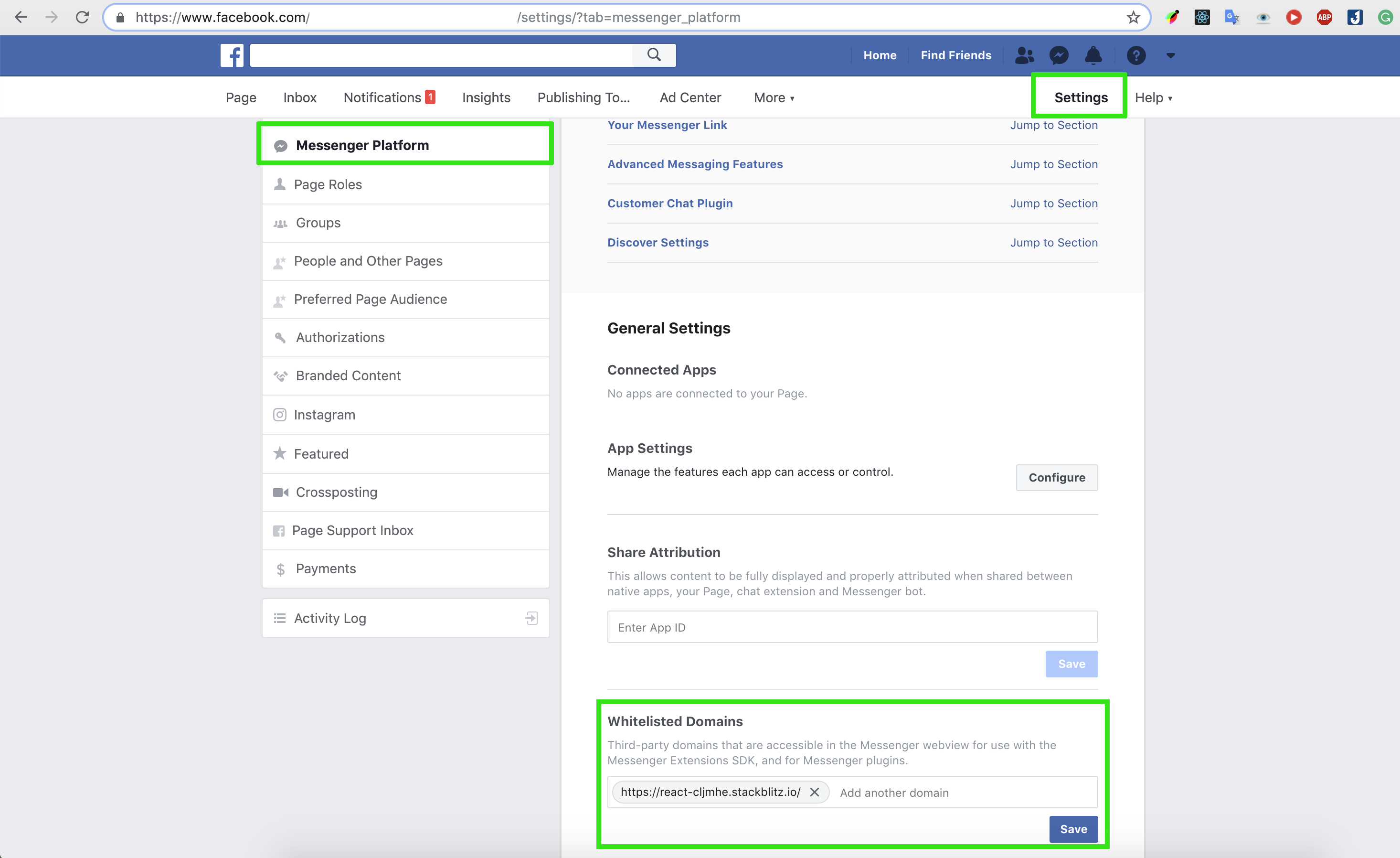
1. Click `Settings` at the top of your Page
2. Click `Messenger Platform` on the left
3. Edit whitelisted domains for your page in the `Whitelisted Domains` section
# Install
```js
npm install react-customer-chat --save
```
## [Setting Up the Plugin](https://developers.facebook.com/docs/messenger-platform/discovery/customer-chat-plugin#steps)
Option 1: Setup Using Developer Steps
1. Click `Settings` at the top of your Page
2. Click `Messenger Platform` on the left
3. Edit whitelisted domains for your page in the `Whitelisted Domains` section
Option 2: Using the Setup Tool
1. Go to Page Settings > Messenger Platform
2. In the 'Customer Chat Plugin' section, click the 'Set Up' Button.
The setup tool provides a simple UI for customizing the greeting message, theme color, displayed response time, and setting the whitelisted domains for the plugin.
[see more](https://developers.facebook.com/docs/messenger-platform/discovery/customer-chat-plugin#setup_tool)
> See more details in [Customer Chat Plugin official docs](https://developers.facebook.com/docs/messenger-platform/discovery/customer-chat-plugin) and [Customer Chat SDK official docs](https://developers.facebook.com/docs/messenger-platform/discovery/customer-chat-plugin/sdk).
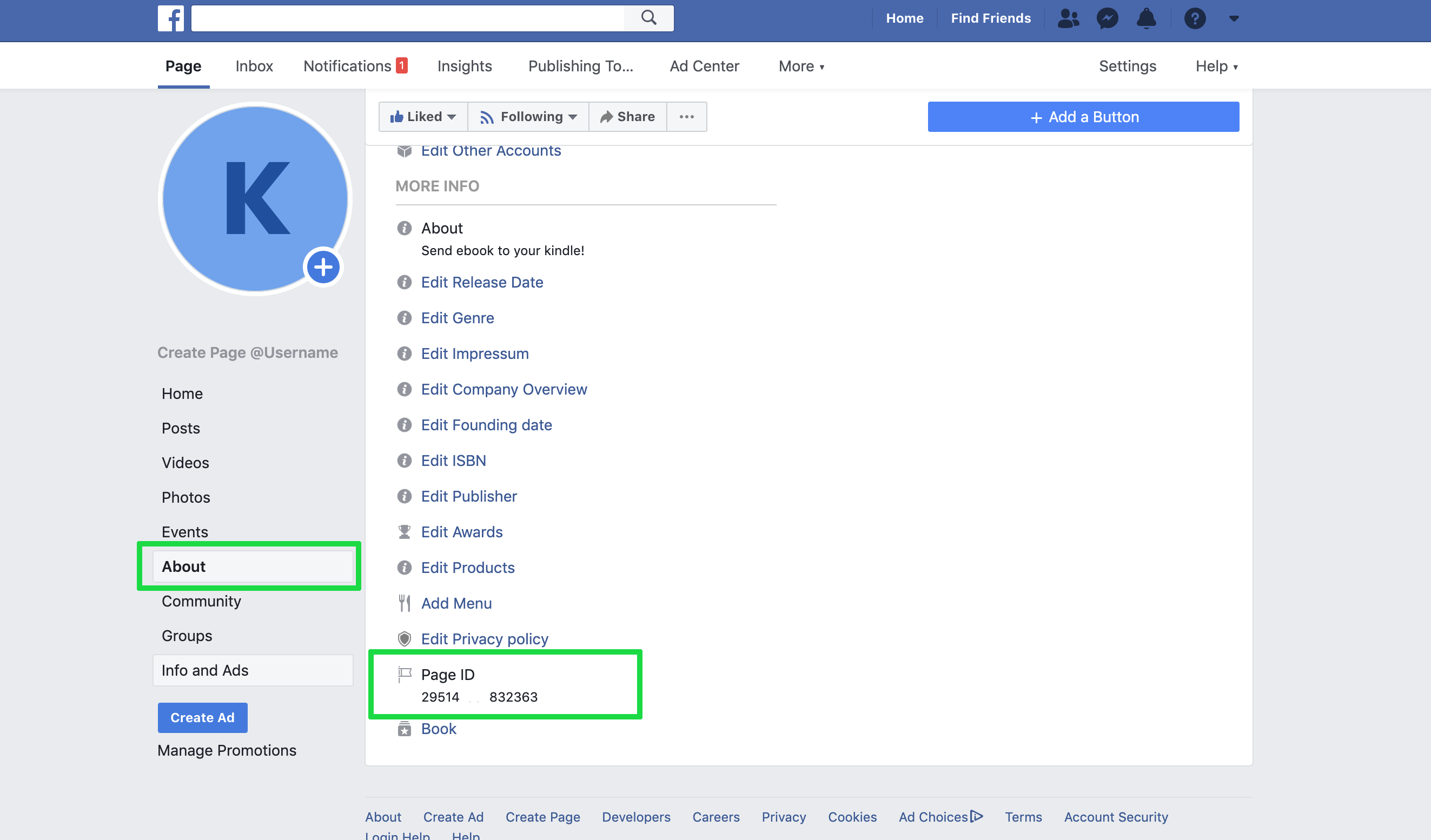
* How To Find Facebook Page ID?
Go to the Facebook page you own/admin > “About” > “Page Info.”
Now, at the very bottom, you can find the “Facebook Page ID”.
### Note:
For security reasons, the plugin will only render when loaded on a domain that you have whitelisted. Refer to [whitelisted_domains reference](https://developers.facebook.com/docs/messenger-platform/reference/messenger-profile-api/domain-whitelisting) to learn how to whitelist your domain programmatically.
> Domain Name and HTTPS Required
Domains must meet the following requirements to be whitelisted:
Served over HTTPS
Use a fully qualified domain name, such as https://www.messenger.com/. IP addresses and localhost are not supported for whitelisting.
# Usage:
```javascript
import CustomerChat from 'react-customer-chat'
```
# Props
* pageId: your page id
* include attribute [Customizing the Plugin](https://developers.facebook.com/docs/messenger-platform/discovery/customer-chat-plugin#customization)
# Pull request
Pull requests are welcome!