react-date-picker
=================
 > A carefully crafted date picker built especially for React, with love.
[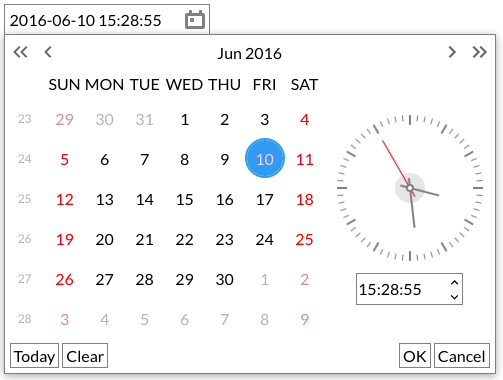](http://zippyui.com/docs/react-date-picker)
[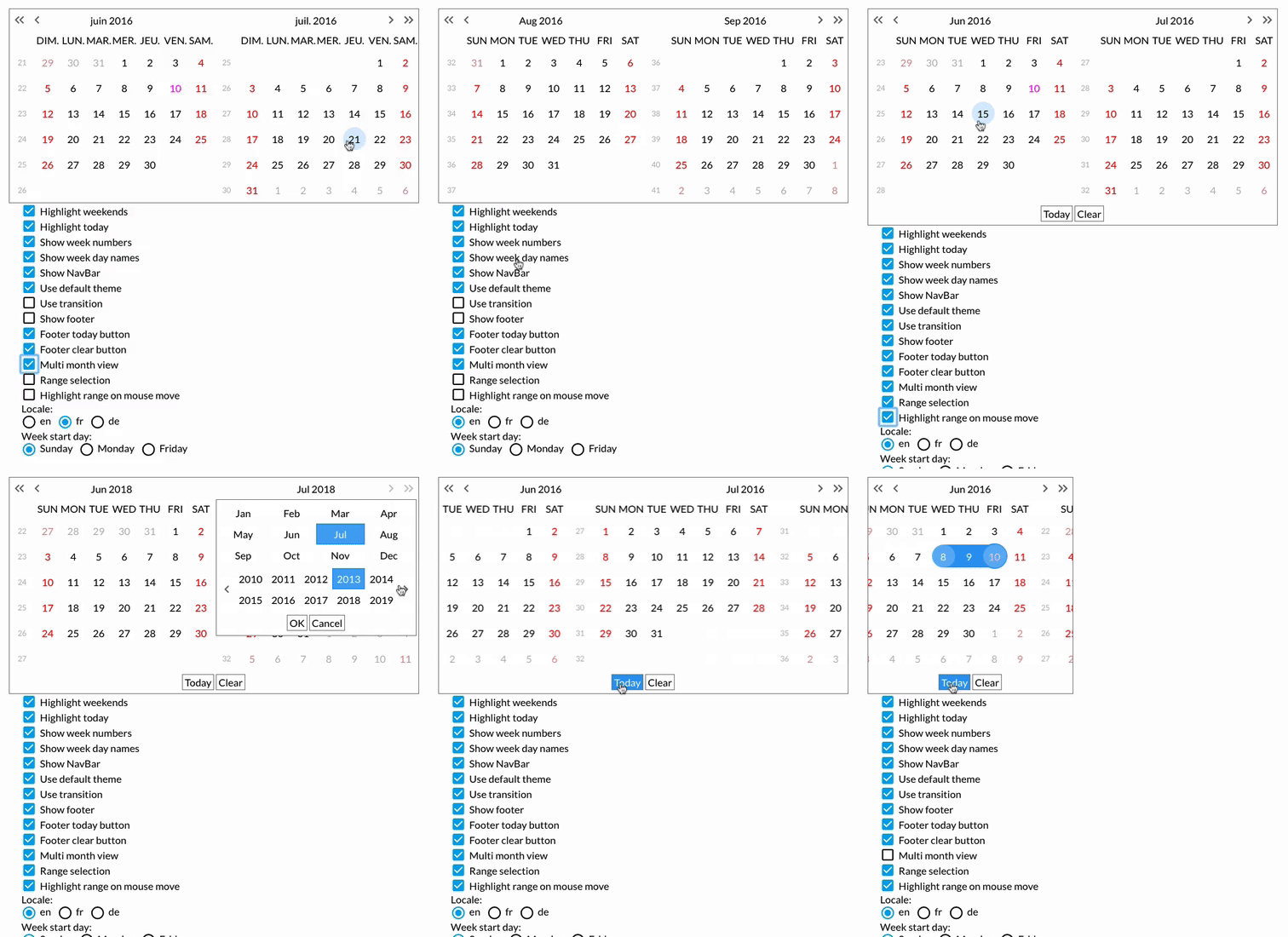](http://zippyui.com/docs/react-date-picker)
Click for [LIVE DEMO!](http://zippyui.com/docs/react-date-picker/examples)
## Install
```sh
$ npm install react-date-picker
```
## Key features
* input field integration
* fabulous keyboard navigation
* single & multi views
* easy to use but insanely configurable!
* multiple React components that can be used standalone but compose well together
* easily themable
* transition on navigation
* localization support & custom date formats
* & [a lot more](http://zippyui.com/docs/react-date-picker/examples) ...
## Usage
Import the css first
```jsx
import 'react-date-picker/index.css'
```
Then go ahead & use the components
```jsx
import { DateField, Calendar } from 'react-date-picker'
const onChange = (dateString, { dateMoment, timestamp }) => {
console.log(dateString)
}
let date = '2017-04-24'
```
## [Docs & examples](http://zippyui.com/docs/react-date-picker)
See [zippyui.com/docs/react-date-picker](http://zippyui.com/docs/react-date-picker)
## Components
The `react-date-picker` module exposes a number of components as named exports. The most important ones are:
* `DateField` - a date field
* `Calendar` - a calendar view - with support for date & time formats
The full list, besides those above:
* `MonthView` - a calendar view without support for time.
* `MultiMonthView` - a `MonthView` with support for multiple months. Composes `MonthView`
* `HistoryView` - a view for selecting a year & a month from a decade. Composes `DecadeView` & `YearView`
* `TransitionView` - a view for transitioning child views navigation
* `YearView` - a view for month selection
* `DecadeView` - a view for year selection
* `ClockInput` - a Clock with an input field to pick time
* `Clock` - a component displaying time
* `DateFormatInput` - an input with support for editing dates & times.
* `DateFormatSpinnerInput` - a `DateFormatInput` that also has spinner controls.
* `Footer`
* `NavBar`
## Changelog
See [changelog](./CHANGELOG.md)
For the old `v4` README, see [v4](./README.v4.md)
## Contributing
When contributing, please work on the `src` dir.
You'll need to run the following commands:
```sh
$ npm i # install all depedencies
$ npm run dev
# starts webpack-dev-server, which does all the bundling and live reloading
```
Now navigate to [localhost:8080](http://localhost:8080)
With this setup, you have an environment which live-reloads all your changes, so you have a rapid development cycle.
## Other
`react-date-picker` uses the awesome `moment.js` library ( Big thanks!)
## License
#### MIT
> A carefully crafted date picker built especially for React, with love.
[](http://zippyui.com/docs/react-date-picker)
[](http://zippyui.com/docs/react-date-picker)
Click for [LIVE DEMO!](http://zippyui.com/docs/react-date-picker/examples)
## Install
```sh
$ npm install react-date-picker
```
## Key features
* input field integration
* fabulous keyboard navigation
* single & multi views
* easy to use but insanely configurable!
* multiple React components that can be used standalone but compose well together
* easily themable
* transition on navigation
* localization support & custom date formats
* & [a lot more](http://zippyui.com/docs/react-date-picker/examples) ...
## Usage
Import the css first
```jsx
import 'react-date-picker/index.css'
```
Then go ahead & use the components
```jsx
import { DateField, Calendar } from 'react-date-picker'
const onChange = (dateString, { dateMoment, timestamp }) => {
console.log(dateString)
}
let date = '2017-04-24'
```
## [Docs & examples](http://zippyui.com/docs/react-date-picker)
See [zippyui.com/docs/react-date-picker](http://zippyui.com/docs/react-date-picker)
## Components
The `react-date-picker` module exposes a number of components as named exports. The most important ones are:
* `DateField` - a date field
* `Calendar` - a calendar view - with support for date & time formats
The full list, besides those above:
* `MonthView` - a calendar view without support for time.
* `MultiMonthView` - a `MonthView` with support for multiple months. Composes `MonthView`
* `HistoryView` - a view for selecting a year & a month from a decade. Composes `DecadeView` & `YearView`
* `TransitionView` - a view for transitioning child views navigation
* `YearView` - a view for month selection
* `DecadeView` - a view for year selection
* `ClockInput` - a Clock with an input field to pick time
* `Clock` - a component displaying time
* `DateFormatInput` - an input with support for editing dates & times.
* `DateFormatSpinnerInput` - a `DateFormatInput` that also has spinner controls.
* `Footer`
* `NavBar`
## Changelog
See [changelog](./CHANGELOG.md)
For the old `v4` README, see [v4](./README.v4.md)
## Contributing
When contributing, please work on the `src` dir.
You'll need to run the following commands:
```sh
$ npm i # install all depedencies
$ npm run dev
# starts webpack-dev-server, which does all the bundling and live reloading
```
Now navigate to [localhost:8080](http://localhost:8080)
With this setup, you have an environment which live-reloads all your changes, so you have a rapid development cycle.
## Other
`react-date-picker` uses the awesome `moment.js` library ( Big thanks!)
## License
#### MIT