react-datum-datagrid
====================
A datagrid built on [react-virtualized](https://github.com/bvaughn/react-virtualized) that works with
[react-datum](https://github.com/zulily/react-datum) and [Backbone.js](http://backbonejs.org/)
[](https://travis-ci.org/zulily/react-datum)
[](https://coveralls.io/github/zulily/react-datum?branch=master)
## Live Demo & Examples
http://zulily.github.io/react-datum-datagrid/docs/examples/#basic
## Installation
**Install from NPM:**
```bash
npm install react-datum-datagrid --save
```
** Install from the web: **
Copy development (.js) or optimized (.min.js) distribution file from https://github.com/zulily/react-datum-datagrid/tree/master/dist in with your other vendor js and use a script tag or AMD to load it.
## Usage
Suppose you have a Backbone Collection of puppy records such as http://zulily.github.io/react-datum-datagrid/test/lib/puppyData.js ...
```javascript
let puppyCollection = new Backbone.Collection(PUPPY_DATA)
```
To build an infinitely scrolling datagrid with locked left columns...
```javascript
class BasicDatagridDisplay extends React.Component {
static displayName = "BasicDatagridDisplay"
render(){
// ReactDatumDatagrid will fill what ever element it is placed in
// Below we constrain it to 100% of the demo pane and a fixed width of 600px
// You can also use Flex! See TODO Flexy Demo
return (
)
}
getColumns(){
return [{
key: 'imageUrl',
name: 'Image',
width: 120,
datum: ReactDatum.LazyPhoto,
locked: true
},{
key: 'name',
},{
key: 'breed',
},{
key: 'size',
width: 80,
},{
key: 'sex',
width: 80,
},{
key: 'contactEmail',
width: '200',
datum: ReactDatum.Email,
datumProps: {
ellipsizeAt: false,
reverseEllipsis: true,
}
}]
}
}
window.Demo = BasicDatagridDisplay
```
And violà...
*screenshot - click to view demo:*
[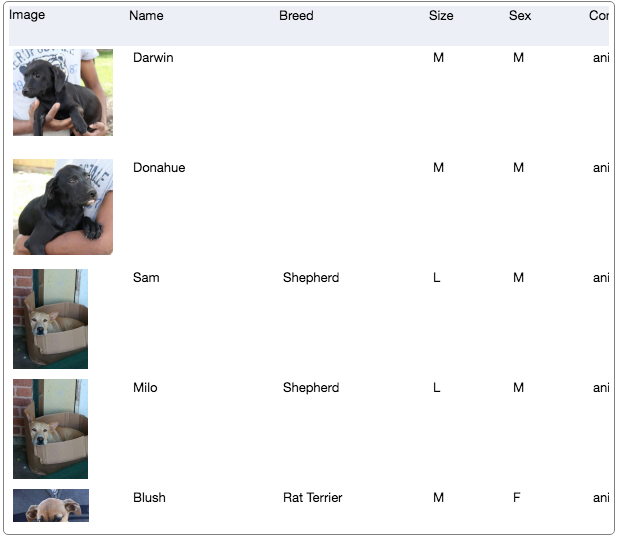 ](http://zulily.github.io/react-datum-datagrid/docs/examples/#basic)
## Column definition objects
Currently supported column feature attributes:
- `key` - this is the only required attribute for all columns. It is the attribute name in the model to display and update.
- `name` - the label to display in the header. May be a React Component. default: column `key` humanized and title cased.
- `width` - the width of the column (when orientation datagrid prop is landscape)
- `height` - the height of the columns (when orientation datagrid prop is portrait)
- `datum` - a datum component to use for display and input. default: ReactDatum.Text
- `datumProps` - props to pass datum component above
- `sortable` - bool; show sort icon in column header
- `sortAttr` - string attribute name to sort by if different then key
- `exportable` - bool; if false, don't export this column in in csv export
- `exportAs` - string to use as header in csv export. default name
- `exportAttribute` - string name of attribute to export if diff than column.key
- `csvExportAttribute` - string name of attribute to export to csv. defaults to exportAttr
- `exportFunction` - a callback function Called with (model, columnDef, datagrid, options). If specified, has precedence over exportAttr and csvExportAttr. It should return a text or numeric value to export for the given model and column definition. Called with (model, columnDefinition, datagrid, options) where options can be `forCsv`: true if being exported for Csv .
- `validations` - An array of methods to call with (model, columnDef, value). Each method specified must return true or the model value will not be set. Failing validations should return a string error message suitable for user comprehension.
- `cellStyle` - inline styles to apply to the cell.
- `cellComponent` - Component to display in cells. alias: `defaultFormatter`. default: ReactDatumDatagrid.Cell
- `headerComponent` - Component to display in header cells. alias: `header`. default: ReactDatumDatagrid.HeaderCell
## API Docs
The object oriented API of react-datum-datagrid is documented in our [API Docs](http://zulily.github.io/react-datum-datagrid/docs/api).
Enough reading, [check out the demos!](http://zulily.github.io/react-datum/docs/examples/)
](http://zulily.github.io/react-datum-datagrid/docs/examples/#basic)
## Column definition objects
Currently supported column feature attributes:
- `key` - this is the only required attribute for all columns. It is the attribute name in the model to display and update.
- `name` - the label to display in the header. May be a React Component. default: column `key` humanized and title cased.
- `width` - the width of the column (when orientation datagrid prop is landscape)
- `height` - the height of the columns (when orientation datagrid prop is portrait)
- `datum` - a datum component to use for display and input. default: ReactDatum.Text
- `datumProps` - props to pass datum component above
- `sortable` - bool; show sort icon in column header
- `sortAttr` - string attribute name to sort by if different then key
- `exportable` - bool; if false, don't export this column in in csv export
- `exportAs` - string to use as header in csv export. default name
- `exportAttribute` - string name of attribute to export if diff than column.key
- `csvExportAttribute` - string name of attribute to export to csv. defaults to exportAttr
- `exportFunction` - a callback function Called with (model, columnDef, datagrid, options). If specified, has precedence over exportAttr and csvExportAttr. It should return a text or numeric value to export for the given model and column definition. Called with (model, columnDefinition, datagrid, options) where options can be `forCsv`: true if being exported for Csv .
- `validations` - An array of methods to call with (model, columnDef, value). Each method specified must return true or the model value will not be set. Failing validations should return a string error message suitable for user comprehension.
- `cellStyle` - inline styles to apply to the cell.
- `cellComponent` - Component to display in cells. alias: `defaultFormatter`. default: ReactDatumDatagrid.Cell
- `headerComponent` - Component to display in header cells. alias: `header`. default: ReactDatumDatagrid.HeaderCell
## API Docs
The object oriented API of react-datum-datagrid is documented in our [API Docs](http://zulily.github.io/react-datum-datagrid/docs/api).
Enough reading, [check out the demos!](http://zulily.github.io/react-datum/docs/examples/)