# react-error-boundaries
[](http://npm.im/react-popconfirm)
[](http://npm-stat.com/charts.html?package=react-popconfirm&from=2017-04-07)
[](http://opensource.org/licenses/MIT)
A reusable React error boundaries component. Based on React 16.2.0.
> Error boundaries are React components that catch JavaScript errors anywhere in their child component tree, log those errors, and display a fallback UI instead of the component tree that crashed. Error boundaries catch errors during rendering, in lifecycle methods, and in constructors of the whole tree below them.
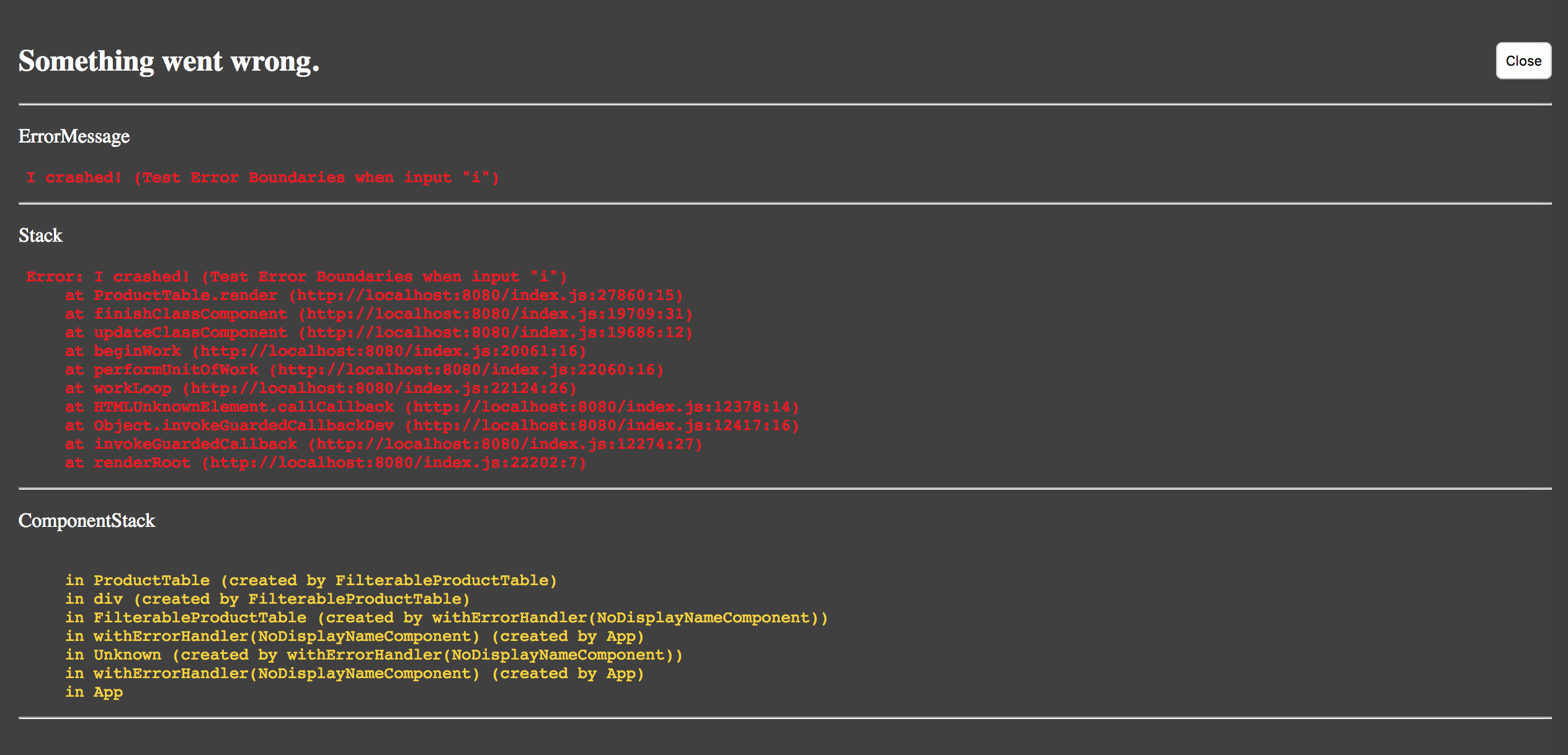
Effect picture:
## Install
```s
npm install react-error-boundaries
```
## Usage
Import:
```js
// import all
import { ErrorBoundary, withErrorHandler, errorHandlerDecorator, FallbackView } from 'react-error-boundaries'
// import default ErrorBoundary
import ErrorBoundary from 'react-error-boundaries'
```
Intro:
- **ErrorBoundary**: React container component to handler error
- **withErrorHandler**: React HOC to customize the errorCallback function and FallbackComponent
- **errorHandlerDecorator**: By this, you can use error boundary as ES7 decorator
- **FallbackView**: The default fallback component, show when error occur. props: `{ error: Objec, errorInfo: Object, closeErrorModal: Function }`(Unable in production, if import you will got undefined)
Use as a component container:
```js
// import first
import React from 'react'
import ReactDOM from 'react-dom'
import ErrorBoundary from 'react-error-boundaries'
const App = () => {
return (
);
}
ReactDOM.render(, document.getElementById('root'));
```
And you can handle errors by providing an onError callback, and customize the FallbackComponent by providing a Component.
> FallbackComponent will receive props:
- closeErrorModal: Function, call when click close button
- error: An error that has been thrown.
- errorInfo: An object with componentStack key. The property has information about component stack during thrown error.
```js
// import first
import React from 'react'
import ReactDOM from 'react-dom'
import ErrorBoundary from 'react-error-boundaries'
function onError(error, errorInfo, props) {
// you can report Error to service here
console.error('onError:', error.message);
}
const App = () => {
return (
);
}
ReactDOM.render(, document.getElementById('root'));
```
Use as class decorator:
```js
// import first
import React from 'react'
import { errorHandlerDecorator } from 'react-error-boundaries'
// ES7 decorator, need babel plugin "transform-decorators-legacy"
@errorHandlerDecorator
class YourComponent extends React.Component {
constructor(props) {
super(props);
}
render() {
return (
contents
);
}
}
// or not use @decorator just like this:
// export default errorHandlerDecorator(YourComponent)
function onError(error, errorInfo, props) {
// you can report Error to service here
console.log('onError:', error.message);
}
ReactDOM.render(, document.getElementById('root'));
```
You can also customize the FallbackComponent in HOC way:
```js
// import first, FallbackView is default Fallback Component
import { withErrorHandler, FallbackView } from 'react-error-boundaries'
// customize the errorCallback
function onError(error, errorInfo, props) {
// you can report Error to service here
console.error('onError:', error.message);
}
/* example 1 */
const ComponentWithErrorBoundary = withErrorHandler(
YourFallbackComponent, // Fallback Component to display errors, to replace default FallbackView
YourComponent // Component to decorate
);
ReactDOM.render(, document.getElementById('root'));
/* example 2 */
// customize as a ES7 decorator
const yourErrorHandlerDecorator = withErrorHandler(
YourFallbackComponent // Fallback Component to display errors, to replace default FallbackView
);
@yourErrorHandlerDecorator
class YourComponent extends React.component {
//......
}
ReactDOM.render(, document.getElementById('root'));
```
## Try example
Input `i` in search input and error will throw.
```shell
# run example, auto open browser and enable hot loader
npm install
npm start
```
## How to disable it
To enable it by set `process.env.NODE_ENV` or `process.env.ERROR_ENV` as `development`, so you can disable it by setting `process.env.NODE_ENV` to be `production` and not set `process.env.ERROR_ENV` as `development`.
With webpack by setting like this to disable it:
```js
plugins: [
new webpack.DefinePlugin({
"process.env": {
NODE_ENV: '"production"'
}
})
]
```
With config like this to enable it even in NODE_ENV is production:
```js
plugins: [
new webpack.DefinePlugin({
"process.env": {
NODE_ENV: '"production"',
ERROR_ENV: '"development"'
}
})
]
```
## License
MIT