[![npm version][npm-version-src]][npm-version-href]
[![GitHub Actions][github-actions-src]][github-actions-href]
[](http://commitizen.github.io/cz-cli/)
# QR & Barcode Library & CLI
> A QR & Barcode Library for Node.js/Bun, the CLI, including all major browsers.
## Features
- 🤖 **QR Code**: Customizable Generation & Reading
- 📊 **Barcode**: `CODE128`, `EAN`, `EAN-13`, `EAN-8`, `EAN-5`, `EAN-2`, `UPC (A)`, `CODE39`, `ITF-14`, `MSI`, `Pharmacode`, `Codabar`—Generation & Reading
- 📦 **Lightweight**: Zero dependencies
- 🚀 **Fast**: Built with performance in mind
- 📜 **TypeScript**: Strongly typed
- 📚 **Simple**: Easy to use
- 📖 **Documentation**: Well-documented
- 🛠 **Library & CLI**: Interact in different ways
## Install
It's simple to install the library and CLI:
```sh
npm install qrx
bun add qrx
yarn add qrx
pnpm add qrx
```
_Check out the package.json scripts for more commands._
## Usage
### QR Code
```html
```
If you want to customize the QR code, you can pass in an options object:
```html
```
You can also use methods to interact with the QR code:
```ts
qrCode.clear() // clear the code
qrCode.makeCode('https://docs.stacksjs.org') // create another code
```
### Barcode
A lightweight Barcode library with zero dependencies. It supports multiple barcode formats and works in browsers and with _Node.js & Bun_.
#### Supported Formats
- [CODE128](https://github.com/lindell/JsBarcode/wiki/CODE128)
- CODE128 (automatic mode switching)
- CODE128 A/B/C (force mode)
- [EAN](https://github.com/lindell/JsBarcode/wiki/EAN)
- EAN-13
- EAN-8
- EAN-5
- EAN-2
- UPC (A)
- UPC (E)
- [CODE39](https://github.com/lindell/JsBarcode/wiki/CODE39)
- [ITF](https://github.com/lindell/JsBarcode/wiki/ITF-14)
- ITF
- ITF-14
- [MSI](https://github.com/lindell/JsBarcode/wiki/MSI)
- MSI10
- MSI11
- MSI1010
- MSI1110
- [Pharmacode](https://github.com/lindell/JsBarcode/wiki/pharmacode)
- [Codabar](https://github.com/lindell/JsBarcode/wiki/codabar)
#### Browser Example
````html
````
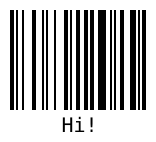
##### Simple example
````javascript
Barcode('#barcode', 'Hi!')
````
#### Example with options
```ts
Barcode('#barcode', '1234', {
format: 'pharmacode',
lineColor: '#0aa',
width: 4,
height: 40,
displayValue: false
})
```

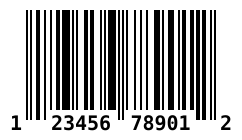
#### More advanced use case
````javascript
Barcode('#barcode')
.options({ font: 'OCR-B' }) // Will affect all barcodes
.EAN13('1234567890128', { fontSize: 18, textMargin: 0 })
.blank(20) // Create space between the barcodes
.EAN5('12345', { height: 85, textPosition: 'top', fontSize: 16, marginTop: 15 })
.render()
````

#### Or define the value and options in the HTML element
Use any `barcode-*` or `data-*` as attributes where `*` is any option.
````html
````
And then initialize it with:
```ts
Barcode('.barcode').init()
```
#### Retrieve the barcode values so you can render it any way you'd like
Pass in an object which will be filled with data.
```javascript
const data = {}
Barcode(data, 'text', { ...options })
```
data will be filled with a ``` encodings ``` property which has all the needed values. See docs for examples of what data looks like.
#### Node.js & Bun
----
#### With canvas
```ts
import { Barcode } from '@stacksjs/qrx'
import { createCanvas } from 'canvas'
const canvas = createCanvas()
Barcode(canvas, 'Hello')
// As this is a node-canvas, you can configure it as you like:
// see https://github.com/Automattic/node-canvas for more information
```
#### With svg
```ts
import { DOMImplementation, XMLSerializer } from 'xmldom'
const xmlSerializer = new XMLSerializer()
const document = new DOMImplementation().createDocument('http://www.w3.org/1999/xhtml', 'html', null)
const svgNode = document.createElementNS('http://www.w3.org/2000/svg', 'svg')
Barcode(svgNode, 'test', {
xmlDocument: document,
})
const svgText = xmlSerializer.serializeToString(svgNode)
```
#### Options
For information about how to use the options, see the docs.
| Option | Default value | Type |
|--------|---------------|------|
| [`format`](https://github.com/lindell/JsBarcode/wiki/Options#format) | `"auto" (CODE128)` | `String` |
| [`width`](https://github.com/lindell/JsBarcode/wiki/Options#width) | `2` | `Number` |
| [`height`](https://github.com/lindell/JsBarcode/wiki/Options#height) | `100` | `Number` |
| [`displayValue`](https://github.com/lindell/JsBarcode/wiki/Options#display-value) | `true` | `Boolean` |
| [`text`](https://github.com/lindell/JsBarcode/wiki/Options#text) | `undefined` | `String` |
| [`fontOptions`](https://github.com/lindell/JsBarcode/wiki/Options#font-options) | `""` | `String` |
| [`font`](https://github.com/lindell/JsBarcode/wiki/Options#font) | `"monospace"` | `String` |
| [`textAlign`](https://github.com/lindell/JsBarcode/wiki/Options#text-align) | `"center"` | `String` |
| [`textPosition`](https://github.com/lindell/JsBarcode/wiki/Options#text-position) | `"bottom"` | `String` |
| [`textMargin`](https://github.com/lindell/JsBarcode/wiki/Options#text-margin) | `2` | `Number` |
| [`fontSize`](https://github.com/lindell/JsBarcode/wiki/Options#font-size) | `20` | `Number` |
| [`background`](https://github.com/lindell/JsBarcode/wiki/Options#background) | `"#ffffff"` | `String (CSS color)` |
| [`lineColor`](https://github.com/lindell/JsBarcode/wiki/Options#line-color) | `"#000000"` | `String (CSS color)` |
| [`margin`](https://github.com/lindell/JsBarcode/wiki/Options#margins) | `10` | `Number` |
| [`marginTop`](https://github.com/lindell/JsBarcode/wiki/Options#margins) | `undefined` | `Number` |
| [`marginBottom`](https://github.com/lindell/JsBarcode/wiki/Options#margins) | `undefined` | `Number` |
| [`marginLeft`](https://github.com/lindell/JsBarcode/wiki/Options#margins) | `undefined` | `Number` |
| [`marginRight`](https://github.com/lindell/JsBarcode/wiki/Options#margins) | `undefined` | `Number` |
| [`valid`](https://github.com/lindell/JsBarcode/wiki/Options#valid) | `function(valid){}` | `Function` |
## Testing
```bash
bun test
```
## Changelog
Please see our [releases](https://github.com/stackjs/qrx/releases) page for more information on what has changed recently.
## Contributing
Please see [CONTRIBUTING](.github/CONTRIBUTING.md) for details.
## Community
For help, discussion about best practices, or any other conversation that would benefit from being searchable:
[Discussions on GitHub](https://github.com/stacksjs/qrx/discussions)
For casual chit-chat with others using this package:
[Join the Stacks Discord Server](https://discord.gg/stacksjs)
## Postcardware
Stacks OSS will always stay open-sourced, and we will always love to receive postcards from wherever Stacks is used! _And we also publish them on our website. Thank you, Spatie._
Our address: Stacks.js, 12665 Village Ln #2306, Playa Vista, CA 90094, United States 🌎
## Sponsors
We would like to extend our thanks to the following sponsors for funding Stacks development. If you are interested in becoming a sponsor, please reach out to us.
- [JetBrains](https://www.jetbrains.com/)
- [The Solana Foundation](https://solana.com/)
## Credit
Many thanks for the libraries that laid the groundwork:
- **QRCode.js**:
- **JsBarcode**:
## License
The MIT License (MIT). Please see [LICENSE](LICENSE.md) for more information.
Made with 💙
[npm-version-src]: https://img.shields.io/npm/v/qrx?style=flat-square
[npm-version-href]: https://npmjs.com/package/qrx
[github-actions-src]: https://img.shields.io/github/actions/workflow/status/stacksjs/qrx/ci.yml?style=flat-square&branch=main
[github-actions-href]: https://github.com/stacksjs/qrx/actions?query=workflow%3Aci
