# react-katex
[](https://travis-ci.org/talyssonoc/react-katex) [](https://codeclimate.com/github/talyssonoc/react-katex) [](https://coveralls.io/github/talyssonoc/react-katex?branch=master)
> Display math expressions with [KaTeX](https://khan.github.io/KaTeX/) and React
## Installation
```sh
$ npm install react-katex
# or
$ yarn add react-katex
```
## Usage
```jsx
import 'katex/dist/katex.min.css';
import { InlineMath, BlockMath } from 'react-katex';
```
### InlineMath
Display math in the middle of the text.
```jsx
var InlineMath = ReactKaTeX.InlineMath;
ReactDOM.render(,
document.getElementById('math'));
// or
ReactDOM.render(\int_0^\infty x^2 dx,
document.getElementById('math'));
```
It will be rendered like this:

### BlockMath
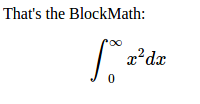
Display math in a separated block, with larger font and symbols.
```jsx
var BlockMath = ReactKaTeX.BlockMath;
ReactDOM.render(,
document.getElementById('math'));
// or
ReactDOM.render(\int_0^\infty x^2 dx,
document.getElementById('math'));
```
It will be rendered like this:
**Note:**
Don't forget to import KaTeX CSS file.
```jsx
import 'katex/dist/katex.min.css';
```
### Error handling
#### Default error message
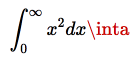
By default the error rendering is handled by KaTeX. You can optionally pass `errorColor` (defaults to `#cc0000`) as a prop:
```jsx
var BlockMath = ReactKaTeX.BlockMath;
ReactDOM.render(
, document.getElementById('math'));
```
This will be rendered like so:
#### Custom error message
It's possible to handle parse errors using the prop `renderError`. This prop must be a function that receives the error object and returns what should be rendered when parsing fails:
```jsx
var BlockMath = ReactKaTeX.BlockMath;
ReactDOM.render(
{
return Fail: {error.name}
}}
/>,
document.getElementById('math'));
// The code above will render 'Fail: ParseError' because it's the value returned from `renderError`.
```
This will render `Fail: ParseError`:

### Escaping expressions
In addition to using the `math` property, you can also quote as a child allowing the use of `{ }` in your expression.
```jsx
ReactDOM.render({"\\frac{\\text{m}}{\\text{s}^2}"},
document.getElementById('math'));
```
Or Multiline
```jsx
ReactDOM.render({`\\frac{\\text{m}}
{\\text{s}^2}`},
document.getElementById('math'));
```
However, it can be annoying to escape backslashes. This can be circumvented with the `String.raw` tag on a template literal when using ES6.
```jsx
ReactDOM.render({String.raw`\frac{\text{m}}{\text{s}^2}`},
document.getElementById('math'));
```
Backticks must be escaped with a backslash but would be passed to KaTeX as \\\`. A tag can be created to replace \\\` with \`
```jsx
const latex = (...a) => String.raw(...a).replace("\\`","`")
ReactDOM.render({latex`\``},
document.getElementById('math'));
```
You can even do variable substitution
```jsx
const top = "m";
const bottom = "s";
ReactDOM.render({String.raw`\frac{\text{${top}}}{\text{${bottom}}^2}`},
document.getElementById('math'));
```