## React Native Android Location Services Dialog Box
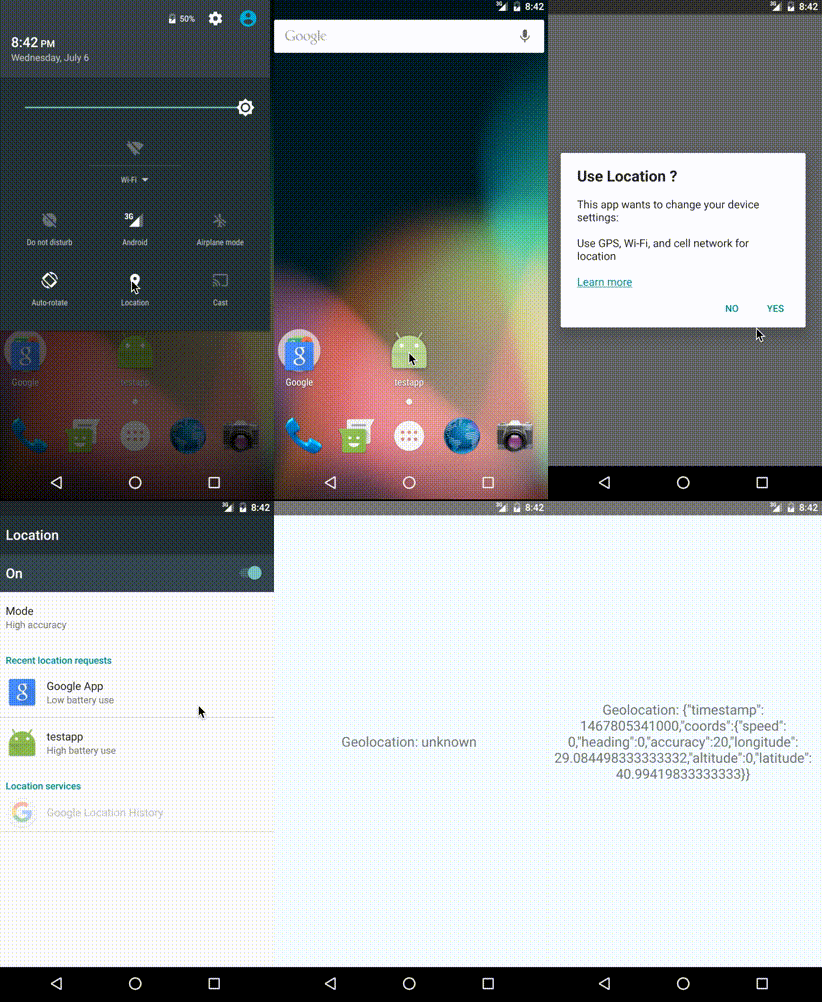 A react-native component for turn on the dialog box from android location services
[](https://badge.fury.io/js/react-native-android-location-services-dialog-box)
### Installation
#### Mostly automatic installation (recommended)
1. `npm install react-native-android-location-services-dialog-box --save`
2. `react-native link react-native-android-location-services-dialog-box`
#### Manual Installation
##### Android
1. `npm install react-native-android-location-services-dialog-box --save`
2. Make the following additions to the given files:
**android/settings.gradle**
```
include ':react-native-android-location-services-dialog-box'
project(':react-native-android-location-services-dialog-box').projectDir = new File(rootProject.projectDir, '../node_modules/react-native-android-location-services-dialog-box/android')
```
**android/app/build.gradle**
```
dependencies {
...
compile project(':react-native-android-location-services-dialog-box')
}
```
**MainApplication.java**
On top, where imports are:
```java
import com.showlocationservicesdialogbox.LocationServicesDialogBoxPackage;
```
Under `protected List getPackages() {`:
```java
return Arrays.asList(
new MainReactPackage(),
new LocationServicesDialogBoxPackage() // <== this
);
```
### Usage
```javascript
import { BackHandler } from 'react-native';
import LocationServicesDialogBox from "react-native-android-location-services-dialog-box";
LocationServicesDialogBox.checkLocationServicesIsEnabled({
message: "
A react-native component for turn on the dialog box from android location services
[](https://badge.fury.io/js/react-native-android-location-services-dialog-box)
### Installation
#### Mostly automatic installation (recommended)
1. `npm install react-native-android-location-services-dialog-box --save`
2. `react-native link react-native-android-location-services-dialog-box`
#### Manual Installation
##### Android
1. `npm install react-native-android-location-services-dialog-box --save`
2. Make the following additions to the given files:
**android/settings.gradle**
```
include ':react-native-android-location-services-dialog-box'
project(':react-native-android-location-services-dialog-box').projectDir = new File(rootProject.projectDir, '../node_modules/react-native-android-location-services-dialog-box/android')
```
**android/app/build.gradle**
```
dependencies {
...
compile project(':react-native-android-location-services-dialog-box')
}
```
**MainApplication.java**
On top, where imports are:
```java
import com.showlocationservicesdialogbox.LocationServicesDialogBoxPackage;
```
Under `protected List getPackages() {`:
```java
return Arrays.asList(
new MainReactPackage(),
new LocationServicesDialogBoxPackage() // <== this
);
```
### Usage
```javascript
import { BackHandler } from 'react-native';
import LocationServicesDialogBox from "react-native-android-location-services-dialog-box";
LocationServicesDialogBox.checkLocationServicesIsEnabled({
message: "Use Location ?
This app wants to change your device settings:
Use GPS, Wi-Fi, and cell network for location
Learn more",
ok: "YES",
cancel: "NO",
enableHighAccuracy: true, // true => GPS AND NETWORK PROVIDER, false => ONLY GPS PROVIDER
showDialog: true, // false => Opens the Location access page directly
openLocationServices: true, // false => Directly catch method is called if location services are turned off
preventOutSideTouch: false, //true => To prevent the location services window from closing when it is clicked outside
preventBackClick: false //true => To prevent the location services popup from closing when it is clicked back button
}).then(function(success) {
console.log(success); // success => {alreadyEnabled: false, enabled: true, status: "enabled"}
}).catch((error) => {
console.log(error.message); // error.message => "disabled"
});
BackHandler.addEventListener('hardwareBackPress', () => { //(optional) you can use it if you need it
LocationServicesDialogBox.forceCloseDialog();
});
```
### Usage And Example For Async Method `ES6`
```javascript
import { BackHandler } from 'react-native';
import LocationServicesDialogBox from "react-native-android-location-services-dialog-box";
export default class LocationServiceTestPage extends Component {
constructor(props){
super(props);
this.checkIsLocation().catch(error => error);
BackHandler.addEventListener('hardwareBackPress', () => { //(optional) you can use it if you need it
LocationServicesDialogBox.forceCloseDialog();
});
}
async checkIsLocation():Promise {
let check = await LocationServicesDialogBox.checkLocationServicesIsEnabled({
message: "Use Location ?",
ok: "YES",
cancel: "NO",
enableHighAccuracy: true, // true => GPS AND NETWORK PROVIDER, false => ONLY GPS PROVIDER
showDialog: true, // false => Opens the Location access page directly
openLocationServices: true, // false => Directly catch method is called if location services are turned off
preventOutSideTouch: false, //true => To prevent the location services window from closing when it is clicked outside
preventBackClick: false //true => To prevent the location services popup from closing when it is clicked back button
}).catch(error => error);
return Object.is(check.status, "enabled");
}
}
```
### Examples `ES6`
```javascript
import React, { Component } from 'react';
import {
AppRegistry,
Text,
View,
BackHandler
} from 'react-native';
import LocationServicesDialogBox from "react-native-android-location-services-dialog-box";
class SampleApp extends Component {
state = {
initialPosition: 'unknown',
};
componentDidMount() {
LocationServicesDialogBox.checkLocationServicesIsEnabled({
message: "Use Location ?
This app wants to change your device settings:
Use GPS, Wi-Fi, and cell network for location
Learn more",
ok: "YES",
cancel: "NO",
enableHighAccuracy: true, // true => GPS AND NETWORK PROVIDER, false => ONLY GPS PROVIDER
showDialog: true, // false => Opens the Location access page directly
openLocationServices: true, // false => Directly catch method is called if location services are turned off
preventOutSideTouch: false, //true => To prevent the location services popup from closing when it is clicked outside
preventBackClick: false //true => To prevent the location services popup from closing when it is clicked back button
}).then(function(success) {
// success => {alreadyEnabled: true, enabled: true, status: "enabled"}
navigator.geolocation.getCurrentPosition((position) => {
let initialPosition = JSON.stringify(position);
this.setState({ initialPosition });
}, error => console.log(error), { enableHighAccuracy: false, timeout: 20000, maximumAge: 1000 });
}.bind(this)
).catch((error) => {
console.log(error.message);
});
BackHandler.addEventListener('hardwareBackPress', () => { //(optional) you can use it if you need it
LocationServicesDialogBox.forceCloseDialog();
});
}
render() {
return (
Geolocation: {this.state.initialPosition}
);
}
}
AppRegistry.registerComponent('SampleApp', () => SampleApp);
```
### Props
| Prop | Type | Default | Description |
|-----------------------------------|-------------|-------------|-------------------------------------------------------------------------------------|
|`message` |`HTML` |`null` |Dialog box content text |
|`ok` |`String` |`null` |Dialog box ok button text |
|`cancel` |`String` |`null` |Dialog box cancel button text |
|`enableHighAccuracy` (optional) |`Boolean` |`true` |Provider switch (ONLY GPS OR GPS AND NETWORK) |
|`showDialog` (optional) |`Boolean` |`true` |Indicate whether to display the dialog box |
|`openLocationServices` (optional) |`Boolean` |`true` |Indicate whether to display the location services screen |
|`preventOutSideTouch` (optional) |`Boolean` |`true` |To prevent the location services window from closing when it is clicked outside |
|`preventBackClick` (optional) |`Boolean` |`true` |To prevent the location services popup from closing when it is clicked back button |
### Methods
| Name | Return | Return Value |
|------------------------------------|--------------------|------------------|
|`checkLocationServicesIsEnabled` | Promise | Object |
|`forceCloseDialog` (optional using) | void | - |
[](https://nodei.co/npm/react-native-android-location-services-dialog-box/)