# Android Installation Guide
## Prerequisites
The documentation that follows assumes you have generated a React Native Android project using the `react-native-cli`, i.e.:
```
react-native init ReactNativeAzureNotificationHubSample
```
In addition to the standard React Native requirements, you will also need to install the following Android SDK components with your prefered SDK management tools:
* Google Play services
## Install react-native-azurenotificationhub
```
npm install react-native-azurenotificationhub
```
## Create a Notification Hub
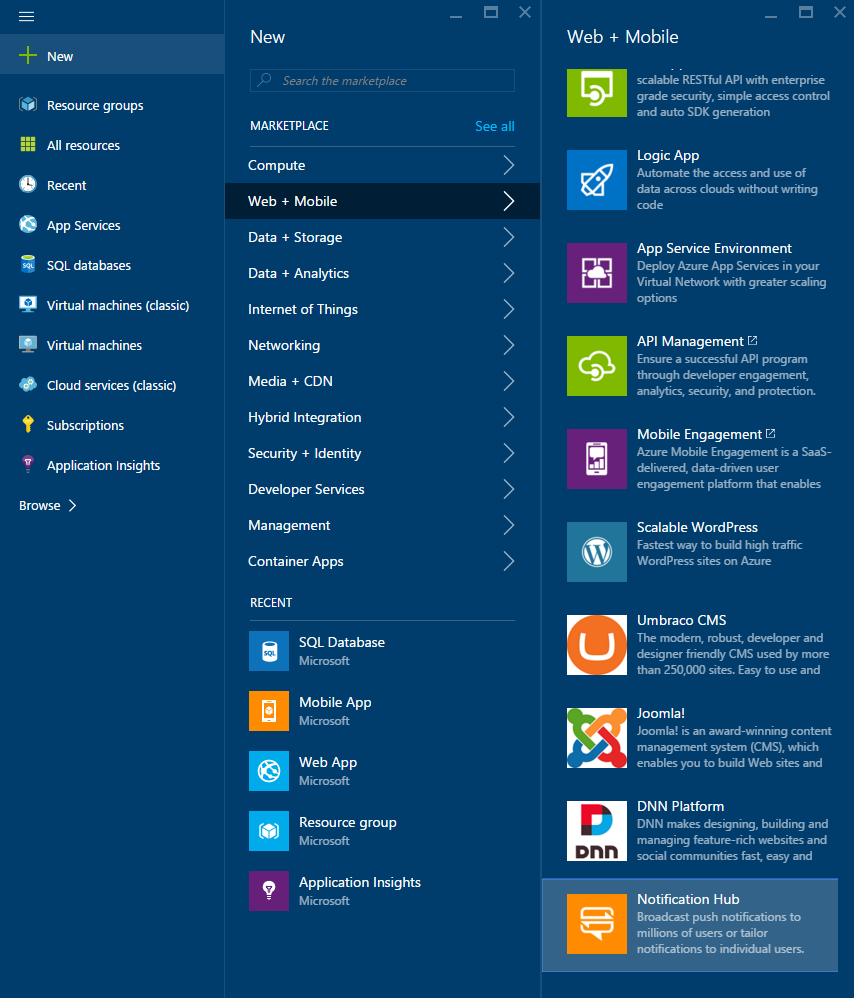
* Log on to the [Azure Portal](https://portal.azure.com) and create a new **Notification Hub**.
## Register app with Notification Hub
* Log in to the [Firebase console](https://firebase.google.com/console/) and create a new Firebase project if you don't already have one.
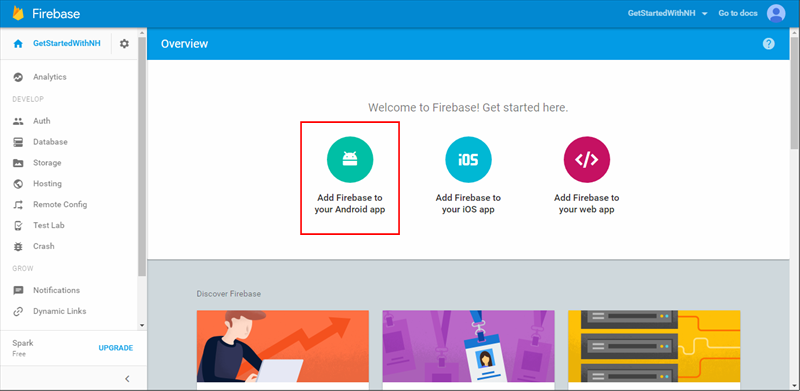
* After your project is created click **Add Firebase to your Android app** and folow the instructions provided.
.
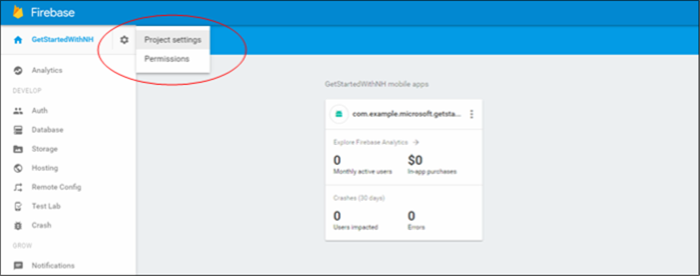
* In the Firebase Console, click the cog for your project and then click **Project Settings**
* Click the **Cloud Messaging** tab in your project settings and copy the value of the **Server key** and **Sender ID**. The former will be used to configure the Notification Hub Access Policy and and the latter for your React Native module registration.
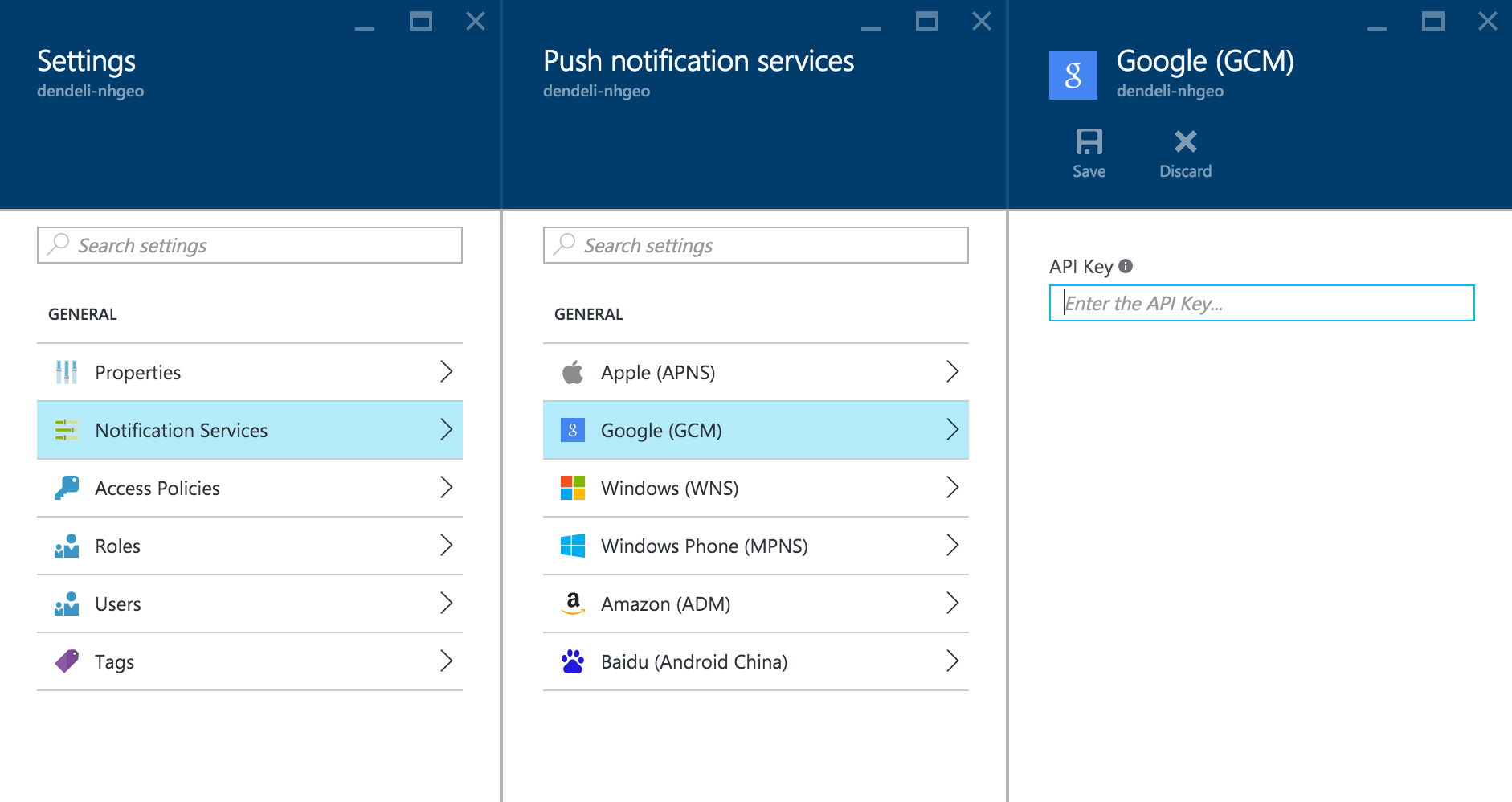
* Back on the [Azure Portal](https://portal.azure.com) page for your notification hub, select **Settings > Notification Services > Google (GCM)**. Enter the FCM **Server key** you copied from the [Firebase console](https://firebase.google.com/console/) and click **Save**.
## Merging of icon resources
In `android/app/src/main/AndroidManifest.xml`
```xml
```
This resolves the error caused by the manifest merger tool for gradle.
## Export React Native Module from app
In `android/build.gradle`
```gradle
...
buildscript {
...
dependencies {
...
classpath("com.google.gms:google-services:4.2.0")
}
}
allprojects {
repositories {
...
maven { url 'https://dl.bintray.com/microsoftazuremobile/SDK' }
}
}
```
In `android/app/build.gradle`
```gradle
...
dependencies {
...
implementation project(":react-native-azurenotificationhub") // <- Note only include this line if using a version of RN < 0.60 since it will be auto linked
implementation "com.google.firebase:firebase-messaging:17.6.0"
implementation "com.google.firebase:firebase-core:16.0.8"
}
apply plugin: "com.google.gms.google-services"
```
In `android/app/src/main/AndroidManifest.xml`
```xml
...
...
...
```
## If using a version of React Native before [RN 0.60](https://github.com/facebook/react-native/releases/tag/v0.60.0) that does not support autolinking:
In `android/settings.gradle`
```gradle
...
include ':react-native-azurenotificationhub'
project(':react-native-azurenotificationhub').projectDir = file('../node_modules/react-native-azurenotificationhub/android')
```
Register the module package in `MainApplication.java`
```java
import com.azure.reactnative.notificationhub.ReactNativeNotificationHubPackage;
public class MainApplication extends Application implements ReactApplication {
private final ReactNativeHost mReactNativeHost = new ReactNativeHost(this) {
@Override
protected boolean getUseDeveloperSupport() {
return BuildConfig.DEBUG;
}
@Override
protected List getPackages() {
return Arrays.asList(
new MainReactPackage(),
new ReactNativeNotificationHubPackage() // <-- Add this package
);
}
};
...
}
```
## JavaScript Configuration
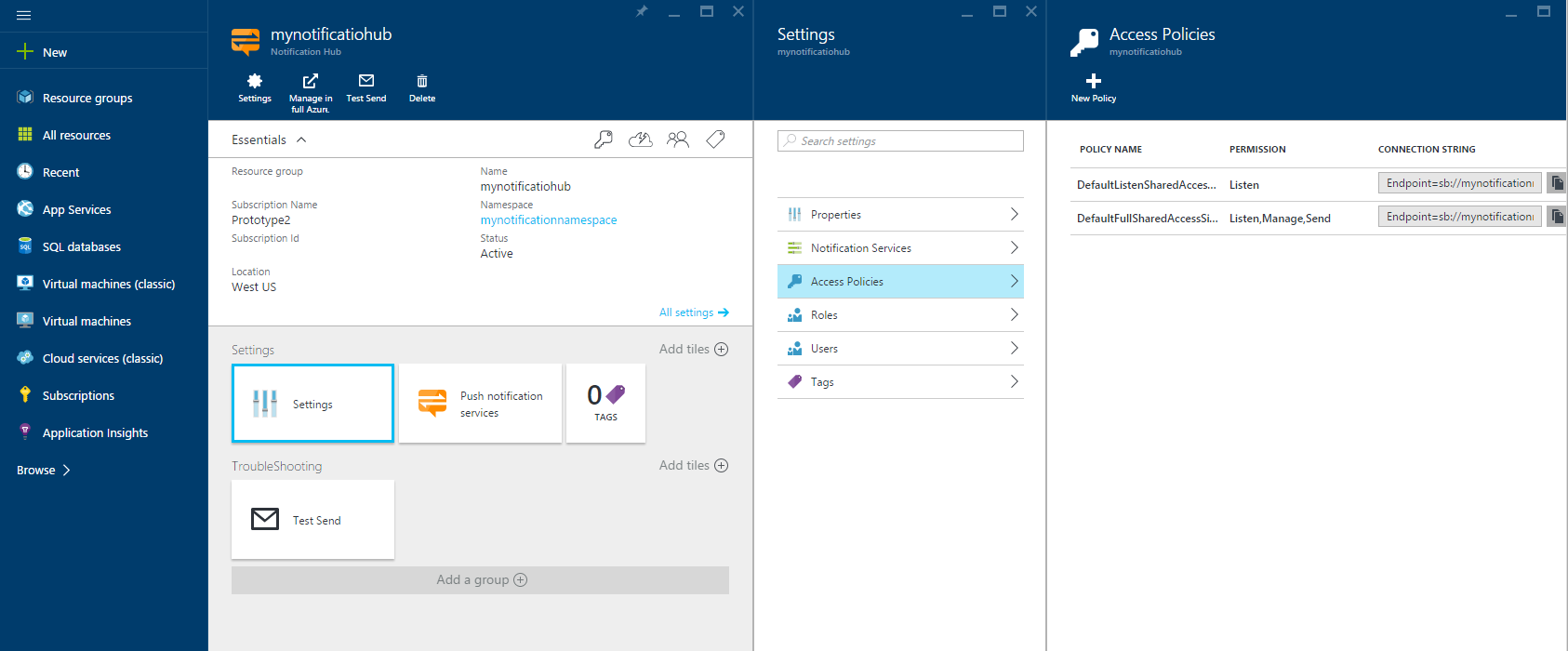
On the [Azure Portal](https://portal.azure.com) page for your notification hub, copy a connection string from **Settings > Access Policies**.
The example below shows how you can register and unregister from Azure Notification Hub in your React component.
```js
import React, { Component } from 'react';
import { NativeEventEmitter } from 'react-native';
import {
StyleSheet,
Text,
TouchableOpacity,
View,
} from 'react-native';
const NotificationHub = require('react-native-azurenotificationhub');
const PushNotificationEmitter = new NativeEventEmitter(NotificationHub);
const EVENT_AZURE_NOTIFICATION_HUB_REGISTERED = 'azureNotificationHubRegistered';
const EVENT_AZURE_NOTIFICATION_HUB_REGISTERED_ERROR = 'azureNotificationHubRegisteredError';
const EVENT_REMOTE_NOTIFICATION_RECEIVED = 'remoteNotificationReceived';
const connectionString = '...'; // The Notification Hub connection string
const hubName = '...'; // The Notification Hub name
const senderID = '...'; // The Sender ID from the Cloud Messaging tab of the Firebase console
const tags = [ ... ]; // The set of tags to subscribe to
const channelName = '...'; // The channel's name (optional)
const channelDescription = '...'; // The channel's description (optional)
const channelImportance = 3; // The channel's importance (NotificationManager.IMPORTANCE_DEFAULT = 3) (optional)
// Notes:
// 1. Setting this value to 4 enables heads-up notification on Android 8
// 2. On some devices such as Samsung Galaxy, changing this value requires
// uninstalling/re-installing the app to take effect.
const channelShowBadge = true; // Optional
const channelEnableLights = true; // Optional
const channelEnableVibration = true; // Optional
const template = '...'; // Notification hub templates:
// https://docs.microsoft.com/en-us/azure/notification-hubs/notification-hubs-templates-cross-platform-push-messages
const templateName = '...'; // The template's name
export default class App extends Component {
constructor(props) {
super(props);
PushNotificationEmitter.addListener(EVENT_REMOTE_NOTIFICATION_RECEIVED, this._onRemoteNotification);
}
register() {
PushNotificationEmitter.addListener(EVENT_AZURE_NOTIFICATION_HUB_REGISTERED, this._onAzureNotificationHubRegistered);
PushNotificationEmitter.addListener(EVENT_AZURE_NOTIFICATION_HUB_REGISTERED_ERROR, this._onAzureNotificationHubRegisteredError);
NotificationHub.register({
connectionString,
hubName,
senderID,
tags,
channelName,
channelDescription,
channelImportance,
channelShowBadge,
channelEnableLights,
channelEnableVibration
})
.then((res) => console.warn(res))
.catch(reason => console.warn(reason));
}
registerTemplate() {
PushNotificationEmitter.addListener(EVENT_AZURE_NOTIFICATION_HUB_REGISTERED, this._onAzureNotificationHubRegistered);
PushNotificationEmitter.addListener(EVENT_AZURE_NOTIFICATION_HUB_REGISTERED_ERROR, this._onAzureNotificationHubRegisteredError);
NotificationHub.registerTemplate({
connectionString,
hubName,
senderID,
template,
templateName,
tags,
channelName,
channelDescription,
channelImportance,
channelShowBadge,
channelEnableLights,
channelEnableVibration
})
.then((res) => console.warn(res))
.catch(reason => console.warn(reason));
}
getInitialNotification() {
NotificationHub.getInitialNotification()
.then((res) => console.warn(res))
.catch(reason => console.warn(reason));
}
getUUID() {
NotificationHub.getUUID(false)
.then((res) => console.warn(res))
.catch(reason => console.warn(reason));
}
isNotificationEnabledOnOSLevel() {
NotificationHub.isNotificationEnabledOnOSLevel()
.then((res) => console.warn(res))
.catch(reason => console.warn(reason));
}
unregister() {
NotificationHub.unregister()
.then((res) => console.warn(res))
.catch(reason => console.warn(reason));
}
unregisterTemplate() {
NotificationHub.unregisterTemplate(templateName)
.then((res) => console.warn(res))
.catch(reason => console.warn(reason));
}
render() {
return (
Register
Register Template
Get initial notification
Get UUID
Check if notification is enabled
Unregister
Unregister Template
);
}
_onAzureNotificationHubRegistered(registrationID) {
console.warn('RegistrationID: ' + registrationID);
}
_onAzureNotificationHubRegisteredError(error) {
console.warn('Error: ' + error);
}
_onRemoteNotification(notification) {
console.warn(notification);
}
}
const styles = StyleSheet.create({
container: {
flex: 1,
justifyContent: 'center',
alignItems: 'center',
backgroundColor: '#F5FCFF',
},
welcome: {
fontSize: 20,
textAlign: 'center',
margin: 10,
},
instructions: {
textAlign: 'center',
color: '#333333',
marginBottom: 5,
},
});
```