# React Native Flurry SDK (react-native-flurry-sdk)
[](https://www.npmjs.com/package/react-native-flurry-sdk)

[](https://www.npmjs.com/package/react-native-flurry-sdk)
A React Native plugin for Flurry SDK
- **Tutorial and sample project** are now available at [https://github.com/flurry/React-Native-Tutorial](https://github.com/flurry/React-Native-Tutorial).
- **Flurry Push** for messaging and **Flurry Config** for remote configuration are now supported by our plugin!
- If you are using Apple Xcode < 12, please use release [v6.3.0](https://www.npmjs.com/package/react-native-flurry-sdk/v/6.3.0).
- If you are using React Native < 0.60, please use release [v6.0.9](https://www.npmjs.com/package/react-native-flurry-sdk/v/6.0.9).
## Table of contents
- [Installation](#installation)
- [Android](#android)
- [iOS](#ios)
- [tvOS](#tvos)
- [Example](#example)
- [API Reference](#api-reference)
- [Support](#support)
- [License](#license)
## Installation
1. Install Flurry SDK module by `npm`
```bash
npm install react-native-flurry-sdk --save
```
2. If you are using React Native >= 0.60, install CocoaPods dependency
```bash
cd ios && pod install && cd ..
```
If you are using React Native < 0.60, link React Native dependency
```bash
react-native link react-native-flurry-sdk
```
3. Add Flurry JS code
```javascript
import Flurry from 'react-native-flurry-sdk';
```
### Android
- By default, Flurry adds `INTERNET` and `ACCESS_NETWORK_STATE` permissions to optimize analytics data. Please see [Manual Flurry Android SDK Integration](https://developer.yahoo.com/flurry/docs/integrateflurry/android-manual/) for the other recommended options.
- To improve analytics identities, please see [Manual Flurry Android SDK Integration](https://developer.yahoo.com/flurry/docs/integrateflurry/android-manual/) for adding Google Play Services library in your app by including the following in your `build.gradle` file:
```groovy
dependencies {
// Recommended to add Google Play Services
implementation 'com.google.android.gms:play-services-ads-identifier:17.1.0'
}
```
- **Flurry Push**
In order to use [Flurry Push](https://developer.yahoo.com/flurry/docs/push/) for [Android](https://developer.yahoo.com/flurry/docs/push/integration/android/), please follow the additional steps below:
1. Follow [Set up a Firebase Cloud Messaging client app on Android](https://firebase.google.com/docs/cloud-messaging/android/client). Complete "Set up Firebase and the FCM SDK" step for adding Firebase to your Android project. There should be a file `google-services.json` in your project's `android/app` folder now. You do not need to provide any setup codes here. Your `build.gradle` will look like:
```groovy
// android/build.gradle (project-level)
buildscript {
dependencies {
classpath 'com.google.gms:google-services:4.3.10'
}
}
```
```groovy
// android/app/build.gradle (app-level)
apply plugin: 'com.google.gms.google-services'
dependencies {
implementation 'com.google.firebase:firebase-messaging:21.1.0'
}
```
2. If you want to customize Flurry Push notification, please do the Flurry setup in `MainApplication.onCreate()`. With the same APIs as the JavaScript version.
```java
import com.flurry.android.reactnative.FlurryModule;
public class MainApplication extends Application implements ReactApplication {
@Override
public void onCreate() {
super.onCreate();
new FlurryModule.Builder()
.withCrashReporting(true)
.withLogEnabled(true)
.withLogLevel(Log.VERBOSE)
.withReportLocation(true)
.withMessaging(true, options_or_listener) // optional user's native `FlurryMarketingOptions` or `FlurryMessagingListener`.
.build(this, FLURRY_ANDROID_API_KEY);
```
3. Add notification permission in the Android manifest file. (required on the Android 13 and above devices.)
```xml
```
4. Set up "Android Authorization" in Flurry [Push Authorization](https://developer.yahoo.com/flurry/docs/push/authorization/).
### iOS
- Please note that starting from [React Native 0.60](https://facebook.github.io/react-native/blog/2019/07/03/version-60), [CocoaPods](https://cocoapods.org) is now the default integration approach for React Native iOS projects. If you are not using CocoaPods, please stick to `react-native-flurry-sdk@6.0.9`.
- **Flurry Push**
To set up Flurry Push, please take the following steps.
1. Open your Podfile, which is located under the `ios` folder of your project.
2. Add the following line in your target section before `use_native_modules!`
```ruby
pod 'react-native-flurry-sdk', :path => '../node_modules/react-native-flurry-sdk/ios', :subspecs => ['FlurrySDK-Push']
```
Your target section of Podfile should now look like this:
```ruby
target 'YourTarget' do
# Pods for your target
pod 'React', :path => '../node_modules/react-native/'
pod 'React-Core', :path => '../node_modules/react-native/React'
# ... other React dependencies
# Add react-native-flurry-sdk
pod 'react-native-flurry-sdk', :path => '../node_modules/react-native-flurry-sdk/ios', :subspecs => ['FlurrySDK-Push']
# ... other targets
target 'YourTargetTests' do
# ...
end
use_native_modules!
end
```
3. Install the dependencies again by executing
```bash
cd ios && pod install && cd ..
```
4. Open your `.xcworkspace` file which is under the `ios` folder. Go to "Capabilities" tab and enable Push Notifications.

5. Enable Background Modes (Background Fetch and Remote Notifications turned on).
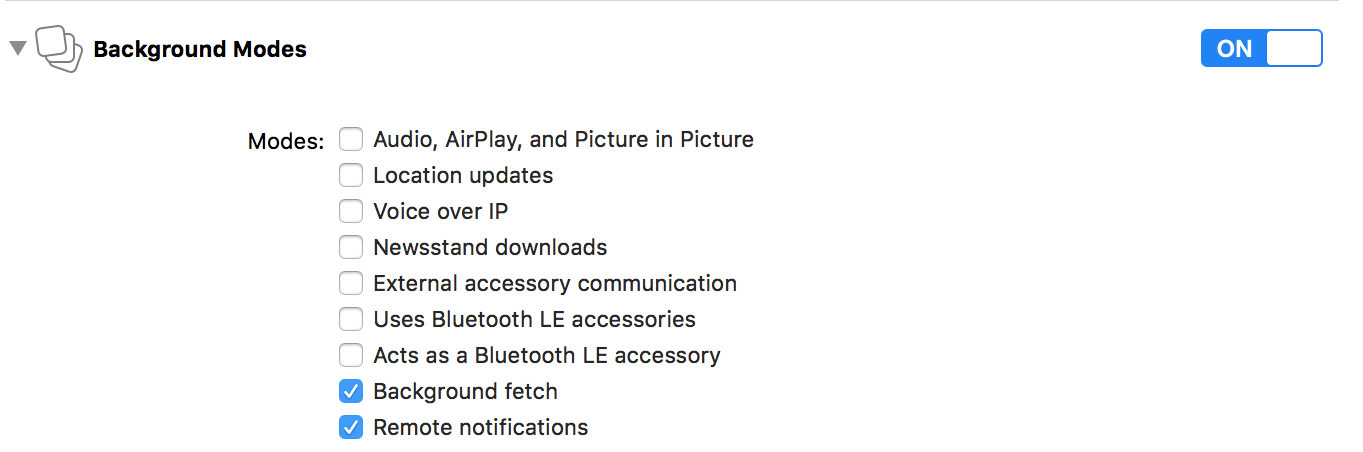
Now your `Info.plist` should contain the following items. For more information, please see [Push Setup](https://developer.yahoo.com/flurry/docs/push/integration/ios/).

6. Set up "iOS Authorization" in Flurry [Push Authorization](https://developer.yahoo.com/flurry/docs/push/authorization/).
7. In order to handle notifications from a cold start, Flurry Push requires to be initialized from AppDelegate as early as possible. Please open `AppDelegate.m`, import the header file
```objc
#import "ReactNativeFlurry.h"
```
And add this line right after `- (BOOL)application:(UIApplication *)application didFinishLaunchingWithOptions:(NSDictionary *)launchOptions`
```objc
[ReactNativeFlurry enableMessaging];
```
### tvOS
- Please note that Flurry Messaging and Flurry Config are currently not available on tvOS. For the detailed list of unavailable APIs, please see API reference below.
## Example
- `index.js`
```javascript
import { AppRegistry } from 'react-native';
import { name as appName } from './app.json';
import App from './App';
import Flurry from 'react-native-flurry-sdk';
// Init Flurry once as early as possible recommended in index.js.
// For each platform (Android, iOS) where the app runs you need to acquire a unique Flurry API Key.
// i.e., you need two API keys if you are going to release the app on both Android and iOS platforms.
// If you are building for TV platforms, you will need two API keys for Android TV and tvOS.
new Flurry.Builder()
.withCrashReporting(true)
.withLogEnabled(true)
.withLogLevel(Flurry.LogLevel.DEBUG)
.withReportLocation(true)
.build(FLURRY_ANDROID_API_KEY, FLURRY_IOS_API_KEY);
AppRegistry.registerComponent(appName, () => App);
```
- `App.js`
```javascript
import React, { Component } from 'react';
import {
Platform,
StyleSheet,
Text,
View
} from 'react-native';
import Flurry from 'react-native-flurry-sdk';
type Props = {};
export default class App extends Component {
constructor(props) {
super(props);
// Example to get Flurry versions.
Flurry.getVersions().then((versions) => {
console.log('Versions: ' + versions.agentVersion + ' : ' + versions.releaseVersion + ' : ' + versions.sessionId);
});
// Example to get Flurry Publisher Segmentation.
Flurry.getPublisherSegmentation(true).then((segmentations) => {
console.log('Publisher Segmentation: ' + segmentations.segments);
});
}
render() {
// Set Flurry preferences.
Flurry.setLogEnabled(true);
Flurry.setLogLevel(Flurry.LogLevel.VERBOSE);
// Set user preferences.
Flurry.setAge(36);
Flurry.setGender(Flurry.Gender.FEMALE);
Flurry.setReportLocation(true);
// Set user properties.
Flurry.UserProperties.set(Flurry.UserProperties.PROPERTY_REGISTERED_USER, 'True');
// Log Flurry events.
Flurry.logEvent('React Native Event');
Flurry.logEvent('React Native Timed Event', {param: 'true'}, true);
...
Flurry.endTimedEvent('React Native Timed Event');
// Log Flurry standard events.
Flurry.logStandardEvent(Flurry.Event.APP_ACTIVATED);
var params = new Map([
[Flurry.EventParam.TOTAL_AMOUNT, 34.99],
[Flurry.EventParam.SUCCESS, true],
[Flurry.EventParam.ITEM_NAME, 'book 1'],
['note', 'This is an awesome book to purchase !!!']
]);
Flurry.logStandardEvent(Flurry.Event.PURCHASED, params);
return (
...
);
}
}
...
```
- `index.js / Config.js`
```javascript
Flurry.addConfigListener((event) => {
if (event.Type === Flurry.ConfigStatus.SUCCESS) {
// Data fetched, activate it.
Flurry.activateConfig();
} else if (event.Type === Flurry.ConfigStatus.ACTIVATED) {
// Received cached data, or newly activated data.
Flurry.getConfigString('welcome_message', 'Welcome!').then((value) => {
console.log((event.isCache ? 'Received cached data: ' : 'Received newly activated data: ') + value.welcome_message);
});
} else if (event.Type === Flurry.ConfigStatus.UNCHANGED) {
// Fetch finished, but data unchanged.
Flurry.getConfigString('welcome_message', 'Welcome!').then((value) => {
console.log('Received unchanged data: ' + value.welcome_message);
});
} else if (event.Type === Flurry.ConfigStatus.ERROR) {
// Fetch failed.
console.log('Fetch error! Retrying: ' + event.isRetrying);
}
});
Flurry.fetchConfig();
```
- `index.js / Messaging.js`
```javascript
// To customize Flurry Push for Android, please duplicate Builder setup in your MainApplication.java.
new Flurry.Builder()
.withMessaging(true)
...
// Optionally add a listener to receive messaging events, and handle the notification.
// Please call required Flurry.willHandleMessage(boolean) when received event types of
// MessageType.RECEIVED or MessageType.CLICKED as soon as possible to avoid delay.
Flurry.addMessagingListener((message) => {
if (message.Type === Flurry.MessageType.RECEIVED) {
Flurry.willHandleMessage(false);
} else if (message.Type === Flurry.MessageType.CLICKED) {
Flurry.willHandleMessage(false);
}
Flurry.printMessage(message);
});
```
## API Reference
See [Android](https://flurry.github.io/flurry-android-sdk/analytics/index.html)-[(FlurryAgent)](https://flurry.github.io/flurry-android-sdk/analytics/com/flurry/android/FlurryAgent.html) /
[iOS](https://flurry.github.io/flurry-ios-sdk/Flurry%20Analytics%20API%20Documentation/index.html)-[(Flurry)](https://flurry.github.io/flurry-ios-sdk/Flurry%20Analytics%20API%20Documentation/interface_flurry.html) for the Flurry references.
- **Methods to initialize Flurry**
```javascript
Flurry.Builder.withAppVersion(versionName = '1.0'); // iOS only. For Android, please use Flurry.setVersionName() instead.
Flurry.Builder.withContinueSessionMillis(sessionMillis = 10000);
Flurry.Builder.withCrashReporting(crashReporting = true);
Flurry.Builder.withGppConsent(gppString: string, gppSectionIds: number[]);
Flurry.Builder.withDataSaleOptOut(isOptOut = false);
Flurry.Builder.withIAPReportingEnabled(enableIAP = true); // iOS only.
Flurry.Builder.withIncludeBackgroundSessionsInMetrics(includeBackgroundSessionsInMetrics = true);
Flurry.Builder.withLogEnabled(enableLog = true);
Flurry.Builder.withLogLevel(logLevel = Flurry.LogLevel.WARN); // LogLevel = { VERBOSE, DEBUG, INFO, WARN, ERROR, ASSERT }
Flurry.Builder.withReportLocation(reportLocation = true); // Android only
Flurry.Builder.withPerformanceMetrics(performanceMetrics = Flurry.Performance.ALL); // Performance = { NONE, COLD_START, SCREEN_TIME, ALL }
Flurry.Builder.withSslPinningEnabled(sslPinningEnabled = false); // Android only
Flurry.Builder.withMessaging(enableMessaging = true); // not available on tvOS
Flurry.Builder.build(apiKeyAndroid: string, apiKeyIos: string); // preferred; passing null if not available
Flurry.Builder.build(apiKey: string); // use when only single platform is supported, or shared (not recommended)
// tvOS only
Flurry.Builder.withTVSessionReportingInterval(interval = 5);
Flurry.Builder.withTVEventCountThreshold(threshold = 10);
```
- **Methods to set Flurry preferences**
```javascript
Flurry.setContinueSessionMillis(sessionMillis = 10000);
Flurry.setCrashReporting(crashReporting = true);
Flurry.setIncludeBackgroundSessionsInMetrics(includeBackgroundSessionsInMetrics = true);
Flurry.setLogEnabled(enableLog = true);
Flurry.setLogLevel(logLevel = Flurry.LogLevel.WARN); // LogLevel = { VERBOSE, DEBUG, INFO, WARN, ERROR, ASSERT }
Flurry.setSslPinningEnabled(sslPinningEnabled = false); // Android only
```
- **Methods to set user preferences**
```javascript
Flurry.setAge(age: number);
Flurry.setGender(gender: Flurry.Gender); // Gender = { MALE, FEMALE }
Flurry.setReportLocation(reportLocation: boolean);
Flurry.setSessionOrigin(originName: string, deepLink: string);
Flurry.setUserId(userId: string);
Flurry.setVersionName(versionName: string); // Android only. For iOS, please use Flurry.Builder.withAppVersion() instead.
Flurry.addOrigin(originName: string, originVersion: string);
Flurry.addOrigin(originName: string, originVersion: string, originParameters: { [key: string]: string; });
Flurry.addSessionProperty(name: string, value: string);
```
- **Methods to set privacy preferences**
```javascript
Flurry.setGppConsent(gppString: string, gppSectionIds: number[]);
Flurry.setDataSaleOptOut(isOptOut: boolean);
Flurry.deleteData();
Flurry.openPrivacyDashboard();
```
- **Methods to set user properties**
```javascript
// Standard User Properties: Flurry.UserProperties = {
// PROPERTY_CURRENCY_PREFERENCE, PROPERTY_PURCHASER, PROPERTY_REGISTERED_USER, PROPERTY_SUBSCRIBER }
Flurry.UserProperties.set(propertyName: string, propertyValue: string);
Flurry.UserProperties.set(propertyName: string, propertyValues: string[]);
Flurry.UserProperties.add(propertyName: string, propertyValue: string);
Flurry.UserProperties.add(propertyName: string, propertyValues: string[]);
Flurry.UserProperties.remove(propertyName: string);
Flurry.UserProperties.remove(propertyName: string, propertyValue: string);
Flurry.UserProperties.remove(propertyName: string, propertyValues: string[]);
Flurry.UserProperties.flag(propertyName: string);
```
- **Methods to get Flurry versions and publisher segmentation**
```javascript
Flurry.getVersions(): Promise<{ agentVersion: number; releaseVersion: string; sessionId: string; }>;
Flurry.getVersions(errorCallback: (errorMessage: string) => void,
successCallback: (agentVersion: number, releaseVersion: string, sessionId: string) => void);
Flurry.getPublisherSegmentation(refresh?: boolean): Promise<{ segments: string }>;
Flurry.fetchPublisherSegmentation();
```
- **Methods to log Flurry events**
```javascript
Flurry.logEvent(eventId: string);
Flurry.logEvent(eventId: string, parameters: { [key: string]: string; });
Flurry.logEvent(eventId: string, timed: boolean);
Flurry.logEvent(eventId: string, parameters: { [key: string]: string; }, timed: boolean);
Flurry.logEvent(eventId: string, timedId: string);
Flurry.logEvent(eventId: string, parameters: { [key: string]: string; }, timedId: string);
Flurry.endTimedEvent(eventId: string);
Flurry.endTimedEvent(eventId: string, parameters: { [key: string]: string; });
Flurry.endTimedEvent(eventId: string, timedId: string);
Flurry.endTimedEvent(eventId: string, parameters: { [key: string]: string; }, timedId: string);
Flurry.logStandardEvent(eventId: Flurry.Event);
Flurry.logStandardEvent(eventId: Flurry.Event, parameters: { [key: Flurry.EventParam]: object; });
Flurry.onPageView(); // Deprecated, API removed, no longer supported by Flurry.
Flurry.onError(errorId: string, message: string, errorClass: string);
Flurry.onError(errorId: string, message: string, errorClass: string, errorParams: { [key: string]: string; });
Flurry.logBreadcrumb(crashBreadcrumb: string);
Flurry.logPayment(productName: string, productId: string, quantity: number, price: number,
currency: string, transactionId: string, parameters: { [key: string]: string; });
```
- **Methods to enable IAP reporting (iOS and tvOS)**
```javascript
Flurry.setIAPReportingEnabled(enableIAP: boolean);
```
- **Methods to set the iOS conversion value sent to Apple through SKAdNetwork (iOS)**
```javascript
Flurry.updateConversionValue(conversionValue: number)
Flurry.updateConversionValueWithEvent(flurryEvent: Flurry.SKAdNetworkEvent); // SKAdNetworkEvent = { NO_EVENT, REGISTRATION, LOGIN, SUBSCRIPTION, IN_APP_PURCHASE }
```
- **Methods for Flurry Performance Metrics**
```javascript
Flurry.Performance.startResourceLogger();
Flurry.Performance.logResourceLogger(id: string);
Flurry.Performance.reportFullyDrawn();
```
- **Methods for Flurry Config**
```javascript
// Event.Type: Flurry.ConfigStatus = { SUCCESS, UNCHANGED, ERROR, ACTIVATED }
// Event.isRetrying: true if it is still retrying fetching, for ERROR type
// Event.isCache: true if activated from the cached data, for ACTIVATED type
Flurry.addConfigListener (callback: (event: { Type: string; isCache?: boolean; isRetrying?: boolean; }) => void);
Flurry.removeConfigListener(callback: (event: { Type: string; isCache?: boolean; isRetrying?: boolean; }) => void);
Flurry.fetchConfig();
Flurry.activateConfig():
Flurry.getConfigString(key: string, defaultValue: string): Promise<{ [key: string]: string; }>;
Flurry.getConfigString(keysAndDefaults: { [key: string]: string; }): Promise<{ [key: string]: string; }>;
```
- **Methods for Messaging (Flurry Push)**
```javascript
// Message.Type: Flurry.MessageType = { RECEIVED, CLICKED,
// CANCELLED, REFRESH } (Android only)
// Message.Title: message title
// Message.Body: message body
// Message.Data: message data (Map)
// Message.ClickAction: click action (Android only)
// Message.Token: refreshed token
Flurry.addMessagingListener(callback: (message: { Type: string;
Title?: string; Body?: string; Data?: { [key: string]: string; }; ClickAction?: string;
Token?: string; }) => void);
Flurry.removeMessagingListener(callback: (message: { Type: string;
Title?: string; Body?: string; Data?: { [key: string]: string; }; ClickAction?: string;
Token?: string; }) => void);
Flurry.willHandleMessage(handled: boolean);
Flurry.printMessage(message: { Type: string;
Title?: string; Body?: string; Data?: { [key: string]: string; }; ClickAction?: string;
Token?: string; });
```
## Support
- [Flurry Developer Support Site](https://developer.yahoo.com/flurry/docs/)
## License
Copyright 2022 Yahoo Inc.
This project is licensed under the terms of the [Apache 2.0](https://www.apache.org/licenses/LICENSE-2.0) open source license. Please refer to [LICENSE](LICENSE) for the full terms.