# React-native-google-place-search
`react-native-google-place-search` is a React Native component that allows you to easily implement a Google Places autocomplete search feature in your application. It provides a customizable UI to search for places and get details like coordinates.
## Preview
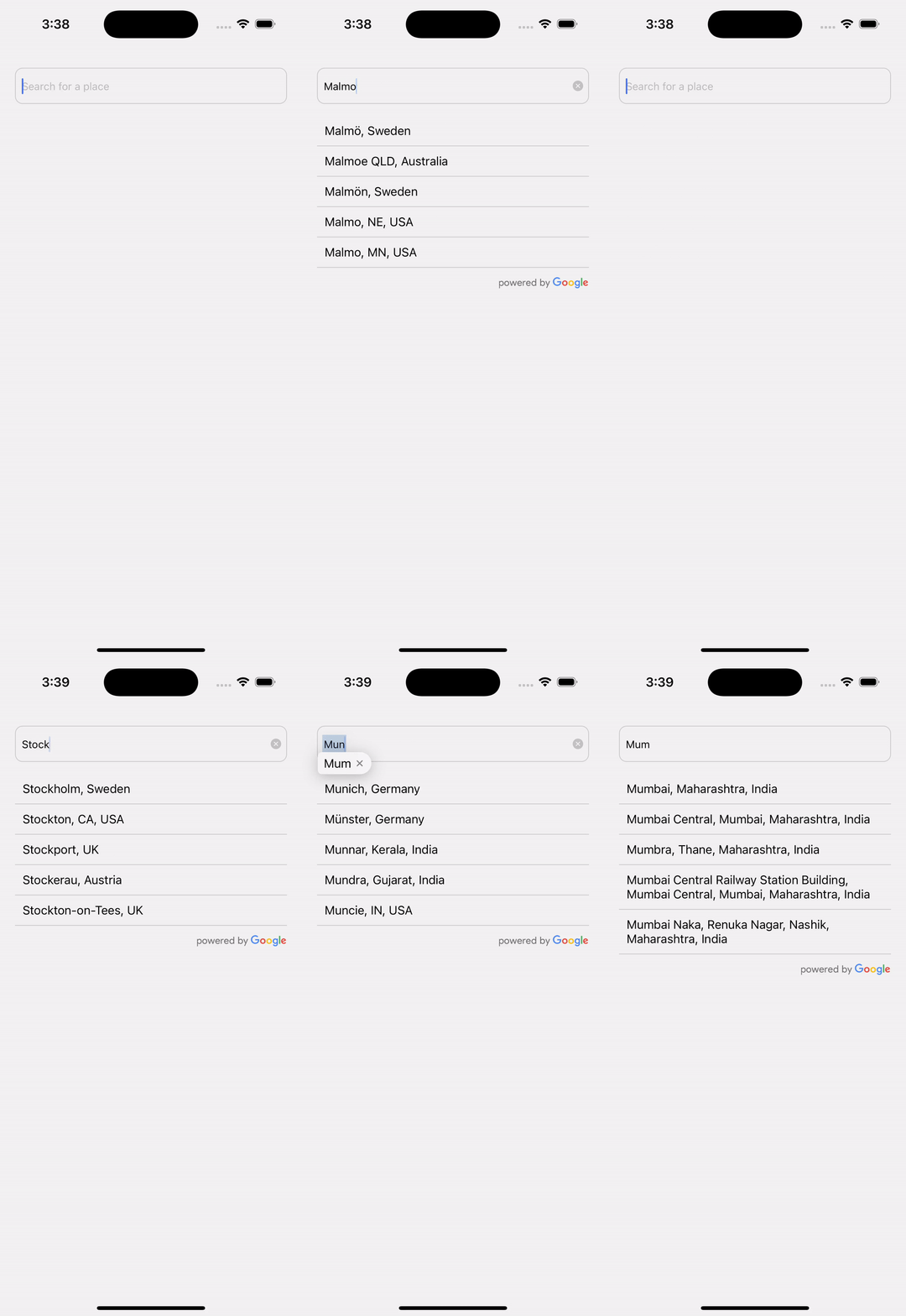
## Features
- **Google Places Autocomplete**: Autocomplete suggestions as you type.
- **Customizable UI**: Customize input styles, list items, headers, and footers.
- **Powered By Google Logo**: Optionally display the "Powered by Google" logo.
- **Place Details Fetching**: Fetch detailed place information including latitude and longitude.
- **Debounce Search**: Optimized search requests using a debounce function.
- **Error Handling**: Display errors if API key is missing or when an API call fails.
## Installation
```bash
npm install react-native-google-place-search
```
or
```bash
yarn add react-native-google-place-search
```
## How to Use
Here’s an example of how to use the `GooglePlaceSearch` component in your project:
```jsx
import React from "react";
import { View, Text } from "react-native";
import GooglePlaceSearch from "react-native-google-place-search";
const App = () => {
const handlePlaceSelected = (place) => {
console.log("Selected Place:", place);
};
return (
);
};
export default App;
```
### Props
Below are all the props that the `GooglePlaceSearch` component accepts:
| Prop Name | Type | Default | Description |
| ----------------------- | ------------------------------------------------ | ------------------------ | -------------------------------------------------------------------------- |
| `onPlaceSelected` | `(place: Place & Partial) => void` | **Required** | Callback fired when a place is selected from the list. |
| `apiKey` | `string` | **Required** | Your Google Places API key. |
| `placeholder` | `string` | `"Search for a place"` | Placeholder text for the search input. |
| `shouldShowPoweredLogo` | `boolean` | `true` | Whether to display the "Powered by Google" logo at the bottom of the list. |
| `containerStyle` | `StyleProp` | `undefined` | Style for the container view. |
| `inputStyle` | `StyleProp` | `undefined` | Style for the text input. |
| `placeItemStyle` | `StyleProp` | `undefined` | Style for each place item in the list. |
| `placeTextStyle` | `StyleProp` | `undefined` | Style for the place text in each list item. |
| `listFooterComponent` | `React.ReactNode` | `Powered by Google` logo | Footer component for the list (e.g., a custom logo or loading indicator). |
| `listFooterStyle` | `StyleProp` | `undefined` | Style for the footer component. |
| `listHeaderComponent` | `React.ReactNode` | `undefined` | Header component for the list. |
| `listHeaderStyle` | `StyleProp` | `undefined` | Style for the header component. |
| `minimumQueryLength` | `number` | `3` | Minimum number of characters required to trigger the search. |
### Place Object Structure
The `onPlaceSelected` callback provides a place object with the following structure:
```js
{
description: string, // The description of the place
place_id: string, // The unique place ID
lat?: number, // (Optional) Latitude of the place
lng?: number // (Optional) Longitude of the place
}
```
### Example Usage
```jsx
console.log("Selected place:", place)}
apiKey="YOUR_GOOGLE_API_KEY"
placeholder="Enter location"
shouldShowPoweredLogo={false}
containerStyle={{ margin: 16 }}
inputStyle={{ borderColor: "blue", borderWidth: 1 }}
placeItemStyle={{
padding: 10,
borderBottomColor: "#ccc",
borderBottomWidth: 1,
}}
placeTextStyle={{ color: "black", fontSize: 16 }}
minimumQueryLength={2}
/>
```
### License
This project is licensed under the MIT License. See the [LICENSE](LICENSE) file for details.