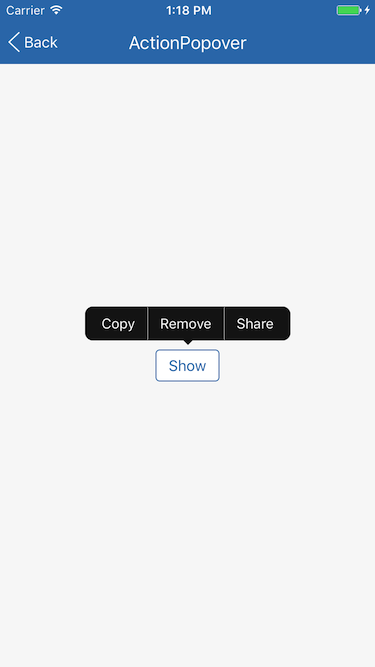
# `ActionPopover{}` 操作气泡
ActionPopover 为操作气泡静态类, 一般用于触发一个多项子操作供用户选择, 表现形式为从触发源组件弹出的气泡。
ActionPopover 基于 [Overlay{}](./Overlay.md) 实现。
## Static Methods
| Method | Params | Returns | Notes |
|---|---|---|---|
| [Overlay methods](./Overlay.md) | | | ActionPopover 继承 Overlay 的全部静态方法。
| show | fromBounds, items, options | key | 显示一个操作气泡, 重写 [Overlay{}](./Overlay.md) 中的同名函数, 输入参数 fromBounds 为弹出气泡源组件 bounds, items 为操作项列表, options(可空)为 ActionPopover.ActionPopoverView 其它属性, 参数类型参见 [ActionPopoverView](#actionpopoveractionpopoverview--props)。
返回唯一的浮层 key 值。
## Static Props
| Prop | Type | Default | Note |
|---|---|---|---|
| [ActionPopoverView](#actionpopoveractionpopoverview--props) | class | | ActionPopover 内容显示组件。
## `` Props
| Prop | Type | Default | Note |
|---|---|---|---|
| [Overlay.PopoverView props...](./Overlay.md#overlaypopoverview--props) | | | ActionPopover.ActionPopoverView 组件继承 Overlay.PopoverView 组件的全部属性。
| items | array | | 操作项列表, 数组元素类型为:
type ActionPopoverItem {
title: string,
onPress: func,
}
| direction | string | 'up' | 继承自 Overlay.PopoverView 并修改默认值。
| align | string | 'center' | 继承自 Overlay.PopoverView 并修改默认值。
| showArrow | bool | true | 继承自 Overlay.PopoverView 并修改默认值。
## `` Static Props
| Prop | Type | Default | Note |
|---|---|---|---|
| [Item](#actionpopoveractionpopoverviewitem--props) | class | | ActionPopover 操作项显示组件。
## `` Props
| Prop | Type | Default | Note |
|---|---|---|---|
| [TouchableOpacity props...](https://facebook.github.io/react-native/docs/touchableopacity.html) | | | ActionPopover.ActionPopoverView.Item 组件继承 TouchableOpacity 组件的全部属性。
| title | string
number
element | | 标题, 可以是字符串、数字或 React Native 组件。
| leftSeparator | bool | false | 是否显示左分隔线。
| rightSeparator | bool | false | 是否显示右分隔线。
## Example
简单用法, fromView 必须是支持 NativeMethodsMixin 的 React Native 原生组件, 如为复合组件需自行实现 measureInWindow 函数, 可参照[Select.js](/components/Select/Select.js)
```
fromView.measureInWindow((x, y, width, height) => {
let items = [
{title: 'Copy', onPress: () => alert('Copy')},
{title: 'Remove', onPress: () => alert('Remove')},
{title: 'Share', onPress: () => alert('Share')},
];
ActionPopover.show({x, y, width, height}, items);
});
```
## Screenshots