# `` 步进器
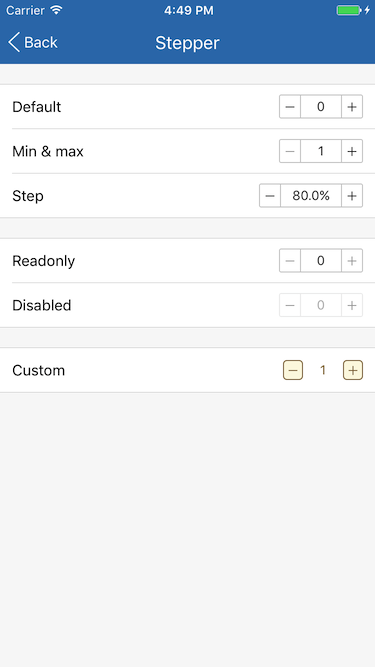
Stepper 组件定义一个步进器。
## Props
| Prop | Type | Default | Note |
|---|---|---|---|
| [View props...](https://facebook.github.io/react-native/docs/view.html) | | | Stepper 组件继承 View 组件的全部属性。
| defaultValue | number | 0 | 初始值, 仅在组件初始化时使用一次, 如不想传入 value 并监听 onChange 保持状态同步, 可使用 defaultValue 代替。
| value | number | | 当前值。
| step | number | 1 | 步长, 可以是整数或小数。
| max | number | | 最大值, 默认不限制。
| min | number | | 最小值, 默认不限制。
| valueStyle | 同Text.style | | 值显示样式。
| valueFormat | func | | 格式化值函数, 传入参数为 value, 默认直接使用 value。
| subButton | string
element | '-' | “减“按钮, 可以是字符串或 React Native 组件。
| addButton | string
element | '+' | “加“按钮, 可以是字符串或 React Native 组件。
| showSeparator | bool | true | 是否显示按钮与值之间的分隔线, 如需完全自定义组件样式可设置为 false。
| disabled | bool | false | 是否禁用, 为 true 时组件显示为半透明且不可触摸。
| editable | bool | true | 是否可编辑。
## Events
| Event Name | Returns | Notes |
|---|---|---|
| [View events...](https://facebook.github.io/react-native/docs/view.html) | | Stepper 组件继承 View 组件的全部事件。
| onChange | value | 当 value 值发生改变时调用。
## Example
简单用法
```
```
使用 defaultValue、min 和 max, 以下代码设置默认值为1, 最小值为1, 最大值为10
```
```
使用 step 和 valueFormat, 以下代码设置步长为0.005(0.5%)并使用一位小数百分比显示值
```
(v * 100).toFixed(1) + '%'}
valueStyle={{minWidth: 60}}
/>
```
自定义
```
-
}
addButton={
+
}
showSeparator={false}
onChange={v => this.setState({valueCustom: v})}
/>
```
## Screenshots