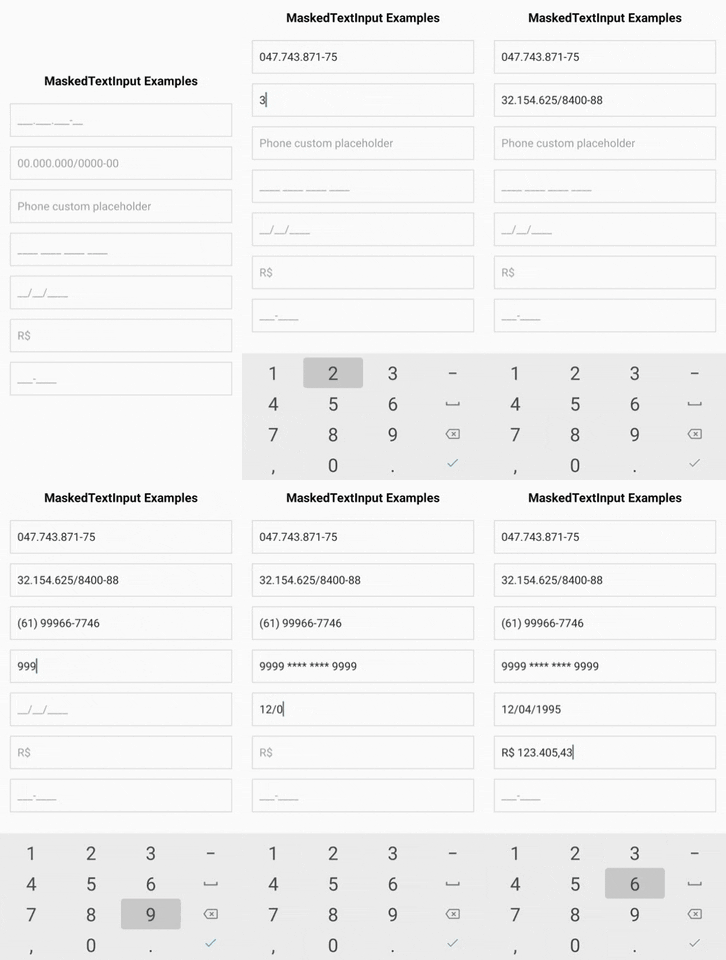
A simple and effective Text Input with mask for ReactNative on iOS, Android, and Web. No fancy stuff, it's basically a JavaScript function that allow you to use custom masks easily.
- [Features](#features)
- [Installation](#installation)
- [Usage](#usage)
- [Props](#props)
- [Mask](#mask)
- [Using function mask](#using-function-mask)
- [Obfuscation](#obfuscation)
- [Predefined Masks](#predefined-masks)
- [createNumberMask](#createnumbermasknumberoptions)
- [Example](#example)
- [formatWithMask](#formatwithmaskoptions)
- [useMaskedInputProps](#usemaskedinputpropsprops) (for any component integration)
## :warning: Important note :warning:
**If you are in need of a *CURRENCY* input in specific check out my other library [react-native-currency-input](https://github.com/CaioQuirinoMedeiros/react-native-currency-input)**
## Features
- Highly customizable masks with the use of `RegExp`
- **Characteres obfuscation!**
- It's just a [``](https://facebook.github.io/react-native/docs/textinput.html) component, no fancy/complex stuff
- Use React Native ES6, Typescript and React Hooks
- Exports the function that do all the magic: [`formatWithMask`](#formatwithmaskoptions)
## Installation
```sh
npm install react-native-mask-input
```
or
```sh
yarn add react-native-mask-input
```
## Usage
```js
import MaskInput from 'react-native-mask-input';
function MyComponent() {
const [phone, setPhone] = React.useState('');
return (
{
setPhone(masked); // you can use the unmasked value as well
// assuming you typed "9" all the way:
console.log(masked); // (99) 99999-9999
console.log(unmasked); // 99999999999
}}
mask={['(', /\d/, /\d/, ')', ' ', /\d/, /\d/, /\d/, /\d/, /\d/, '-', /\d/, /\d/, /\d/, /\d/]}
/>
);
}
```
## Props
| Prop | Type | Default | Description |
| ------------------------------ | ------------- | ------- | ----------------------------------------------------------------------------------------------------------------------------------------------------------------------------------------------- |
| **...TextInputProps** | | | Inherit all [props of `TextInput`](https://reactnative.dev/docs/textinput#props). |
| **`value`** | number | | The value for controlled input. **REQUIRED** |
| **`onChangeText`** | function | | Callback that is called when the input's text changes. differently of the default function, this one receives three arguments: `(maskedText, unmaskedText, obfuscatedText) => void` **REQUIRED** |
| **`mask`** | [Mask](#mask) | | An array where each item defines one character of the value. If the item is a string, that string will be used, if it is an RegExp, it will validate the input on it. |
| **`showObfuscatedValue`** | boolean | false | Whether or not to display the obfuscated value on the `TextInput`. |
| **`placeholderFillCharacter`** | string | `_` | Character to be used as the "fill character" on the default placeholder value. |
| **`obfuscationCharacter`** | string | `*` | Character to be used on the obfuscated characteres. |
| **`maskAutoComplete`** | boolean | false | Add next mask characters at the end of the value |
## Mask
An array where each item defines one character of the value. If the item is a string, that string will be used, if it is an `RegExp`, it will validate the input on it.
**To be clear:** All the characters you want to be inputed by the user must be a `RegExp` in your mask.
If you want a mask for Zip Code, for example, you'd do like this:
```js
const zipCodeMask = [/\d/, /\d/, /\d/, /\d/, /\d/, '-', /\d/, /\d/, /\d/];
```
That's because the RegExp `/\d/` accepts any digit character (0-9)
```js
import { formatWithMask } from 'react-native-mask-input'
const { masked, unmasked, obfuscated } = formatWithMask({
text: '71680345',
mask: zipCodeMask,
});
console.log(masked); // "71680-345"
console.log(unmasked); // "71680345"
console.log(obfuscated); // "71680-345"
```
### Using function mask
The mask can also be a function that receives the current value and returns the array mask. That's to help you to change the mask dynamically based on the value.
```js
import MaskInput from 'react-native-mask-input'
const CPF_MASK = [/\d/, /\d/, /\d/, ".", /\d/, /\d/, /\d/, ".", /\d/, /\d/, /\d/, "-", /\d/, /\d/]
const CNPJ_MASK = [/\d/, /\d/, ".", /\d/, /\d/, /\d/, ".", /\d/, /\d/, /\d/, "/", /\d/, /\d/, /\d/, "-", /\d/, /\d/]
function MyComponent() {
const [value, setValue] = React.useState('');
return (
{
if (text.replace(/\D+/g, "").length <= 11) {
return CPF_MASK
} else {
return CNPJ_MASK
}
}}
/>
);
}
```
### Obfuscation
To mark a character as obfuscated, use the `RegExp` within an array, like this:
```js
const creditCardMask = [/\d/, /\d/, /\d/, /\d/, " " [/\d/], [/\d/], [/\d/], [/\d/], " ", [/\d/], [/\d/], [/\d/], [/\d/], " ", /\d/, /\d/, /\d/, /\d/];
function MyComponent() {
const [creditCard, setCreditCard] = React.useState('');
return (
{
setCreditCard(unmasked); // you can use the masked value as well
// assuming you typed "1234123412341234":
console.log(masked); // "1234 1234 1234 1234"
console.log(unmasked); // "1234123412341234"
console.log(obfuscated); // "1234 #### #### 1234"
}}
/>
);
}
```
> You need to use the prop **showObfuscatedValue** in order to show the obfuscated value on the input
### Predefined Masks
in order to perhaps help some of you, some commonly used masks are exported, if it does not fit your use case I hope it'll at least serve as an inspiration:
```js
import MaskInput, { Masks } from 'react-native-mask-input';
function MyComponent() {
const [creditCard, setCreditCard] = React.useState('');
return (
);
}
```
| Mask | Use case |
| ------------------- | --------------------------- |
| Masks.BRL_CAR_PLATE | ABC-1234 |
| Masks.BRL_CPNJ | 33.594.232/0001-00 |
| Masks.BRL_CPF | 903.549.000-21 |
| Masks.BRL_CURRENCY | R\$ 1.234,56 |
| Masks.BRL_PHONE | (61) 99966-7746 |
| Masks.USA_PHONE | (415) 555-0132 |
| Masks.CREDIT_CARD | 9999 \*\*\*\* \*\*\*\* 9999 |
| Masks.DATE_DDMMYYYY | 12/04/1995 |
| Masks.DATE_MMDDYYYY | 04/12/1995 |
| Masks.DATE_YYYYMMDD | 1995/04/12 |
| Masks.ZIP_CODE | 71680-345 |
### `createNumberMask(numberOptions)`
This is a helper function to create a number mask, you'd use this on currency input cases for example.
```js
import MaskInput, { createNumberMask } from 'react-native-mask-input';
const dollarMask = createNumberMask({
prefix: ['R', '$', ' '],
delimiter: '.',
separator: ',',
precision: 2,
})
function MyComponent() {
const [value, setValue] = React.useState('');
return (
{
setValue(unmasked); // you can use the masked value as well
// assuming you typed "123456":
console.log(masked); // "R$ 1.234,56"
console.log(unmasked); // "123456"
}}
/>
);
}
```
#### `numberOptions`
| Name | Type | Default | Description |
| --------------- | ------------- | --------------- | --------------------------------------- |
| **`prefix`** | [Mask](#mask) | [] | Mask to be prefixed on the mask result. |
| **`delimiter`** | string | `.` | Character for thousands delimiter. |
| **`separator`** | string | `,` | Decimal separator character. |
| **`precision`** | number | 2 | Decimal precision. |
## Example
See [EXAMPLE](example)
```sh
git clone https://github.com/caioquirinomedeiros/react-native-mask-input.git
cd react-native-mask-input/example
yarn
yarn android / yarn ios
```
## `formatWithMask(options)`
```js
import { formatWithMask, Masks } from 'react-native-mask-input';
const creditCard = '9999999999999999';
const { masked, unmasked, obfuscated } = formatWithMask({
text: phone,
mask: Masks.CREDIT_CARD,
obfuscationCharacter: '-',
});
console.log(masked); // 9999 9999 9999 9999
console.log(unmasked); // 9999999999999999
console.log(obfuscated); // 9999 ---- ---- 9999
```
### `options`
| Name | Type | Default | Description |
| -------------------------- | ------------- | ------- | --------------------------------------------------------------------------------------------------------------------------------------------------------------------- |
| **`text`** | string | | Text to be formatted with the mask. |
| **`mask`** | [Mask](#mask) | | An array where each item defines one character of the value. If the item is a string, that string will be used, if it is an RegExp, it will validate the input on it. |
| **`obfuscationCharacter`** | string | `*` | Character to be used on the obfuscated characteres. |
## `useMaskedInputProps(props)`
```js
import { Input } from 'native-base'
import { Masks } from 'react-native-mask-input';
function MyComponent() {
const [phone, setPhone] = React.useState('');
const maskedInputProps = useMaskedInputProps({
value: phone,
onChangeText: setPhone,
mask: Masks.BRL_PHONE,
});
return
}
```
## Contributing
See the [contributing guide](CONTRIBUTING.md) to learn how to contribute to the repository and the development workflow.
## License
react-native-mask-input is released under the MIT license. See [LICENSE](LICENSE) for details.
Any question or support will welcome.