# react-native-navigation-apps
Open & Navigate With External Navigation Apps (Waze,GoogleMaps,iOS Maps) from react native
## Description
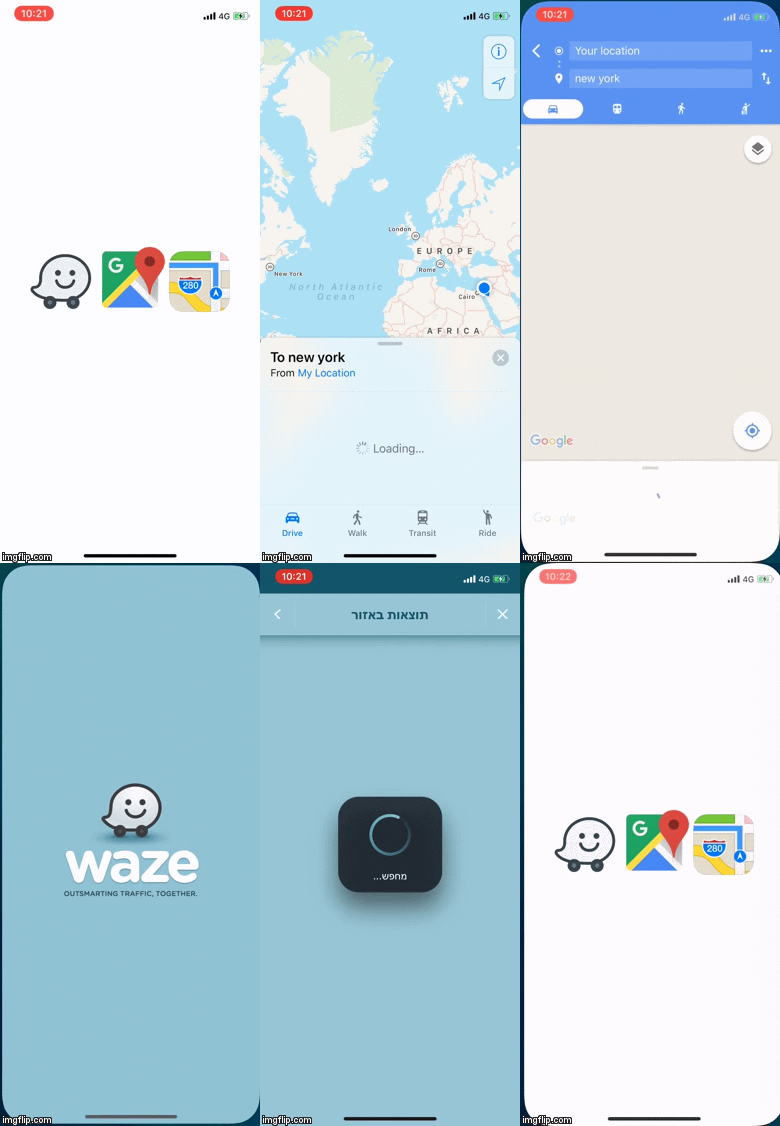
A react native component for using navigation apps like waze google maps and ios maps
to navigate by address or latitude and longitude
## Example
 ## Installation
```
npm -i --save react-native-navigation-apps
```
```
yarn add react-native-navigation-apps
```
## Usage
```javascript
import {NavigationApps,actions,googleMapsTravelModes} from "react-native-navigation-apps";
```
### Details
Each app (waze,google maps,ios maps) has its own configuration an `action` `address` `lat` `lon` and `icon`
For google maps and ios maps also have `travelMode` (`driving`,`walking`,`transit`)
Action can be :
`navigateByAddress` -- navigate to an address by address (text)
`navigateByLatAndLon` -- navigate to an address by Latitude and Longitude
`searchLocationByLatAndLon` -- only search an address (not navigate) by Latitude and Longitude
travelMode can be :
`driving`
`walking`
`transit`
### Properties
| Prop | Description | Default |
| --------------------- | ----------------------------------------------------------------------------------------------------------------------------------------------------------------------------------------------------------------------------------------------------------------------------------------------------------------------- | -------------- |
| **`row`** | align navigation apps as row | `false` |
| **`viewMode`** | Set navigation apps display as `modal` , `view` or `sheet` mode | `view` |
| **`iconSize`** | icon size of the navigation app | `100` |
| **`modalProps`** | react native modal props | `{}` |
| **`modalContainerStyle`** | Styling modal container | `{}` |
| **`modalBtnCloseContainerStyle`**| Styling the modal close button container | `{}` |
| **`modalBtnCloseStyle`** | Styling the modal close button | `{}` |
| **`modalBtnCloseTextStyle`** | Styling the modal close button text | `{}` |
| **`modalBtnOpenStyle`** | Styling the modal open button | `{}` |
| **`modalBtnOpenTextStyle`** | Styling the modal open button text | `{}` |
| **`modalBtnOpenTitle`** | Title for the the modal open button | `''` |
| **`modalBtnCloseTitle`** | Title for the modal close button | `''` |
| **`actionSheetBtnOpenTitle`** | Title for the the action sheet open button | `open action sheet` |
| **`actionSheetCloseTitle`** | Title for the action sheet close button | `close action sheet` |
| **`actionSheetBtnOpenTextStyle`**| Styling the action sheet open button text | `{}` |
| **`actionSheetBtnOpenStyle`** | Styling the action sheet open button | `{}` |
| **`address`** | Set the default address for the navigation apps | `''` |
| **`waze`** | Set configuration for waze : `action` `address` `lat` `lon` and `icon` ... if `address` not set waze will take the address from the default `address` prop | `address:'',action:navigateByAddress`,`lat`:'',`lon`:'' |
| **`googleMaps`** |Set configuration for google maps `action` `address` `lat` `lon` `icon` and `travelMode` ... if `address` not set google maps will take the address from the default `address` prop | `address:'',action:navigateByAddress`,`lat`:'',`lon`:`travelMode`:'driving'|
| **`maps`** | Set configuration for ios maps `action` `address` `lat` `lon` `icon` and `travelMode` ... if `address` not set ios maps will take the address from the default `address` prop | `address:'',action:navigateByAddress`,`lat`:'',`lon`:'',`travelMode`:'driving' |
## IOS Usage
To use `waze` and `google maps` on iOS devices you must add this lines to the `info.plist` file
```
LSApplicationQueriesSchemes
comgooglemaps
waze
```
## Installation
```
npm -i --save react-native-navigation-apps
```
```
yarn add react-native-navigation-apps
```
## Usage
```javascript
import {NavigationApps,actions,googleMapsTravelModes} from "react-native-navigation-apps";
```
### Details
Each app (waze,google maps,ios maps) has its own configuration an `action` `address` `lat` `lon` and `icon`
For google maps and ios maps also have `travelMode` (`driving`,`walking`,`transit`)
Action can be :
`navigateByAddress` -- navigate to an address by address (text)
`navigateByLatAndLon` -- navigate to an address by Latitude and Longitude
`searchLocationByLatAndLon` -- only search an address (not navigate) by Latitude and Longitude
travelMode can be :
`driving`
`walking`
`transit`
### Properties
| Prop | Description | Default |
| --------------------- | ----------------------------------------------------------------------------------------------------------------------------------------------------------------------------------------------------------------------------------------------------------------------------------------------------------------------- | -------------- |
| **`row`** | align navigation apps as row | `false` |
| **`viewMode`** | Set navigation apps display as `modal` , `view` or `sheet` mode | `view` |
| **`iconSize`** | icon size of the navigation app | `100` |
| **`modalProps`** | react native modal props | `{}` |
| **`modalContainerStyle`** | Styling modal container | `{}` |
| **`modalBtnCloseContainerStyle`**| Styling the modal close button container | `{}` |
| **`modalBtnCloseStyle`** | Styling the modal close button | `{}` |
| **`modalBtnCloseTextStyle`** | Styling the modal close button text | `{}` |
| **`modalBtnOpenStyle`** | Styling the modal open button | `{}` |
| **`modalBtnOpenTextStyle`** | Styling the modal open button text | `{}` |
| **`modalBtnOpenTitle`** | Title for the the modal open button | `''` |
| **`modalBtnCloseTitle`** | Title for the modal close button | `''` |
| **`actionSheetBtnOpenTitle`** | Title for the the action sheet open button | `open action sheet` |
| **`actionSheetCloseTitle`** | Title for the action sheet close button | `close action sheet` |
| **`actionSheetBtnOpenTextStyle`**| Styling the action sheet open button text | `{}` |
| **`actionSheetBtnOpenStyle`** | Styling the action sheet open button | `{}` |
| **`address`** | Set the default address for the navigation apps | `''` |
| **`waze`** | Set configuration for waze : `action` `address` `lat` `lon` and `icon` ... if `address` not set waze will take the address from the default `address` prop | `address:'',action:navigateByAddress`,`lat`:'',`lon`:'' |
| **`googleMaps`** |Set configuration for google maps `action` `address` `lat` `lon` `icon` and `travelMode` ... if `address` not set google maps will take the address from the default `address` prop | `address:'',action:navigateByAddress`,`lat`:'',`lon`:`travelMode`:'driving'|
| **`maps`** | Set configuration for ios maps `action` `address` `lat` `lon` `icon` and `travelMode` ... if `address` not set ios maps will take the address from the default `address` prop | `address:'',action:navigateByAddress`,`lat`:'',`lon`:'',`travelMode`:'driving' |
## IOS Usage
To use `waze` and `google maps` on iOS devices you must add this lines to the `info.plist` file
```
LSApplicationQueriesSchemes
comgooglemaps
waze
```