# react-native-numeric-input
a cross platform stylish numeric input for react native
Visual Demo
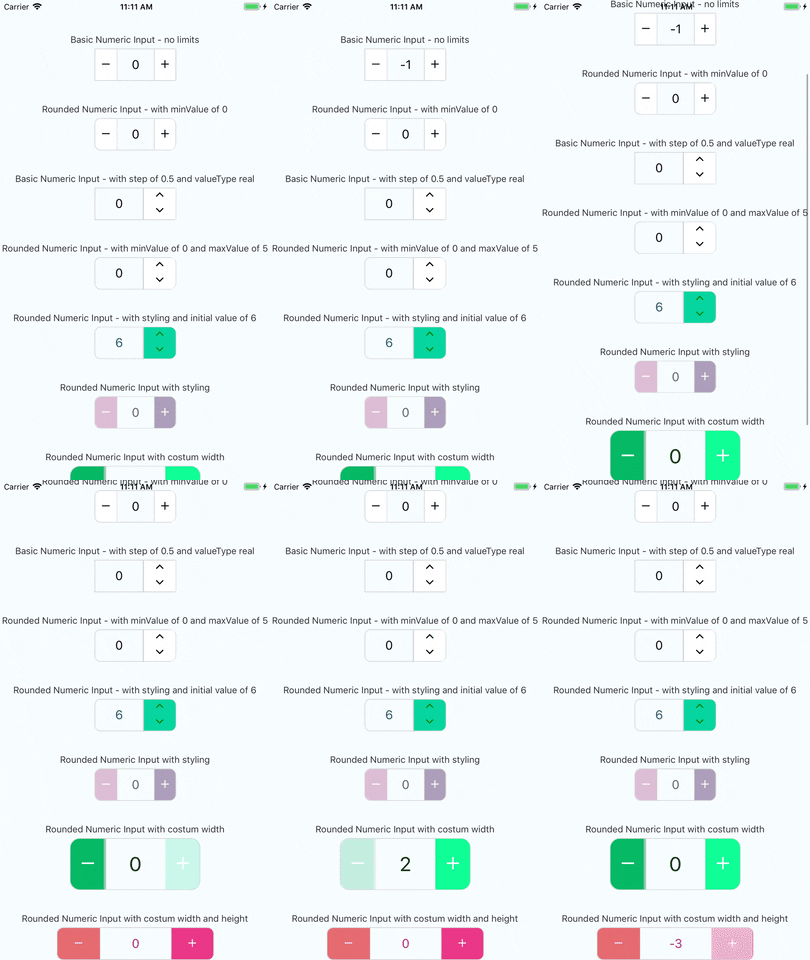
## Working example
you can check out the very simple react native example app
just click [here](https://github.com/himelbrand/react-native-numeric-input/tree/master/Example) and follow the instructions
enjoy!
## Installation
### Latest version
v1.9.0
#### if you have react-native-vector-icons installed in your project
```bash
yarn add react-native-numeric-input
```
or with npm
```bash
npm install react-native-numeric-input --save
```
#### if you don't have react-native-vector-icons installed in your project
```bash
yarn add react-native-numeric-input react-native-vector-icons
react-native link
```
or with npm
```bash
npm install react-native-numeric-input react-native-vector-icons --save
react-native link
```
if you're experiencing issues with `react-native link` which is used to install react-native-vector-icons
please refer to [react-native-vector-icons](https://github.com/oblador/react-native-vector-icons) to see manual installation steps
[link to npm page](https://www.npmjs.com/package/react-native-numeric-input)
## Responsive default size
this component uses the [react-native-pixel-perfect](https://www.npmjs.com/package/react-native-pixel-perfect)
and the defualt style is using base resolution for iphone7, in case you want to use the default design but, using a different base resolution, I added a function called updateBaseResolution(width,height) to use it you need to access it via a ref to the component.
since the component is dependant on react-native-pixel-perfect, when installing this package you install also react-native-pixel-perfect if it's not already installed.
so you can create your own responsive size function and use it to set your custom style.
## Usage
### import Component
```javascript
import NumericInput from 'react-native-numeric-input'
```
### Basic Usage
```javascript
console.log(value)} />
```
**or basic up-down**
```javascript
console.log(value)} />
```
### Keep State Value
```javascript
this.setState({value})} />
```
### Advanced Usage
```javascript
this.setState({value})}
onLimitReached={(isMax,msg) => console.log(isMax,msg)}
totalWidth={240}
totalHeight={50}
iconSize={25}
step={1.5}
valueType='real'
rounded
textColor='#B0228C'
iconStyle={{ color: 'white' }}
rightButtonBackgroundColor='#EA3788'
leftButtonBackgroundColor='#E56B70'/>
```
## Props
Name | Type | Default
------------------------------------|-------------------------------------|:-------:
**value** |`number` | none
**minValue** |`number` | none
**maxValue** |`number` | none
**step** |`number` | 1
**valueType** |`'integer'` or `'real'` | `'integer'`
**initValue** |`number` | null if not used will start at 0
**iconSize** |`number` | calcSize(30)
**borderColor** |`string` | `'#d4d4d4'`
**iconStyle** |`object` | none
**totalWidth** |`number` | calcSize(220)
**separatorWidth** |`number` | 1
**type** |`'plus-minus'` or `'up-down'` | `'plus-minus'`
**rounded** |`boolean` | false
**textColor** |`string` | `'black'`
**containerStyle** |`object` | none
**inputStyle** |`object` | none
**upDownButtonsBackgroundColor** |`string` | `'white'`
**rightButtonBackgroundColor** |`string` | `'white'`
**leftButtonBackgroundColor** |`string` | `'white'`
**totalHeight** |`number` | none
**onChange** |`function` | none - required prop
**onLimitReached** |`function` | none (empty function)
**editable** |`boolean` | true
**validateOnBlur** |`boolean` | true
**reachMaxIncIconStyle** |`object` | none
**reachMaxDecIconStyle** |`object` | none
**reachMinIncIconStyle** |`object` | none
**reachMinDecIconStyle** |`object` | none
**extraTextInputProps** |`object` | none
### notes about props
* **value prop** - this component uses it's own state to hold value if value is not given as a prop
* **style props** - this component has a default style and the styles props are to override the default style or add more fields
* **totalWidth prop** - this prop is for the entire component width, and all other sizes are derived from it , unless given other size props
* **initValue prop** - if using value prop, this is not needed and the initial value can be given by the value prop
* **validateOnBlur** - added on version 1.3.2, if set to false the text input will validate while typing, not recommended, so just keep it true unless there is a good reason not to use the default functionallity
* **reachMaxIncIconStyle** - added on version 1.4.0, used to set style to the increment button icon in case maxValue is reached - **optional**
* **reachMaxDecIconStyle** - added on version 1.4.0, used to set style to the decrement button icon in case maxValue is reached - **optional**
* **reachMinIncIconStyle** - added on version 1.4.0, used to set style to the increment button icon in case minValue is reached - **optional**
* **reachMinDecIconStyle** - added on version 1.4.0, used to set style to the decrement button icon in case minValue is reached - **optional**
* **onLimitReached** - added on version 1.7.0, used to handle event of min/max reached, **this function receives 2 arguments: (isMas:Boolean, msg:String)** like in the advanced example above - **optional**
* **extraTextInputProps** - added on version 1.8.0, used to add props used for the original TextInput component that are not used/supported in this component explicitly - **optional**
## Versioning
We use [SemVer](http://semver.org/) for versioning. For the versions available, see the [tags on this repository](https://github.com/himelbrand/react-native-numeric-input/tags).
## License
This project is licensed under the MIT License