# React Native Picker Module for Android & IOS
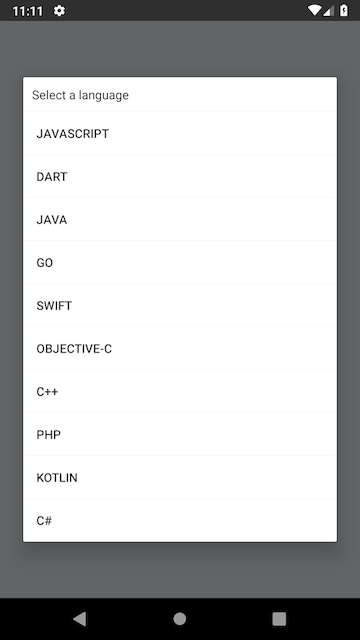
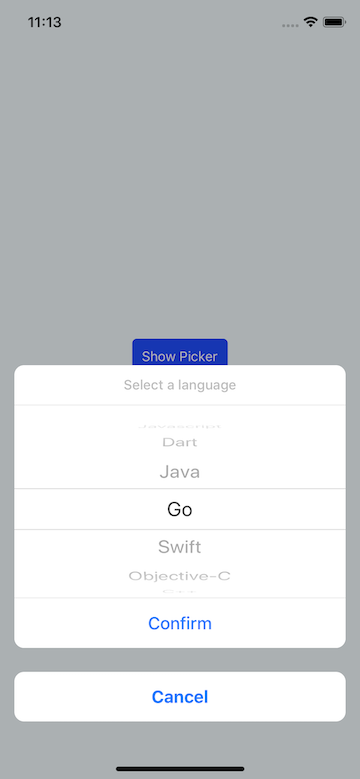
With this package you can easily use picker with onPress function.
Using `react-native-modal` and `@react-native-community/picker` component for IOS and using `RecyclerView` and `AlertDialog` for Android as `NativeModule`.
 ## v2.0.4 released.
- @react-native-picker/picker added because picker maintainer is changed.
## v2.0.31 released.
### v2.0.31
- PRs merged. Some issues fixed
### v2.0.2
- Android input.substr issue solved.
### v2.0.1
- On IOS null value issue solved.
### Version 2.0.0
- useNativeDriver flag added.
- @react-native-community/picker added because picker extracted from core react native
- react-native-modal added to package for IOS
- selectedColor added
- disabled & enabled IOS confirm button styles added.
- Now we can set object array for items or array.
- IOS part start using hooks
- confirmButtonStyle & cancelButtonStyle & contentContainerStyle added
- Adding image to picker item at Android removed. If you need this feature please use v1.3.1
- **And a lot of upgrade...**
## Getting Started
**With YARN**
```
yarn add react-native-picker-module && yarn add react-native-modal && yarn add @react-native-community/picker
```
#### After React Native v0.60.0
```
cd ios && pod install
```
#### Before React Native v0.60.0
**Automatic linking**
```
react-native link react-native-picker-module
```
**Manual Linking**
**[Manual Installation](/docs/manual-installation.md)** (If something went wrong with react-native link)
## Props
| Props | Type | Default & Description | Required | OS |
|-------------|------|--------------------------------------------------|----------|------------|
|value |string|- |**No** |Android, IOS|
|useNativeDriver|bool|`true` |**No** |IOS|
|backdropColor|string|- |**No** |IOS|
|backdropOpacity|double|`0.7` |**No** |IOS|
|items |array / object array |- |**Yes** |Android, IOS|
|title |string|- |**No** |Android, IOS|
|titleStyle |object|{} |**No** |IOS |
|confirmButtonStyle |object|{} |**No** |IOS |
|cancelButtonStyle |object|{} |**No** |IOS |
|contentContainerStyle |object|{} |**No** |IOS |
|itemStyle |object|{} |**No** |IOS |
|cancelButtonTextStyle |object| {} |**No** |IOS |
|confirmButtonEnabledTextStyle|object| {} |**No** |IOS |
|confirmButtonDisabledTextStyle |object| {} |**No** |IOS |
|pickerRef |any |- |**Yes** |Android, IOS|
|onValueChange|func |(value: string) => void |**Yes** |Android, IOS|
|cancelButton |string|`Cancel` |**No** |IOS |
|confirmButton|string|`Confirm` |**No** |IOS |
|onCancel |func |- |**No** |Android, IOS|
|selectedColor|string|- |**No** |Android, IOS|
## Usage with Hooks
```javascript
import React, { useRef, useState } from "react"
import { Button, SafeAreaView, Text } from "react-native"
import ReactNativePickerModule from "react-native-picker-module"
const App = () => {
const pickerRef = useRef()
const [value, setValue] = useState()
const dataset_1 = [1, 2, "Java", "Kotlin", "C++", "C#", "PHP"]
const dataset_2 = [
{
value: 101,
label: "Javascript",
},
{
value: "golang_101",
label: "Go",
},
{
value: "kotlin_dsl",
label: "Kotlin",
},
{
value: "java_101",
label: "Java",
},
{
value: "cplusplus",
label: "C++",
},
{
value: "csharp_201",
label: "C#",
},
{
value: "php_201",
label: "PHP",
},
]
return (
<>
{
console.log("Cancelled")
}}
onValueChange={value => {
console.log("value: ", value)
setValue(value)
}}
/>
)
}
export default App
```
## Class Component Example
```javascript
import React from "react"
import { SafeAreaView, Text, Button } from "react-native"
import ReactNativePickerModule from "react-native-picker-module"
const dataset = [
{
value: 101,
label: "Javascript",
},
{
value: "golang_101",
label: "Go",
},
{
value: "kotlin_dsl",
label: "Kotlin",
},
{
value: "java_101",
label: "Java",
},
{
value: "cplusplus",
label: "C++",
},
{
value: "csharp_201",
label: "C#",
},
{
value: "php_201",
label: "PHP",
},
]
class App extends React.Component {
constructor(props) {
super(props)
this.pickerRef = React.createRef()
this.state = {
value: null,
}
}
render() {
return (
<>
{
console.log("Cancelled")
}}
onValueChange={value => {
this.setState({
value: value,
})
}}
/>
)
}
}
export default App
```
## FYI
You can use more than one picker in same screen. You just need to set different pickerRef.
p.s : If you want to get country list from native device you can use this package: [https://github.com/talut/react-native-countries](https://github.com/talut/react-native-countries)
## License
This project is licensed under the MIT License - see the LICENSE.md file for details
## v2.0.4 released.
- @react-native-picker/picker added because picker maintainer is changed.
## v2.0.31 released.
### v2.0.31
- PRs merged. Some issues fixed
### v2.0.2
- Android input.substr issue solved.
### v2.0.1
- On IOS null value issue solved.
### Version 2.0.0
- useNativeDriver flag added.
- @react-native-community/picker added because picker extracted from core react native
- react-native-modal added to package for IOS
- selectedColor added
- disabled & enabled IOS confirm button styles added.
- Now we can set object array for items or array.
- IOS part start using hooks
- confirmButtonStyle & cancelButtonStyle & contentContainerStyle added
- Adding image to picker item at Android removed. If you need this feature please use v1.3.1
- **And a lot of upgrade...**
## Getting Started
**With YARN**
```
yarn add react-native-picker-module && yarn add react-native-modal && yarn add @react-native-community/picker
```
#### After React Native v0.60.0
```
cd ios && pod install
```
#### Before React Native v0.60.0
**Automatic linking**
```
react-native link react-native-picker-module
```
**Manual Linking**
**[Manual Installation](/docs/manual-installation.md)** (If something went wrong with react-native link)
## Props
| Props | Type | Default & Description | Required | OS |
|-------------|------|--------------------------------------------------|----------|------------|
|value |string|- |**No** |Android, IOS|
|useNativeDriver|bool|`true` |**No** |IOS|
|backdropColor|string|- |**No** |IOS|
|backdropOpacity|double|`0.7` |**No** |IOS|
|items |array / object array |- |**Yes** |Android, IOS|
|title |string|- |**No** |Android, IOS|
|titleStyle |object|{} |**No** |IOS |
|confirmButtonStyle |object|{} |**No** |IOS |
|cancelButtonStyle |object|{} |**No** |IOS |
|contentContainerStyle |object|{} |**No** |IOS |
|itemStyle |object|{} |**No** |IOS |
|cancelButtonTextStyle |object| {} |**No** |IOS |
|confirmButtonEnabledTextStyle|object| {} |**No** |IOS |
|confirmButtonDisabledTextStyle |object| {} |**No** |IOS |
|pickerRef |any |- |**Yes** |Android, IOS|
|onValueChange|func |(value: string) => void |**Yes** |Android, IOS|
|cancelButton |string|`Cancel` |**No** |IOS |
|confirmButton|string|`Confirm` |**No** |IOS |
|onCancel |func |- |**No** |Android, IOS|
|selectedColor|string|- |**No** |Android, IOS|
## Usage with Hooks
```javascript
import React, { useRef, useState } from "react"
import { Button, SafeAreaView, Text } from "react-native"
import ReactNativePickerModule from "react-native-picker-module"
const App = () => {
const pickerRef = useRef()
const [value, setValue] = useState()
const dataset_1 = [1, 2, "Java", "Kotlin", "C++", "C#", "PHP"]
const dataset_2 = [
{
value: 101,
label: "Javascript",
},
{
value: "golang_101",
label: "Go",
},
{
value: "kotlin_dsl",
label: "Kotlin",
},
{
value: "java_101",
label: "Java",
},
{
value: "cplusplus",
label: "C++",
},
{
value: "csharp_201",
label: "C#",
},
{
value: "php_201",
label: "PHP",
},
]
return (
<>
{
console.log("Cancelled")
}}
onValueChange={value => {
console.log("value: ", value)
setValue(value)
}}
/>
)
}
export default App
```
## Class Component Example
```javascript
import React from "react"
import { SafeAreaView, Text, Button } from "react-native"
import ReactNativePickerModule from "react-native-picker-module"
const dataset = [
{
value: 101,
label: "Javascript",
},
{
value: "golang_101",
label: "Go",
},
{
value: "kotlin_dsl",
label: "Kotlin",
},
{
value: "java_101",
label: "Java",
},
{
value: "cplusplus",
label: "C++",
},
{
value: "csharp_201",
label: "C#",
},
{
value: "php_201",
label: "PHP",
},
]
class App extends React.Component {
constructor(props) {
super(props)
this.pickerRef = React.createRef()
this.state = {
value: null,
}
}
render() {
return (
<>
{
console.log("Cancelled")
}}
onValueChange={value => {
this.setState({
value: value,
})
}}
/>
)
}
}
export default App
```
## FYI
You can use more than one picker in same screen. You just need to set different pickerRef.
p.s : If you want to get country list from native device you can use this package: [https://github.com/talut/react-native-countries](https://github.com/talut/react-native-countries)
## License
This project is licensed under the MIT License - see the LICENSE.md file for details