# react-native-pins
[](https://www.npmjs.com/package/react-native-pins)
[](https://npmjs.org/package/react-native-pins)
[](https://npmjs.org/package/react-native-pins)
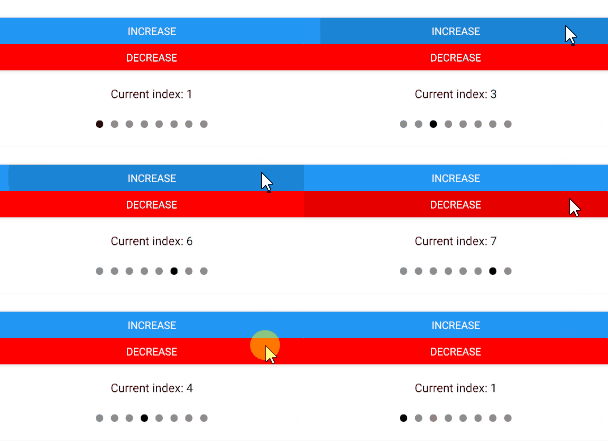
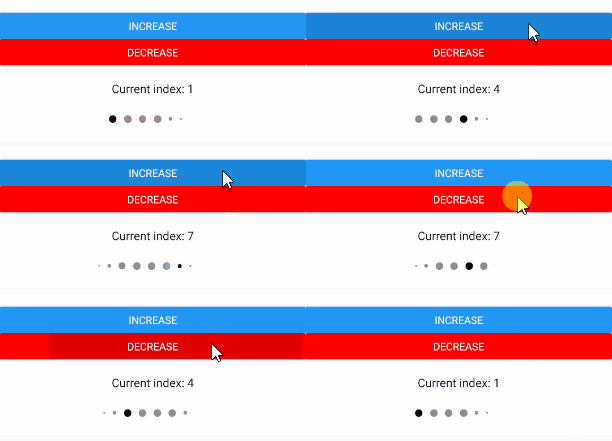 The pins come with a shake animation and configurable
device vibration.
## Install
To get started install via npm:
```sh
npm install react-native-pins
```
#### Usage
Import:
```js
import { Pins } from 'react-native-pins';
```
Then add it to your code:
```js
(this.pins = ref)}
numberOfPins={5}
numberOfPinsActive={2}
numberOfPinsMaximum={2}
activeOnly
/>
```
The `` has a `shake()` method which can be called through a reference `this.pins.shake()`.
This will perform a shake animation and vibration if enabled. A callback can be passed through props which
will be fired when the animation is complete. See props below.
#### Pins
| Prop | Type | Optional | Default | Description |
| --------------- | ------------- | --------- | -------------------- | --------------------------------------------------------------------------------------- |
| onRef | any | Yes | | onRef allows you to call the `shake()` method. |
| activeOnly | booolean | yes | false | Whether to only fill the active pin or to fill all of them. |
| spacing | number | yes | 15 | The space between the pins |
| pinSize | number | yes | 18 | The size of the pins |
| numberOfPins | number | Yes | 5 | Number of pins to render. |
| numberOfPinsActive | number | Yes | 0 | Number of active pins. You can pass the `pin.length` here. |
| vibration | bool | Yes | true | Should vibration be enabled on shake? |
| animationShakeCallback | func | Yes | | A callback triggered when the pin shake animation has finished. |
| containerStyle | object | Yes | See Pins.js | Style applied to PINS container. |
| pinStyle | object | Yes | See Pins.js | Style applied to each circle PIN. |
| pinActiveStyle | object | Yes | See Pins.js | Style applied to each circle PIN when it is active. |
| numberOfPinsMaximum | number | Yes | | This property is used to set a maximum number of pins to show. If specified, then the pins will have an animation effect, as showcased in the demo above. |
## Contributors ✨
Thanks goes to these wonderful people ([emoji key](https://allcontributors.org/docs/en/emoji-key)):
This project follows the [all-contributors](https://github.com/all-contributors/all-contributors) specification. Contributions of any kind welcome!
## License
This project is licensed under the MIT License
The pins come with a shake animation and configurable
device vibration.
## Install
To get started install via npm:
```sh
npm install react-native-pins
```
#### Usage
Import:
```js
import { Pins } from 'react-native-pins';
```
Then add it to your code:
```js
(this.pins = ref)}
numberOfPins={5}
numberOfPinsActive={2}
numberOfPinsMaximum={2}
activeOnly
/>
```
The `` has a `shake()` method which can be called through a reference `this.pins.shake()`.
This will perform a shake animation and vibration if enabled. A callback can be passed through props which
will be fired when the animation is complete. See props below.
#### Pins
| Prop | Type | Optional | Default | Description |
| --------------- | ------------- | --------- | -------------------- | --------------------------------------------------------------------------------------- |
| onRef | any | Yes | | onRef allows you to call the `shake()` method. |
| activeOnly | booolean | yes | false | Whether to only fill the active pin or to fill all of them. |
| spacing | number | yes | 15 | The space between the pins |
| pinSize | number | yes | 18 | The size of the pins |
| numberOfPins | number | Yes | 5 | Number of pins to render. |
| numberOfPinsActive | number | Yes | 0 | Number of active pins. You can pass the `pin.length` here. |
| vibration | bool | Yes | true | Should vibration be enabled on shake? |
| animationShakeCallback | func | Yes | | A callback triggered when the pin shake animation has finished. |
| containerStyle | object | Yes | See Pins.js | Style applied to PINS container. |
| pinStyle | object | Yes | See Pins.js | Style applied to each circle PIN. |
| pinActiveStyle | object | Yes | See Pins.js | Style applied to each circle PIN when it is active. |
| numberOfPinsMaximum | number | Yes | | This property is used to set a maximum number of pins to show. If specified, then the pins will have an animation effect, as showcased in the demo above. |
## Contributors ✨
Thanks goes to these wonderful people ([emoji key](https://allcontributors.org/docs/en/emoji-key)):
This project follows the [all-contributors](https://github.com/all-contributors/all-contributors) specification. Contributions of any kind welcome!
## License
This project is licensed under the MIT License


