# react-picky-date-time
[](#contributors-)
[](https://badge.fury.io/js/react-picky-date-time)   [](https://raw.githubusercontent.com/edwardfxiao/react-picky-date-time/master/LICENSE) [](https://github.com/996icu/996.ICU/blob/master/LICENSE) [](https://996.icu)
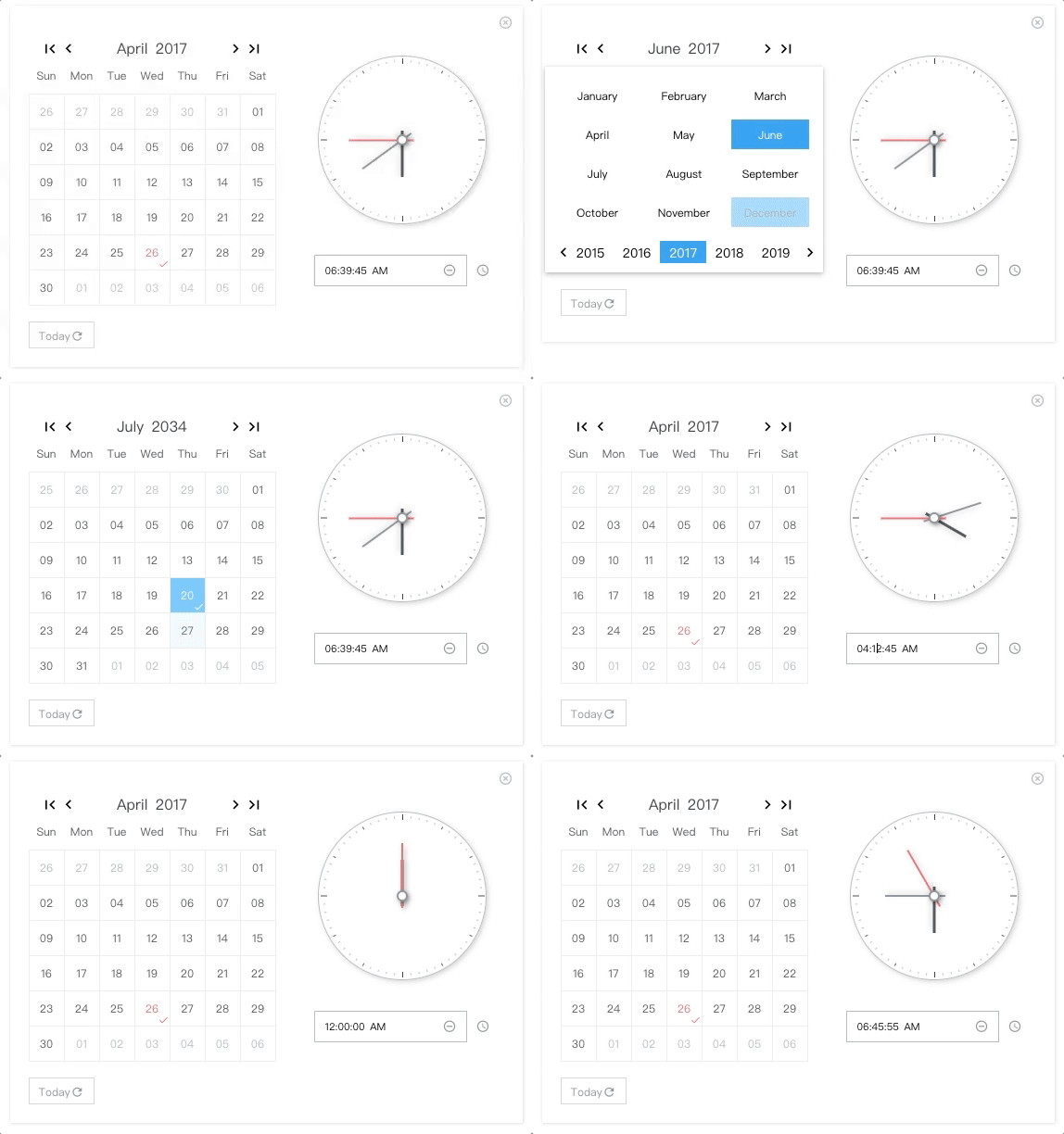
A react component for date time picker.
 NO Jquery, NO Moment.js
### :tada: For range surpport, please take a look at react-minimal-datetime-range
# Demo & Examples
Please check the online demo example
Attention: you can find demo source here :)
# Codesandbox Examples
* Online demo example playground
* Custom locales(when providing ```window.REACT_PICKY_DATE_TIME['customLocale']```)
### :tada: For version >= 2.0.0, please update react and react-dom to at least ```16.8.6```, since it is rewrited with hooks.
```js
"peerDependencies": {
"react": ">= 16.8.6",
"react-dom": ">= 16.8.6"
}
```
# Docs Link
[Custom Locale Guide(can be multiple locales)](#custom-locale)
# Usage
```js
import ReactPickyDateTime from 'react-picky-date-time';
...
const Index = memo(() => {
const [showPickyDateTime, setShowPickyDateTime] = useState(true);
const [date, setDate] = useState('30');
const [month, setMonth] = useState('01');
const [year, setYear] = useState('2000');
const [hour, setHour] = useState('03');
const [minute, setMinute] = useState('10');
const [second, setSecond] = useState('40');
const [meridiem, setMeridiem] = useState('PM');
...
// See events section
...
return (
setShowPickyDateTime(false)}
defaultTime={`${hour}:${minute}:${second} ${meridiem}`} // OPTIONAL. format: "HH:MM:SS AM"
defaultDate={`${month}/${date}/${year}`} // OPTIONAL. format: "MM/DD/YYYY"
onYearPicked={res => onYearPicked(res)}
onMonthPicked={res => onMonthPicked(res)}
onDatePicked={res => onDatePicked(res)}
onResetDate={res => onResetDate(res)}
onResetDefaultDate={res => onResetDefaultDate(res)}
onSecondChange={res => onSecondChange(res)}
onMinuteChange={res => onMinuteChange(res)}
onHourChange={res => onHourChange(res)}
onMeridiemChange={res => onMeridiemChange(res)}
onResetTime={res => onResetTime(res)}
onResetDefaultTime={res => onResetDefaultTime(res)}
onClearTime={res => onClearTime(res)}
// markedDates={['10/19/2021']} // OPTIONAL. format: "MM/DD/YYYY"
// supportDateRange={['12/03/2021', '12/05/2021']} // OPTIONAL. min date and max date. format: "MM/DD/YYYY"
/>
);
});
```
##### [Class components version example goes here ->](/CLASS-VERSION.md)
# Installation
```sh
npm install react-picky-date-time --save
```
#### By CDN (starting from v1.9.1)
```html
...
```
# Donate
Thanks for donating me a donut! ⁄(⁄ ⁄•⁄ω⁄•⁄ ⁄)⁄
# Browser support
Tested on IE9+ and Chrome and Safari(10.0.3)
This library relies ```new AbortController```, so if you are developing for IE10+ you should include the polyfill like below
```js
import 'promise-polyfill/src/polyfill';
import 'unfetch/polyfill';
import 'abortcontroller-polyfill';
```
For IE9, you also need ```performance``` ```requestAnimationFrame``` polyfill for clock ticking
# Events
Also consoled out on the demo page examples
```js
const onYearPicked = res => {
const { year } = res;
setYear(year);
};
const onMonthPicked = res => {
const { month, year } = res;
setMonth(month);
setYear(year);
};
const onDatePicked = res => {
const { date, month, year } = res;
setDate(date);
setMonth(month);
setYear(year);
};
const onResetDate = res => {
const { date, month, year } = res;
setDate(date);
setMonth(month);
setYear(year);
};
const onResetDefaultDate = res => {
const { date, month, year } = res;
setDate(date);
setMonth(month);
setYear(year);
};
const onSecondChange = res => {
const { value } = res;
setSecond(value);
};
const onMinuteChange = res => {
const { value } = res;
setMinute(value);
};
const onHourChange = res => {
const { value } = res;
setHour(value);
};
const onMeridiemChange = res => {
setMeridiem(res);
};
const onResetTime = res => {
const { clockHandSecond, clockHandMinute, clockHandHour } = res;
setSecond(clockHandSecond.value);
setMinute(clockHandMinute.value);
setHour(clockHandHour.value);
};
const onResetDefaultTime = res => {
const { clockHandSecond, clockHandMinute, clockHandHour } = res;
setSecond(clockHandSecond.value);
setMinute(clockHandMinute.value);
setHour(clockHandHour.value);
};
const onClearTime = res => {
const { clockHandSecond, clockHandMinute, clockHandHour } = res;
setSecond(clockHandSecond.value);
setMinute(clockHandMinute.value);
setHour(clockHandHour.value);
};
// just toggle your outter component state to true or false to show or hide
openPickyDateTime() {
setShowPickyDateTime(true)
}
onClose() {
setShowPickyDateTime(false)
}
```
### Custom Locale (can be multiple locales)
By providing ```window.REACT_PICKY_DATE_TIME['customLocale']```, you can overwrite the current locale if you like or add a new locale.
codesandbox example(located in index.html)
```html
```
## Contributors ✨
Thanks goes to these wonderful people ([emoji key](https://allcontributors.org/docs/en/emoji-key)):
This project follows the [all-contributors](https://github.com/all-contributors/all-contributors) specification. Contributions of any kind welcome!
NO Jquery, NO Moment.js
### :tada: For range surpport, please take a look at react-minimal-datetime-range
# Demo & Examples
Please check the online demo example
Attention: you can find demo source here :)
# Codesandbox Examples
* Online demo example playground
* Custom locales(when providing ```window.REACT_PICKY_DATE_TIME['customLocale']```)
### :tada: For version >= 2.0.0, please update react and react-dom to at least ```16.8.6```, since it is rewrited with hooks.
```js
"peerDependencies": {
"react": ">= 16.8.6",
"react-dom": ">= 16.8.6"
}
```
# Docs Link
[Custom Locale Guide(can be multiple locales)](#custom-locale)
# Usage
```js
import ReactPickyDateTime from 'react-picky-date-time';
...
const Index = memo(() => {
const [showPickyDateTime, setShowPickyDateTime] = useState(true);
const [date, setDate] = useState('30');
const [month, setMonth] = useState('01');
const [year, setYear] = useState('2000');
const [hour, setHour] = useState('03');
const [minute, setMinute] = useState('10');
const [second, setSecond] = useState('40');
const [meridiem, setMeridiem] = useState('PM');
...
// See events section
...
return (
setShowPickyDateTime(false)}
defaultTime={`${hour}:${minute}:${second} ${meridiem}`} // OPTIONAL. format: "HH:MM:SS AM"
defaultDate={`${month}/${date}/${year}`} // OPTIONAL. format: "MM/DD/YYYY"
onYearPicked={res => onYearPicked(res)}
onMonthPicked={res => onMonthPicked(res)}
onDatePicked={res => onDatePicked(res)}
onResetDate={res => onResetDate(res)}
onResetDefaultDate={res => onResetDefaultDate(res)}
onSecondChange={res => onSecondChange(res)}
onMinuteChange={res => onMinuteChange(res)}
onHourChange={res => onHourChange(res)}
onMeridiemChange={res => onMeridiemChange(res)}
onResetTime={res => onResetTime(res)}
onResetDefaultTime={res => onResetDefaultTime(res)}
onClearTime={res => onClearTime(res)}
// markedDates={['10/19/2021']} // OPTIONAL. format: "MM/DD/YYYY"
// supportDateRange={['12/03/2021', '12/05/2021']} // OPTIONAL. min date and max date. format: "MM/DD/YYYY"
/>
);
});
```
##### [Class components version example goes here ->](/CLASS-VERSION.md)
# Installation
```sh
npm install react-picky-date-time --save
```
#### By CDN (starting from v1.9.1)
```html
...
```
# Donate
Thanks for donating me a donut! ⁄(⁄ ⁄•⁄ω⁄•⁄ ⁄)⁄
# Browser support
Tested on IE9+ and Chrome and Safari(10.0.3)
This library relies ```new AbortController```, so if you are developing for IE10+ you should include the polyfill like below
```js
import 'promise-polyfill/src/polyfill';
import 'unfetch/polyfill';
import 'abortcontroller-polyfill';
```
For IE9, you also need ```performance``` ```requestAnimationFrame``` polyfill for clock ticking
# Events
Also consoled out on the demo page examples
```js
const onYearPicked = res => {
const { year } = res;
setYear(year);
};
const onMonthPicked = res => {
const { month, year } = res;
setMonth(month);
setYear(year);
};
const onDatePicked = res => {
const { date, month, year } = res;
setDate(date);
setMonth(month);
setYear(year);
};
const onResetDate = res => {
const { date, month, year } = res;
setDate(date);
setMonth(month);
setYear(year);
};
const onResetDefaultDate = res => {
const { date, month, year } = res;
setDate(date);
setMonth(month);
setYear(year);
};
const onSecondChange = res => {
const { value } = res;
setSecond(value);
};
const onMinuteChange = res => {
const { value } = res;
setMinute(value);
};
const onHourChange = res => {
const { value } = res;
setHour(value);
};
const onMeridiemChange = res => {
setMeridiem(res);
};
const onResetTime = res => {
const { clockHandSecond, clockHandMinute, clockHandHour } = res;
setSecond(clockHandSecond.value);
setMinute(clockHandMinute.value);
setHour(clockHandHour.value);
};
const onResetDefaultTime = res => {
const { clockHandSecond, clockHandMinute, clockHandHour } = res;
setSecond(clockHandSecond.value);
setMinute(clockHandMinute.value);
setHour(clockHandHour.value);
};
const onClearTime = res => {
const { clockHandSecond, clockHandMinute, clockHandHour } = res;
setSecond(clockHandSecond.value);
setMinute(clockHandMinute.value);
setHour(clockHandHour.value);
};
// just toggle your outter component state to true or false to show or hide
openPickyDateTime() {
setShowPickyDateTime(true)
}
onClose() {
setShowPickyDateTime(false)
}
```
### Custom Locale (can be multiple locales)
By providing ```window.REACT_PICKY_DATE_TIME['customLocale']```, you can overwrite the current locale if you like or add a new locale.
codesandbox example(located in index.html)
```html
```
## Contributors ✨
Thanks goes to these wonderful people ([emoji key](https://allcontributors.org/docs/en/emoji-key)):
This project follows the [all-contributors](https://github.com/all-contributors/all-contributors) specification. Contributions of any kind welcome!
