Tiniest React implementation of the Screen Wake Lock API. It provides a way to prevent devices from dimming or locking the screen when an application needs to keep running.
## Features
- 🌐 Follows the **[W3C Screen Wake Lock API specifications](https://w3c.github.io/screen-wake-lock/)**
- 🪝 **Easy to use** - Just one react hook `useWakeLock`
- 🪶 **Lightweight & 0 Dependency** - _Less than **[650b](https://bundlephobia.com/result?p=react-screen-wake-lock)**_
- 🔌 **Easily integration** - _It works without additional configuration (React, remix, Next.js...)_
- 🧪 **Ready to test** - Mocks the Screen Wake Lock with [Jest](https://github.com/jorisre/jest-wake-lock-mock#readme)
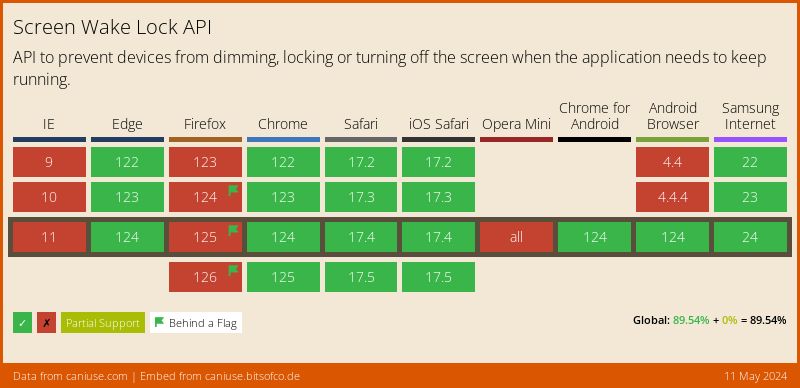
- ⚠️ **Browser Support** - [Screen Wake Lock API](https://caniuse.com/wake-lock)
react-screen-wake-lock use native Screen Wake Lock API under the hood which is not supported by all browsers.
### Examples (Demo)
- [Basic](https://github.com/jorisre/react-screen-wake-lock#usage)
- [Demo example](https://github.com/jorisre/react-screen-wake-lock/blob/main/example/src/App.tsx)
## Installation
```sh
yarn add react-screen-wake-lock
```
or
```sh
npm i react-screen-wake-lock
```
## Usage
```tsx
import { useWakeLock } from 'react-screen-wake-lock';
function Component() {
const { isSupported, released, request, release } = useWakeLock({
onRequest: () => alert('Screen Wake Lock: requested!'),
onError: () => alert('An error happened 💥'),
onRelease: () => alert('Screen Wake Lock: released!'),
reacquireOnPageVisible: true,
});
return (
Screen Wake Lock API supported: {`${isSupported}`}
Released: {`${released}`}
);
}
export default Component;
```
## Props
| Prop | description | default | required |
| :----------------------: | :-----------------------------------------------------------: | :---------: | :------: |
| `onRequest` | called on successfully `navigator.wakeLock.request` | `undefined` | false |
| `onError` | called when caught an error from `navigator.wakeLock.request` | `undefined` | false |
| `onRelease` | called when wake lock is released | `undefined` | false |
| `reacquireOnPageVisible` | Reacquires the wake lock when the page becomes visible again | `false` | false |
### Returns
| Prop | description | type | |
| :-----------: | :-----------------------------------------------------------------------------------: | :------: | --------- |
| `isSupported` | Browser support for the Screen Wake Lock API | boolean |
| `released` | Once WakeLock is released, `released` become `true` and the value never changes again | boolean | undefined |
| `request` | Returns a promise which allows control over screen dimming and locking | function |
| `release` | Returns a promise that is resolved once the sentinel has been successfully released | function |
## Testing
To write tests with ease, follow this [guide](https://github.com/jorisre/jest-wake-lock-mock#readme)
## Author
**🌈 [Joris](https://github.com/jorisre)** · [@\_jorisre](https://twitter.com/_jorisre)