# ✨ React Slime Simulation ✨
[](https://www.npmjs.com/package/react-slime-simulation)
[](https://github.com/LightInn/ReactSlimeSimulation/blob/main/LICENSE)
[](https://github.com/LightInn/ReactSlimeSimulation)
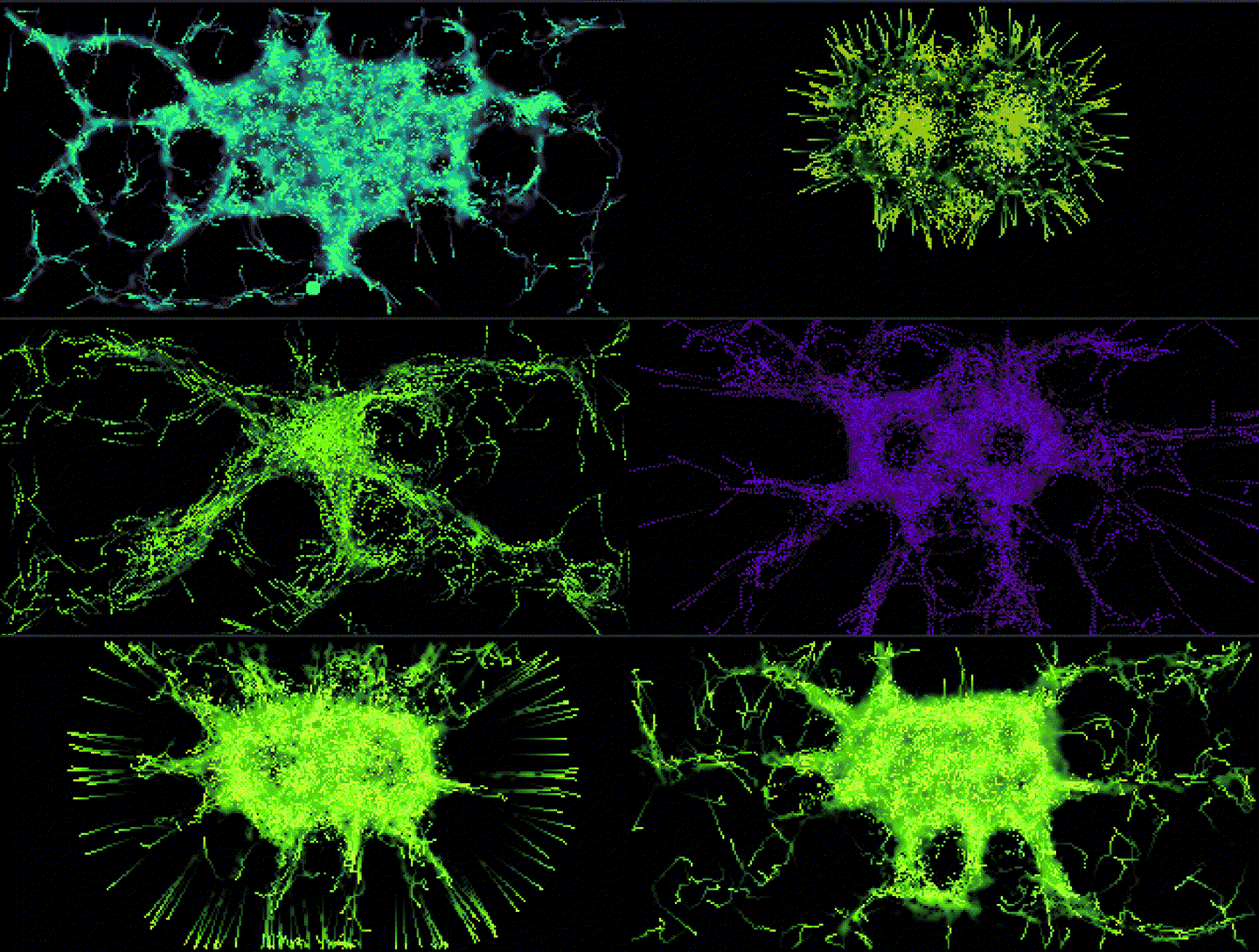
A highly customizable React component to simulate the fascinating behavior of unicellular organisms (like _Physarum polycephalum_ or "slime mold") directly in your browser using Canvas. Create organic and interactive visualizations!
---
**➡️ demo GIF here! ⬅️**
---
## 🚀 Key Features
- **Canvas Simulation:** Efficient rendering using `requestAnimationFrame`.
- **Highly Configurable:** Adjust dozens of parameters to influence behavior and appearance.
- **Custom Starting Shape:** Use your own SVG to define the initial agent area.
- **Random Default Behavior:** Get unique simulations every time without effort.
- **Brush Interaction:** Influence the simulation in real-time with your mouse.
- **Easy Integration:** Simple React component to add to your projects.
- **Lightweight:** No heavy external dependencies (React is a `peerDependency`).
## 📦 Installation
```bash
npm install react-slime-simulation
# or
yarn add react-slime-simulation
```
## 💻 Basic Usage
Import the component and add it to your application. By default, it will use random parameters and the built-in SVG.
```jsx
import React from "react";
import SlimeSimulation from "react-slime-simulation";
import "./App.css"; // Make sure the container can take up space
function App() {
return (
);
}
export default App;
```
## ⚙️ API & Props
The simulation behavior can be finely tuned via props.
| Prop | Type | Default | Description |
| :------------------ | :------ | :----------------------------- | :--------------------------------------------------------------------------------------------------------------------------------------------------------- |
| `useRandomDefaults` | boolean | `true` | If `true`, ignores other parameter props and generates random values on each mount (original default behavior). If `false`, uses the provided prop values. |
| `svgShape` | string | Built-in SVG (see source code) | A string containing the complete SVG markup () to define the starting area. If invalid, agents appear randomly. |
| `initialAgents` | number | Random (`600`-`1100`) | Number of agents in the simulation. Significantly impacts performance. |
| `sensorOffset` | number | Random (`5`-`29`) | Distance at which agents "sense" traces ahead of them. |
| `agentSpeed` | number | Random (`0.8`-`1.9`) | Movement speed of agents per frame. |
| `trailStrength` | number | Random (`0.5`-`2.9`) | Amount of "trail" left by an agent at each step. |
| `evaporationRate` | number | Random (`0.005`-`0.044`) | Rate at which trails evaporate each frame. |
| `edgeAvoidance` | number | Random (`0.0`-`0.9`) | Strength with which agents try to avoid the edges of the simulation area. |
| `escapeThreshold` | number | Random (`0.5`-`1.0`) | Trace density threshold that triggers an agent's "escape" behavior. |
| `baseHue` | number | Random (`0`-`359`) | Base HSL hue for the trail color. |
| `hueRange` | number | Random (`30`-`89`) | Range of hue variation around `baseHue`, based on trace intensity. |
| `lightnessRange` | number | Random (`20`-`49`) | Range of lightness variation (L in HSL) around 50%, based on trace intensity. |
| `brushSize` | number | `4` | Radius (in simulation pixels) of the mouse influence area. |
| `brushStrength` | number | `1.5` | Strength with which the mouse leaves trails. |
| `pixelScale` | number | `6` | Scaling factor. The simulation runs at `windowWidth / pixelScale` pixels wide. Decreasing increases resolution but reduces performance. |
| `edgeThreshold` | number | `3` | Distance (in simulation pixels) to edges triggering `edgeAvoidance` logic. |
| `reshuffleCount` | number | `10` | Number of times agents are initially repositioned for the "mixing" visual effect. |
| `startDelay` | number | `500` | Delay in milliseconds before the main animation loop starts after initialization. |
**Important Note on `useRandomDefaults`:** When `useRandomDefaults` is `true` (default), values you pass for `initialAgents`, `sensorOffset`, `agentSpeed`, etc., will be **ignored**. Set `useRandomDefaults` to `false` to use your own custom values.
## 🎨 Advanced Customization
### Using Specific Settings
```jsx
import SlimeSimulation from "react-slime-simulation";
function MyCustomSimulation() {
const settings = {
useRandomDefaults: false,
initialAgents: 450,
agentSpeed: 1.1,
evaporationRate: 0.025,
pixelScale: 7,
baseHue: 180,
hueRange: 15,
trailStrength: 1.8,
};
return ;
}
```
### Using a Custom SVG
Define your SVG shape as a string. Make sure the SVG has a `fill` to ensure rasterization works.
```jsx
import SlimeSimulation from "react-slime-simulation";
function MySVGShapeSimulation() {
const customSvg = `
`;
const settings = {
useRandomDefaults: false,
initialAgents: 600,
svgShape: customSvg,
baseHue: 300,
};
return ;
}
```
## 🙌 Contributing
Contributions are welcome! If you have ideas for improvements, bug fixes, or new features:
1. Fork the repository: [https://github.com/LightInn/ReactSlimeSimulation.git](https://github.com/LightInn/ReactSlimeSimulation.git)
2. Create your feature branch (`git checkout -b feature/my-awesome-feature`)
3. Commit your changes (`git commit -am 'Add my awesome feature'`)
4. Push to the branch (`git push origin feature/my-awesome-feature`)
5. Open a Pull Request!
Feel free to open an [Issue](https://github.com/LightInn/react-slime-simulation/issues) to discuss major changes beforehand.
## 📜 License
This project is licensed under the MIT License. See the [LICENSE](https://github.com/LightInn/react-slime-simulation/blob/main/LICENSE) file for more details.