# React Style Editor
[![Npm Version][npm-version-image]][npm-version-url] [![Size][bundlephobia-image]][bundlephobia-url]
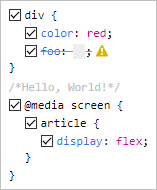
A React component that displays and edits CSS, similar to the browser's DevTools.
[](https://aurelain.github.io/react-style-editor/)
## [Live demo](https://aurelain.github.io/react-style-editor/)
## Features
- Parses any CSS string and formats it in a familiar fashion
- Validates each rule and each declaration using the browsers's own engine
- Facilitates commenting the CSS code through checkbox toggling
- Allows easy additions by clicking next to the desired location
- Has no dependencies (other than React)
- Is tiny (< 10 KB minified)
- Is customizable through classes
- Offers 3 output formats:
- the code with preserved formatting
- a machine-friendly model of the code (recursive array of objects)
- the prettified code
## Installation
```sh
npm i react-style-editor
```
## Usage
```js
import React from 'react';
import StyleEditor from 'react-style-editor';
class Component extends React.Component {
render() {
return (
);
}
}
```
## Props
| prop | type | default | description |
| --------------- | -------- | ----------- | --------------------------------------------------------------------------------------------------------- |
| `defaultValue` | string | `''` | The initial CSS code |
| `value` | string | `undefined` | The controlled CSS code |
| `onChange` | function | `null` | A closure that receives a single argument, `string` or `array`, depending on the value of `outputFormats` |
| `outputFormats` | string | `'pretty'` | Comma-separated values of: `'preserved'`, `'machine'`, `'pretty'` |
| `readOnly` | boolean | `false` | All interactions with the component are blocked |
All parameters are optional, but some are inter-related. For example, due to the nature of React, you should use `StyleEditor` either fully controlled or fully uncontrolled (see [this article](https://reactjs.org/blog/2018/06/07/you-probably-dont-need-derived-state.html#preferred-solutions)).
A short summary:
- `defaultValue` => uncontrolled, the component is on its own
- `value` => controlled => you must also use the `onChange` or `readOnly` properties.
The above behavior is identical to that of normal React form elements, e.g. ``.
Any other props are spread to the internal root.
## Exports
Besides the default export (`StyleEditor`), there are also a few utility functions exported:
- `analyze()`: ouputs the `machine` format
- `parse()`: a lighter version of `analyze()`
- `stringify()`: outputs the `preserved` format
- `prettify()`: outputs the `pretty` format
They all expect a CSS string as parameter and are useful if you don't want to use the React component and wait for its `onChange`.
## Wishlist
- Color swatches (similar to the browser)
- Dropdown suggestions for properties/values (similar to the browser)
- Keyboard support for `TAB`, `:` and `UP`/`DOWN` increments of numeric values
- Theme support (similar to the browser)
- Toggle view mode: tree/original
- Undo/redo
- Better code quality through `propTypes`
- Filters (similar to the browser)
- Error messages displayed in the warning-sign's tooltip
[npm-version-image]: https://img.shields.io/npm/v/react-style-editor.svg?style=flat-square
[npm-version-url]: https://www.npmjs.com/package/react-style-editor
[bundlephobia-image]: https://img.shields.io/bundlephobia/minzip/react-style-editor.svg?style=flat-square
[bundlephobia-url]: https://bundlephobia.com/result?p=react-style-editor